Cluster management lets you view single-cluster worker resource information, basic information, worker status, configuration information, and data status for each cluster.
Single cluster worker resource information
This section displays resource status and configuration information for each worker in a single cluster of the Retrieval Engine Edition.
QRS workers and searcher workers: Click to go to the upgrade/downgrade page.
For pay-as-you-go instances, you will be redirected to the general upgrade/downgrade page.
For subscription instances, you will be redirected to the upgrade page by default.
Searcher worker replicas: Edit and save directly on the page (number of worker rows, used to improve query throughput and meet instance disaster recovery requirements).
After adjustment, replicas × shards must be less than or equal to the number of searcher worker.
Searcher worker shards: Edit and save directly on the page (number of worker columns, used to expand instance memory space. When the number of QRS workers is 0, the number of data worker shards is fixed at 1. When the number of QRS workers is not 0, the number is determined by the data shards of the index table)
After adjustment, replicas × shards must be less than or equal to the number of searcher worker.
If the instance is High-availability Edition, multiple cluster resources are homogeneous. When you modify replicas and shards, the changes take effect for all clusters simultaneously.
If the instance is Standard Edition, total instance resources = single cluster resources
If the instance is High-availability Edition, total instance resources = single cluster resources × 2
Basic information
Mount status (modifiable): Whether the current cluster is mounted (Mounted/Not mounted).
Traffic status (modifiable): The traffic status of the current cluster (Production traffic/Test traffic).
Cluster creation time: The creation time of the current cluster.
Cluster description (editable): The description of the current cluster.
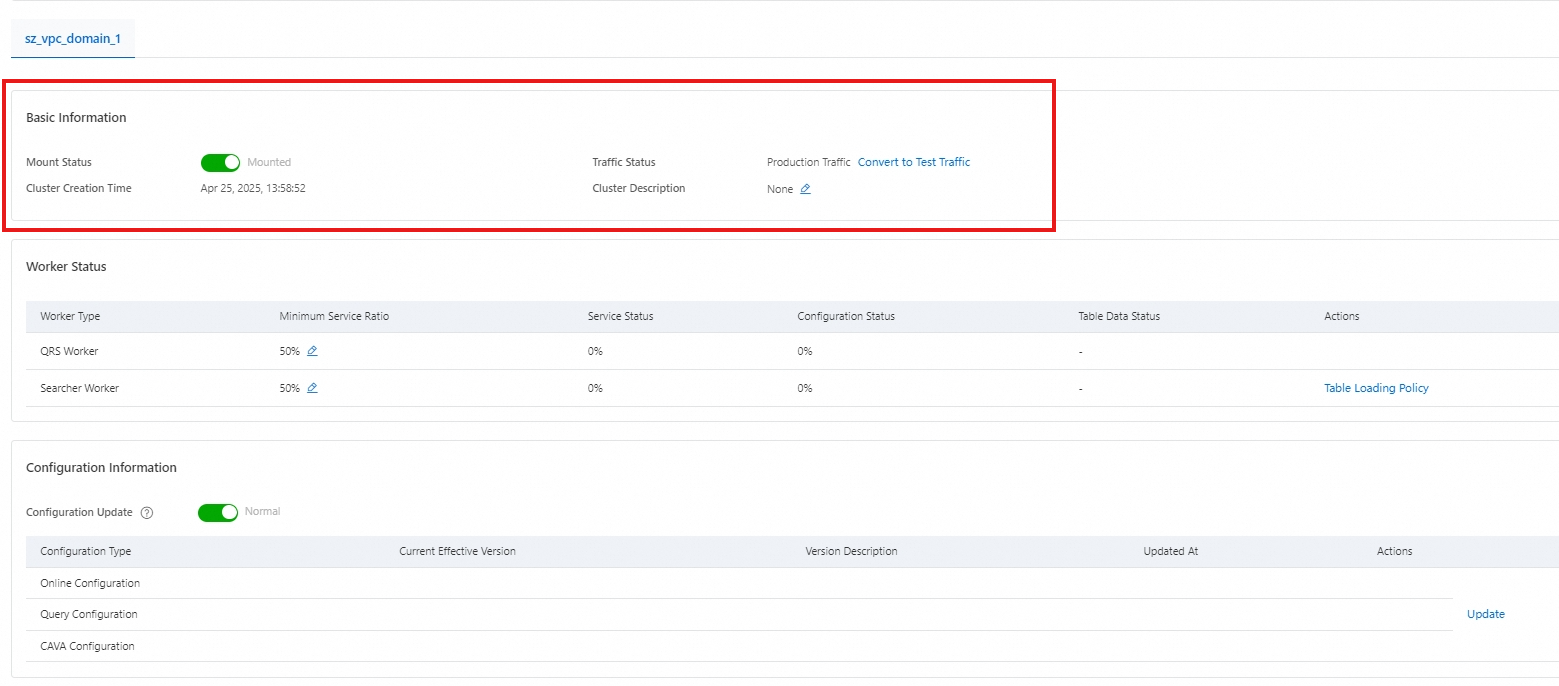
If the mount status is Mounted, the online traffic of the cluster will be immediately allocated to the new cluster. Please confirm that the cluster configuration is correct before proceeding with caution.
If the cluster mount status is Not mounted, the cluster will stop providing external search services. Please ensure that the cluster has no traffic before performing this operation.
Worker status
This section displays the minimum service ratio, service status, and configuration status of the QRS workers and searcher worker in the current cluster.

You can modify the minimum service ratio for QRS workers and searcher worker.
Click the table name in the table data status of the data worker to go to the Table management page.
Click the table loading policy of the data worker to view/edit the table loading policy of the current data worker.
Note:
Scaling out the number of replicas for QRS workers and searcher worker in the cluster can improve the availability and stability of query request services and handle higher query QPS pressure.
Scaling out the number of shards for searcher worker in the cluster can improve query performance and reduce query latency. To scale out the number of shards, see: Edit table.
When scaling out the number of replicas, if the instance type is smaller than the modified number, an error message will be displayed. You can purchase an OpenSearch Retrieval Engine Edition instance accordingly.
Minimum service ratio: The proportion of service rows that the engine can serve during full or incremental switching. For example, if the current number of replicas is set to 4 and the minimum service ratio is set to 50%, then during full or incremental switching, at least 2 replica machines will be in a state that can provide services.
The cluster will perform rolling updates based on the configured minimum service ratio. When operating on a production cluster, ensure that the minimum service ratio is greater than 0, and that the searcher worker that can provide services according to the minimum service ratio can support all current traffic during rolling updates.
Configuration information
Configuration update: You can enable or disable the Configuration update switch. (enabled by default, task is normal; can be manually disabled, which pauses the configuration update task)
You can also view or edit the current cluster's online configuration, query configuration, and CAVA configuration.

After modifying and publishing a new version of the cluster configuration, you need to click Update to update the currently active version of the current cluster configuration to the specified version updated to.
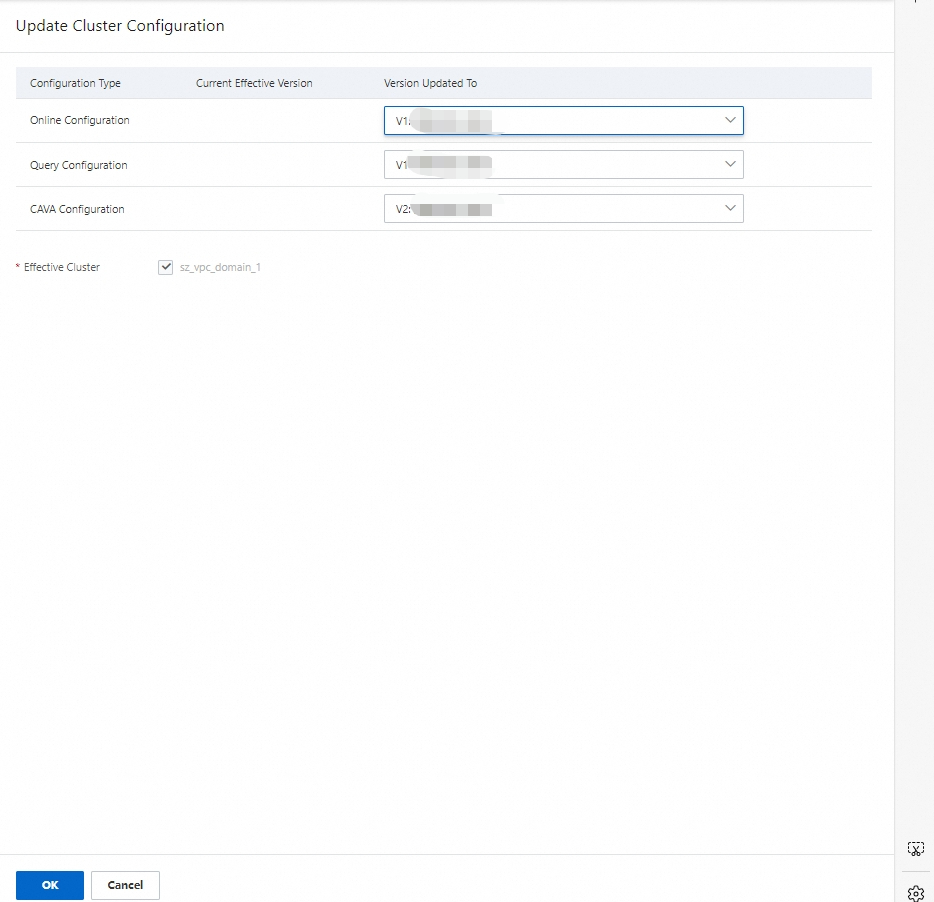
After clicking OK, you can view the progress in Extended Features > Change History.
When the status of online configuration becomes Normal, the cluster configuration information will immediately change to the new version.
Data status
You can view or modify the enabling status of full index update, real-time data indexing, and incremental data indexing for the current cluster's data.
Full idex update: enabled by default, task is normal; can be manually disabled, which pauses the full switching task.
NoteScenarios for pausing full index update: You can pause when there are issues with the new full build or when you do not want to perform a full build.
Real-time data indexing: enabled by default, task is normal; can be manually disabled, which pauses the real-time incremental task.
Incremental data indexing: enabled by default, task is normal; can be manually disabled, which pauses the batch incremental task.
NoteNote when pausing incremental data indexing: If the batch is paused for too long, it may cause the real-time memory to fill up, which will stop the real-time incremental process.
