Renewal
Precautions
Description:
You can renew your subscription instance to extend the subscription period. Pay-as-you-go instances never expire. You need to only make sure that the balance in your Alibaba Cloud account is sufficient.
Pricing:
The fee required to renew an instance is the same as that required to purchase an instance. For more information, see Billing overview.
Fee deduction:
Auto-renewal: If you enable auto-renewal, the system first attempts to deduct fees from your Alibaba Cloud account at 08:00:00 eight days before your instance expires. If the deduction fails, the system initiates the fee deduction once every day until the deduction succeeds or until the day before the instance expires. Make sure that the balance in your Alibaba Cloud account is sufficient. If your instance is about to expire on the next day, you must manually renew the instance. If you manually renewed your instance before renewal fees are automatically deducted, the system automatically renews the instance based on the new expiration date.
Manual renewal: If you do not enable auto-renewal, you must manually renew your instance before the instance expires.
Procedure
Manually renew instances
Pay-as-you-go instances never expire and do not require renewal. A subscription instance has a validity period. If you do not renew a subscription instance before the end of the validity period, services may be interrupted or even data may be lost. You can manually renew your subscription instance before it expires or within seven days after it expires.
Renew an instance
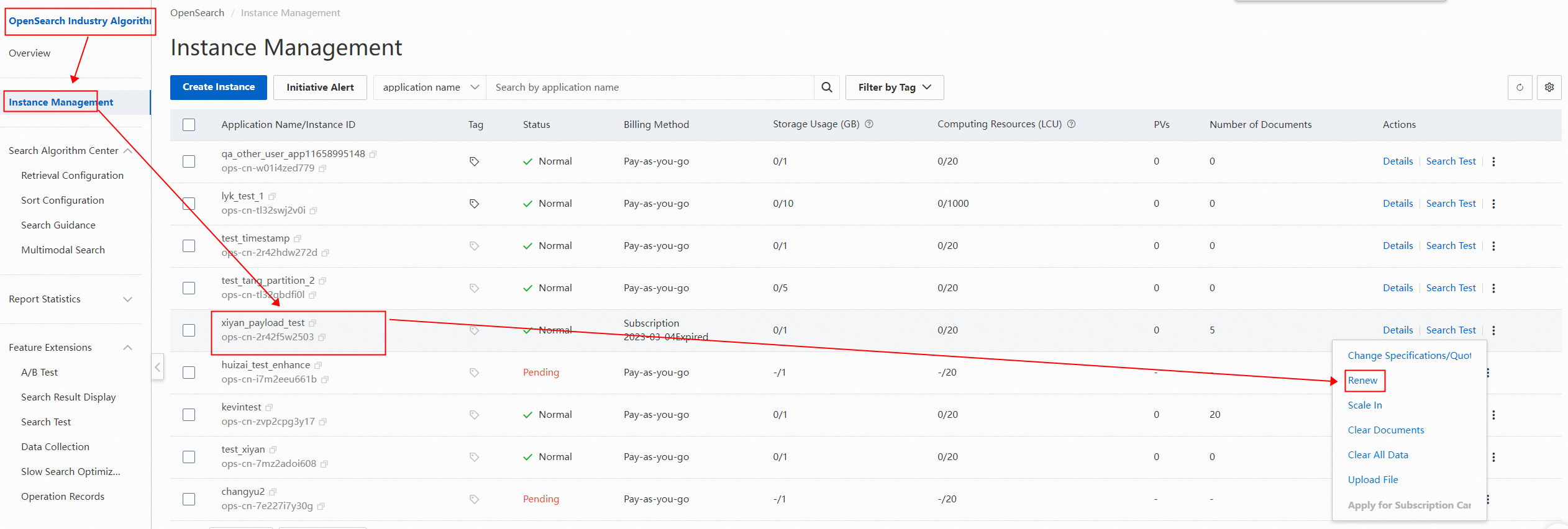
1. Log on to the OpenSearch console. In the upper-left corner, move the pointer over OpenSearch Industry Algorithms Edition and select OpenSearch High-performance Search Edition. In the left-side pane, click Instance Management. On the page that appears, find a subscription instance and choose More > Renew in the Actions column.
2. On the Renew page, set the renewal period for the instance.
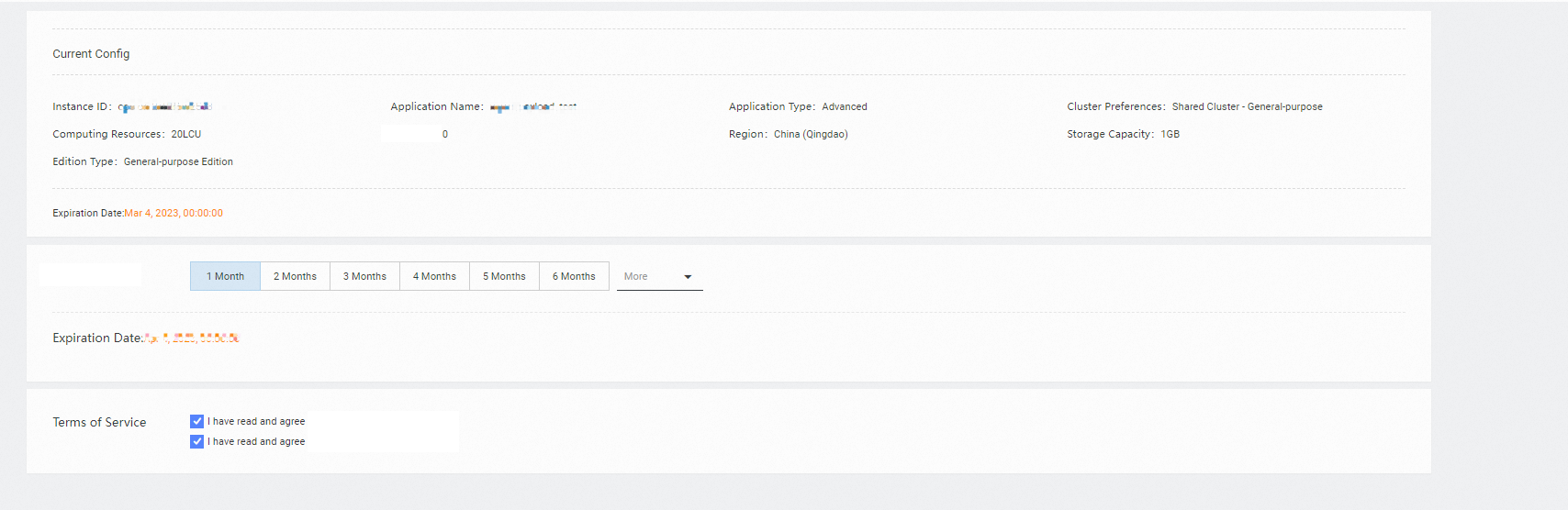
3. Read and agree to OpenSearch Terms of Service and click Buy Now.
Renew multiple instances at a time
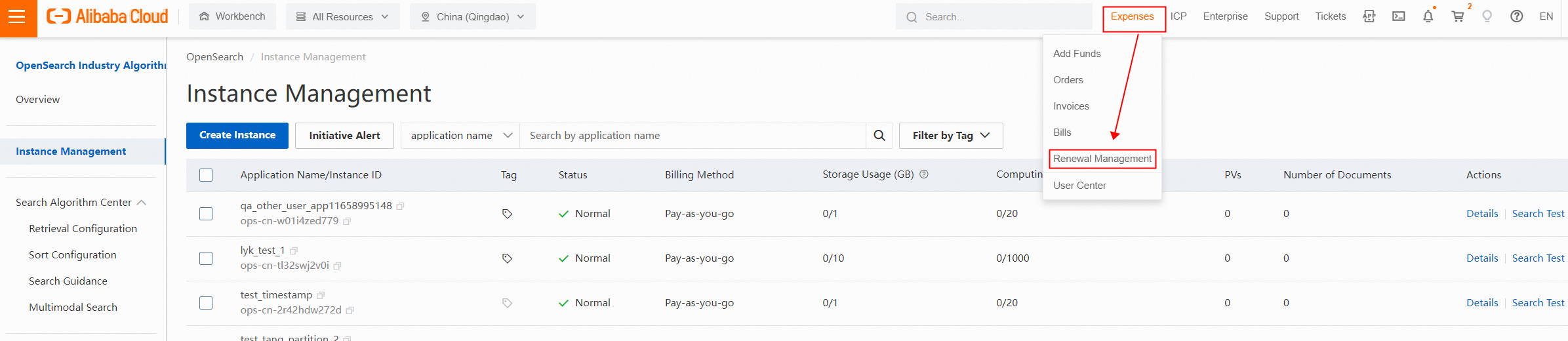
1. Log on to the OpenSearch console. In the upper-left corner, move the pointer over OpenSearch Industry Algorithms Edition and select OpenSearch High-performance Search Edition. In the top navigation bar, choose Expenses > Renewal Management.
2. On the Renewal page, select OpenSearch (Subscription) for the Instances parameter.
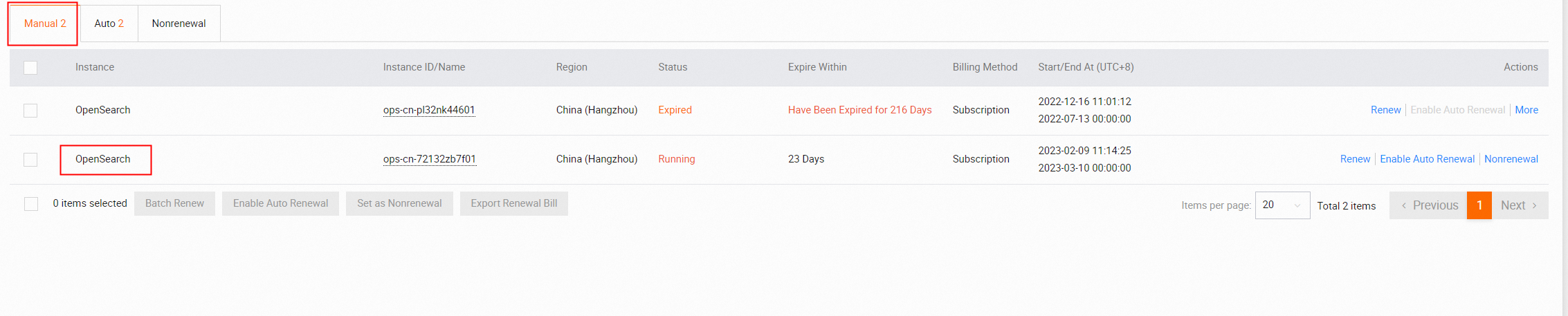
3. Click the Manual, Auto, or Nonrenewal tab as needed. Then, select the instances that you want to renew and click Batch Renew in the upper part of the page.
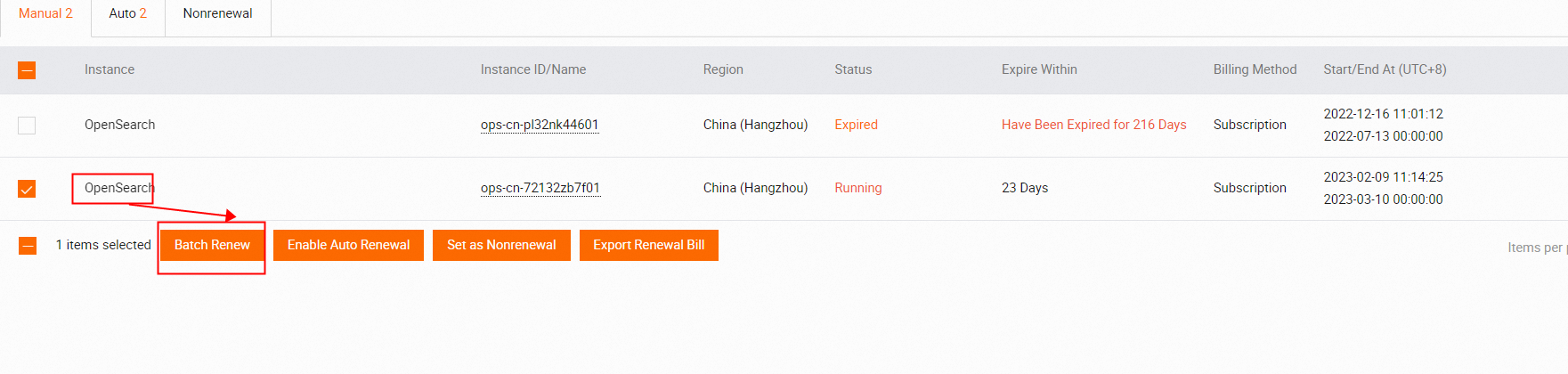
4. On the Batch Renew page, select By Year or By Month and then a renewal duration in the Duration column of each instance. Alternatively, click Batch Setting and select a renewal duration.
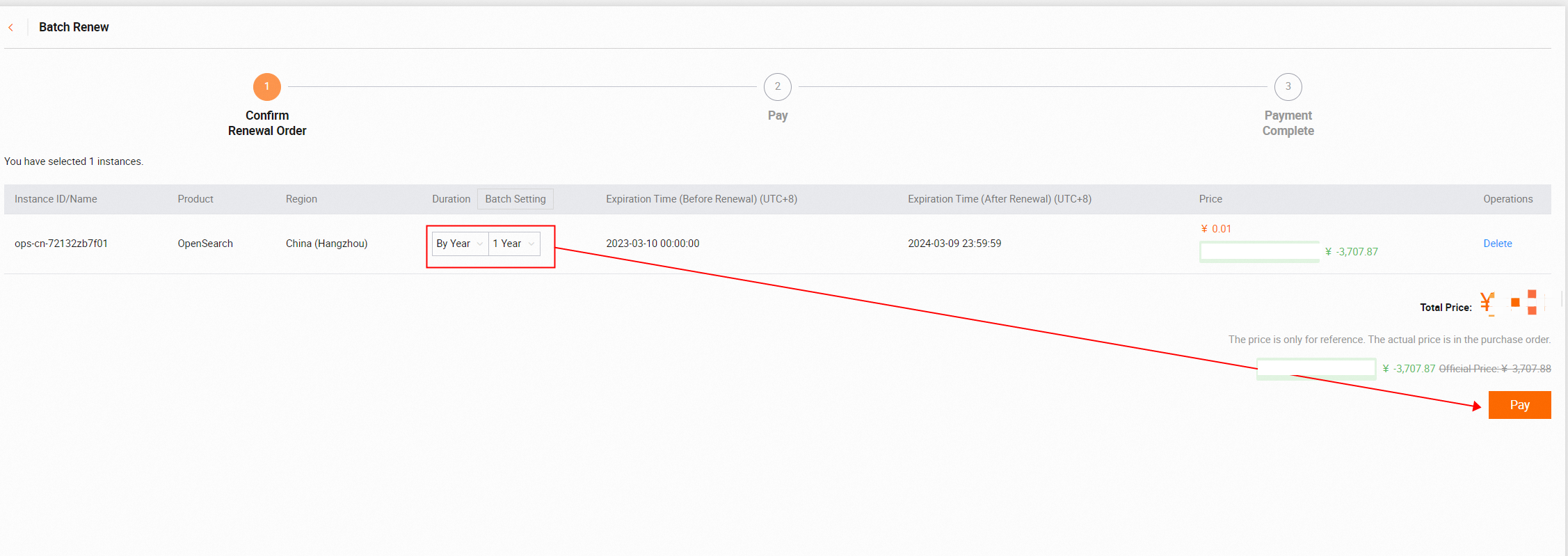
5. Click Pay to complete the payment.
Enable auto-renewal or modify the auto-renewal duration
If you enable auto-renewal for instances, you do not need to manually renew the instances on a regular basis. Auto-renewal also helps prevent service interruptions that occur if you fail to renew instances in a timely manner.
Enable auto-renewal
Enable auto-renewal when you purchase an instance
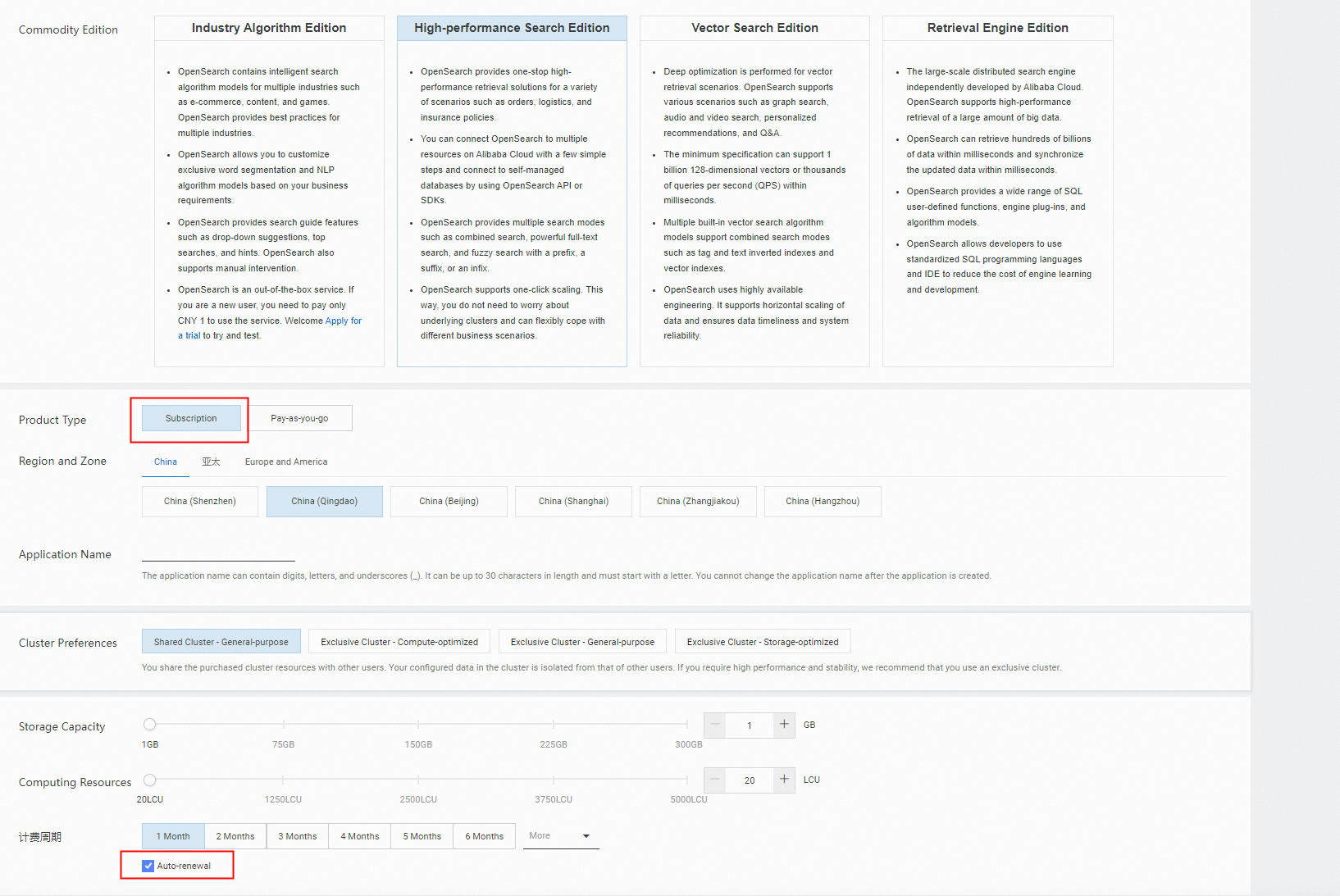
When you purchase a subscription instance, you can select Auto-renewal.
Enable auto-renewal after you purchase an instance
After you enable auto-renewal for an instance, the system automatically renews the instance based on the renewal duration that you specified. For example, if you select a three-month renewal duration, you are charged for a three-month subscription for each renewal.
1. Log on to the OpenSearch console. In the upper-left corner, move the pointer over OpenSearch Industry Algorithms Edition and select OpenSearch High-performance Search Edition.
2. In the top navigation bar, choose Expenses > Renewal Management.
3. On the Renewal page, select OpenSearch (Subscription) for the Instances parameter. Click the Manual or Nonrenewal tab as needed. Find the subscription instance for which you want to enable auto-renewal and click Enable Auto Renewal in the Actions column.
4. In the Enable Manual Renewal dialog box, select a renewal duration and click Auto Renew.
Modify the auto-renewal duration
1. Log on to the OpenSearch console. In the upper-left corner, move the pointer over OpenSearch Industry Algorithms Edition and select OpenSearch High-performance Search Edition. In the top navigation bar, choose Expenses > Renewal Management.
2. On the Renewal page, select OpenSearch (Subscription) for the Instances parameter.
3. On the Renewal page, click the Auto tab. Find the instance for which you want to modify the auto-renewal duration, and click Edit Auto Renewal in the Actions column.
4. In the Edit Auto Renewal dialog box, modify the auto-renewal duration and click OK.
Impact of expiration or overdue payments
Instance type | Instance status | Action |
Subscription | From the first day to the seventh day after an instance expires, the instance is locked and cannot be accessed. | Manually renew the instance. The instance is immediately unlocked. |
An instance is automatically released on the eighth day after it expires. The data in the instance is cleared. | The data is permanently deleted and cannot be restored. | |
Pay-as-you-go | Your services are not affected on the first day when an overdue payment occurs in your Alibaba Cloud account. The system sends text messages or emails to notify you to add funds at the earliest opportunity. | Add funds to your Alibaba Cloud account at the earliest opportunity. |
From the second day to the eighth day after your Alibaba Cloud account has an overdue payment, all pay-as-you-go instances that belong to the account are locked. | Add funds to your Alibaba Cloud account. The instances are immediately unlocked. | |
On the ninth day after your Alibaba Cloud account has an overdue payment, all pay-as-you-go instances that belong to the account are released. The data in the instances is cleared. | The data is permanently deleted and cannot be restored. |
Note:
To prevent possible service interruptions, we recommend that you manually renew your subscription instance or enable auto-renewal before your subscription instance expires.
Make sure that the balance in your Alibaba Cloud account is sufficient.