This topic describes all the system policies supported by SchedulerX and their corresponding permission descriptions. It provides a reference when you grant permissions to a RAM user or RAM role. This topic also describes how to create custom policies and provides examples to implement fine-grained authorization.
What is a system policy?
A policy defines a set of permissions that are described based on the policy structure and syntax. You can use policies to describe the authorized resource sets, authorized operation sets, and authorization conditions. Alibaba Cloud Resource Access Management (RAM) provides system policies and custom policies. All system policies are created and updated by Alibaba Cloud. You can use system policies, but you cannot modify them. You can manage and update custom policies based on your business requirements. You can create, update, and delete custom policies. During service iteration, Schedulerx adds new permissions to system policies to support new features and capabilities. The update of a system policy affects all RAM identities to which the policy is attached, including RAM users, RAM user groups, and RAM roles. For more information about RAM policies, see Policy overview.
System policies are designed for new users to quickly get started with Alibaba Cloud products on the management console, though they also enable the use of more advanced methods like API operations or CLI commands. If you are familiar with the advanced methods, we recommend that you use custom policies to implement finer-grained control on who is permitted to call what API operations, thereby improving security.
System policies can be classified into service system policies, service role policies, and service-linked role policies. Some cloud services provide only one or two of the three types of policies. For more information, see the policy types that are described in the following section.
System policies
AliyunMSEFullAccess
You can attach the AliyunMSEFullAccess policy to RAM users or roles. This policy defines the permissions to manage Microservices Engine (MSE), including the permissions to manage SchedulerX and XXL-JOB.
AliyunMSEReadOnlyAccess
You can attach the AliyunMSEReadOnlyAccess policy to RAM users or roles. This policy defines the read-only permissions on MSE, including the read-only permissions on SchedulerX and XXL-JOB.
Authorization operation references
By default, RAM users and roles do not have any permissions. You can access the resources of Alibaba Cloud accounts only after the administrators of the Alibaba Cloud accounts grant permissions to the RAM users and roles. To ensure resource security, we recommend that you grant only required permissions to the RAM users and roles based on the principle of least privilege. For more information about authorization, see the following topics:
What is a custom policy?
Resource Access Management (RAM) policies are classified into system policies and custom policies. You can manage custom policies based on your business requirements.
After you create a custom policy, you must attach the policy to a RAM user, RAM user group, or RAM role. This way, the permissions that are specified in the policy can be granted to the principal.
You can delete a RAM policy that is not attached to a principal. If the RAM policy is attached to a principal, before you can delete the RAM policy you must detach the RAM policy from the principal.
Custom policies support version control. You can manage custom policy versions based on the version management mechanism provided by RAM.
References
Policy description
The following sample code provides an example of a custom RAM policy in SchedulerX. A custom RAM policy contains the Action and Resource elements. You can create a custom policy based on the rules that are defined by SchedulerX.
Structure of a custom policy
{
  "Statement": [
    {
      "Action": "edas:*", // The actions that are allowed. For information about how to configure the Action element, see the "Action" section of this topic.
      "Effect": "Allow",
      "Resource": "*"     // The resources that can be accessed. For information about how to configure the Resource element, see the "Resource" section of this topic.
    }
  ],
  "Version": "1",
}
Action
SchedulerX defines the Action element in the following structure:
edas:${type}Schedulerx*${type}: The valid values of the ${type} parameter are Read, Manage, Delete, and Create. The following table lists the valid values and describes the operations related to each value.
Valid value | Related operation |
Create | Create namespaces, applications, jobs, and workflows. |
Manage |
|
Delete | Delete namespaces, application groups, jobs, and workflows. |
Read | Query application groups, jobs, job instances, workflows, and online instances. |
Resource
SchedulerX defines the Resource element in the following structure:
acs:edas:${regionid}:${accountid}:namespace/${namespace_id}/${resourceType}/${resourceId}Parameter | Description |
| The region in which the resource you want to access is deployed. If you want to use the default setting, enter an asterisk ( |
| The Alibaba Cloud account to which the resource you want to access belongs. If you want to use the default setting, enter an asterisk ( |
| The ID of the namespace to which the resource you want to access belongs.
|
| The type of the resource that you want to access. A value of JobGroup specifies a job group in SchedulerX. Jobs are grouped by application. |
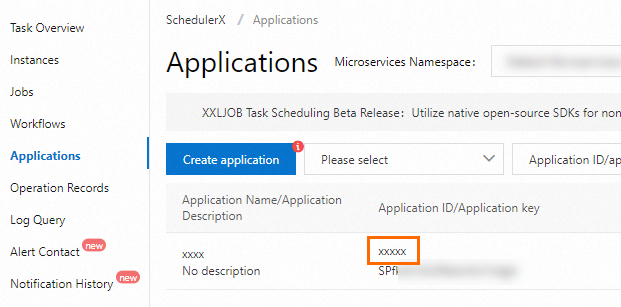
| The ID of the resource that you want to access. If you set the To obtain the value of the
|
 icon that appears on the right to copy the namespace ID, and then replace
 icon that appears on the right to copy the namespace ID, and then replace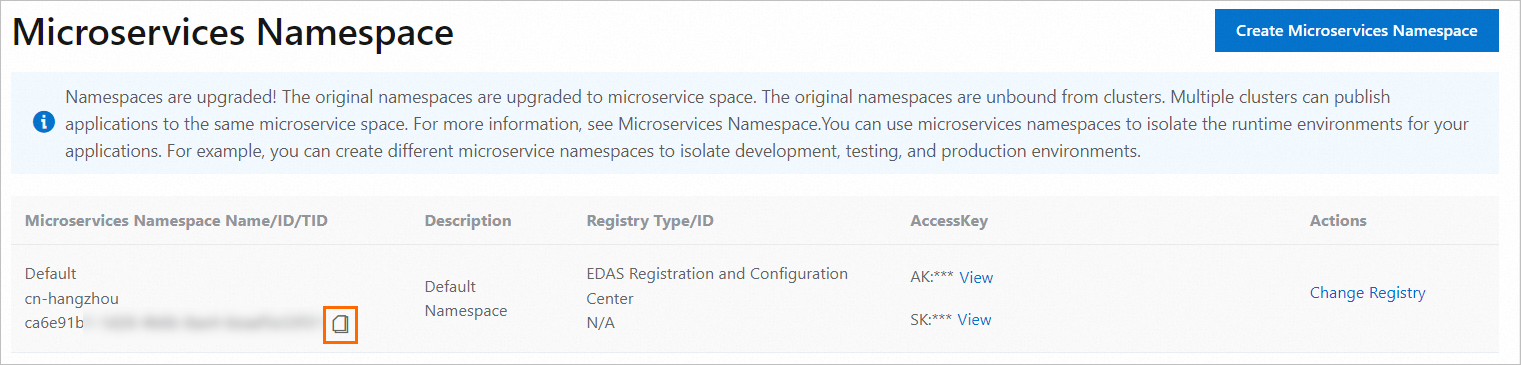

Sample custom policies
Grant a RAM user the permission to manage all resources
After the following policy is attached to a RAM user, you can manage all resources of SchedulerX and access all operations and resources of SchedulerX as the RAM user.
{
    "Version": "1",
    "Statement": [
        {
            "Effect": "Allow",
            "Action": [
                "edas:*Schedulerx*"
            ],
            "Resource": [
                "acs:edas:*:*:*"
            ]
        }
    ]
}
Grant a RAM user the read-only permissions on all resources
After the following policy is attached to a RAM user, you can query all resources of SchedulerX in read-only mode and view information about all resources of SchedulerX as the RAM user.
{
    "Version": "1",
    "Statement": [
        {
            "Effect": "Allow",
            "Action": [
                "edas:ReadSchedulerx*"
            ],
            "Resource": [
                "acs:edas:*:*:*"
            ]
        }
    ]
}
Grant a RAM user the permissions on all actions in a specified namespace
The following sample code provides an example of a custom RAM policy that defines the management permissions on application and job resources in specified namespaces. The IDs of the specified namespaces must be obtained from the Microservices Namespace page in the EDAS console. In this example, the specified namespaces are ID-01 and ID-02. The RAM user who has this custom policy can manage and schedule all resources in the specified namespaces. You can also modify the settings of the Action element to limit the access permissions to the preceding resources. For example, if you set the Action element to edas:ReadSchedulerx*, the RAM user to which this custom policy is attached can only query resources in the specified namespaces in read-only mode.
{
    "Version": "1",
    "Statement": [
        {
            "Effect": "Allow",
            "Action": [
                "edas:*Schedulerx*"
            ],
            "Resource": [
                "acs:edas:*:*:namespace/Namespace ID-01/*",
              	"acs:edas:*:*:namespace/Namespace ID-02/*"
            ]
        }
    ]
}
Grant a RAM user the permissions on all actions of a specified application
The following sample code provides an example of a custom RAM policy that defines the management permissions on specific applications. The Resource element specifies the IDs of the applications whose management permissions you want to grant to a RAM user. You can also include an asterisk (*) in the Resource element to grant the management permissions on multiple applications to the RAM user at a time. For example, if you include TestGroup* in the Resource element of a custom policy, the custom policy defines the management permissions on all applications that are prefixed with TestGroup in the specified namespace.
{
    "Version": "1",
    "Statement": [
        {
            "Effect": "Allow",
            "Action": [
                "edas:*Schedulerx*"
            ],
            "Resource": [
                "acs:edas:*:*:namespace/Namespace ID-01/JobGroup/TestGroup*",
              	"acs:edas:*:*:namespace/Namespace ID-02/JobGroup/AppGroup"
            ]
        }
    ]
}