The following error message appears when you call API operations or use SDKs to access Simple Message Queue (formerly MNS): HTTP status code: 403, error code: AccessDenied, and error message: The OwnerId that your Access Key Id identified to is forbidden for this operation. This issue may occur due to one of the following causes: 1. You attempt to access queues in other regions. 2. The specified owner ID is invalid. 3. The permission policy attached to the RAM user is invalid.
Issue
The following error message appears when you use a SMQ SDK or call a SMQ API operation:
[Error Code]:403 AccessDenied [Message]:The OwnerId that your Access Key Id associated to is forbidden for this operation.Cause
The following causes may exist:
The SMQ queue that you want to access resides in a different region from the region where your SMQ is activated.
If you use a private queue endpoint, message producers and consumers must be deployed on Elastic Compute Service (ECS) instances in the same region. Otherwise, this issue occurs.
If you use a public queue endpoint, message producers and consumers can be deployed on on-premises servers or on ECS instances for which Internet access is enabled and that reside in the same region.
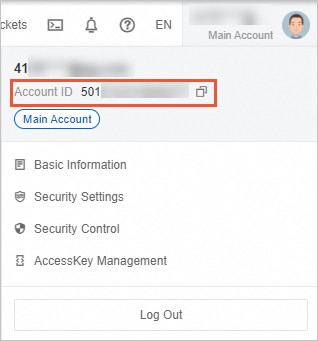
The value of the OwnerId parameter is invalid. The OwnerId parameter specifies the ID of an Alibaba Cloud account. You can log on to the SMQ console,hover your mouse over the avatar on the right, and obtain the account ID from the pop-up window that appears.
The RAM user is invalid or the permissions of the RAM user are invalid.
When you call an HTTP-based API operations, the specified request URL does not match the syntax of the request header. For more information, see References.
A third-party SDK is used.
Solution
To troubleshoot the issue, perform the following steps:
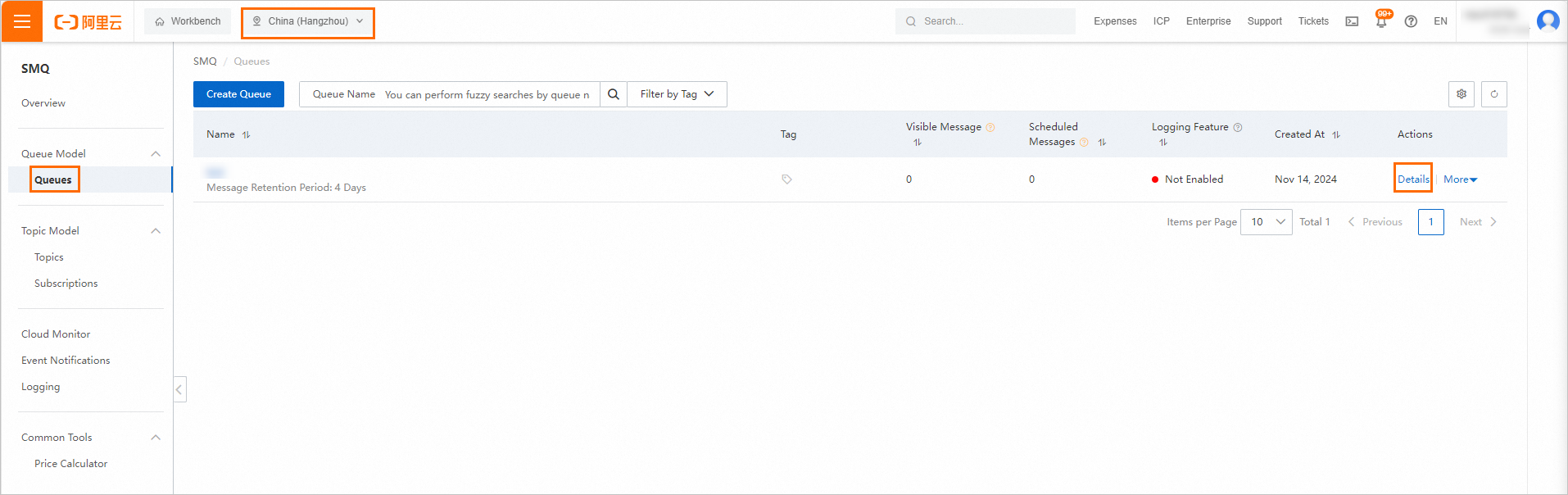
Log on to the SMQ console. Select the region where the SMQ queue that you want to use resides and click Queues. On the Queues page, find the queue. In the Actions column, click Details. In the Endpoint section of the Queue Details page, view the information about the required SMQ endpoint.
NoteIn the SMQ endpoint, the substring that starts with a digit is the value of the OwnerId parameter.

Check whether the SMQ endpoint and the value of the OwnerId parameter that are used by producers and consumers are valid.
Check whether the producers and consumers meet the following conditions. If not, you must modify the configurations of the producers and consumers.
If you use a private queue endpoint, message producers and consumers must be deployed on Elastic Compute Service (ECS) instances in the same region.
If you use a public queue endpoint, message producers and consumers can be deployed on on-premises servers or on ECS instances for which Internet access is enabled and that reside in the same region.
If you use a RAM user to access the SMQ queue, check whether the configurations of the RAM user in the corresponding Alibaba Cloud account are valid. For example, the following policy is attached to a RAM user of an Alibaba Cloud account. You want to use the RAM user to access
/queues/busi-msn/messages. In this case, the issue occurs because you do not have the permissions on the resources that you want to access. For more information about how to configure a RAM user, see Create a RAM user."Resource": [ "acs:mns:*:*:/queues", "acs:mns:*:*:/queues/busi-test", "acs:mns:*:*:/queues/busi-test/*"If the issue persists after you perform the preceding steps, the reason may be that a third-party SDK is used or the specified request URL does not match the syntax of the request header when you call an HTTP -based API operation. For more information, see References.
References
SMQ is named MQS before the service is commercialized. The endpoints of the service before and after the service is commercialized are different. Examples:
Before SMQ is commercialized, an endpoint can be
http://y9g.mqs-cn-beijing.aliyuncs.com/.After SMQ is commercialized, an endpoint can be
http://44404.mns.cn-beijing.aliyuncs.com/.
The preceding endpoints are used as examples. To view actual endpoints, go to the SMQ console. In the following sections, http://y9g.mqs-cn-beijing.aliyuncs.com/ is referred to as an old endpoint and http://44404.mns.cn-beijing.aliyuncs.com/ is referred to as a new endpoint.
After SMQ is commercialized, SMQ supports the latest API version and is still compatible with the previous API version. The x-mns-version HTTP header is used by SMQ to identify the API version.
If a request includes the x-mns-version: 2015-06-06 header, SMQ processes the request based on the syntax of the latest API version.
If a request includes a header in the
x-mqs-version: xxxx-xx-xxformat, SMQ processes the request based on the syntax of the previous API version.
When you use SMQ, you must comply with the following rules:
When you call HTTP-based API operations, you must specify request URLs based on the API version. If you use a new endpoint and a header is in the
x-mqs-version: xxxx-xx-xxformat, an error occurs.If you want to use a third-party SDK, the SDK may fail to differentiate between an old endpoint and a new endpoint. If you use a new endpoint, an error may occur. Compared with third-party SDKs, Official SDKs are more reliable. Official SDKs also provide high performance in processing messages. For example, you can use the BatchSendMessage and BatchReceiveMessage operations to manage multiple messages at a time. If you do not want to modify the existing code and want to use a third-party SDK that is not recommended, we recommend that you contact Alibaba Cloud Technical Support to obtain an old endpoint.