This topic provides an overview of the MaxQA (MaxCompute Query Accelerator 2.0) engine, including its architecture, use cases, limitations, and usage.
MaxQA is generally available. If you have any questions, submit a ticket, and the MaxCompute technical team will assist you.
For operational details, see Query Acceleration MaxQA operation guide.
Feature description
MaxQA (MaxCompute Query Accelerator 2.0), formerly MCQA 2.0, is a query acceleration solution for MaxCompute that addresses the growing demand for real-time and near-real-time data analytics. It significantly reduces query response times by using dedicated acceleration resource pools and comprehensive optimizations across the control path, query optimizer, execution engine, storage engine, and caching mechanism. MaxQA is ideal for latency-sensitive workloads that require high stability, such as business intelligence (BI), interactive analysis, and near-real-time data warehouse scenarios.
The MaxCompute MaxQA (formerly MCQA2.0) feature provides the following capabilities:
High-performance queries and insertions
Accelerates queries and data insertion jobs for terabyte-scale datasets, achieving sub-second execution times.
SQL compatibility
Fully compatible with MaxCompute SQL features, including user-defined functions (UDFs), Delta Tables, and incremental materialized views.
Resource isolation and elastic management
Provides isolated query acceleration resource pools dedicated to a single tenant for enhanced stability.
Supports time-based resource allocation rules and auto-scaling for interactive quota groups and batch processing resource pools to improve resource utilization.
Features end-to-end caching, where jobs automatically cache intermediate and final results from multiple execution stages. Subsequent jobs can hit this cache at any stage, significantly accelerating query execution.
Supports multiple BI tools (FineBI, Tableau, QuickBI).
Limitations
Only DDL/DML/DQL statements can be executed in MaxQA (such as permission operation statements, Tunnel-related statements, uploading/downloading resources, etc.).
MaxQA supports User-Defined Functions (UDFs). To ensure security, each UDF is launched in an isolated environment. To prevent dramatic performance fluctuations, a maximum of only 50% of resources in a MaxQA instance can be used to run UDFs.
For DQL statements, a maximum of 1 million rows of data are returned by default. You can exceed this limit by setting the
odps.sql.select.auto.limitparameter to a larger value (it is recommended to set this carefully according to actual business needs, as too large a return value may affect execution efficiency).Jobs that require resident Workers in the execution plan, such as Distributed MapJoin, are not currently supported.
If a MaxQA job fails due to these limitations, you must manually retry the job or submit it to a batch processing resource pool.
Service architecture
The core technical advantages of MaxQA include intelligent dynamically isolated resource pools, end-to-end caching mechanisms, localized I/O, latency-optimized execution plans (QueryPlan), and a more efficient execution engine to improve query efficiency.
Intelligent and dynamically isolated resource pools
Each MaxQA instance operates in a completely isolated compute environment. A tenant can create multiple instances, each corresponding to an interactive quota group. This model prevents the "noisy neighbor" problem common in multi-tenant environments and ensures stable query latency.
End-to-end cache mechanism
Data such as scanned tables, metadata, execution plans, intermediate results, and final query results are automatically cached. Subsequent jobs can hit this cache at multiple stages, which accelerates execution. Because the compute environment is isolated at the instance level, the cache has a longer lifespan and is not affected by jobs from other instances.
Local IO
Maximizes the use of local storage for IO data from operations such as shuffle and spill. This reduces dependency on external systems and improves latency stability.
Latency-optimized execution plan
The query optimizer prioritizes low latency in all aspects of query planning, including physical execution plan selection, concurrency calculation, and compression algorithm choice.
Simplified control path
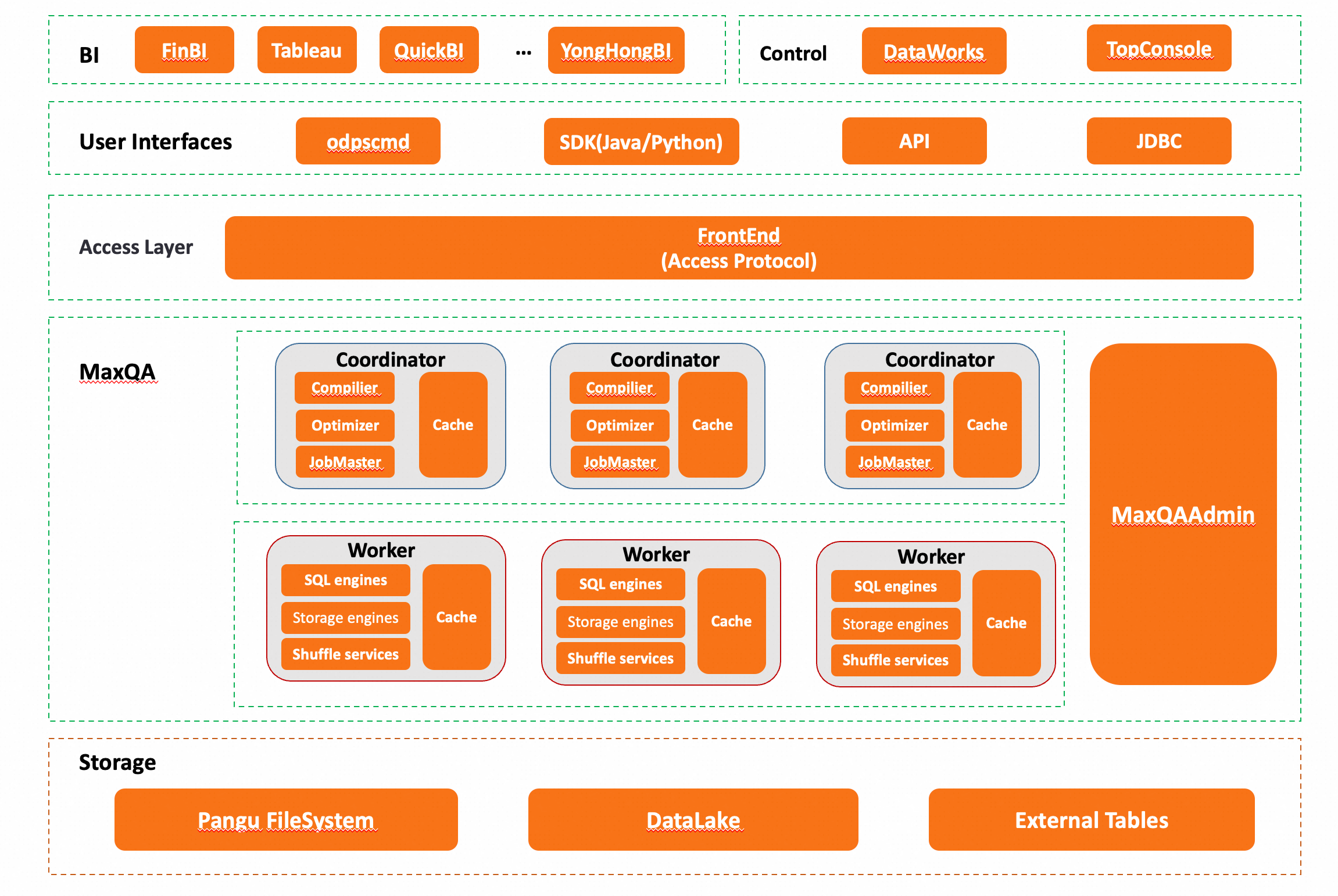
The frontend connects directly to the coordinator. The control path architecture is optimized and asynchronous to make interaction more efficient.
The MaxQA technical architecture is shown in the following figure.
Scenarios
The MaxQA feature covers various application scenarios from daily operational reports to advanced data analysis, particularly suitable for business scenarios with high requirements for query response time and stability. Whether for short-term decision support or long-term strategic planning, MaxQA provides strong technical support for enterprises, enhancing the value creation capability driven by data.
Scenario | Description | Characteristics | Examples |
Ad hoc query | Flexibly select query conditions based on actual needs, quickly obtain query results, and adjust query logic. This is suitable for data developers or data analysts who want to conduct query analysis using familiar client tools. | • Requires query latency of a few seconds to tens of seconds. • Typically used by data developers and data analysts with SQL skills. • Allows for flexible query conditions to quickly adapt to changing business needs. | • Data scientists performing exploratory data analysis. • Data engineers debugging temporary queries in ETL processes. |
Business intelligence (BI) | Use MaxCompute to build enterprise-level data warehouses, and process data through ETL into aggregate data that can be consumed by businesses. Leverage MaxQA's low latency, resource isolation, elastic concurrency, data caching, and other features to meet the requirements for multi-concurrent, fast-response report generation, statistical analysis, and fixed report analysis. | • Queries are typically run on aggregated result data. • Best for scenarios with smaller data volumes, multi-dimensional queries, fixed queries, and high query frequency. • Requires high performance, with responses returned in seconds (for example, most queries complete in under 5 seconds). | • Generating daily sales reports. • Monitoring key business indicators in real time. • Periodically generating financial reports. |
Interactive data analysis | Self-service BI tools and interactive data exploration platforms make it easy for non-technical users to perform complex data analysis. These tools typically implement dynamic filtering, sorting, aggregation, and other functions through a series of short queries, providing a flexible and intuitive operational experience. | • Supports drag-and-drop operations, eliminating the need to write complex SQL statements. • Delivers fast query feedback to help users iterate on their analysis. • Suitable for data analysts of all skill levels, from beginners to experts. | • Using Tableau or Fine BI for visualization analysis. • Data exploration on online data analysis platforms. |
Detailed queries and analysis of large amounts of data | MaxQA can automatically identify the characteristics of query jobs, quickly respond to and process small-scale jobs, and automatically match the resource requirements of large-scale jobs, meeting the needs of analysts to analyze queries of different scales and complexities. | Exploration of large historical datasets, typically requiring only a small subset of the data. • Moderate latency requirements, balancing between real-time and batch processing speeds. • Typically used by business analysts to uncover patterns, identify opportunities, and validate hypotheses from detailed data. | • Analyzing user behavior paths. • Building customer segments and profiles. • Mining product usage patterns. |
System parameter description for different CU specifications
Number of CUs | Maximum number of parallel jobs | Job timeout (min) | Max per-job concurrency |
32CU | 32 | 120 min | Number of CUs × 30 |
64CU | 48 | 120 min | Number of CUs × 30 |
96CU | 64 | 120 min | Number of CUs × 30 |
128CU | 80 | 120 min | Number of CUs × 30 |
160CU | 96 | 120 min | Number of CUs × 30 |
192CU | 112 | 120 min | Number of CUs × 30 |
224CU | 128 | 120 min | Number of CUs × 30 |
[256, 1024)CU | 144 | 120 min | Number of CUs × 30 |
[1024, 1536)CU | 288 | 120 min | Number of CUs × 30 |
[1536, 2048)CU | 432 | 180 min | Number of CUs × 30 |
[2048, 2560)CU | 576 | 240 min | Number of CUs × 30 |
[2560, 3072)CU | 720 | 300 min | Number of CUs × 30 |
[3072, 3584)CU | 864 | 360 min | Number of CUs × 30 |
[3584, 4096)CU | 1008 | 420 min | Number of CUs × 30 |
[4096, 4608)CU | 1152 | 480 min | Number of CUs × 30 |
[4608, 5120)CU | 1296 | 540 min | Number of CUs × 30 |
[5120, 5632)CU | 1440 | 600 min | Number of CUs × 30 |
[5632, 6144)CU | 1584 | 660 min | Number of CUs × 30 |
TPC-DS Performance Testing results
Results may vary slightly by region. Actual performance in your environment may differ.
Specification | 10GB | 100GB | 1TB |
64CU | 468s | 672s | 1978s |
128CU | 319s | 418s | 1001s |
The above performance test report was obtained from the test environment in the China (Beijing) region.
For detailed test plans and content, see TPC-DS Performance Testing.
MaxQA vs. MCQA
Comparison item | MCQA | MaxQA (MCQA2.0) |
Architecture | Based on Serverless resource pools. | Single-tenant isolated computing environment. |
Latency stability | Average. | Good. |
Computing performance | Significantly better than offline mode, but stability is insufficient. | Incorporates multiple optimizations, better performance. |
Supported job types | Only supports DQL. | All types of SQL capabilities, including DDL, DQL, and DML. |
Use method | Enable interactive mode. | Specify the name of the interactive quota group when submitting a job. For more information, see MaxQA feature connection methods. |
Quota routing | Supported. | Not currently supported. |
Pay-as-you-go | Supported. | Not currently supported. |
Session concept | Yes. Jobs submitted from the same client in adjacent time periods may belong to one session, with each session corresponding to an Instance ID. | No. Each SQL job corresponds to an Instance ID. |
Fallback mechanism | Has the ability to automatically fall back to batch processing mode. | Does not support automatic fallback. |
Usage method
For specific usage methods of MaxQA, see Query Acceleration MaxQA operation guide.