This topic describes how to use an Object Table to generate signed URLs to upload and download OSS objects.
Background information
You can use MaxCompute Object Tables to process unstructured data in OSS. You can use Object Tables and SQL queries to filter objects, such as images, based on their metadata and then pass them to a third-party service for processing. However, these computing services require permissions to download OSS objects. Common methods include using permanent AccessKey pairs or service role assumption. These methods have drawbacks:
Permanent AccessKey pairs pose a security risk. You must store the AccessKey pair in the third-party service. If the AccessKey pair is leaked, your data is at high risk.
Service role assumption usually refers to the role that MaxCompute assumes to access OSS. The third-party service must assume another role, which increases code complexity.
OSS supports using presigned URLs to download or preview files. If the URL is valid, you can directly access the object over HTTP. This operation is simple. In addition to generating URLs for downloads, you can also generate URLs for uploads.
GET_SIGNED_URL_FROM_OSS
The GET_SIGNED_URL_FROM_OSS function generates a signed URL to download or upload an OSS object. You can use the URL to directly read or write OSS files over HTTP.
Limits
You can create Object Tables only by using the internal endpoint of OSS.
This function is not supported for MaxQA query acceleration. You must include the
SET odps.mcqa.disable=true;command with your SQL statement.If an OSS bucket has the Block Public Access feature enabled, the
GET_SIGNED_URL_FROM_OSSfunction cannot generate a publicly accessible pre-signed URL. Make sure your bucket permissions allow pre-signed URL generation and use.
Function definition
STRING GET_SIGNED_URL_FROM_OSS (
  STRING <full_object_table_name>,
  STRING <key>
  [, INT <timeToLiveSeconds>]
  [, DATETIME <expiration>]
  [, STRING <httpMethod>]
)
Parameters
Parameter | Required | Type | Description | Default |
full_object_table_name | Yes | STRING | The full path of the Object Table in the three-layer model, including the project and schema names. Example: If you select RoleARN authentication when creating the table, an STS token is automatically generated to access OSS. | None |
key | Yes | STRING | The name of the object to access within the Object Table. For more information about the key parameter, see the description in the returned results of View Object Table properties. | None |
timeToLiveSeconds | No | INT | The lifetime of the pre-signed URL in seconds. Minimum: 1 second. Maximum: 604,800 seconds (7 days). This parameter is mutually exclusive with expiration. | 3,600 seconds |
expiration | No | DATETIME | The expiration time of the pre-signed URL. The value must be at least 1 second and no more than 604,800 seconds (7 days) after the current time. This parameter is mutually exclusive with timeToLiveSeconds. | 3,600 seconds after the current time |
httpMethod | No | STRING | The HTTP method for the generated URL, specifying whether to download (read) from or upload (write) to OSS.
| GET |
Return value
Returns the generated pre-signed URL as a STRING.
Function definitions for other scenarios
Minimal: expires in 3600 seconds, GET method.
STRING get_signed_url_from_oss (
  STRING <fullTableName>,
  STRING <ossKey>
);
Custom expiration (seconds): GET method.
STRING GET_SIGNED_URL_FROM_OSS(
  STRING <fullTableName>,
  STRING <ossKey>,
  INT <timeToLiveSeconds>
);
You can customize the expiration period and read/write permissions.
STRING GET_SIGNED_URL_FROM_OSS(
  STRING <fullTableName>,
  STRING <ossKey>,
  INT <timeToLiveSeconds>,
  STRING <httpMethod>
);
Custom expiration (DATETIME): GET method.
STRING GET_SIGNED_URL_FROM_OSS(
  STRING <fullTableName>,
  STRING <ossKey>,
  DATETIME <expiration>
);
You can customize the expiration time and read/write permissions.
STRING GET_SIGNED_URL_FROM_OSS(
  STRING <fullTableName>,
  STRING <ossKey>,
  DATETIME <expiration>,
  STRING <httpMethod>
);
Usage examples
The following example generates a pre-signed URL to download an OSS object from an Elastic Compute Service (ECS) instance in the China (Hangzhou) region.
Before you run the following code, replace project_name and schema_name with your actual project and schema names.
Download an OSS object from an ECS instance using a signed URL
Step 1: Generate a URL to download the OSS object
Log on to the OSS console and upload the test file signedget.txt to the
object-table-test/object_table_folderdirectory. For more information, see Upload files.Use a local client (odpscmd) or create a MaxCompute SQL node in DataWorks to create an Object Table and refresh the metadata cache.
-- Enable the three-layer model to support schemas in a MaxCompute project.
SET odps.namespace.schema=true;
-- Select the MaxCompute project.
USE <project_name>;
-- Select the schema.
USE SCHEMA <schema_name>;
-- Enable the 2.0 data type system in the MaxCompute project.
SET odps.sql.type.system.odps2=true;
-- This function is not supported for MaxQA query acceleration.
SET odps.mcqa.disable=true;
-- Create an Object Table.
CREATE OBJECT TABLE IF NOT EXISTS test_get_signed_url_from_oss
WITH serdeproperties (
  'odps.properties.rolearn'='acs:ram::<uid>:role/<role_name>'
)
LOCATION 'oss://oss-cn-hangzhou-internal.aliyuncs.com/object-table-test/object_table_folder/';
-- Refresh the table cache.
ALTER TABLE test_get_signed_url_from_oss REFRESH METADATA;
Query the metadata in the Object Table.
SET odps.namespace.schema=true;
SELECT * FROM test_get_signed_url_from_oss;
Expected output:
+---------------+------------+------------+---------------------+---------------+----------------------------------+--------------+------------+--------------------+
| key           | size       | type       | last_modified       | storage_class | etag                             | restore_info | owner_id   | owner_display_name |
+---------------+------------+------------+---------------------+---------------+----------------------------------+--------------+------------+--------------------+
| signedget.txt | 38         | Normal     | 2025-06-04 01:36:52 | Standard      | 96D8258845DAB51BC9B****6E61A2563 | NONE         | 13****     | 13****             |
+---------------+------------+------------+---------------------+---------------+----------------------------------+--------------+------------+--------------------+
Read the object data by using the GET_DATA_FROM_OSS function.
SET odps.namespace.schema=true;
SELECT
  STRING(
    GET_DATA_FROM_OSS(
      '<project_name>.<schema_name>.test_get_signed_url_from_oss',
      key
    )
  )
FROM test_get_signed_url_from_oss;
Expected output:
+----------------------------------------+
| _c0                                    |
+----------------------------------------+
| test maxcompute download files by url  |
+----------------------------------------+
Query the Object Table and generate a pre-signed URL.
SET odps.namespace.schema=true;
SELECT GET_SIGNED_URL_FROM_OSS(
  '<project_name>.<schema_name>.test_get_signed_url_from_oss',
  key)
FROM test_get_signed_url_from_oss;
Expected output:
+------------+
| _c0        |
+------------+
| http://object-table-test.oss-cn-hangzhou-internal.aliyuncs.com/object_table_folder%2Fsignedget.txt?Expires=17490****&OSSAccessKeyId=STS.****&Signature=****&security-token=**** |
+------------+
Step 2: Download the object from an ECS instance
Log on to the ECS console. In the left-side navigation pane, choose .
In the China (Hangzhou) region, select the target instance, click Remote Connection, and then connect to the instance by using Workbench.
In the terminal, run the following commands to download the OSS object:
-- Change the directory to /opt.
cd /opt
-- Download the OSS object by using the pre-signed URL.
curl -o /opt/ecs_signed.txt "http://object-table-test.oss-cn-hangzhou-internal.aliyuncs.com/object_table_folder%2Fsignedget.txt?Expires=17490****&OSSAccessKeyId=STS.****&Signature=****&security-token=****"
Output:
[xxx] opt]# curl -o /opt/ecs_signed.txt "http://object-table-test.oss-cn-hangzhou-inxxx&SAccessKeyId=STS.xxx&Signature=xxx&security-token=CAIS3gJxxx
xxx
  % Total    % Received % Xferd  Average Speed   Time    Time     Time  Current
                                 Dload  Upload   Total   Spent    Left  Speed
100    38  100    38    0     0    263      0 --:--:-- --:--:-- --:--:--   265
opt]# ls
aliyun-security  ecs_signed.txt
[root@iZbp1al9u5z0axrqx50mptZ opt]# cat ecs_signed.txt
test maxcompute download files by url
xxx opt]#
Upload an OSS object from an ECS instance using a signed URL
Step 1: Generate a URL to upload the OSS object
Query the created test_get_signed_url_from_oss Object Table to generate a signed URL. The following code provides an example:
SET odps.namespace.schema=true;
SELECT get_signed_url_from_oss(
  '<project_name>.<schema_name>.test_get_signed_url_from_oss',
  key,
  3600,
  'PUT'
)
FROM test_get_signed_url_from_oss;
The following result is returned:
+------------+
| _c0        |
+------------+
| http://object-table-test.oss-cn-hangzhou-internal.aliyuncs.com/object_table_folder%2Fsinged_put?Expires=17490****&OSSAccessKeyId=****&Signature=****&security-token=**** |
+------------+
Step 2: Upload the object from an ECS instance
Prepare the signedput.txt test file and upload it to the /opt directory on the ECS instance.
In the Workbench terminal, run the following command to upload the data to OSS.
# Switch to the /opt directory.
cd /opt

# Upload signedput.txt to OSS using the signed URL.
curl -X PUT -T /opt/signedput.txt -i "http://object-table-test.oss-cn-hangzhou-internal.aliyuncs.com/object_table_folder%2Fsinged_put?Expires=17490****&OSSAccessKeyId=****&Signature=****&security-token=****"
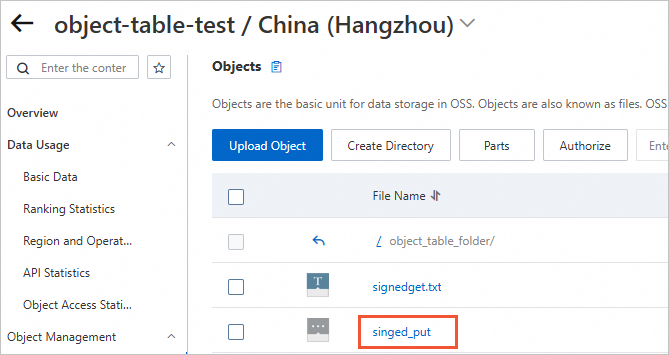
The following figure shows the result:
Step 3: Query the metadata of the Object Table
Refresh the table cache:
SET odps.namespace.schema=true;
ALTER TABLE test_get_signed_url_from_oss REFRESH METADATA;
You can query the metadata of the Object Table:
SET odps.namespace.schema=true;
SELECT * FROM test_get_signed_url_from_oss;
The following is returned:
+------------+------------+------------+---------------+---------------+------------+--------------+------------+--------------------+
| key        | size       | type       | last_modified | storage_class | etag       | restore_info | owner_id   | owner_display_name |
+------------+------------+------------+---------------+---------------+------------+--------------+------------+--------------------+
| signedget.txt | 38         | Normal     | 2025-06-03 01:36:52 | Standard      | 96D8258845DAB51BC****546E61A2563 | NONE         | 13**** | 13****   |
| singed_put | 44         | Normal     | 2025-06-03 19:31:23 | Standard      | F5EA64DF895CF08C3****7D3FD09F12 | NONE         | 13**** | 13****   |
+------------+------------+------------+---------------+---------------+------------+--------------+------------+--------------------+
Read the OSS object data using GET_DATA_FROM_OSS.
SET odps.namespace.schema=true;
SELECT
  string(
    get_data_from_oss(
      '<project_name>.<schema_name>.test_get_signed_url_from_oss',
      key
    )
  )
FROM test_get_signed_url_from_oss;
The following result is returned:
+------------+
| _c0        |
+------------+
| test maxcompute download files by url  |
| test  Object Table upload file to oss by url |
+------------+
FAQ
Problem 1: The table path in the function is different from the path of the underlying table being queried
Error message
ODPS-0130071:[0,0] Semantic analysis exception - physical plan generation failed: Can't do ObjectTableTwoPhasesSplitting process (Caused by: java.lang.IllegalArgumentException: The first arg[xxx.default.test_get_signed_url_from_ossxxxxxx] of function GET_SIGNED_URL_FROM_OSS({object_table_full_name}, {object_key}, ...) can't be found in the underlying object table scans[xxx.default.test_get_signed_url_from_oss]).Problem description
The table name
test_get_signed_url_from_ossxxxxxxdoes not exist or is different from the table name specified in the SQL statement.Solution
Specify the name of an existing Object Table in the
project.schema.tableformat.
The `timeToLiveSeconds` parameter value is invalid
Error message
ODPS-0121095:[1,8] Invalid argument - The parameter <timeToLiveSeconds> of the function GET_SIGNED_URL_FROM_OSS() you specified (0) is invalid, it should be in the range [1, 604800].Problem description
The value of the `timeToLiveSeconds` parameter is invalid. The value must be in the range [1, 604800].
Solution
Specify a valid value for the time-to-live (TTL).
The `HttpMethod` parameter value is invalid
Error message
ODPS-0121095:[1,8] Invalid argument - The parameter <httpMethod> of the function GET_SIGNED_URL_FROM_OSS() you specified 'PU' is invalid, it can only be 'GET' or 'PUT'.Problem description
The value of the `HttpMethod` parameter is invalid.
Solution
Set the `HttpMethod` parameter to GET or PUT.
The link has expired because the validity period is too short
Error message
The `Request has expired` error is reported when you run the curl command.
Problem Description
The signed URL expired before it was used.
Solution
Set a reasonable value for the `expiration` parameter. Do not set an excessively long or short value.
The three-layer model syntax is not enabled
Error message
ODPS-0130071:[0,0] Semantic analysis exception - physical plan generation failed: Can't do ObjectTableTwoPhasesSplitting process (Caused by: java.lang.IllegalArgumentException: Invalid parameter of object table full name[str=xxx.test_get_signed_url_from_oss], which should be split up into 3 parts by '.' like '${project}.${schema}.${table}').Problem description
The schema syntax is not enabled. Therefore, the
project.schema.tableformat cannot be parsed.Solution
Add the
set odps.namespace.schema=true;command before the SQL statement to enable the schema syntax.