If your destination Logstores contain no data after you distribute data transformation results, this topic can help you resolve the issue.
Scenario 1: The storage destinations that are specified in the transformation statement are inconsistent with the storage destinations that are specified in the Create Data Transformation Job panel
The `website_log` Logstore contains 5,000 logs. Specifically, 1,000 logs have a `SourceIP` of `192.0.2.54`, 1,000 logs have a `SourceIP` of `192.0.2.28`, 1,000 logs have a `SourceIP` of `192.0.2.136`, and 2,000 logs have other `SourceIP` values. You want to transform this data and distribute it to different destination Logstores: `54_log_target`, `28_log_target`, and `136_log_target`.
-
Processing requirements
-
Distribute logs with a `SourceIP` of `192.0.2.54` to the `54_log_target` Logstore.
-
Distribute logs with a `SourceIP` of `192.0.2.28` to the `28_log_target` Logstore.
-
Distribute logs with a `SourceIP` of `192.0.2.136` to the `136_log_target` Logstore.
You can discard any data not meeting the processing conditions.
-
-
Transformation statement
The three destination Logstores are named `54_log`, `28_log`, and `136_log`.
e_if(e_search("SourceIP==192.0.2.54"), e_output(name="54-target", project="sls-test", logstore="54_log")) e_if(e_search("SourceIP==192.0.2.28"), e_output(name="28-target", project="sls-test", logstore="28_log")) e_if(e_search("SourceIP==192.0.2.136"), e_output(name="136-target", project="sls-test", logstore="136_log")) e_drop() -
Storage destinations
The three destination Logstores are `54_log_target`, `28_log_target`, and `136_log_target`.
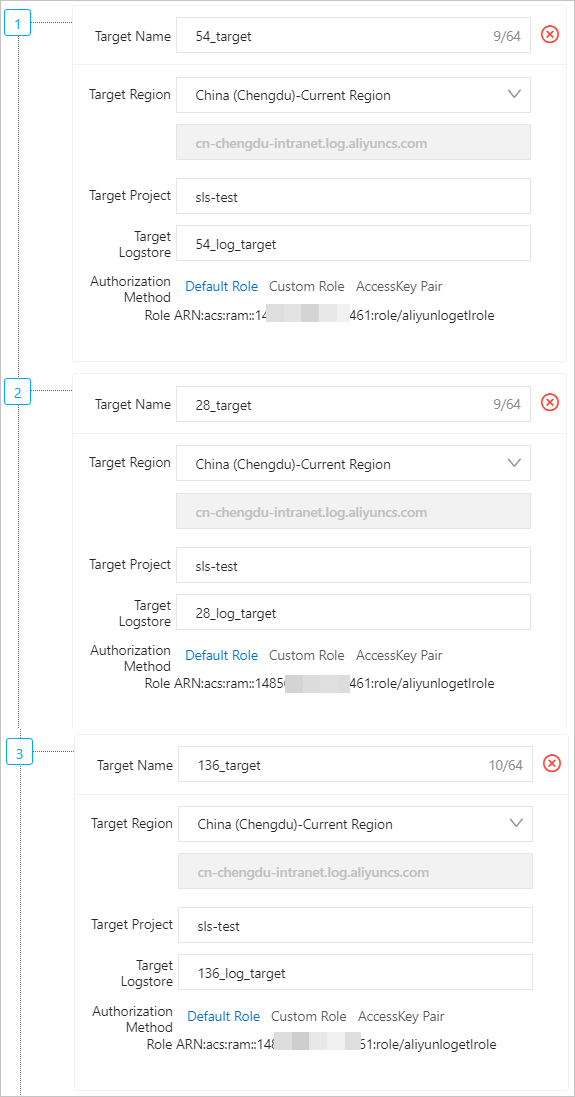
-
Transformation results
The `54_log_target`, `28_log_target`, and `136_log_target` Logstores contain no data.
-
Cause analysis
The
project(destination project name) andlogstore(destination Logstore name) parameters are set in the `e_output` function of the transformation statement. However, different values for Destination Project and Destination Logstore are set on the Create Data Transformation Job page. The destination specified in the transformation statement takes precedence.This means that in this scenario, the transformation results are distributed to the three Logstores specified in the transformation statement: `54_log`, `28_log`, and `136_log`.
-
Solution
If you use the e_output or e_coutput function and configure only the name parameter, the transformation results are distributed to the storage destinations that are specified in the Create Data Transformation Job panel.
-
If you configure the Project parameter and LogStore parameter in the
e_outputande_coutputfunctions, these parameters must match the storage destination that you configured in the Create Data Transformation Task panel. For more information, see e_outputLogStoreut.NoteIf no e_drop() function is included in the transformation statement and multiple storage destinations are specified in the transformation statement, the system distributes all logs that do not meet the conditions in the statement and are not discarded to the destination Logstore in the storage destination that is numbered 1.
e_if(e_search("SourceIP==192.0.2.54"),
  e_output(name="54-target",
             project="sls-test",
             logstore="54_log_target"))
e_if(e_search("SourceIP==192.0.2.28"),
    e_output(name="28-target",
             project="sls-test",
             logstore="28_log_target"))
e_if(e_search("SourceIP==192.0.2.136"),
    e_output(name="136-target",
             project="sls-test",
             logstore="136_log_target"))
e_drop()
Scenario 2: No transformation statements are specified or the specified transformation statement contains only the e_drop() function
Transformation statement
None
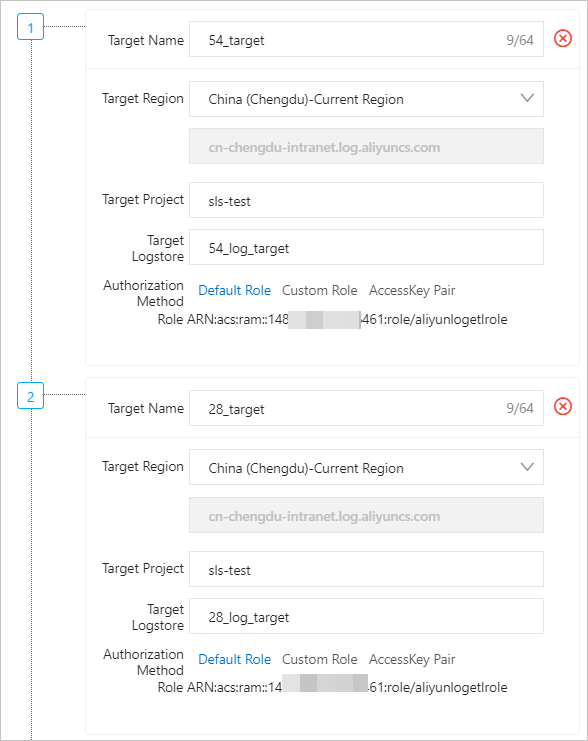
Storage destinations
-
Transformation results
Only the
54_log_targetLogstore contains data. -
Cause analysis
-
No transformation statements are specified on the data transformation page. However, the following operations are performed in the Create Data Transformation Job panel:
-
If you set one destination, data from the source Logstore is copied to the destination Logstore.
-
If you set multiple destinations, all data is distributed only to the first destination Logstore and is not forwarded to other Logstores.
-
-
If you specify only an `e_drop()` statement on the data transformation page, all log data is discarded, and the destination Logstores contain no data.
-
Scenario 3: Latency exists during data transformation
If you are sure that your data transformation job is configured correctly but the destination Logstores still contain no data, the cause might be data transformation latency.
For more information, see the Performance Guide. We recommend that you plan across three levels before you deploy processing jobs.
-
Source Logstore: Adjust the number of shards in the readwrite state based on the data volume to meet concurrency requirements for data transformation.
Optimize your DSL processing logic—for example, optimize regular expressions, apply conditional pruning appropriately, and perform data filtering as early as possible.
-
Destination Logstore: Set a sufficient number of shards in the readwrite state to prevent write blocking.