This topic describes how to send and receive custom messages and provides sample code.
Sample code
Send and receive custom messages on Android: Android/ARTCExample/BasicUsage/src/main/java/com/aliyun/artc/api/basicusage/DataChannelMessage/DataChannelMessageActivity.java.
Send and receive custom messages on iOS: iOS/ARTCExample/BasicUsage/DataChannelMessage/DataChannelMessageVC.swift.
Prerequisites
Have a valid Alibaba Cloud account and create an ApsaraVideo Real-time Communication application. For more information, see Create an application. Obtain the App ID and App Key from the Application Management console.
Integrate the ARTC SDK into your project and implement basic real-time audio and video features. To integrate the SDK, see Download and integrate the SDK. To implement audio and video features, see Implement an audio and video call.
Implementation
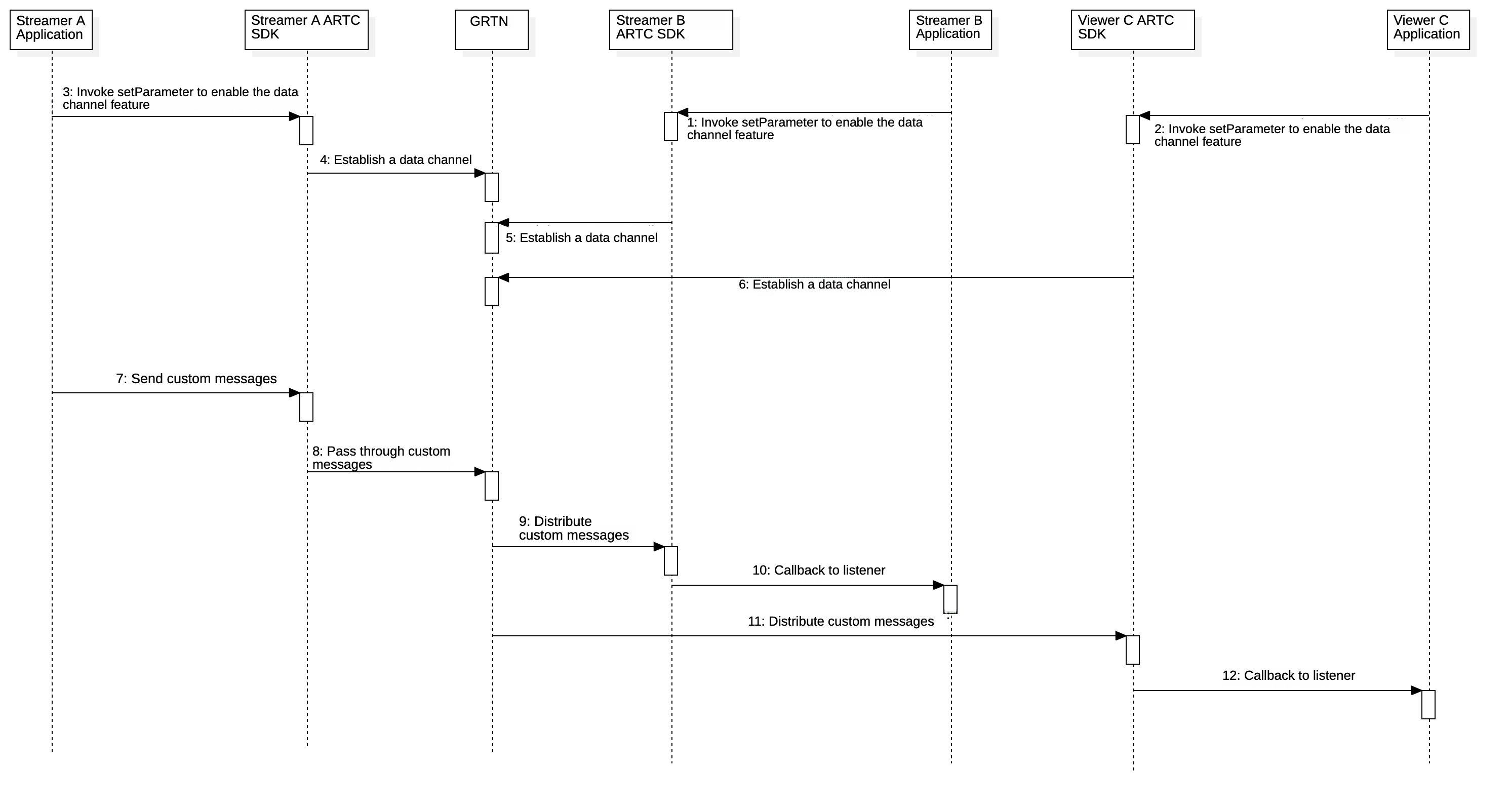
Users with the streamer role can send and receive messages. Users with the viewer role can only receive messages.
Enable the custom message channel
The custom message channel is disabled by default in ARTC. Call the setParameter method to enable it. You can call this method before or after you join a channel.
Android
param = "{\"data\":{\"enablePubDataChannel\":true" + ",\"enableSubDataChannel\":true}}";
mAliRtcEngine.setParameter(param);
iOS
NSString* parameter = [NSString stringWithFormat:@"{\"data\":{\"enablePubDataChannel\":true,\"enableSubDataChannel\":true}}"];
[self.engine setParameter:parameter];
Harmony
const param = '{"data":{"enablePubDataChannel":true,"enableSubDataChannel":true}}';
this.rtcEngine.setParameter(param);
Web
// On the web client, call this before joinChannel.
mAliRtcEngine.setParameter(
  JSON.stringify({
    data: {
      enablePubDataChannel: true,
      enableSubDataChannel: true,
    },
  }),
);
Windows
char * param = "{\"data\":{\"enablePubDataChannel\":true,\"enableSubDataChannel\":true}}";
mAliRtcEngine->SetParameter(param);
Send a custom message
After you establish a data channel, call the sendDataChannelMsg method to send messages.
Users with the streamer role can send and receive messages. Users with the viewer role can only receive messages.
Call
setParameterto enable the custom message channel.The following limits apply to sending data:
The maximum bitrate is 30 KB/s.
The data channel can send a maximum of 60 packets per second. Each packet can be up to 1 KB in size.
Android
AliRtcEngine.AliRtcDataChannelMsg msg = new AliRtcEngine.AliRtcDataChannelMsg();
msg.type = AliRtcEngine.AliRtcDataMsgType.AliEngineDataMsgCustom;
/* data can be any type of data (text, images, etc.) */
msg.data =  xxxx;
mAliRtcEngine.sendDataChannelMsg(msg);
iOS
AliRtcDataChannelMsg* msg = [[AliRtcDataChannelMsg alloc] init];
msg.type = AliRtcDataMsgCustom;
/* data can be any type of data (text, images, etc.) */
msg.data = xxxxx;
[self.engine sendDataChannelMessage:msg];
Harmony
const msg = new AliRtcDataChannelMsg();
msg.type = AliRtcDataMsgType.AliRtcDataChannelCustom;

const seiData = this.stringToArrayBuffer(this.SendText);
msg.data = seiData;

// Send the message
const res = this.rtcEngine.sendDataChannelMsg(msg);
Web
const data = new TextEncoder().encode('xxxx');
// data can be any type of data (text, images, etc.) in ArrayBuffer format
mAliRtcEngine.sendDataChannelMessage(
  new AliRtcDataChannelMsg(data),
);
Windows
AliEngineDataChannelMsg msg;
msg.type = AliEngineDataChannelCustom;
/* data can be any type of data (text, images, etc.) */
msg.data =  data;
msg.dataLen = dataLength;
mAliRtcEngine->SendDataChannelMessage(msg);
Receive a custom message
You can receive custom messages by listening for the onDataChannelMessage callback.
Android
// In the AliRtcEngineNotify callback
public void onDataChannelMessage(String uid, AliRtcEngine.AliRtcDataChannelMsg msg) {
    /* TODO: Add your custom message processing logic here. */
}
iOS
- (void)onDataChannelMessage:(NSString *_Nonnull)uid controlMsg:(AliRtcDataChannelMsg*_Nonnull)controlMsg {
	/* TODO: Add your custom message processing logic here. */
}
Harmony
// Callback for receiving data channel messages
listener.onDataChannelMessage((uid: string, msg: AliRtcDataChannelMsg) => {
  console.info(`Received data channel message: uid=${uid}, type=${msg.type}`);
  /* TODO: Add your custom message processing logic here. */
});
Web
mAliRtcEngine.on('dataChannelMsg', (uid, message) => {
  // Add your custom message processing logic here.
  console.log('dataChannelMsg', uid, message);
});
Windows
public:
virtual void OnDataChannelMessage(const char* uid, const AliEngineDataChannelMsg& msg) override {
    /* TODO: Add your custom message processing logic here. */
}