This topic describes how to create an ApsaraVideo Real-time Communication (ARTC) application using Alibaba Cloud resources.
Operation Flow
Operation | Description |
Create an ApsaraVideo Real-time Communication application in the ApsaraVideo Live console. After creation, obtain the Appid and Appkey. Note
| |
After obtaining the Appid and Appkey, copy the authentication code provided by Alibaba Cloud to your server based on your development language. | |
After configuring the server, use CocoaPods (for iOS) or Maven (for Android) to integrate and obtain the SDK.
|
Step 1: Activate the application
Log on to the ApsaraVideo Live console.
In the navigation pane on the left, click Live + > ApsaraVideo Real-time Communication > Applications.
Click Create Application.
Enter a custom instance name, select the Terms of Service checkbox, and then click Buy Now.
After a success message is displayed, you can refresh the Application Management page to view your new ApsaraVideo Real-time Communication application.
NoteBy default, creating an application does not incur charges. You are charged based on your actual usage. For more information, see Audio and Video Call Fees.
Step 2: Server integration
Integrate the authentication code that is provided by Alibaba Cloud into your server environment. For example, for information about joining a channel with a single parameter in Java, see Token Authentication.
The server provides APIs for mobile applications to invoke.
Step 3: SDK integration
Choose the appropriate mode based on your business scenario. You can select the interactive mode for interactive entertainment or the communication mode for one-to-one or one-vs.-all broadcasts. Selecting the correct mode ensures a smooth user experience and efficient resource usage.
Mode | Stream Ingest | Stream Pulling | Mode Description |
Interactive Mode |
| No role restrictions apply. All participants have permission to pull streams. |
|
Communication Mode | No role restrictions apply. All participants have permission to ingest streams. | No role restrictions apply. All participants have permission to pull streams. |
|
1. Engineering Configuration
Android
Use Maven repositories to integrate the required dependency libraries.
Add the Maven repository address to the root-level
build.gradlefile.allprojects { repositories { google() jcenter() // Add the Maven address required by RTC maven { url "https://maven.aliyun.com/nexus/content/repositories/releases" } } }In the app/build.gradle file of your project, add the following lines of code.
// Import the dependent real-time communication SDK (RTC SDK) implementation 'com.aliyun.aio:AliVCSDK_ARTC:${latest version}'In the app/src/main/AndroidManifest.xml file, add the following code to obtain the required device permissions.
<uses-permission android:name="android.permission.CAMERA" /> <uses-permission android:name="android.permission.RECORD_AUDIO" /> <uses-permission android:name="android.permission.INTERNET" /> <uses-permission android:name="android.permission.WRITE_EXTERNAL_STORAGE" /> <!-- Request legacy Bluetooth permissions on older devices. --> <uses-permission android:name="android.permission.BLUETOOTH" android:maxSdkVersion="30" /> <uses-permission android:name="android.permission.BLUETOOTH_ADMIN" android:maxSdkVersion="30" /> <!-- Needed only if your app communicates with already-paired Bluetooth devices. --> <uses-permission android:name="android.permission.BLUETOOTH_CONNECT" /> <uses-permission android:name="android.permission.CHANGE_NETWORK_STATE" /> <uses-permission android:name="android.permission.ACCESS_NETWORK_STATE" /> <uses-permission android:name="android.permission.MODIFY_AUDIO_SETTINGS" /> <uses-permission android:name="android.permission.READ_PHONE_STATE" /> <uses-permission android:name="android.permission.WRITE_SETTINGS" tools:ignore="ProtectedPermissions" /> <uses-permission android:name="android.permission.FOREGROUND_SERVICE" />NoteSome permissions, such as the following, require dynamic requests:
Manifest.permission.CAMERA
Manifest.permission.WRITE_EXTERNAL_STORAGE
Manifest.permission.RECORD_AUDIO
Manifest.permission.READ_EXTERNAL_STORAGE
If the Android system version is 12 or later (API_LEVEL 31 or later), dynamically request the following additional permissions:
Manifest.permission.BLUETOOTH_CONNECT
(Optional) Add obfuscation rules.
-keep class com.aliyun.allinone.** { *; } -keep class com.aliyun.rts.network.AliHttpTool { *; } -keep class com.aliyun.common.AlivcBase { *; } -keep class com.huawei.multimedia.alivc.** { *; } -keep class com.alivc.rtc.** { *; } -keep class com.alivc.component.** { *; } -keep class org.webrtc.** { *; }The configuration is complete.
iOS
Use CocoaPods for integration.
In the terminal window, enter the following command to install CocoaPods.
ImportantBefore you use CocoaPods, make sure that Ruby is installed on your Mac.
sudo gem install cocoapodsNavigate to your project path and run the following command in the terminal window to create a Podfile.
pod initEdit the Podfile and add the RTC SDK dependency.
pod 'AliVCSDK_ARTC', '~> ${latest version}'Run the following command in the terminal window to update the CocoaPods dependencies in your project. After the command is run, a project file with the `.xcworkspace` suffix is generated. This file contains the integrated SDK. Double-click this file to update and install the SDK.
pod updateAdd permission requests.
ImportantAdd recording and camera permissions.
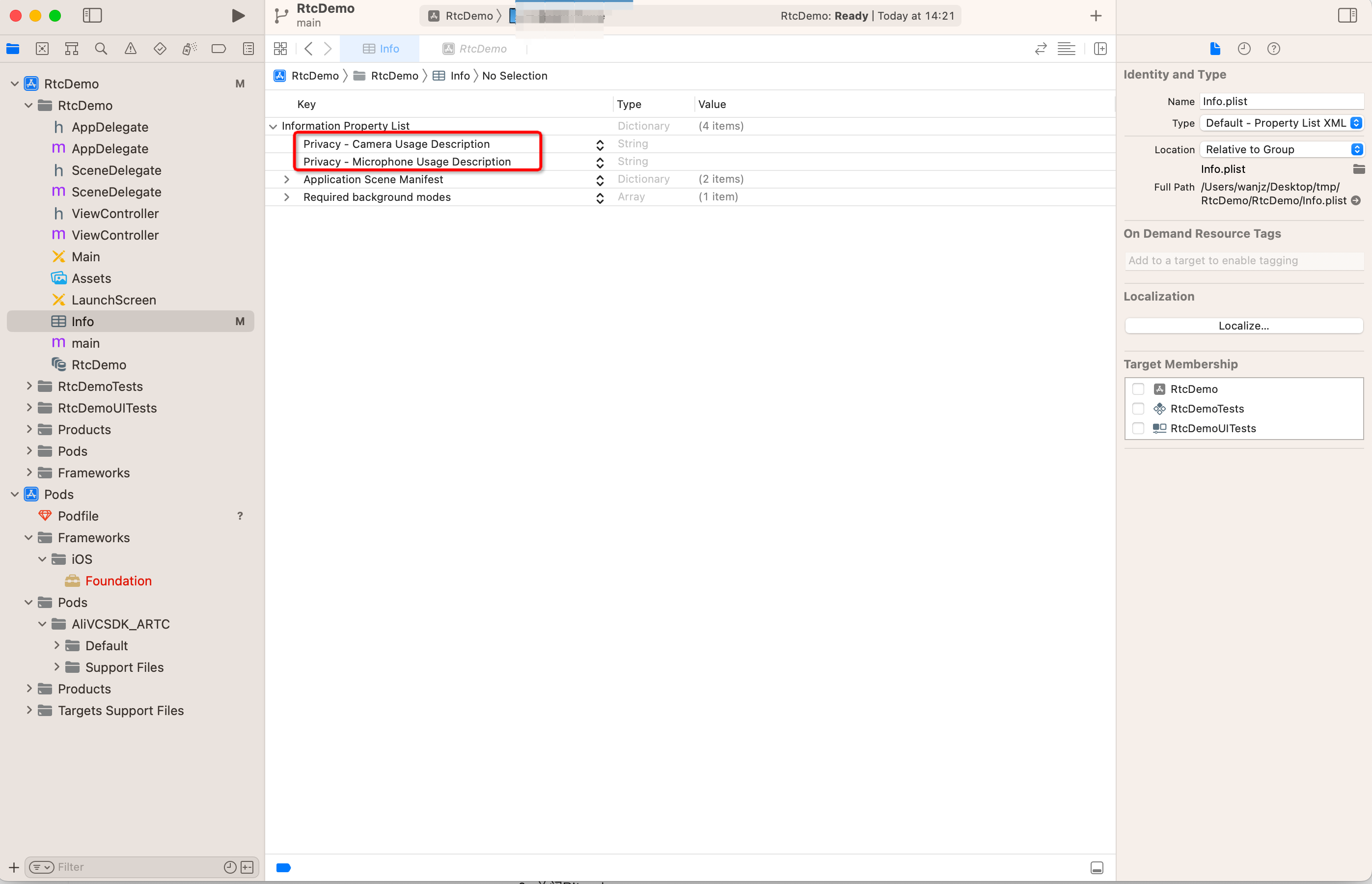
In the Info.plist file, add the camera and microphone permissions: Privacy - Camera Usage Description and Privacy - Microphone Usage Description.
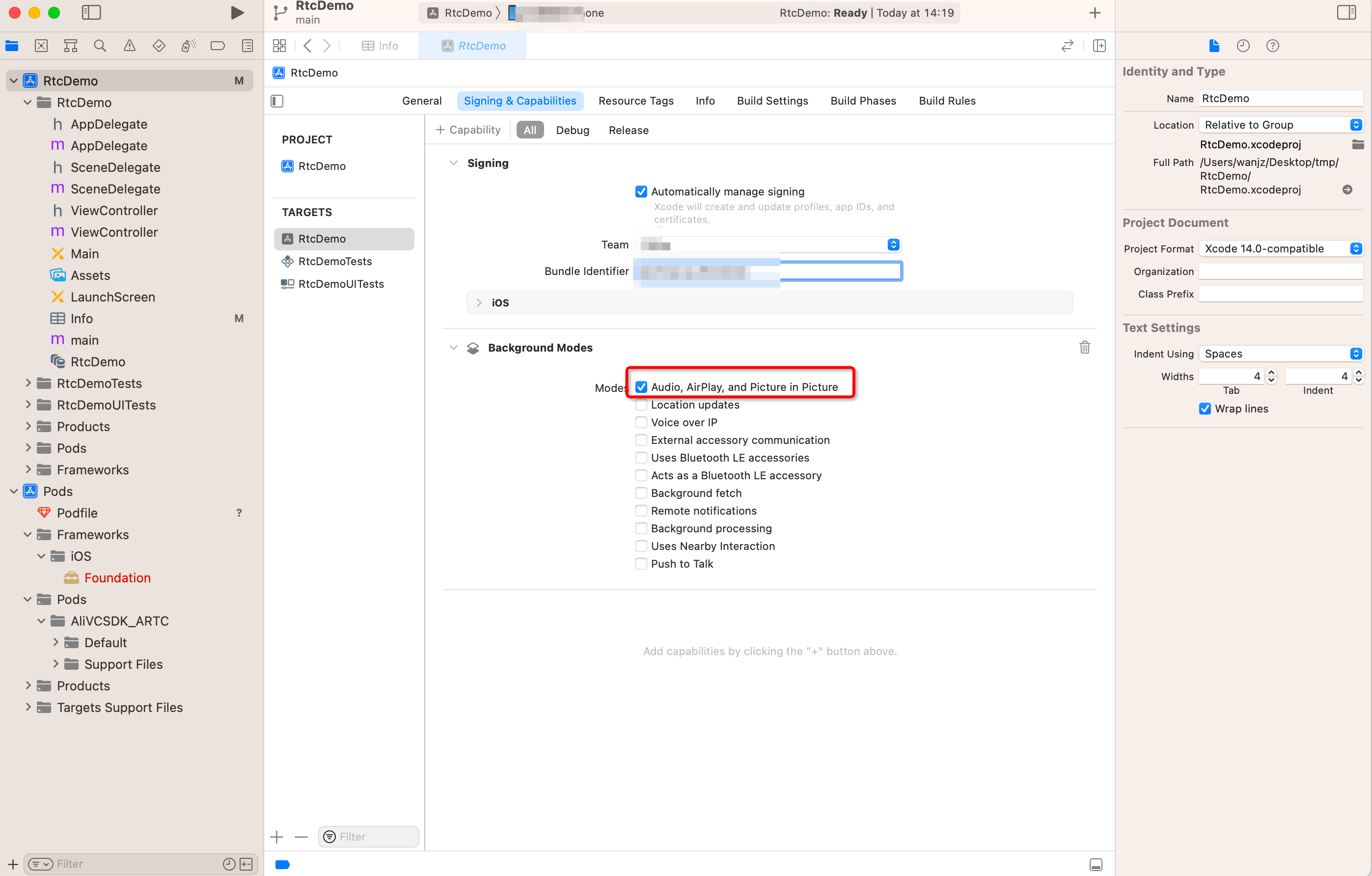
Enable the background audio capture mode. As shown in the following figure, select Audio, AirPlay, and Picture in Picture.
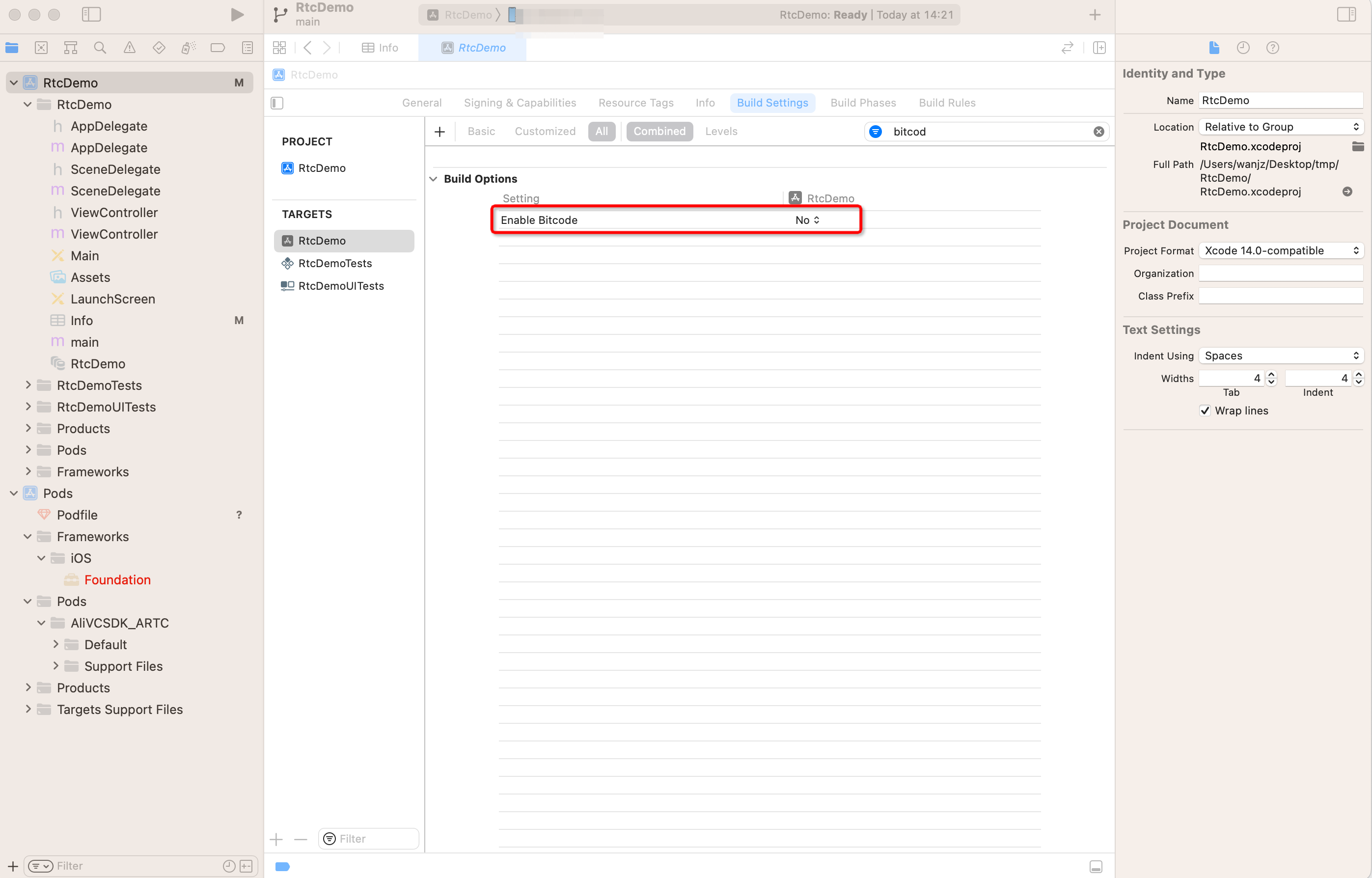
Find the Enable Bitcode option, and set it to No to disable Bitcode.
Windows
Use Visual Studio 2015 (VS2015) for integration.
Add the include path for the runtime library.
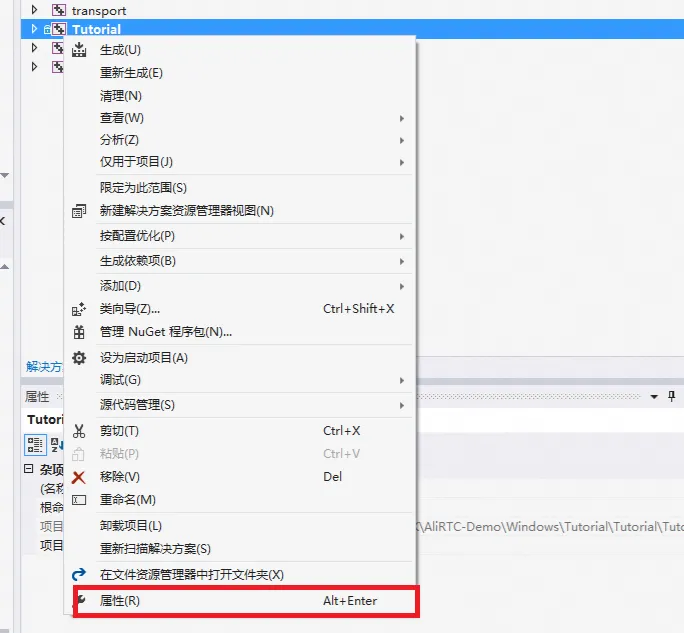
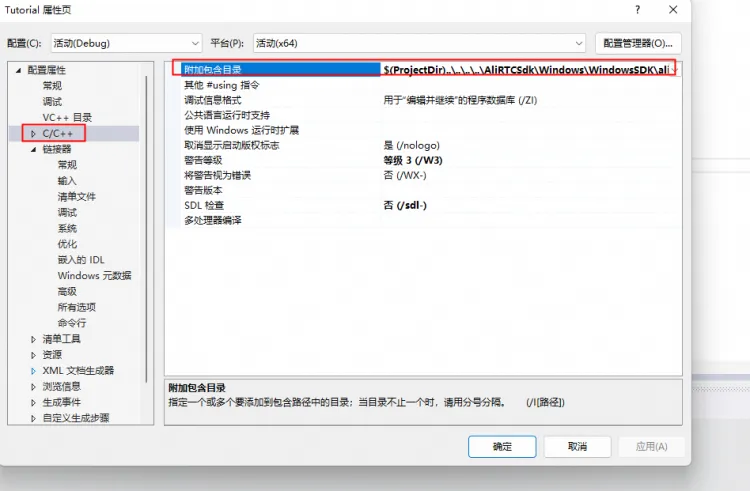
Add the runtime library path.
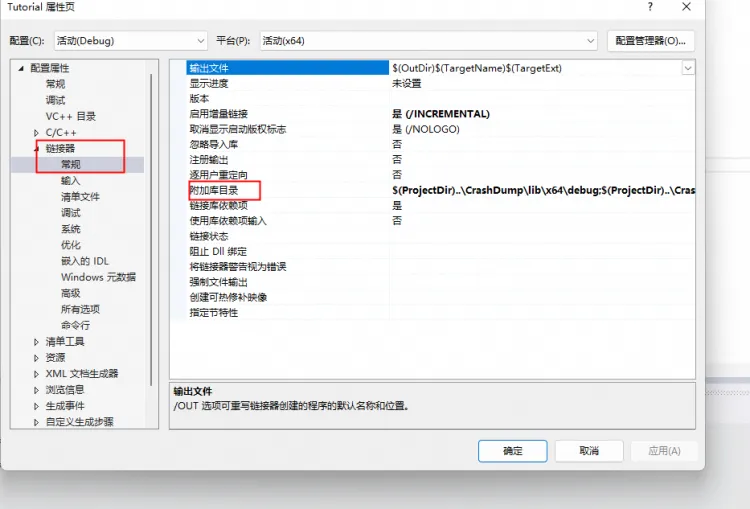
Harmony client
Environment Preparations
Before you integrate the ApsaraVideo SDK for Alibaba Cloud, make sure that your development environment meets the following requirements:
Contact Huawei business personnel to sign a cooperation plan, activate the relevant permissions, and obtain DevEco Studio 5.0.3.900 Release or later.
Obtain HarmonyOS NEXT SDK API Version 12 or later.
Obtain HarmonyOS NEXT 5.0.0.102 operating system (API Version 12 or later). The operating system must support audio and video on HarmonyOS devices and have the "Allow debugging" option enabled.
To debug on a real device, configure the device. For more information, see the HarmonyOS official documentation.
The HarmonyOS device is connected to the Internet.
You have registered a Huawei Developer account and completed identity verification.
Engineering Configuration
Manual Import
Download the `AliVCSDK_ARTC-6.11.0-Beta.har` package and place it in the `libs` folder of the project. Then, configure the reference in your project:
"dependencies": { "@aliyun_video_cloud/alivcsdk_artc":"file:./libs/AliVCSDK_ARTC-6.11.0-beta.har", }
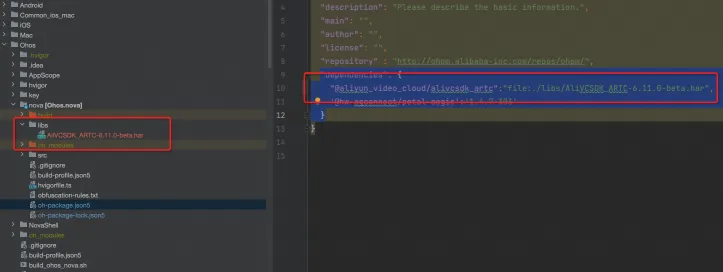
ohpm Import
Configure the project:
"dependencies": { "@aliyun_video_cloud/alivcsdk_artc":"6.11.0-beta", }Run the following command:
ohpm install @aliyun_video_cloud/alivcsdk_artc
2. SDK Integration
1. Initialize the RTC engine and register callbacks
The SDK is designed to use internal retry mechanisms to recover from exceptions. If the SDK cannot resolve an error, it notifies your application through callback interfaces (APIs).
Cause of Exception | Callback and Parameters | Solution | Description |
Authentication failed | onJoinChannelResult callback returns AliRtcErrJoinBadToken | If an error occurs, the app must check if the Token is correct. | If authentication fails when a user actively invokes an API, the system returns an authentication failure error message in the API invocation callback. |
Authentication will expire | onWillAuthInfoExpire | If this exception occurs, the app must re-obtain the latest authentication information and then invoke refreshAuthInfo to refresh the authentication information. | Authentication expiration errors occur in two scenarios: when a user invokes an API or during program execution. Therefore, error feedback is provided through API callbacks or independent error callbacks. |
Authentication expired | onAuthInfoExpired | If this exception occurs, the app must rejoin the channel. | Authentication expiration errors occur in two scenarios: when a user invokes an API or during program execution. Therefore, error feedback is provided through API callbacks or independent error callbacks. |
Network connection abnormal | onConnectionStatusChange callback returns AliRtcConnectionStatusFailed. | If this exception occurs, the app must rejoin the channel. | The SDK has an automatic recovery capability for temporary network disconnections. However, if the disconnection duration exceeds the preset threshold, a timeout is triggered, and the connection is lost. In this case, the app should check the network status and guide the user to rejoin the meeting. |
Kicked offline | onBye |
| The RTC service provides a feature that allows administrators to actively remove participants. |
On-premises device abnormal | onLocalDeviceException | If this exception occurs, the app must check if permissions and device hardware are normal. | The RTC service supports device detection and abnormal diagnosis. If an on-premises device experiences an exception, the RTC service notifies the client of the on-premises device exception through a callback. If the SDK cannot resolve the issue on its own, the app must intervene to check if the device is normal. |
Android
private void createEngine() {
mAliRtcEngine = AliRtcEngine.getInstance(getApplicationContext());
mAliRtcEngine.setRtcEngineEventListener(new AliRtcEngineEventListener() {
/* Notification of SDK connection status to the server. Handle connection failures. */
@Override
public void onConnectionStatusChange(AliRtcEngine.AliRtcConnectionStatus aliRtcConnectionStatus, AliRtcEngine.AliRtcConnectionStatusChangeReason aliRtcConnectionStatusChangeReason) {
super.onConnectionStatusChange(aliRtcConnectionStatus, aliRtcConnectionStatusChangeReason);
if (aliRtcConnectionStatus == AliRtcEngine.AliRtcConnectionStatus.AliRtcConnectionStatusFailed) {
/* TODO: Required. Prompt the customer with an error message. The SDK reports this only after internal recovery policies have failed and it can no longer be used. */
} else {
/* TODO: Optional. Add business logic, typically for data statistics or UI changes. */
}
}
/* The SDK attempts to control on-premises device exceptions. */
@Override
public void OnLocalDeviceException(AliRtcEngine.AliRtcEngineLocalDeviceType aliRtcEngineLocalDeviceType, AliRtcEngine.AliRtcEngineLocalDeviceExceptionType aliRtcEngineLocalDeviceExceptionType, String s) {
super.OnLocalDeviceException(aliRtcEngineLocalDeviceType, aliRtcEngineLocalDeviceExceptionType, s);
/* TODO: Required. Prompt the customer with an error message. The SDK reports this only after internal recovery policies have failed and it can no longer be used. */
}
@Override
public void onJoinChannelResult(int result, String channel, String userId, int elapsed) {
super.onJoinChannelResult(result, channel, userId, elapsed);
/* TODO: Optional. Add business logic, typically for data statistics or UI changes. */
Log.i(TAG, "onJoinChannelResult result=" + result + ",channel=" + channel + ",userId=" + userId + ",elapsed=" + elapsed);
}
@Override
public void onLeaveChannelResult(int result, AliRtcEngine.AliRtcStats stats) {
super.onLeaveChannelResult(result, stats);
Log.i(TAG, "onLeaveChannelResult result=" + result);
}
});
mAliRtcEngine.setRtcEngineNotify(new AliRtcEngineNotify() {
/* Callback when authentication is 30 seconds from expiring. Refresh authentication time. */
@Override
public void onAuthInfoWillExpire() {
super.onAuthInfoWillExpire();
/* TODO: Required. The service triggers re-obtaining authentication information for the current channel and user, then set refreshAuthInfo. */
}
/* The service might trigger kicking users, so handle this as well. */
@Override
public void onBye(int code) {
super.onBye(code);
/* TODO: Handle this based on your business scenario. */
}
@Override
public void onRemoteUserOnLineNotify(String uid, int elapsed) {
super.onRemoteUserOnLineNotify(uid, elapsed);
Log.i(TAG, "onRemoteUserOnLineNotify uid=" + uid + ",elapsed=" + elapsed);
}
@Override
public void onRemoteUserOffLineNotify(String uid, AliRtcEngine.AliRtcUserOfflineReason aliRtcUserOfflineReason) {
super.onRemoteUserOffLineNotify(uid, aliRtcUserOfflineReason);
Log.i(TAG, "onRemoteUserOnLineNotify uid=" + uid + ",aliRtcUserOfflineReason=" + aliRtcUserOfflineReason);
}
@Override
public void onRemoteTrackAvailableNotify(String uid, AliRtcEngine.AliRtcAudioTrack aliRtcAudioTrack, AliRtcEngine.AliRtcVideoTrack aliRtcVideoTrack) {
super.onRemoteTrackAvailableNotify(uid, aliRtcAudioTrack, aliRtcVideoTrack);
Log.i(TAG, "onRemoteUserOnLineNotify uid=" + uid + ",aliRtcAudioTrack=" + aliRtcAudioTrack + ",aliRtcVideoTrack=" + aliRtcVideoTrack);
mMainHandler.post(new Runnable() {
@Override
public void run() {
if (aliRtcVideoTrack == AliRtcEngine.AliRtcVideoTrack.AliRtcVideoTrackCamera
|| aliRtcVideoTrack == AliRtcEngine.AliRtcVideoTrack.AliRtcVideoTrackBoth) {
AliRtcEngine.AliRtcVideoCanvas remote_canvas = new AliRtcEngine.AliRtcVideoCanvas();
SurfaceView remoteView = mAliRtcEngine.createRenderSurfaceView(mContext);
if (remoteView != null) {
remoteView.setZOrderOnTop(true);
remoteView.setZOrderMediaOverlay(true);
}
remote_canvas.view = remoteView;
mLocalSurfaceContainer.addView(remote_canvas.view, new FrameLayout.LayoutParams(
findViewById(R.id.local_surface_container).getWidth()/4,
findViewById(R.id.local_surface_container).getHeight()/4));
mAliRtcEngine.setRemoteViewConfig(remote_canvas,uid,AliRtcEngine.AliRtcVideoTrack.AliRtcVideoTrackCamera);
} else {
mAliRtcEngine.setRemoteViewConfig(null, uid, AliRtcEngine.AliRtcVideoTrack.AliRtcVideoTrackCamera);
}
}
});
}
});
}iOS
- (AliRtcEngine *)engine{
if (!_engine) {
NSString *extras = @"";
/* Construct the engine and pass the delegate. */
_engine = [AliRtcEngine sharedInstance:self extras:extras];
}
return _engine;
}
#pragma mark - "Delegates of engine"
/* Callback when authentication is 30 seconds from expiring. Refresh authentication time. */
- (void)onAuthInfoWillExpire{
/* TODO: Required. The service triggers re-obtaining authentication information for the current channel and user, then set refreshAuthInfo. */
}
/* Notification of SDK connection status to the server. Handle connection failures. */
- (void)onConnectionStatusChange:(AliRtcConnectionStatus)status reason:(AliRtcConnectionStatusChangeReason)reason {
if (status == AliRtcConnectionStatusFailed) {
/* TODO: Required. Prompt the customer with an error message. The SDK reports this only after internal recovery policies have failed and it can no longer be used. */
} else {
/* TODO: Optional. Add business logic, typically for data statistics or UI changes. */
}
}
/* The SDK attempts to control on-premises device exceptions. */
- (void)onLocalDeviceException:(AliRtcLocalDeviceType)deviceType exceptionType:(AliRtcLocalDeviceExceptionType)exceptionType message:(NSString *_Nullable)msg {
/* TODO: Required. Prompt the customer with an error message. The SDK reports this only after internal recovery policies have failed and it can no longer be used. */
}
/* The service might trigger kicking users, so handle this as well. */
- (void)onBye:(int)code {
/* TODO: Handle this based on your business scenario. */
}
/* Remote stream ingest notification. When auto-subscribing, set the black screen time and first frame time concurrently. */
- (void)onRemoteTrackAvailableNotify:(NSString *_Nonnull)uid audioTrack:(AliRtcAudioTrack)audioTrack videoTrack:(AliRtcVideoTrack)videoTrack {
/* TODO: Required. Set a video rendering window for the SDK. */
dispatch_async(dispatch_get_main_queue(), ^{
if (videoTrack & AliRtcVideoTrackCamera) {
AliVideoCanvas *canvas = [[AliVideoCanvas alloc] init];
canvas.view = self.remoteRenderView;
canvas.renderMode = AliRtcRenderModeAuto;
[self.engine setRemoteViewConfig:canvas uid:uid forTrack:AliRtcVideoTrackCamera];
} else {
/* Clear the remote user's rendering window here, but the remote user might leave the channel directly. */
[self.engine setRemoteViewConfig:nil uid:uid forTrack:AliRtcVideoTrackCamera];
}
});
}
- (void)onRemoteUserOffLineNotify:(NSString *)uid offlineReason:(AliRtcUserOfflineReason)reason {
dispatch_async(dispatch_get_main_queue(), ^{
/* Clear the remote user's rendering window here as well. */
[self.engine setRemoteViewConfig:nil uid:uid forTrack:AliRtcVideoTrackBoth];
});
}
- (void)onJoinChannelResult:(int)result channel:(NSString *)channel userId:(NSString *)userId elapsed:(int)elapsed {
/* TODO: Optional. Add business logic, typically for data statistics or UI changes. */
}
- (void)onLeaveChannelResult:(int)result stats:(AliRtcStats)stats {
/* TODO: Optional. Add business logic, typically for data statistics or UI changes. */
}Windows
class AliEngineEventListenerImpl : public AliEngineEventListener {
public:
AliEngineEventListenerImpl(AliEngine* engine, HWND hWnd) {
mAliRtcEngine = engine;
mHWnd = hWnd;
};
virtual AliEngineEventListenerImpl() {};
virtual void OnConnectionStatusChange(int status, int reason) override {
if (status == AliEngineConnectionFailed) {
/* TODO: Required. Prompt the customer with an error message. The SDK reports this only after internal recovery policies have failed and it can no longer be used. */
} else {
/* TODO: Optional. Add business logic, typically for data statistics or UI changes. */
}
};
virtual void OnLocalDeviceException(AliEngineLocalDeviceType deviceType, AliEngineLocalDeviceExceptionType exceptionType, const char* msg) override {
/* TODO: Required. Prompt the customer with an error message. The SDK reports this only after internal recovery policies have failed and it can no longer be used. */
};
virtual void OnJoinChannelResult(int result, const char *channel, const char *userId, int elapsed) override {
/* TODO: Optional. Add business logic, typically for data statistics or UI changes. */
};
virtual void OnLeaveChannelResult(int result, AliEngineStats stats) override {
};
virtual void OnAuthInfoWillExpire() override {
/* TODO: Required. The service triggers re-obtaining authentication information for the current channel and user, then set refreshAuthInfo. */
};
virtual void OnBye(int code) override {
/* TODO: Handle this based on your business scenario. */
};
virtual void OnRemoteUserOnLineNotify(const char *uid, int elapsed) override {
};
virtual void OnRemoteUserOffLineNotify(const char *uid, AliEngineUserOfflineReason reason) override {
};
virtual void OnRemoteTrackAvailableNotify(const char *uid,
AliEngineAudioTrack audioTrack,
AliEngineVideoTrack videoTrack) {
AliEngineVideoCanvas remote_canvas;
if (videoTrack == AliEngineVideoTrackCamera
|| videoTrack == AliEngineVideoTrackBoth) {
RECT rect;
::GetWindowRect(mHWnd, &rect);
remote_canvas.displayView = remoteView;
remote_canvas.renderMode = AliEngineRenderModeAuto;
mAliRtcEngine->SetRemoteViewConfig(remote_canvas,uid,AliEngineVideoTrackCamera);
} else {
mAliRtcEngine->SetRemoteViewConfig(remote_canvas, uid, AliEngineVideoTrackCamera);
}
}
private:
AliEngine* mAliRtcEngine = nullptr;
/* Windows window handle */
HWND mHWnd;
};
private:
void createEngine() {
mAliRtcEngine = AliRtcEngine.Create("");
mLisenter = new AliEngineEventListenerImpl(mAliRtcEngine, mHWnd);
mAliRtcEngine->SetEngineEventListener(mLisenter);
}Harmony client
this.rtcSdk = AliRtcEngine.getInstance(NULL, getContext(this));
this.engineEventListener: AliRtcEngineEventListener = new AliRtcEngineEventListener();
this.engineEventListener
.onRemoteUserOnline((uid: string, elapsed: boolean)=> {
// Someone joined the channel
})
.onRemoteUserOffline((uid:string, reason: AliRtcUserOfflineReason)=> {
// Someone left the channel
})
.onJoinChannel((result : number, channel : string, userId : string, elapsed : number)=> {
// Triggered when joining the channel
})
.onLeaveChannel((result : number, stat : AliRtcStats)=> {
// Triggered when leaving the channel
})
.onBye((code : AliRtcOnByeType)=> {
// Callback when kicked out by the server or the channel is closed
})
.onOccurError((error : number, msg : string)=> {
// Callback when an error occurs
})
.onConnectionStatusChange((status : number, reason : number)=> {
// Callback when network connection changes
})
;
this.rtcSdk?.setRtcEngineEventListener(this.engineEventListener);2. Set parameters before joining the channel
In interactive mode, if a user has the streamer role, the SDK automatically ingests local audio and video streams and receives audio and video streams from other streamers by default.
In interactive mode, if a user has the viewer role, the SDK does not ingest local audio or video streams but receives audio and video streams from other streamers.
By default, the SDK uses the automatic stream ingest and subscription mode. You can also disable this mode.
Android
private void initEngineBeforeJoin() {
/* Optional: Parameter settings before joining the channel */
mAliRtcEngine.setChannelProfile(AliRtcEngine.AliRTCSdkChannelProfile.AliRTCSdkInteractiveLive);
mAliRtcEngine.setClientRole(AliRtcEngine.AliRTCSdkClientRole.AliRTCSdkInteractive);
/* Set audio properties */
mAliRtcEngine.setAudioProfile(AliRtcEngine.AliRtcAudioProfile.AliRtcEngineStereoHighQualityMode, AliRtcEngine.AliRtcAudioScenario.AliRtcSceneMusicMode);
/* Optional: Camera preview. Streams are ingested even if not set. */
AliRtcEngine.AliRtcVideoCanvas canvas = new AliRtcEngine.AliRtcVideoCanvas();
canvas.view = mAliRtcEngine.createRenderSurfaceView(mContext);
mLocalSurfaceContainer.removeAllViews();
if (canvas.view != null) {
mLocalSurfaceContainer.addView(canvas.view, new FrameLayout.LayoutParams(FrameLayout.LayoutParams.MATCH_PARENT, FrameLayout.LayoutParams.MATCH_PARENT));
}
mAliRtcEngine.setLocalViewConfig(canvas, AliRtcEngine.AliRtcVideoTrack.AliRtcVideoTrackCamera);
}iOS
- (void)initBeforeJoin {
/* Optional: Parameter settings before joining the channel */
[self.engine setChannelProfile:AliRtcInteractivelive];
[self.engine setClientRole:AliRtcClientRoleInteractive];
/* Set audio properties */
[self.engine setAudioProfile:AliRtcEngineStereoHighQualityMode audio_scene:AliRtcSceneMusicMode];
/* Optional: Camera preview. Streams are ingested even if not set. */
AliVideoCanvas *canvas = [[AliVideoCanvas alloc] init];
canvas.view = self.previewView;
canvas.renderMode = AliRtcRenderModeAuto;
[self.engine setLocalViewConfig:canvas forTrack:AliRtcVideoTrackCamera];
return;
}Windows
private:
void initEngineBeforeJoin() {
/* Optional: Parameter settings before joining the channel */
mAliRtcEngine->SetChannelProfile(AliEngineInteractiveLive);
mAliRtcEngine->SetClientRole(AliEngineClientRoleInteractive);
/* Set audio properties */
mAliRtcEngine->SetAudioProfile(AliEngineBasicQualityMode, AliEngineSceneMusicMode);
/* Optional: Camera preview. Streams are ingested even if not set. */
AliEngineVideoCanvas canvas;
/* Windows window handle */
canvas.view = mHWnd;
mAliRtcEngine.setLocalViewConfig(canvas, AliEngineVideoTrackCamera);
}HarmonyOS Client
initEngineBeforeJoin = (surfaceId: string) => {
let encoderConfig : AliRtcVideoEncoderConfiguration = new AliRtcVideoEncoderConfiguration();
encoderConfig.dimensions = new AliRtcVideoDimensions();
encoderConfig.dimensions.width = 480
encoderConfig.dimensions.height = 640
encoderConfig.frameRate = AliRtcFrameRate.AliEngineFrameRateFps15
this.rtcSdk?.setVideoEncoderConfiguration(encoderConfig)
let profile : AliRtcChannelProfile = AliRtcChannelProfile.AliEngineInteractiveLive
if (this.mainPageParams.interactive_mode == 0) {
profile = AliRtcChannelProfile.AliEngineCommunication
} else if (this.mainPageParams.interactive_mode == 2) {
profile = AliRtcChannelProfile.AliEngineInteractiveWithLowLatencyLive
}
this.rtcSdk?.setChannelProfile(profile);
this.rtcSdk?.setClientRole(this.mainPageParams.is_anchor ? AliRtcClientRole.AliEngineClientRoleInteractive : AliRtcClientRole.AliEngineClientRoleLive);
this.localVideoCanvas.surfaceId = surfaceId;
this.rtcSdk?.setLocalViewConfig(this.localVideoCanvas, this.componentController, AliRtcVideoTrack.AliEngineVideoTrackCamera);
}3. Join
After a user joins the channel, the system ingests and subscribes to streams based on the parameters that are set before the user joins the channel.
By default, the SDK automatically ingests and subscribes to streams to reduce the number of API calls that the client needs to make.
Android
initEngineBeforeJoin();
mAliRtcEngine.joinChannel("Your authentication information", null, null, "testUserName");iOS
[self initBeforeJoin];
/* The channelId and userId here depend entirely on the values issued by the server; the app does not perceive them. */
[self.engine joinChannel:@"Your authentication information" channelId:nil userId:nil name:@"testUserName" onResultWithUserId:nil];Windows
initEngineBeforeJoin();
mAliRtcEngine->joinChannel("Your authentication information", null, null, "testUserName");Harmony Client
this.initEngineBeforeJoin();
this.rtcSdk?.joinChannel("Your authentication information", null, null, "testUserName");4. Switch roles
When a user switches from the streamer role to the viewer role, which is also known as stepping down, the system stops ingesting local audio and video streams. The audio and video streams that are already subscribed to are not affected.
When a user switches from the viewer role to the streamer role, which is also known as stepping up, the system ingests local audio and video streams. The audio and video streams that are already subscribed to are not affected.
Android
/* TODO: Set the role based on your business. */
/* Set the interactive role (streamer role). */
mAliRtcEngine.setClientRole(AliRtcEngine.AliRTCSdkClientRole.AliRTCSdkInteractive);
/* Set the viewing role (viewer role). */
mAliRtcEngine.setClientRole(AliRtcEngine.AliRTCSdkClientRole.AliRTCSdkLive);iOS
/* TODO: Set the role based on your business. */
/* Set the interactive role (streamer role). */
[self.engine setClientRole:AliRtcClientRoleInteractive];
/* Set the viewing role (viewer role). */
[self.engine setClientRole:AliRtcClientRolelive];Windows
/* TODO: Set the role based on your business. */
/* Set the interactive role (streamer role). */
mAliRtcEngine->SetClientRole(AliEngineClientRoleInteractive);
/* Set the viewing role (viewer role). */
mAliRtcEngine->SetClientRole(AliEngineClientRoleLive);HarmonyOS
/* TODO: Set the role based on your business. */
/* Set the interactive role (streamer role). */
this.rtcSdk?.setClientRole(AliRtcClientRole.AliEngineClientRoleInteractive);
/* Set the viewing role (viewer role). */
this.rtcSdk?.setClientRole(AliRtcClientRole.AliEngineClientRoleLive);5. Leave Meeting
Android
mAliRtcEngine.leaveChannel();iOS
[self.engine leaveChannel];Windows
mAliRtcEngine->LeaveChannel();Harmony Client
this.rtcSdk?.leaveChannel();6. Destroy the engine
Android
mAliRtcEngine.destroy();
mAliRtcEngine = null;iOS
[AliRtcEngine destroy];Windows
mAliRtcEngine->Destroy();
mAliRtcEngine = nullptr;HarmonyOS
AliRtcEngine.destroyInstance();
this.rtcSdk? = null;Effect Display
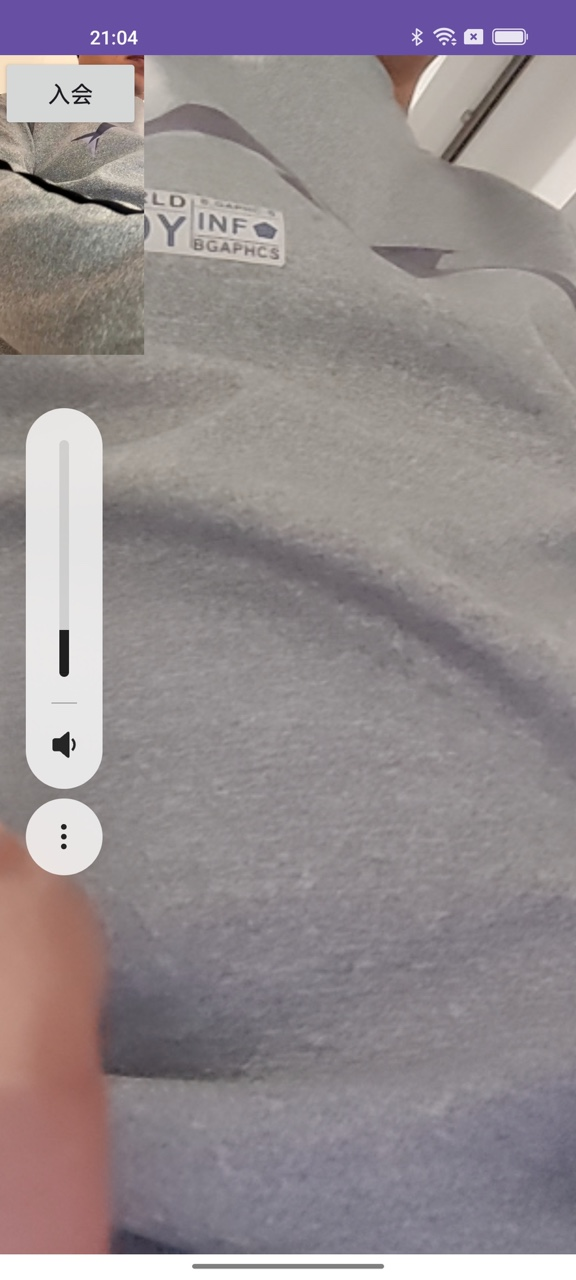
After you integrate the preceding code, the following result is returned. You can make adjustments as needed.
Android
iOS
Windows
Other APIs
For more information about API calls, see ApsaraVideo Real-time Communication ARTC SDK.