Per the Measures for the Administration of Internet Information Services and the Administrative Measures for the Filing of Non-commercial Internet Information Services, China requires ICP filing for non-commercial and ICP licensing for commercial Internet Information Services. You cannot serve Internet Information Services without a license or ICP filing. The Alibaba Cloud Filing Service lets you apply for, modify, cancel, and claim ICP filings.
ICP filing applies only to servers located in the Chinese mainland. Alibaba Cloud International site does not support ICP filing . To apply for an ICP filing, use an Alibaba Cloud China site account or see GoChina ICP Filing Assistant.
Impact of not having an ICP filing
Websites, apps, and other services with domain names resolving to servers in the Chinese mainland must obtain an ICP filing before providing services.
-
If you resolve a domain name to an Alibaba Cloud server in the Chinese mainland without an ICP filing from Alibaba Cloud, the Alibaba Cloud monitoring system blocks access to the domain name and prompts you to complete the filing process.
-
If you already have an ICP filing from another provider and want to resolve your domain name to an Alibaba Cloud server in the Chinese mainland, you must add Alibaba Cloud as a service provider. Otherwise, the Alibaba Cloud monitoring system blocks access to the domain name. You are then prompted to add Alibaba Cloud to your ICP filing information.
Alibaba Cloud Filing Service
When you build a website, you must submit server, website, and entity information for regulatory review, as shown in the following figure. ICP filing is the process of submitting this information for regulatory review. This ensures your website services are legitimate and secure. 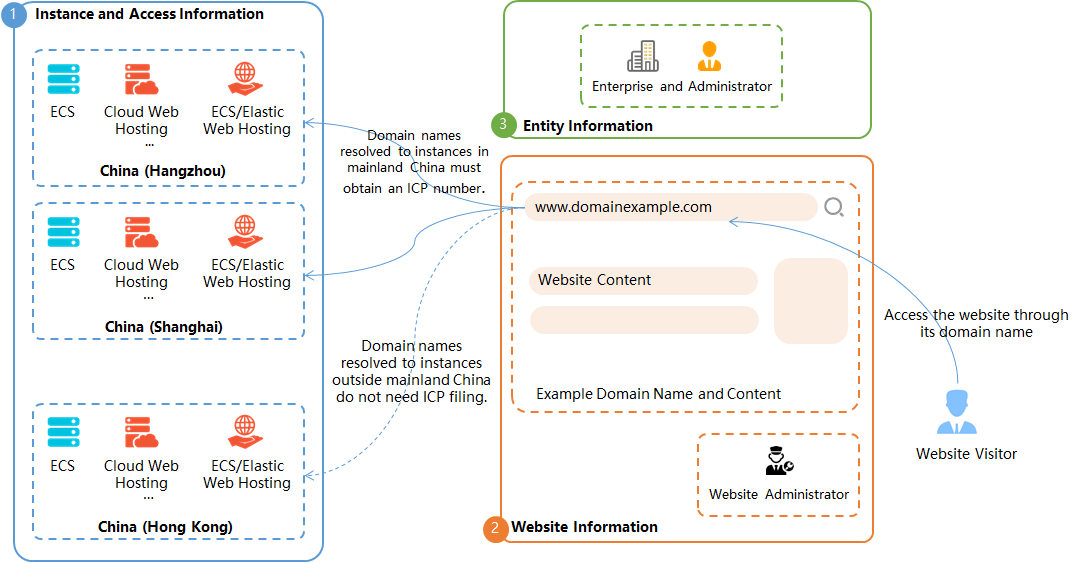 The Alibaba Cloud Filing Service is available on PCs and mobile devices and lets you apply for, modify, cancel, and claim ICP filings.
-
Apply for an ICP filing
Purchase an Alibaba Cloud server in the Chinese mainland, then log on to the Alibaba Cloud ICP Filing system on a PC or download the Alibaba Cloud app to submit your application. The ICP filing documentation on the Alibaba Cloud China Website (www.aliyun.com) covers filing process and types.
-
Modify or cancel ICP filing information
-
Modify ICP filing information
After obtaining an ICP filing, you can modify entity, website, or app information (such as the administrator or domain name) through the Alibaba Cloud Filing Service on a PC or mobile device.
-
Unregistering an ICP filing
To remove Alibaba Cloud as the service provider or cancel an ICP filing, log on to the Alibaba Cloud ICP Filing system on a PC or download the Alibaba Cloud app. The process is similar on both PCs and mobile devices.
-
Remove Alibaba Cloud from the service provider list: Removes the association between your ICP filing and Alibaba Cloud. Add your filing to a new service provider first, then remove Alibaba Cloud.
WarningAfter removing Alibaba Cloud from the service provider list, add a new service provider promptly. Otherwise, your website or app may be classified as an empty shell.
-
Cancel an ICP filing: If you no longer use a website or app filed through Alibaba Cloud, cancel the ICP filing for the entity, website, or app.
-
-
Notes on ICP filing
Note the following when you use the Alibaba Cloud Filing Service.
-
Conditions
You must meet certain conditions to apply for an ICP filing through the Alibaba Cloud Filing Service. For example, the service supports ICP filings only for domain names, not IP addresses.
-
Domain name and server checks
Verify that your domain name and server meet filing requirements before applying.
-
Communications administration rules
Regional communications administrations set ICP filing rules for information submission, materials, modifying filing information, and service provider changes. Read the rules for your region and prepare the required materials. the ICP filing documentation on the Alibaba Cloud China Website (www.aliyun.com).
-
International account restrictions
Alibaba Cloud International site does not support ICP filing or app filing applications. To submit a filing, register an Alibaba Cloud China site account. The ICP filing application system is available only in Chinese. You must be able to read and write Chinese to complete the filing process.