Generated columns are special columns calculated from other columns. They are divided into stored generated columns and virtual generated columns. Starting from Hologres V3.1, stored generated columns are supported, which are automatically calculated when data is written or updated and occupy storage space. Virtual generated columns are not supported yet. This topic describes how to use stored generated columns in Hologres.
Scenarios
Automatic calculation of required fields: Eliminates the need for manual processing of calculation logic.
Data consistency: Prevents inconsistencies caused by human errors or code logic issues.
Query performance optimization: For high-frequency query scenarios, reading stored generated columns is equivalent to reading regular columns.
Business logic simplification: Reduces SQL complexity for fixed common data transformation operations.
Proper use of generated columns based on your business needs can significantly improve development efficiency and ensure data reliability.
Syntax
Use the GENERATED ALWAYS AS clause to declare a generated column, and use the STORED keyword to specify a stored generated column.
Create a table that contains a generated column.
CREATE TABLE generated_col_t (
    [...,]
    col1 INT,
    col2 INT GENERATED ALWAYS AS (col1 + 1) STORED
);
Create a logical partitioned table that contains a generated column, and use the generated column as the partition key.
CREATE TABLE generated_col_logical_part (
    a TEXT,
    b INT,
    ts TIMESTAMP NOT NULL,
    d TIMESTAMP GENERATED ALWAYS AS (date_trunc('day', ts)) STORED NOT NULL
)
LOGICAL PARTITION BY LIST(d);
Precautions
When you use the CREATE TABLE statement
When you define a generated column, only IMMUTABLE functions or expressions are supported. Non-IMMUTABLE functions such as CURRENT_DATE and RANDOM are not supported.
When you define a generated column, the expression cannot reference other generated columns. You also cannot define the
defaultkeyword for the generated column.When you create a partitioned table, you can set the partition key of a logical partitioned table as a generated column, but you cannot set the partition key of a physical partitioned table as a generated column. Regular columns in partitioned tables can be set as generated columns.
When you create a foreign table using CREATE FOREIGN TABLE, generated columns are not supported.
Generated columns can be set as various Hologres indexes, including primary keys, distribution keys, segment keys, clustered indexes, bitmap indexes, and dictionary-encoded columns.
Altering a table
You cannot use the `ADD` operation on generated columns.
You can drop a generated column. However, before a generated column is dropped, dropping its referenced columns is not supported.
You cannot modify the data type of a generated column or the data types of its referenced columns. You are recommended to use the REBUILD feature to achieve this purpose. For more information, see REBUILD (Beta).
You can rename a generated column.
When performing DML or DQL operations
When you write or update data in a table that contains generated columns, you can omit the generated columns or use the
defaultkeyword for them. You cannot write values directly to generated columns.When you update data, if a generated column or its referenced column is a distribution key, updating that column is not supported.
When you update data using a fixed plan, if the primary key is a generated column, updating the referenced columns of the generated column is not supported.
When you perform partial column updates using a fixed plan, if a generated column references multiple regular columns, updating only some of these columns is not supported.
Other operations on tables with generated columns are all supported, including read and write operations executed through the HQE engine, read and write operations executed through fixed plans, and operations such as Copy.
Other operations
When you use CREATE TABLE LIKE, the source table can contain generated columns. To preserve the properties of the generated columns, you must enable the
hg_experimental_enable_create_table_like_propertiesparameter.When you use CREATE TABLE AS, original tables with generated columns are not supported.
To modify parameters of a table with generated columns, you can use the REBUILD syntax (including migrating the table's table group). For more information, see REBUILD (Beta). Using the HG_MOVE_TABLE_TO_TABLE_GROUP syntax to migrate a table's table group is not supported.
To perform INSERT OVERWRITE operations on tables that contain generated columns, you must use the native INSERT OVERWRITE syntax, which is supported in Hologres V3.1 and later. The original
hg_insert_overwritesyntax is not supported. For more information, see INSERT OVERWRITE.
Examples
Create a table with a generated column.
CREATE TABLE generated_col_t (
    id INT PRIMARY KEY,
    col1 INT,
    col2 INT GENERATED ALWAYS AS (col1 + 1) STORED
);
Import data.
You can import data to all non-generated columns. Example:
INSERT INTO generated_col_t VALUES (1, 1);
INSERT INTO generated_col_t(id, col1) VALUES (2, 2);
The query
SELECT * FROM generated_col_t;returns the following result.id col1 col2 1 1 2 2 2 3You can use the
defaultkeyword for generated columns when you import data. For example:INSERT INTO generated_col_t VALUES (3, 3, default); INSERT INTO generated_col_t(id, col1, col2) VALUES (4, 4, default);The query
SELECT * FROM generated_col_t;returns the following result.id col1 col2 4 4 5 2 2 3 3 3 4 1 1 2Not supported: Directly import data to generated columns. Example:
INSERT INTO generated_col_t VALUES (5, 5, 6);
INSERT INTO generated_col_t(id, col1, col2) VALUES (6, 6, 7);
The following result is returned.

Update data.
You can update non-generated columns. Example:
UPDATE generated_col_t SET col1 = 2 WHERE id = 1;The query
SELECT * FROM generated_col_t;returns the following result.id col1 col2 2 2 3 3 3 4 4 4 5 1 2 3 -- This row has been changedYou can use the
defaultkeyword for generated columns when you update data. For example:UPDATE generated_col_t SET col1 = 3, col2 = default WHERE id = 2;The query
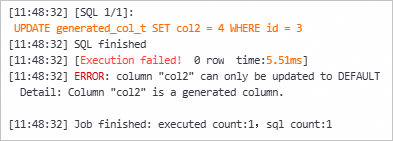
SELECT * FROM generated_col_t;returns the following result.id col1 col2 3 3 4 2 3 4 -- This row has been changed 4 4 5 1 2 3Not supported: Directly update generated columns. Example:
UPDATE generated_col_t SET col2 = 4 WHERE id = 3;The following result is returned.
You can use the following SQL query to check whether a function is IMMUTABLE for specific parameter types. For example, the TO_CHAR function is IMMUTABLE only when the input is of the TIMESTAMP WITH TIME ZONE data type. Therefore, when you use this function in a generated column, you must ensure that the parameter type matches.
SELECT n.nspname AS "Schema",
  p.proname AS "Name",
  pg_catalog.pg_get_function_result(p.oid) AS "Result data type",
  pg_catalog.pg_get_function_arguments(p.oid) AS "Argument data types",
 CASE p.prokind
  WHEN 'a' THEN 'agg'
  WHEN 'w' THEN 'window'
  WHEN 'p' THEN 'proc'
  ELSE 'func'
 END AS "Type",
 CASE
  WHEN p.provolatile = 'i' THEN 'immutable'
  WHEN p.provolatile = 's' THEN 'stable'
  WHEN p.provolatile = 'v' THEN 'volatile'
 END AS "Volatility",
 CASE
  WHEN p.proparallel = 'r' THEN 'restricted'
  WHEN p.proparallel = 's' THEN 'safe'
  WHEN p.proparallel = 'u' THEN 'unsafe'
 END AS "Parallel",
 pg_catalog.pg_get_userbyid(p.proowner) AS "Owner",
 CASE WHEN prosecdef THEN 'definer' ELSE 'invoker' END AS "Security",
 pg_catalog.array_to_string(p.proacl, E'\n') AS "Access privileges",
 l.lanname AS "Language",
 p.prosrc AS "Source code",
 pg_catalog.obj_description(p.oid, 'pg_proc') AS "Description"
FROM pg_catalog.pg_proc p
     LEFT JOIN pg_catalog.pg_namespace n ON n.oid = p.pronamespace
     LEFT JOIN pg_catalog.pg_language l ON l.oid = p.prolang
-- Target function
WHERE p.proname OPERATOR(pg_catalog.~) '^(TO_CHAR)$' COLLATE pg_catalog.default
  AND pg_catalog.pg_function_is_visible(p.oid)
ORDER BY 1, 2, 4;