has
Description: A has() filter step filters elements and returns the elements that meet the specified condition.
Note: We recommend that you use a
filter()step instead of a has() step.
g("thinkerpop").E("1;2;3;4;5;6").hasLabel("created").has("weight", P.inside(0.0, 0.6))
==> {"label":"created","pk":"1","sk":"3","weight":0.4}
==> {"label":"created","pk":"4","sk":"3","weight":0.4}
==> {"label":"created","pk":"6","sk":"3","weight":0.2}
// The preceding statement is equivalent to the following statement:
g("thinkerpop").E("1;2;3;4;5;6").hasLabel("created").filter("weight<=0.6 AND weight>=0.0")
hasKey
Description: A hasKey() filter step filters elements based on field names and returns the names and values of the fields that meet the specified condition.
Note: This step can take a
Pfunction as the filter condition.
// Obtain the addresses or names of persons.
g("thinkerpop").V("1;2;3;4;5;6").hasLabel("person").properties().hasKey(P.within("location","name"))
==> {"name":"marko"}
==> {"name":"josh"}
==> {"name":"vadas"}
==> {"name":"peter"}

// Obtain the names of persons.
g("thinkerpop").V("1;2;3;4;5;6").hasLabel("person").properties().hasKey("name")
==> {"name":"marko"}
==> {"name":"josh"}
==> {"name":"vadas"}
==> {"name":"peter"}
hasLabel
Description: A hasLabel() filter step filters elements based on labels and returns the elements that meet the specified condition.
Note: You must use a
hasLabel()step to specify the labels that you want to access in a graph for the first query step. The labels are optional for subsequent query steps. By default, if you do not specify labels for subsequent steps, all accessible labels are accessed.
g("thinkerpop").V("1;2;3;4;5;6").hasLabel("person").union(outE("knows"),outE("created")).hasLabel("knows")
==> {"label":"knows","pk":"1","sk":"4","weight":1.0}
==> {"label":"knows","pk":"1","sk":"2","weight":0.5}

g("thinkerpop").V("1").hasLabel("person")
==> {"label":"person","age":29,"name":"marko","pk":"1"}
hasValue
Description: A hasValue() filter step filters elements based on field values and returns the names and values of the fields that meet the specified condition.
Note: This step can take a
Pfunction as the filter condition.
// Find all age values that are greater than 30.
g("thinkerpop").V("1;2;3;4;5;6").hasLabel("person").properties("age").hasValue(P.gt(30))
==> {"age":32}
==> {"age":35}
identity
Description: An identity() map step returns input objects.
Note: This step is often used with branch steps.
g("thinkerpop").V("1").hasLabel("person").identity()
==> {"label":"person","age":29,"name":"marko","pk":"1"}

// Find a specific person and the friends of the person.
g("thinkerpop").V("1").hasLabel("person").union(identity(),outE("knows").inV())
==> {"label":"person","age":29,"name":"marko","pk":"1"}
==> {"label":"person","age":32,"name":"josh","pk":"4"}
==> {"label":"person","age":27,"name":"vadas","pk":"2"}
indexQuery
Description: An indexQuery() modulator step performs an inverted query.
Syntax: For more information, see link Inverted query.
Note:
If you use an
indexQuery()step to modulate aV()step, you can leave the input parameters of the V() step empty.This step is an extended step of iGraph.
g("thinkerpop").V().hasLabel("software_index").indexQuery("{\"match\":{\"lang\":\"java\"}}")
==> {"label":"software_index","lang":"java","name":"ripple","pk":"5"}
inV
Description: An inV() element step returns the vertices that are associated with an edge.
Note:
You can use this step to query all vertices associated with an edge in a graph.
// By default, vertices are queried based on the secondary key (skey) of the input edge.
g("thinkerpop").E("1").hasLabel("knows").inV()
==> {"label":"person","age":32,"name":"josh","pk":"4"}
==> {"label":"person","age":27,"name":"vadas","pk":"2"}

g("thinkerpop").V("1;2;3;4;5;6").hasLabel("person").outE().inV()
==> {"label":"software","lang":"java","name":"lop","pk":"3"}
==> {"label":"software","lang":"java","name":"lop","pk":"3"}
==> {"label":"software","lang":"java","name":"lop","pk":"3"}
==> {"label":"software","lang":"java","name":"ripple","pk":"5"}
==> {"label":"person","age":32,"name":"josh","pk":"4"}
==> {"label":"person","age":27,"name":"vadas","pk":"2"}
is
Description: An is() filter step filters elements based on a number or string. Elements that meet the filter condition are retained, whereas other elements are discarded.
Note:
This step can take a
Pfunction as the filter condition.
g("thinkerpop").V("1;2;3;4;5;6").hasLabel("person").values("name").is("marko")
==> "marko"

g("thinkerpop").V("1;2;3;4;5;6").hasLabel("person").where(values("name").is("marko"))
==> {"label":"person","age":29,"name":"marko","pk":"1"}

g("thinkerpop").V("1;2;3;4;5;6").hasLabel("person").where(outE("knows").count().is(2))
==> {"label":"person","age":29,"name":"marko","pk":"1"}

g("thinkerpop").V("1;2;3;4;5;6").hasLabel("person").where(values("age").is(P.inside(28,34)))
==> {"label":"person","age":29,"name":"marko","pk":"1"}
==> {"label":"person","age":32,"name":"josh","pk":"4"}
label
Description: A label() map step returns the graph labels of elements.
Note:
You can use this step to obtain the labels of elements in a graph.
g("thinkerpop").V("1").hasLabel("person").label()
==> "person"

g("thinkerpop").V("1").hasLabel("person").outE().label()
==> "created"
==> "knows"
==> "knows"
limit
Description: A limit() filter step returns a specific number of the first elements.
Syntax:
limit(NUM). TheNUMvalue is of the UNIT32 type. We recommend that you specify a NUM value that is less than 50,000.Note:
A
limit(NUM)step is equivalent to arange(0,NUM)step.A
tail()step returns a specific number of the last elements.An implicit
barrier()step is automatically inserted.
g("thinkerpop").V("1;2;3;4;5;6").hasLabel("person").limit(2)
==> {"label":"person","age":29,"name":"marko","pk":"1"}
==> {"label":"person","age":32,"name":"josh","pk":"4"}
local
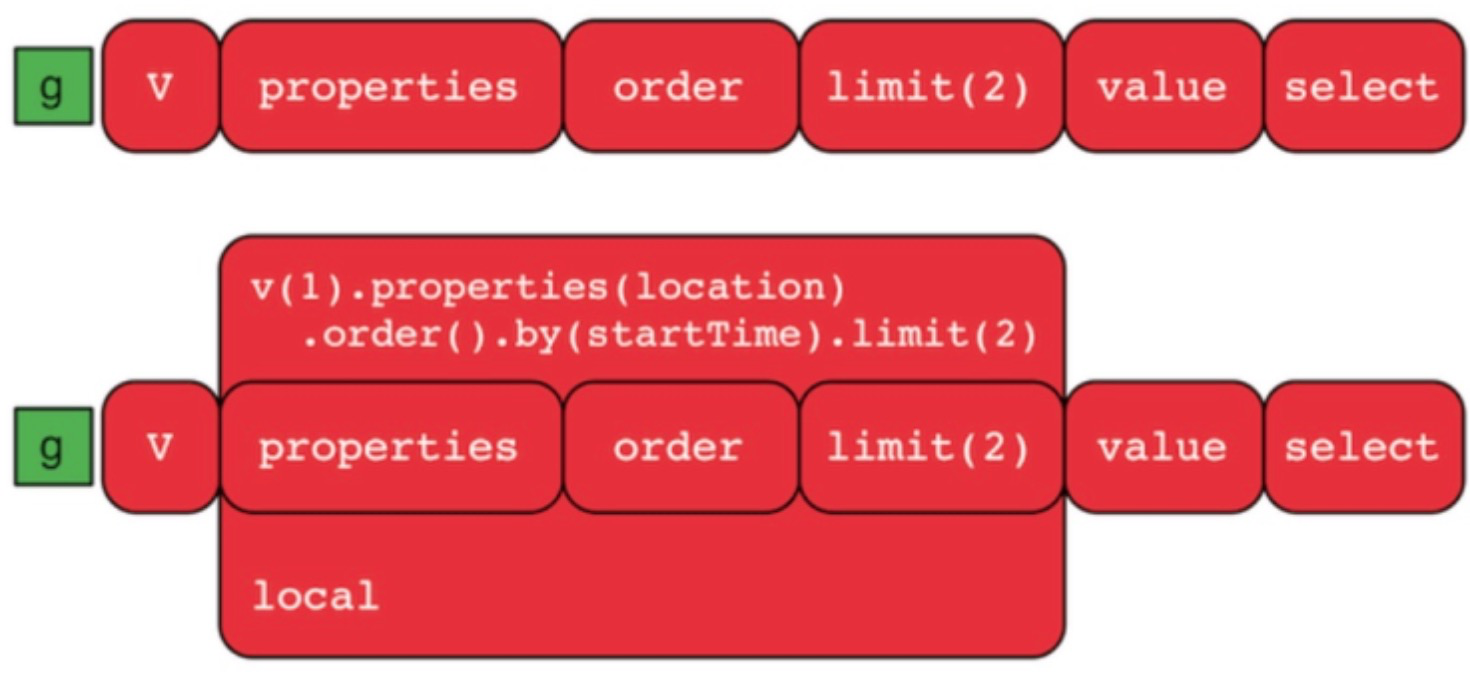
Description: A local() branch step runs a child traversal for each input object.
Note:
The performance of a local() step is poor because this step runs a child traversal for each object in a serial manner.
A local() step ensures the diversity of results. However, we recommend that you use a
distinct()step instead.
// If you do not use a local() step, only one result is returned for all objects.
g("thinkerpop").V("1;2;3;4;5;6").hasLabel("person").outE("created").limit(1)
==> {"label":"created","pk":"1","sk":"3","weight":0.4}

// If you use a local() step, one result is returned for each object to ensure the diversity of results.
g("thinkerpop").V("1;2;3;4;5;6").hasLabel("person").local(outE("created").limit(1))
==> {"label":"created","pk":"1","sk":"3","weight":0.4}
==> {"label":"created","pk":"4","sk":"3","weight":0.4}
==> {"label":"created","pk":"6","sk":"3","weight":0.2}
// The preceding statement is equivalent to the following statement:
g("thinkerpop").V("1;2;3;4;5;6").hasLabel("person").outE("created").distinct().by("pk")
loops
Description: A loops() map step returns the number of times that the current loop has been gone through.
// Repeat the out() step until marko is found or the step is repeated twice.
g("thinkerpop").V("1;2;3;4;5;6").hasLabel("person").emit(or(__.has("name","marko"),loops().is(P.eq(2)))).repeat(__.out()).values("name")
==> "marko"
==> "lop"
==> "ripple"
math
Description: A math() map step performs scientific calculation.
Operators or functions:
An asterisk (*) indicates that the function is an extended function of iGraph.
Operator or function
Description
Example
+, -, *, /, %, and ^
The addition, subtraction, multiplication, division, modulo, and exponentiation operators.
math("_+_") and math("_^2")
abs
Returns the absolute value of a number.
math("abs(_)")
cos, sin, tan, (*)cot, (*)sec, (*)csc, acos, asin, or atan
The trigonometric functions.
math("cos(_)")
(*)atan2
Returns the arc tangents of the values that are calculated based on the y/x formula. The arc tangents are returned in radians.
math("atan2(x,y)")
consh, sinh, tanh,
(*)acosh, (*)asinh, and (*)atanh
The hyperbolic functions.
math("cosh(_)")
(*)sinc
The Sinc function. sinc(x) = sin(x)/x.
math("sinc(_)")
(*)deg2grad, (*)grad2deg, (*)rad2deg, and (*)deg2rad
The functions that convert angles between degrees and radians or gradians.
math("cos(deg2rad(_))")
log, log10, log2, and (*)log1p
The logarithmic functions.
math("log2(_)")
(*)logn
A logarithmic function.
math("logn(_,2)")
exp and (*)expm1
The exponential functions.
math("exp(_)")
(*)pow
An exponential function.
math("pow(_,2)")
ceil
Returns the smallest integer greater than or equal to a number.
math("ceil(_)")
floor
Returns the largest integer less than or equal to a number.
math("floor(_)")
(*)round
Returns the nearest integer to which a number is rounded.
math("round(_)")
(*)roundn
Returns a floating-point number rounded to the specified number of decimals.
math("roundn(_,2)")
sqrt
Returns the square root of a number.
math("sqrt(_)")
cbrt
Returns the cube root of a number.
math("cbrt(_)")
(*)root
Returns the nth root of a number, in which n is a positive integer.
math("root(x,5)")
signum and (*)sgn
The sign functions.
math("signum(_)")
(*)avg, (*)max, and (*)min
The functions that return the average value, the maximum value, and the minimum value.
math("a,b,c,d")
(*)sum and (*)mul
The functions that return the sum and product of all given values.
math("mul(a,b,c)")
(*)clamp and (*)iclamp
The functions that return the value clamped to the inclusive range of a minimum value and a maximum value.
math("clamp(-1,a,1)")
(*)inrange
Checks whether a specific value exists within the interval.
math("inrange(-1,_,1)")
(*)<, (*)<=, (*)=, (*)==, (*)!=, (*)<>, (*)>, (*)>=, (*)equal, and (*)not_equal
The logical operators.
math("equal(_,2)") and
math("_==2")
(*)erf and (*)erfc
The error functions.
math("erf(_)")
(*)frac
Returns the fractional part of a real number.
math("frac(_)")
(*)trunc
Returns the integer part of a real number.
math("trunc(_)")
(*)hypot
Returns the length of the hypotenuse of a right-angled triangle.
math("hypot(a,b)")
(*)ncdf
The normal cumulative distribution function.
math("ncdf(_)")
(*)and, (*)nand, (*)or, (*)nor, (*)not, (*)xor, (*)xnor, (*)&,
and (*)|
The logical operators.
math("a and b or c") and
math("a & b | c")
(*)mand and (*)mor
The batch AND function and batch OR function.
math("mand("a>1,b<2,c=3")")
(*)true and (*)false
The functions that return a value of 0 or 1.
math("true & _=2")
Note:
"_" indicates the input itself.
Operands:
_and the keys of sideEffects.If the objects involved in a math() step are of a multi-value type, the objects are processed as vectors. The following functions or operators do not support multi-value objects: mand, mor, &, |, atan2, long, clamp, iclamp, root, hypot, inrange, and roundn.
The following functions aggregate the vectors in a math() step: avg, min, max, sum, and mul.
// Return the square of the age of Person 1.
g("thinkerpop").V("1").hasLabel("person").values("age").math("_ * _")
==> 841

// Return the sum of the ages of Person 1 and each friend of Person 1.
g("thinkerpop").V("1").hasLabel("person").values("age").aggregate("x").cap("x").E("1").hasLabel("knows").inV().values("age").as("y").local(select("x").unfold().math("_ + y"))
==> 61
==> 56
max
Description: A max() map step returns the maximum value of input objects.
Note:
The input objects must be of a numeric type. The
booltype is not supported.The input of a
max(Scope.local)step can be an iterator. The objects in the scope must be of a numeric type. Thebooltype is not supported.An implicit
barrier()step is automatically inserted.
g("thinkerpop").V("1;2;3;4;5;6").hasLabel("person").values("age").max()
==> 35

g("thinkerpop").V("1;2;3;4;5;6").hasLabel("person").values("age").fold().max(Scope.local)
==> 35

g("thinkerpop").V("1;2;3;4;5;6").hasLabel("person").aggregate("x").by("age").cap("x").max(Scope.local)
==> 35
mean
Description: A mean() map step returns the average value of input objects.
Note:
The input objects must be of a numeric type. The
booltype is not supported.An implicit
barrier()step is automatically inserted.
g("thinkerpop").V("1;2;3;4;5;6").hasLabel("person").values("age").mean()
==> 30.75
min
Description: A min() map step returns the minimum value of input objects.
Note:
The input objects must be of a numeric type. The
booltype is not supported.The input of a
min(Scope.local)step can be an iterator. The objects in the scope must be of a numeric type. Thebooltype is not supported.An implicit
barrier()step is automatically inserted.
g("thinkerpop").V("1;2;3;4;5;6").hasLabel("person").values("age").min()
==> 27

g("thinkerpop").V("1;2;3;4;5;6").hasLabel("person").values("age").fold().min(Scope.local)
==> 27

g("thinkerpop").V("1;2;3;4;5;6").hasLabel("person").aggregate("x").by("age").cap("x").min(Scope.local)
==> 27
not
Description: A not() filter step returns the input objects for which a child traversal returns no results.
// Return the persons who have no friends.
g("thinkerpop").V("1;2;4;6").hasLabel("person").not(outE("knows"))
==> {"label":"person","age":32,"name":"josh","pk":"4"}
==> {"label":"person","age":27,"name":"vadas","pk":"2"}
==> {"label":"person","age":35,"name":"peter","pk":"6"}

// Return the persons whose age is not 27.
g("thinkerpop").V("1;2;4;6").hasLabel("person").not(values("age").is(27))
==> {"label":"person","age":29,"name":"marko","pk":"1"}
==> {"label":"person","age":32,"name":"josh","pk":"4"}
==> {"label":"person","age":35,"name":"peter","pk":"6"}