Function Compute calls lifecycle hooks when specific events occur during a function instance's life. In a PHP runtime, two hooks are available: Initializer runs once when an instance starts, and PreStop runs once before the instance is destroyed. Use hooks to run initialization logic (such as opening a database connection) before the first request is handled, and cleanup logic (such as closing a connection) before the instance shuts down.
Lifecycle hook invocations are billed at the same rate as regular function invocations. Execution logs appear in Function Logs, Real-time Logs, and Advanced Logs, but not in the invocation request list.
How lifecycle hooks work
A function instance goes through three phases:
Start — Function Compute starts the instance and calls the Initializer hook (if configured). The handler does not run until the Initializer hook completes successfully.
Invoke — Function Compute calls the handler for each incoming request. The instance may handle multiple requests before being destroyed.
Destroy — Function Compute calls the PreStop hook (if configured), then destroys the instance.
Both hooks fire once per instance, not once per request. The Initializer hook does not run again on warm starts.
Initializer hook
The Initializer hook runs after an instance starts and before the handler is called. Function Compute guarantees it runs exactly once per instance. If the hook fails, Function Compute retries it until it succeeds before invoking the handler. Design the hook to be idempotent so that retries are safe.
Method signature
The Initializer hook takes a single $context parameter with the same structure as the handler's context. It returns no value.
The initializer and initializationTimeout fields in $context reflect the Initializer Hook and Initializer Hook Timeout Period settings configured for the function. If those settings are not configured, these fields are empty and the hook has no effect.
Example
<?php
function my_initializer($context) {
    $logger = $GLOBALS['fcLogger'];
    $logger->info("hello world");
}
?>
The method name (my_initializer) must match the value set for Initializer Hook in the Function Compute console. For example, if you set Initializer Hook to main.my_initializer, Function Compute loads the my_initializer method from main.php.
PreStop hook
The PreStop hook runs before a function instance is destroyed. Use it for cleanup tasks such as closing database connections or flushing write buffers. It runs once per instance, not after each request.
The method signature is identical to the Initializer hook: a single $context parameter and no return value.
Example
<?php

$counter = 0;

function preStop($context) {
    $GLOBALS['fcLogger']->info("preStop ok");
}

function handler($event, $context) {
    global $counter;
    $counter += 2;
    return $counter;
}
?>
To query logs for a specific function version in the Logstore configured for the function:
<funcName> AND <ServiceName> AND qualifier: <VERSION>Configure lifecycle hooks
Use the Function Compute console
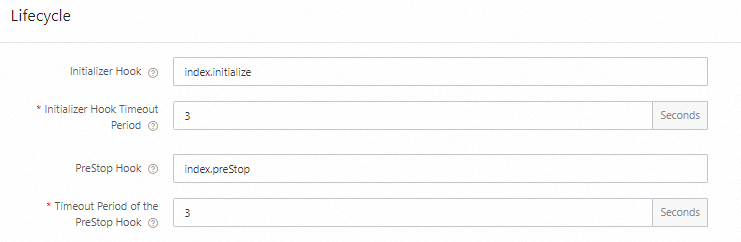
On the function's FC tab in the Function Compute console, set the Initializer Hook and PreStop Hook parameters. For details, see Configure the instance lifecycles.
The hook value format is [file name].[method name]:
index.initialize— loads theinitializemethod fromindex.phpindex.preStop— loads thepreStopmethod fromindex.php
Use Serverless Devs
Add the instanceLifecycleConfig block to the s.yaml file under the function's props:
edition: 3.0.0
name: fcDeployApp
access: "default"

vars: # The global variables
  region: "cn-hangzhou"

resources:
  hello_world:
    component: fc3 # The name of the component
    props:
      region: ${vars.region}              # For information about how to use variables, visit https://docs.serverless-devs.com/serverless-devs/yaml#%E5%8F%98%E9%87%8F%E8%B5%8B%E5%80%BC.
      functionName: "testphp"
      description: 'this is a test'
      runtime: "php7.2"
      code: ./
      handler: index.handler
      memorySize: 128
      timeout: 30
      instanceLifecycleConfig:      # The extension function
        initializer:                # The Initializer hook
          handler: index.my_initializer
          timeout: 60
        preStop:                    # The PreStop hook
          handler: index.preStop    # The handler
          timeout: 60               # The timeout period
For the full s.yaml syntax reference, see Common commands of Serverless Devs.
View lifecycle hook logs
Log on to the Function Compute console. In the left-side navigation pane, click Functions.
In the top navigation bar, select a region. On the Functions page, click the target function.
On the function details page, click the Test Function tab, click Test Function, and then choose Logs > Function Logs.
The Logs tab shows both invocation logs and Initializer logs. Each log block includes a platform-injected start/end marker (such as FC Initialize Start) and any output the hook writes via $logger:
2024-03-04 17:57:28 FC Initialize Start RequestId: 1-65e59b07-1520da26-bf73bbb91b69
2024-03-04 17:57:28 2024-03-04 09:57:28.192 1-65e59b07-1520da26-bf73bbb91b69 [info] initializer
2024-03-04 17:57:28 FC Initialize End RequestId: 1-65e59b07-1520da26-bf73bbb91b69
2024-03-04 17:57:28 FC Invoke Start RequestId: 1-65e59b07-1520da26-bf73bbb91b69
2024-03-04 17:57:28 FC Invoke End RequestId: 1-65e59b07-1520da26-bf73bbb91b69
Function instances are cached for a period after handling requests, so PreStop logs do not appear immediately. To trigger a PreStop hook right away, update the function's configuration or code. PreStop logs follow the same format:
2024-03-04 18:33:26 FC PreStop Start RequestId: 93c93603-9fbe-4576-9458-193c8b213031
2024-03-04 18:33:26 2024-03-04 10:33:26.077 93c93603-9fbe-4576-9458-193c8b213031 [info] preStop
2024-03-04 18:33:26 FC PreStop End RequestId: 93c93603-9fbe-4576-9458-193c8b213031
Example: MySQL connection management
A common pattern is to open a database connection in the Initializer hook and close it in the PreStop hook. This lets a single connection serve all invocations on the same instance without reconnecting on every request.
The Initializer hook reads MySQL configuration from environment variables, creates the connection, and verifies connectivity. The PreStop hook closes the connection before the instance is destroyed.
For a complete working example, see php72-mysql.
What's next
Function instance lifecycles — understand the full instance lifecycle model
Query logs related to hooks — advanced log queries for lifecycle events