Go is a statically compiled language. Function Compute does not support editing Go code directly in the console, so you must compile your application locally, package the binary into a .zip file, and then upload it.
Prerequisites
Before you begin, ensure that you have:
The Go development environment installed (Go 1.8 or later). Function Compute supports Go 1.x.
How it works
Write your Go function using the Function Compute SDK for Go.
Compile the source file locally into a Linux-compatible binary.
Package the binary into a .zip file.
Create an event-triggered function in the Function Compute console, upload the .zip file, and set Handler to the name of the compiled binary.
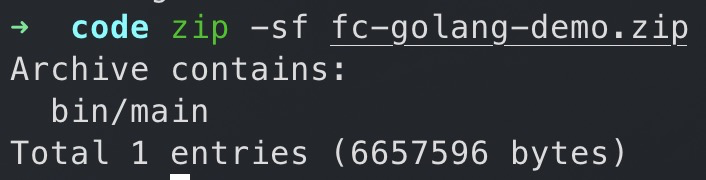
The Handler field must match the compiled binary name exactly. If the binary is namedmainand is in the root of the .zip file, set Handler tomain. If it is in a subdirectory such asbin/, set Handler tobin/main. Function Compute executes this binary directly when the function is invoked.
Compile and package on Linux or macOS
Download the Function Compute SDK for Go.
go get github.com/aliyun/fc-runtime-go-sdk/fcCreate a source file (for example,
main.go), then build the binary. Use the command that matches your machine: Linux (x86-64) — build a statically linked binary to avoid external dependencies such aslibc:GOOS=linux CGO_ENABLED=0 go build main.gomacOS with Apple silicon (M1) — cross-compile for the x86-64 architecture used by Function Compute:
GOOS=linux GOARCH=amd64 go build main.gomacOS with Intel — set
GOOS=linuxto produce a Linux-compatible binary:GOOS=linux go build main.goAfter the build, a binary with the same name as your source file is created in the current directory.
Package the binary into a .zip file.
zip fc-golang-demo.zip main
Compile and package on Windows
Create a source file such as
main.go, then open Command Prompt: press Win+R, typecmd, and press Enter.Build the binary.
set GOOS=linux
set GOARCH=amd64
go build -o main main.go
After the build, a binary named
mainis created in the current directory.Use the build-fc-zip tool to package the binary. On Windows, use this tool instead of the native
zipcommand to preserve file permissions.Install
build-fc-zip.set GOOS=windows set GOARCH=amd64 go install github.com/aliyun/fc-runtime-go-sdk/cmd/build-fc-zip@latestThe tool is installed to
%USERPROFILE%\go\binby default.Package the binary.
%USERPROFILE%\go\bin\build-fc-zip.exe -output main.zip main
Create a function and configure the handler
Create an event-triggered function. For Runtime, select Go 1.
Upload your code package and configure the handler. For details, see Create an event function. In the Handler configuration on the Function Compute console, the Handler for a Go FC function must be set directly to
[filename]. This filename is the name of the compiled binary file.If the binary is in the root of the .zip package, set Handler to
main.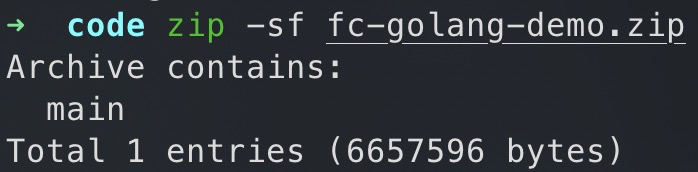
If the binary is in a subdirectory such as
bin/, set Handler tobin/main.