To deploy a Java function to Function Compute, package your code and its dependencies into a ZIP or JAR file, then upload the package through the Function Compute console or Serverless Devs.
This topic covers two deployment paths:
Deploy with Maven — compile and upload manually via the console
Deploy with Serverless Devs — compile and deploy in a single CLI command
Dependency libraries
Function Compute provides two Java libraries:
| Library | Artifact ID | Version | Description |
|---|---|---|---|
com.aliyun:fc-java-core | fc-java-core | 1.4.1 | Defines the handler interface and context object |
com.aliyun:fc-java-events | fc-java-event | 1.2.0 | Provides event types for common event sources |
Get both libraries from the Maven central repository, then add them to your pom.xml:
<!-- fc-java-core: required -->
<dependency>
    <groupId>com.aliyun.fc.runtime</groupId>
    <artifactId>fc-java-core</artifactId>
    <version>1.4.1</version>
</dependency>

<!-- fc-java-events: optional, add if your function handles events from Alibaba Cloud services -->
<dependency>
    <groupId>com.aliyun.fc.runtime</groupId>
    <artifactId>fc-java-event</artifactId>
    <version>1.2.0</version>
</dependency>
If your dependency package is too large, package the dependencies into a layer to keep the code package small. For details, see Create a custom layer.
Deploy with Maven
Prerequisites
Before you begin, ensure that you have:
Java installed (Java official website)
Maven installed (Installing Apache Maven)
Steps
Create a Java project. Place your handler at
src/main/java/example/App.java:package example; import com.aliyun.fc.runtime.Context; import com.aliyun.fc.runtime.StreamRequestHandler; import java.io.IOException; import java.io.InputStream; import java.io.OutputStream; public class App implements StreamRequestHandler { @Override public void handleRequest(InputStream inputStream, OutputStream outputStream, Context context) throws IOException { outputStream.write(new String("hello world").getBytes()); } }In
pom.xml, add themaven-shade-pluginto the<build>section. This plugin bundles your dependencies into a single JAR file suitable for deployment.You can also use Apache Maven Assembly instead of Apache Maven Shade.
<build>
    <plugins>
        <plugin>
            <groupId>org.apache.maven.plugins</groupId>
            <artifactId>maven-shade-plugin</artifactId>
            <version>3.2.1</version>
            <executions>
                <execution>
                    <phase>package</phase>
                    <goals>
                        <goal>shade</goal>
                    </goals>
                    <configuration>
                        <filters>
                            <filter>
                                <artifact>*:*</artifact>
                                <excludes>
                                    <exclude>META-INF/*.SF</exclude>
                                    <exclude>META-INF/*.DSA</exclude>
                                    <exclude>META-INF/*.RSA</exclude>
                                </excludes>
                            </filter>
                        </filters>
                    </configuration>
                </execution>
            </executions>
        </plugin>
    </plugins>
</build>
<details> <summary>Complete example pom.xml</summary>
<project xmlns="http://maven.apache.org/POM/4.0.0"
  xmlns:xsi="http://www.w3.org/2001/XMLSchema-instance" xsi:schemaLocation="http://maven.apache.org/POM/4.0.0 http://maven.apache.org/maven-v4_0_0.xsd">
  <modelVersion>4.0.0</modelVersion>
  <groupId>example</groupId>
  <artifactId>HelloFCJava</artifactId>
  <packaging>jar</packaging>
  <version>1.0-SNAPSHOT</version>
  <name>HelloFCJava</name>

  <dependencies>
    <dependency>
      <groupId>junit</groupId>
      <artifactId>junit</artifactId>
      <version>3.8.1</version>
      <scope>test</scope>
    </dependency>
    <dependency>
      <groupId>com.aliyun.fc.runtime</groupId>
      <artifactId>fc-java-core</artifactId>
      <version>1.4.1</version>
    </dependency>
  </dependencies>

  <build>
    <plugins>
        <plugin>
          <groupId>org.apache.maven.plugins</groupId>
          <artifactId>maven-shade-plugin</artifactId>
          <version>3.2.1</version>
          <executions>
            <execution>
              <phase>package</phase>
              <goals>
                <goal>shade</goal>
              </goals>
              <configuration>
                <filters>
                  <filter>
                    <artifact>*:*</artifact>
                    <excludes>
                      <exclude>META-INF/*.SF</exclude>
                      <exclude>META-INF/*.DSA</exclude>
                      <exclude>META-INF/*.RSA</exclude>
                    </excludes>
                  </filter>
                </filters>
              </configuration>
            </execution>
          </executions>
        </plugin>
    </plugins>
  </build>

  <properties>
    <maven.compiler.target>1.8</maven.compiler.target>
    <maven.compiler.source>1.8</maven.compiler.source>
    <maven.test.skip>true</maven.test.skip>
  </properties>
</project>
</details>
From the project root directory, run:
ImportantOn macOS and Linux, make sure the code file is readable and executable before compressing it.
mvn clean packageA successful build ends with:
[INFO] BUILD SUCCESS
[INFO] ------------------------------------------------------------------------
[INFO] Total time:  11.681 s
[INFO] Finished at: 2020-03-26T15:55:05+08:00
[INFO] ------------------------------------------------------------------------
The output JAR is named after the
artifactIdandversionfields inpom.xml. For the example above, the file istarget/HelloFCJava-1.0-SNAPSHOT.jar. If the build fails, check the error message and fix the code before retrying.Log in to the Function Compute console and upload the JAR file.
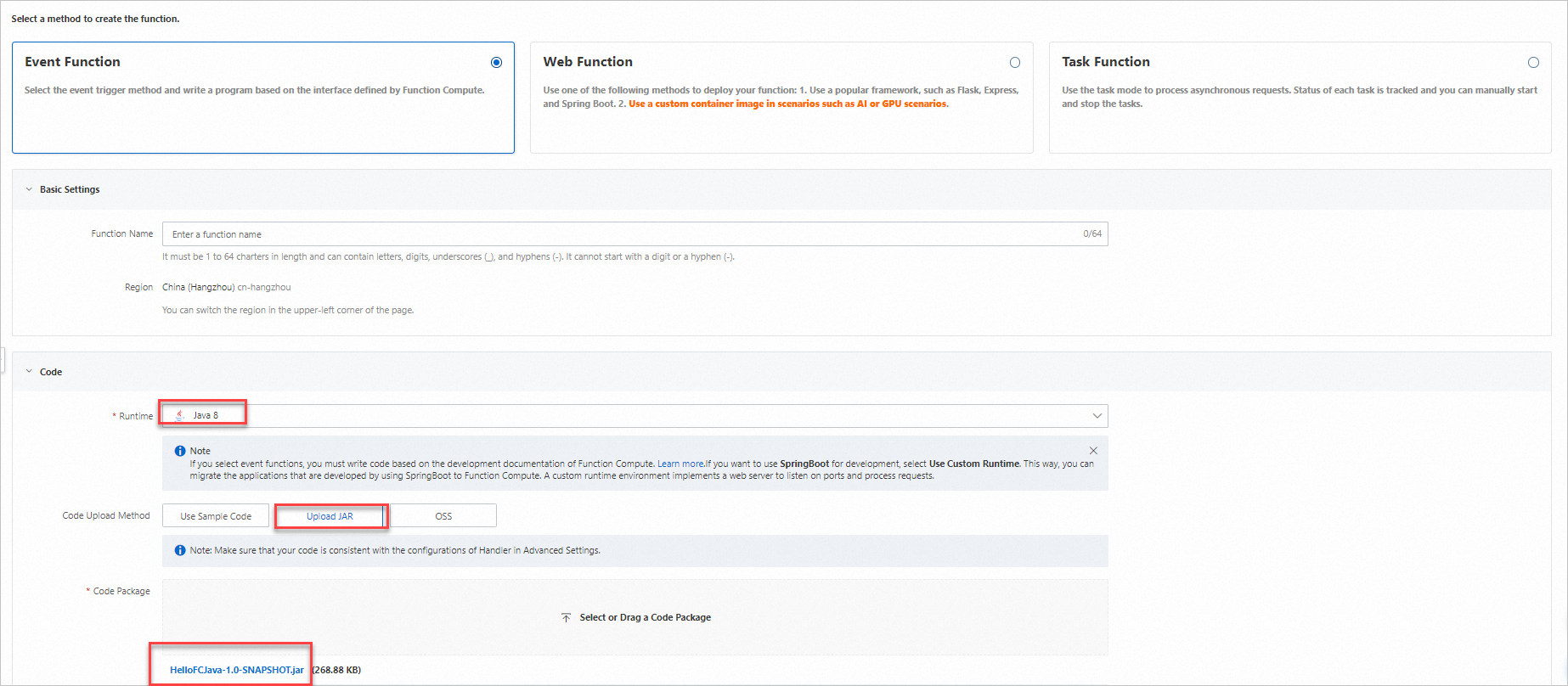
On the Function Details page, go to the Configurations tab and verify the Handler value. The handler must follow the format
[Package name].[Class name]::[Method name]. For the example above, the handler isexample.App::handleRequest. Click Modify to update it if needed.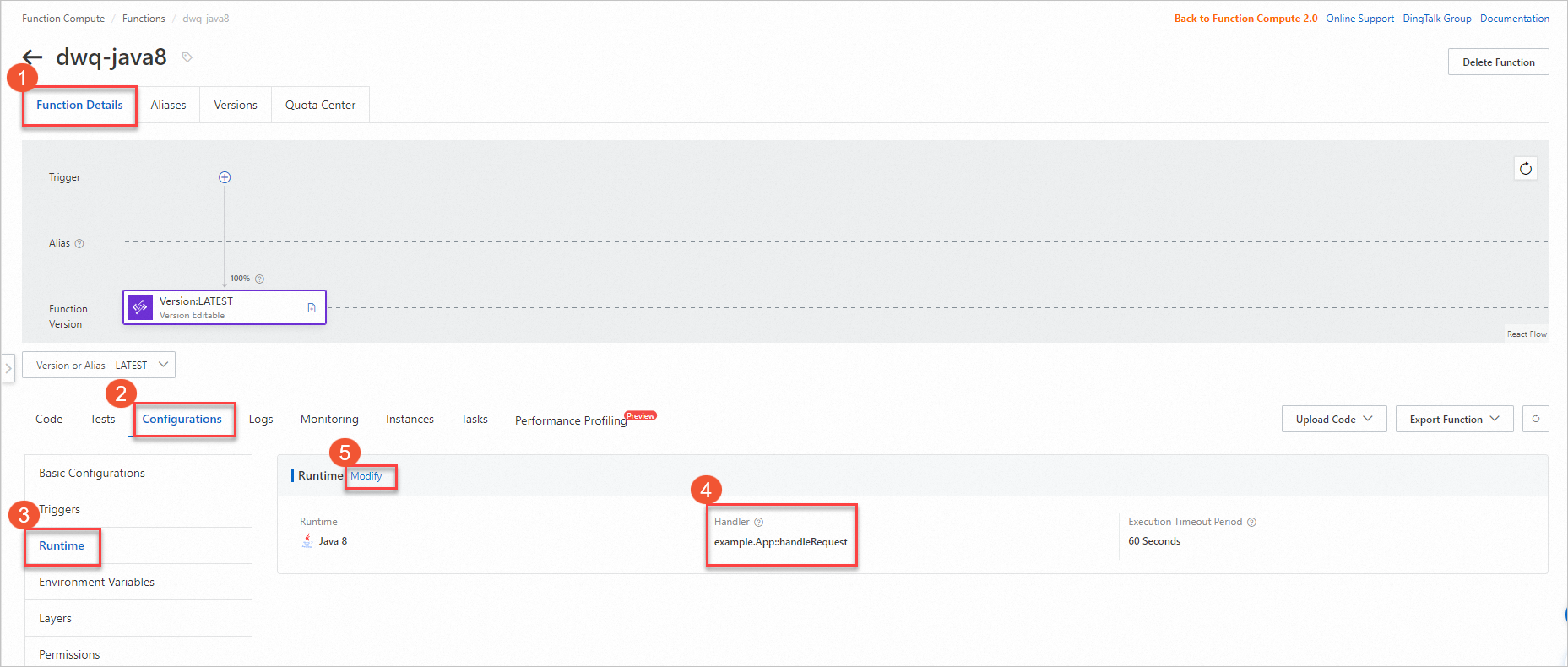
On the Code tab, click Test Function to verify the deployment.

Deploy with Serverless Devs
Serverless Devs handles compilation and deployment in a single command — s deploy runs mvn package automatically before uploading your code.
Prerequisites
Before you begin, ensure that you have:
Serverless Devs and its dependencies installed. See Install Serverless Devs and dependencies.
Serverless Devs configured. See Configure Serverless Devs.
Java Development Kit (JDK) installed. Download from Java Downloads.
Maven installed. Download from Apache Maven Downloads.
Steps
Initialize a project:
s initWhen prompted, select Alibaba Cloud as the vendor and choose a Java template, runtime, region, and function name.
Go to the project directory:
cd start-fc-event-java8The project structure looks like this:
start-fc-event-java8
├── src
│   └── main
│       └── java
│           └── example
│               └── App.java
├── pom.xml
├── readme
└── s.yaml
Deploy the project:
s deployServerless Devs runs
mvn packagefirst (thepre-deployhook), then uploads and deploys the JAR. A successful deployment ends with output similar to:[2022-04-07 12:00:09] [INFO] [S-CORE] - Start the pre-action [2022-04-07 12:00:09] [INFO] [S-CORE] - Action: mvn package [INFO] Scanning for projects... [INFO] ------------------------< example:HelloFCJava >------------------------- [INFO] Building HelloFCJava 1.0-SNAPSHOT [INFO] --------------------------------[ jar ]--------------------------------- ...... [INFO] BUILD SUCCESS [INFO] ------------------------------------------------------------------------ [INFO] Total time: 3.617 s [INFO] Finished at: 2022-04-07T20:00:14+08:00 [INFO] ------------------------------------------------------------------------ [2022-04-07 12:00:14] [INFO] [S-CORE] - End the pre-action Checking Service, Function (0.64s) Creating Service, Function (0.71s) Tips for next step ====================== * Display information of the deployed resource: s info * Display metrics: s metrics * Display logs: s logs * Invoke remote function: s invoke * Remove Service: s remove service * Remove Function: s remove function * Remove Trigger: s remove trigger * Remove CustomDomain: s remove domain helloworld: region: cn-hangzhou service: name: hello-world-service function: name: start-fc-event-java8 runtime: java8 handler: example.App::handleRequest memorySize: 128 timeout: 60Invoke the function to verify it runs correctly:
s invokeExpected output:
========= FC invoke Logs begin =========
FC Initialize Start RequestId: b246c3bf-06bc-49e5-92b8-xxxxxxxx
FC Initialize End RequestId: b246c3bf-06bc-49e5-92b8-xxxxxxxx
FC Invoke Start RequestId: b246c3bf-06bc-49e5-92b8-xxxxxxxx
FC Invoke End RequestId: b246c3bf-06bc-49e5-92b8-xxxxxxxx

Duration: 7.27 ms, Billed Duration: 8 ms, Memory Size: 128 MB, Max Memory Used: 65.75 MB
========= FC invoke Logs end =========

FC Invoke Result:
hello world