Function Compute automatically allocates one or more instances to process user requests. Each instance provides a secure and isolated runtime environment. When traditional applications are migrated to a serverless architecture, the transient nature of function instance creation and destruction may lead to issues such as delayed monitoring data updates, metric data latency, or data loss. To address these challenges, Function Compute provides various lifecycle hooks to ensure real-time and complete monitoring data.
Function instance lifecycle
Function instances are dynamically created and destroyed based on the current request volume. The lifecycle of each function instance includes three phases: Creating, Invoke, and Destroy, as shown in the following figure.

Creating
Instance creation refers to Function Compute creating function instances based on your function configuration. During the instance creation phase, Function Compute performs the following three tasks in sequence:
Instance Create: Function Compute loads code and layers, or pulls images, and then initializes an instance.
Runtime Init: Function Compute initializes the runtime.
Init Hook: Function Compute executes the configured Initializer hook. For more information, see Initializer hooks.
The following figure shows the Creating phase.

Instances are created in the following scenarios:
Elastic scale-out
Function Compute creates new instances to process received requests if the existing instances are fully loaded. The created instances enter the Invoke phase after they are created. Elastic scale-out may cause cold starts. For information about how to resolve this issue, see Best practices for optimizing cold starts in Function Compute.
Minimum instance adjustment
If you change the minimum number of instances for a function from 0 to 1 or more, Function Compute immediately starts the instance creation process for these instances. If no invocation requests are received, the Invoke phase will occur long after the Creating phase. For more information, see Configure startup snapshot elasticity policies.
Invoke
During instance runtime, your function handler is called to process function invocation requests from internal and external sources. In the Invoke phase, for built-in runtimes supported by Function Compute, an instance processes only one request at a time. For custom runtimes or custom container runtimes, an instance can process multiple requests simultaneously. You can enable multiple concurrent requests per instance by configuring instance concurrency. For more information, see Configure instance concurrency.
Function Compute charges only for actual requests and hook executions. Instances are frozen during periods without requests and therefore not billed. For more information, see Billing.
Destroy
This phase is triggered if a function instance does not receive any invocations for a period of time. During the Destroy phase, Function Compute first executes the PreStop hook. You can perform cleanup tasks in PreStop hooks.
Instances are destroyed in the following scenarios:
Idle instances: If an instance does not receive any invocation requests for a period of time, Function Compute automatically reclaims the instance.
Minimum instance adjustment: When you reduce the number of minimum instances, Function Compute immediately destroys the excess instances.
Instance exceptions: If an instance encounters an exception during the Creating or Running phase, Function Compute destroys the instance.
Instance freezing mechanism
When there are no invocation requests, Function Compute freezes (Freeze) the instance, and when new requests arrive, Function Compute thaws (Thaw) the instance. The following figure shows this process.

An instance is frozen in the following scenarios:
The instance is initialized but not yet invoked by any requests.
The instance is invoked to process requests and subsequent requests are not immediately submitted.
After an invocation phase is completed, Function Compute freezes the function instance. Background processes, threads, or coroutines in the program cannot continue running, and asynchronous logs may not be written successfully.
Limits
GPU functions support two types of Initializer hooks: Code Invocation and Command Execution. These two types cannot be configured simultaneously. Only one can be active.
For event, Web, and task functions, only the Code Invocation type is supported. This type is enabled by default, and you do not need to select it manually.
PreStop hooks only support the Code Invocation type, and all runtimes support PreStop hooks.
The input parameters of a PreStop hook do not contain an event parameter.
The PreStop hook does not support returning values, and any logic added to the hook to return values is ineffective.
If you use a Java Runtime, you must update fc-java-core to 1.4.0 or later to utilize the PreStop hook functionality.
When a function returns responses, Function Compute freezes the function instance. You cannot assume that all asynchronous processes, threads, and coroutines are successfully executed when responses are returned. You cannot assume that asynchronous logs are refreshed either.
For Code Invocation type hooks, the configuration methods differ across runtimes. For built-in runtimes, you need to customize the hook entry point when configuring lifecycle hooks. For example, if you configure the Initializer hook as
index.initialize, you need to add aninitializecallback function in your code. For custom runtimes and custom container runtimes, after configuring Initializer and PreStop hooks, the system sends HTTP requests (POST /initialize or GET/pre-stop) to your function when the instance starts or stops. You need to respond to these requests in your business code.
Billing
You are not charged for the number of invocations for instance lifecycle hooks. Other billable items are the same as regular invocations. The following figure shows the billing durations. For more information about billing methods, see Billing overview.

Requirement
Function creation is completed. For more information, see Create a function.
Configure instance lifecycle hooks
Configure hooks in the Function Compute console
Log on to the Function Compute console. In the left-side navigation pane, click Functions.
In the top navigation bar, select a region. On the Functions page, click the function that you want to manage.
On the Function Details page, click the Configurations tab. Click Modify to the right of the Instance Configuration section.
In the Instance Configuration panel, set the Initializer hook and timeout period.
This topic provides an example of configuring an Initializer hook for a GPU function. For event, web, and task functions, the Initializer hooks support only the Code Invocation type.
Select Code Invocation type

Select Command Execution type

Also in the Instance Configuration panel, continue to set the PreStop hook and timeout period, and then click Deploy.

If you configured a Code Invocation type Initializer hook or PreStop hook, you need to implement the corresponding functions in your code.
Click the Code tab. In the code editor, add the hook function logic.
For example, if you configured the PreStop hook as
index.preStop, you need to implement the preStop function. For more information about how to implement lifecycle hooks in different runtimes, see Lifecycle hooks for function instances in different runtimes.NoteThe online IDE supports PHP, Python, Node.js, and custom runtimes. However, it does not support compiled languages like Java, Go, and .NET, nor does it support Custom Container runtimes.
Click Deploy Code above the code editor, and then click Test Function.
Configure hooks by using Serverless Devs
The following code snippet shows an example of the s.yaml file if you use Serverless Devs to configure an initializer hook:
  codeUri: './code.zip'
  ......
  instanceLifecycleConfig:
    initializer:
      timeout: 60
      command:
        - /bin/sh
        - -c
        - echo "hello"
If you want to disable a hook, you need to explicitly set both the handler parameter and command to empty. Otherwise, the backend will not update. For example, to disable an initializer hook, you need to deploy with the following configuration. Note that the timeout and command parameters of the initializer hook are now invalid.
  codeUri: './code.zip'
  ......
  instanceLifecycleConfig:
    initializer:
      handler: ""
      timeout: 60
      command: ""
For more information about how to implement lifecycle hooks in different runtimes, see Lifecycle hooks for function instances in different runtimes.
Configure hooks by using SDKs
You can use SDKs to deploy and update hooks. This section describes how to obtain the SDK code sample required for configuring hooks when creating a function.
Go to the CreateFunction - Create Function page, click Debug to enter the OpenAPI portal.
On the Parameters tab, fill in the Input Parameters based on the basic information of the function you want to create.
NoteThe preStop hook does not currently support configuring the command parameter.
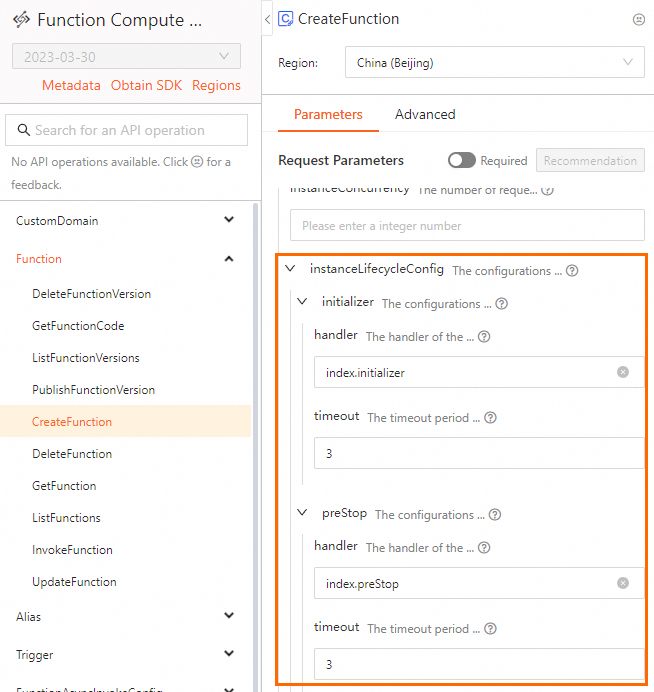
After configuring the parameters, click the SDK Sample Code tab to obtain the SDK sample code in your preferred language.
For more information about how to implement lifecycle hooks in different runtimes, see Lifecycle hooks for function instances in different runtimes.
Lifecycle hooks for function instances in different runtimes
All runtimes in Function Compute support both Initializer and PreStop hooks. The following table describes the methods to implement lifecycle hooks in different runtimes.
Runtime | Description | Reference |
Node.js | Use Node.js to implement lifecycle hooks for function instances. | |
Python | Use Python to implement lifecycle hooks for function instances. | |
PHP | Use PHP to implement lifecycle hooks for function instances. | |
Java | Use Java to implement lifecycle hooks for function instances. | |
C# | Use C# to implement lifecycle hooks for function instances. | |
Go | Use Go to implement lifecycle hooks for function instances. | |
Custom runtimes | Implement lifecycle hooks for instances in custom runtimes. | |
Custom Container runtimes | Implement lifecycle hooks for instances in Custom Container runtimes. |
Query hook-related logs
After you configure an instance lifecycle hook and run its code, you can query the logs related to the hook.
Currently, logs generated by Command Execution type hooks are not supported for writing to function logs.
Log on to the Function Compute console. In the left-side navigation pane, click Functions.
In the top navigation bar, select a region. On the Functions page, click the function that you want to manage.
On the Function Details page, click the Logs tab. On the Invocation Requests tab, find the request whose logs you want to view and click Actions column's Advanced Logs.
You can use a copied instance ID to query the start and end logs of all lifecycle hooks. You can also use
instance ID + lifecycle hook keywordto query the start and end logs of a specific hook, for example,c-62833f38-20f1629801fa4bd***** and PreStop.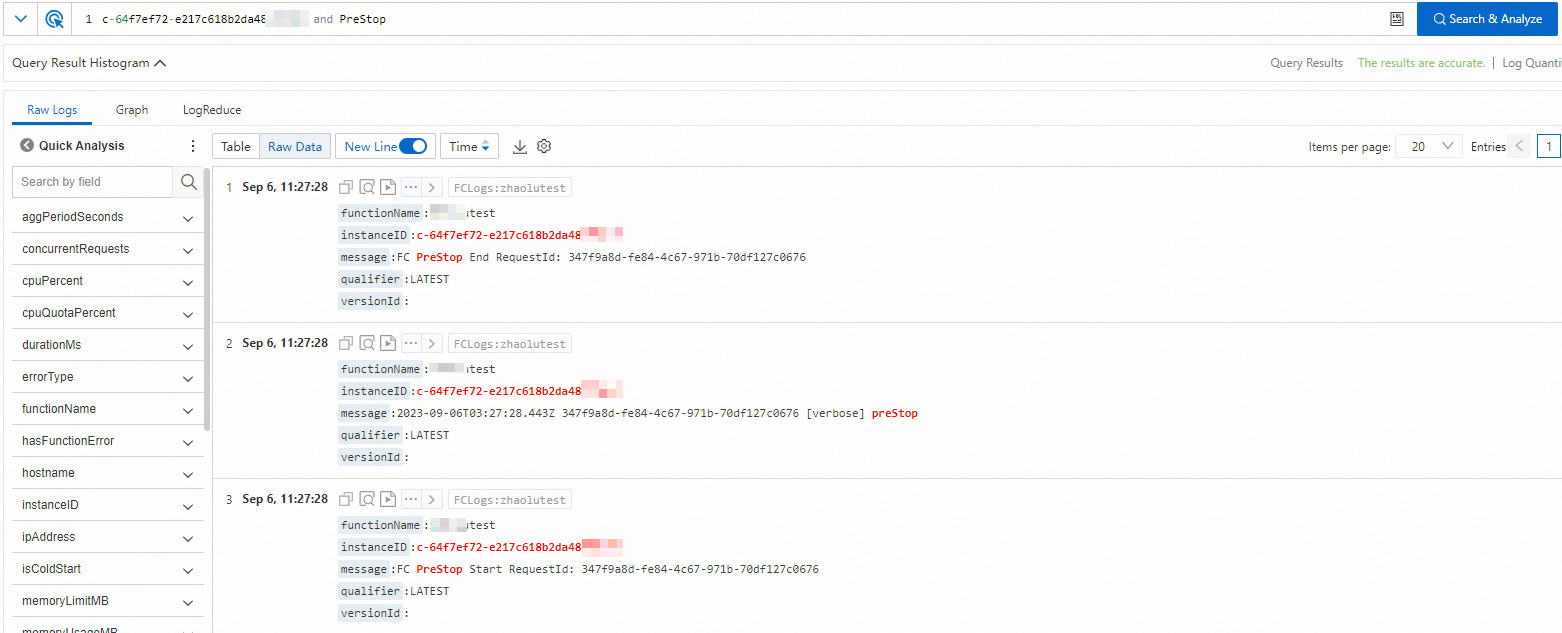
You can also query the request logs based on the request ID in the start and end logs. If the user log does not contain a request ID, you can click the
 icon to obtain the context log.