Use a custom Kafka partitioner to control how records are routed to Kafka partitions when the built-in partition strategies don't meet your needs.
Partition strategies
Set the sink.partitioner option in your Kafka sink's WITH clause to choose a partition strategy.
| Value | Behavior |
|---|---|
default |
Routes keyed records to the same partition, with order maintained. Routes keyless records across partitions in a round-robin fashion for load balancing. |
fixed |
Maps each Flink parallel task to a fixed Kafka partition. If parallelism matches the partition count, each parallel task writes to a specific partition. If parallelism exceeds the partition count, some tasks remain idle. If parallelism is less than the partition count, a task may handle multiple partitions. |
round-robin |
Distributes records across Kafka partitions in a round-robin fashion. |
Custom FlinkKafkaPartitioner subclass |
Routes records using your own logic. Set this to the fully qualified class name, for example, com.aliyun.KafkaSinkPartitioner. |
For details on all connector options, see the Connector options in WITH clause section of the Kafka connector topic.
Use a custom Kafka partitioner in an SQL job
Prerequisites
Before you begin, ensure that you have:
-
An ApsaraMQ for Kafka instance with source and sink topics configured
-
Maven installed for building the JAR
Step 1: Write a custom partitioner
KafkaSinkPartitioner.java
Extend FlinkKafkaPartitioner and override the partition method. In an SQL job, Flink represents records internally as GenericRowData.
The following example routes records to a partition based on the last two digits of the dt field (string type), so that records sharing the same date suffix go to the same partition.
package com.aliyun;
import org.apache.flink.streaming.connectors.kafka.partitioner.FlinkKafkaPartitioner;
import org.apache.flink.table.data.GenericRowData;

public class KafkaSinkPartitioner extends FlinkKafkaPartitioner {

    @Override
    public int partition(Object record, byte[] key, byte[] value, String topic, int[] partitionSize) {
        // In Flink SQL, records are internally represented using GenericRowData.
        if (record instanceof GenericRowData){
            GenericRowData grData  = (GenericRowData) record;
            // Obtain all fields in a row.
            for (int i = 0; i < grData.getArity(); i++){
                Object field = grData.getField(i);
                System.out.println("index: " + i + " :" + field);
            }
            // Data with identical last two digits in their date fields is routed to the same partition.
            String dateString = grData.getString(2).toString();
            int date = Integer.parseInt(dateString.substring(dateString.length() - 2));
            return date % 3;
        }
        else {
            throw new IllegalArgumentException("record is not GenericRowData");
        }
    }
}
Step 2: Create an SQL draft
Set sink.partitioner to the fully qualified class name of your partitioner class. The following example uses ApsaraMQ for Kafka as the Kafka service.
CREATE TEMPORARY TABLE KafkaSource (
  order_id STRING,
  order_name STRING,
  dt STRING
) WITH (
  'connector' = 'kafka',
  'topic' = 'source',
  'properties.group.id' = 'test-group',
  'properties.bootstrap.servers' = '<bootstrap.servers>',  -- Enter your Kafka broker endpoint.
  'format' = 'csv',
  'scan.startup.mode' = 'earliest-offset'
);

CREATE TEMPORARY TABLE kafkaSink (
  order_id STRING,
  order_name STRING,
  dt STRING
) WITH (
  'connector' = 'kafka',
  'topic' = 'sink',
  'properties.bootstrap.servers' = '<bootstrap.servers>',
  'format' = 'csv',
  'properties.enable.idempotence' = 'false',
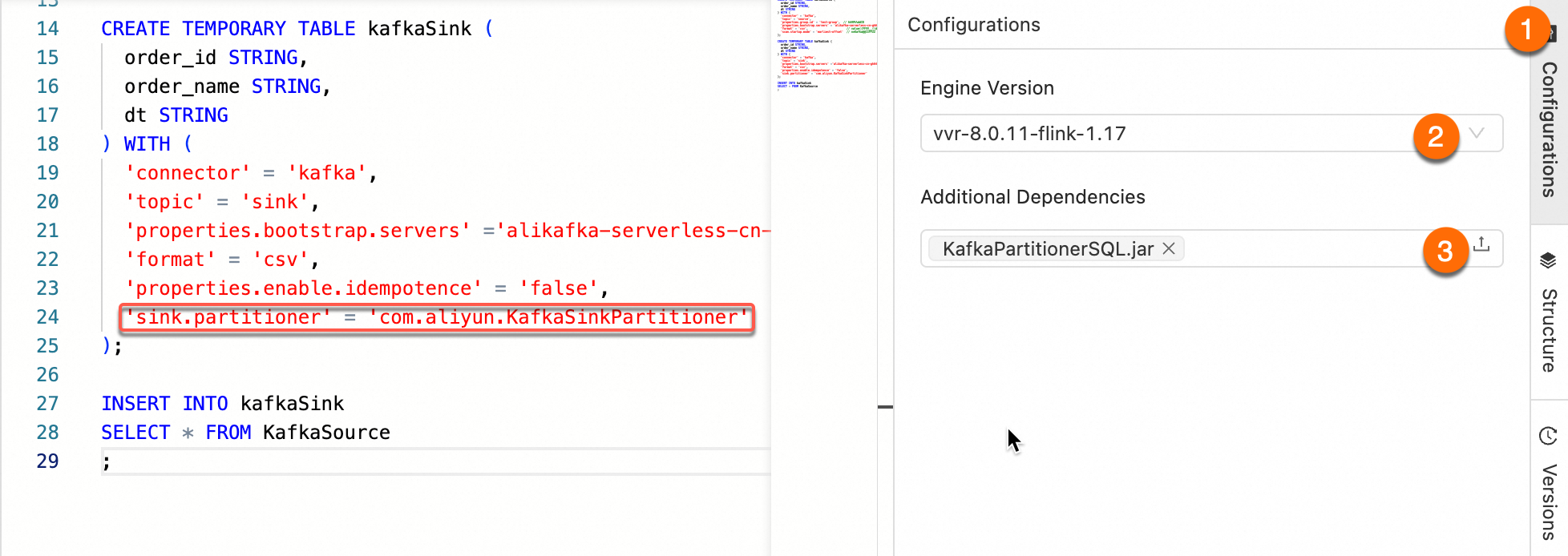
  'sink.partitioner' = 'com.aliyun.KafkaSinkPartitioner'
);

INSERT INTO kafkaSink
SELECT * FROM KafkaSource;
pom.xml
Other released versions of the Kafka connector are available in the Maven Central Repository.
<project xmlns="http://maven.apache.org/POM/4.0.0" xmlns:xsi="http://www.w3.org/2001/XMLSchema-instance"
         xsi:schemaLocation="http://maven.apache.org/POM/4.0.0 http://maven.apache.org/maven-v4_0_0.xsd">
    <modelVersion>4.0.0</modelVersion>
    <groupId>com.aliyun</groupId>
    <artifactId>KafkaPartitionerSQL</artifactId>
    <version>1.0-SNAPSHOT</version>

    <dependencies>
        <!-- Kafka connector -->
        <dependency>
            <groupId>com.alibaba.ververica</groupId>
            <artifactId>ververica-connector-kafka</artifactId>
            <version>1.17-vvr-8.0.11-1</version>
        </dependency>
        <!-- Flink dependency -->
        <dependency>
            <groupId>org.apache.flink</groupId>
            <artifactId>flink-table-common</artifactId>
            <version>1.17.2</version>
        </dependency>
    </dependencies>

    <build>
        <finalName>KafkaPartitionerSQL</finalName>
        <plugins>
            <!-- Java compiler -->
            <plugin>
                <groupId>org.apache.maven.plugins</groupId>
                <artifactId>maven-compiler-plugin</artifactId>
                <version>3.13.0</version>
                <configuration>
                    <source>1.8</source>
                    <target>1.8</target>
                </configuration>
            </plugin>
            <!-- Use maven-shade-plugin to create a fat JAR that contains all necessary dependencies. -->
            <plugin>
                <groupId>org.apache.maven.plugins</groupId>
                <artifactId>maven-shade-plugin</artifactId>
                <version>3.5.3</version>
            </plugin>
        </plugins>
    </build>
</project>ApsaraMQ for Kafka does not support exactly-once delivery (idempotent or transactional writes). Set properties.enable.idempotence=false on the sink table.
Step 3: Upload your custom partitioner
Package the project as a JAR and upload it using Artifacts.
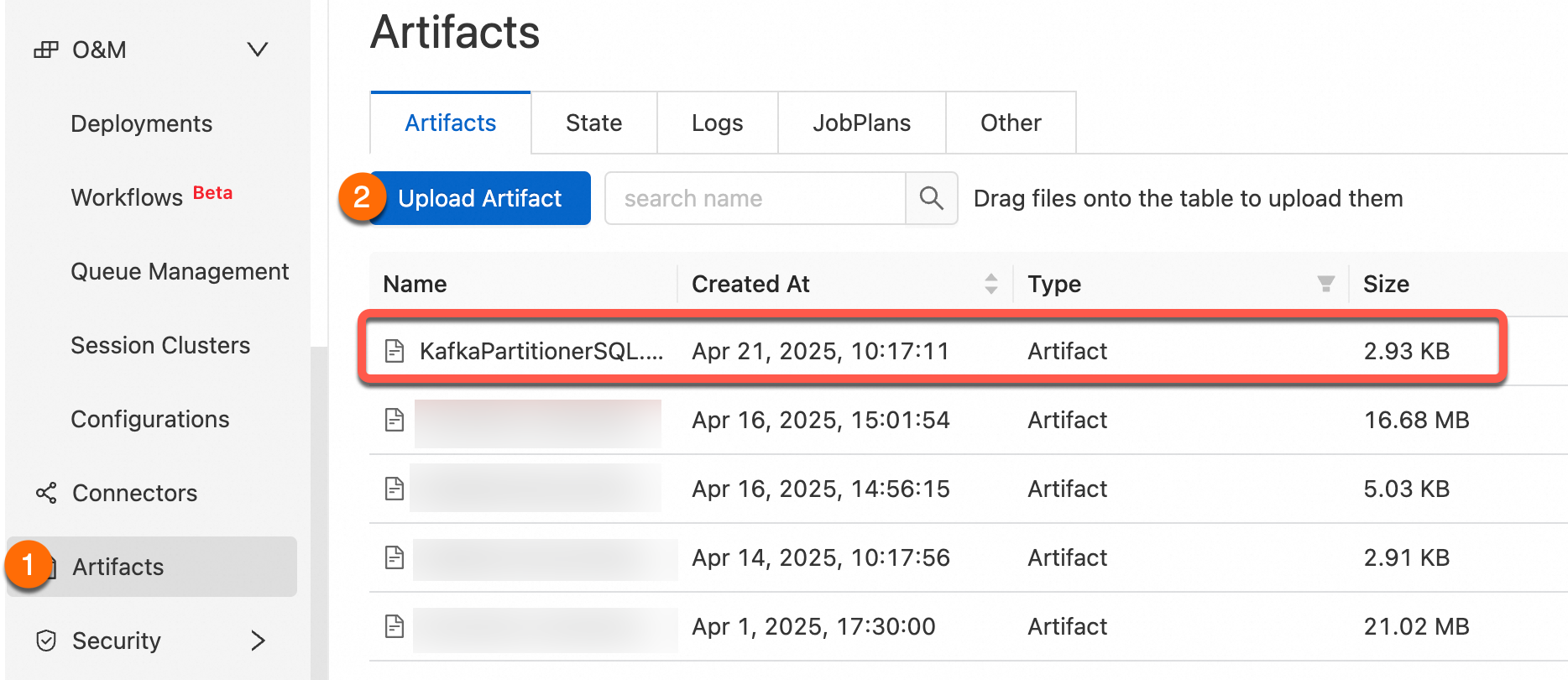
Step 4: Add the JAR as a dependency
Add the uploaded JAR as an additional dependency of your SQL job, then confirm that sink.partitioner in the WITH clause is set to the fully qualified class name, for example, org.mycompany.MyPartitioner.
Step 5: Verify
The following steps use ApsaraMQ for Kafka to send test messages and confirm partition routing.
-
Log on to the ApsaraMQ for Apache Kafka console.
-
In the Resource Distribution section of the Overview page, select the region where your instance resides.
-
On the Instances page, click the name of your instance.
-
On the Topics page, select a topic and click Send Message in the upper right corner. Send the following four messages:
yun001,flink,20250501
yun002,flink,20250505
yun003,flink,20250505
yun004,flink,20250505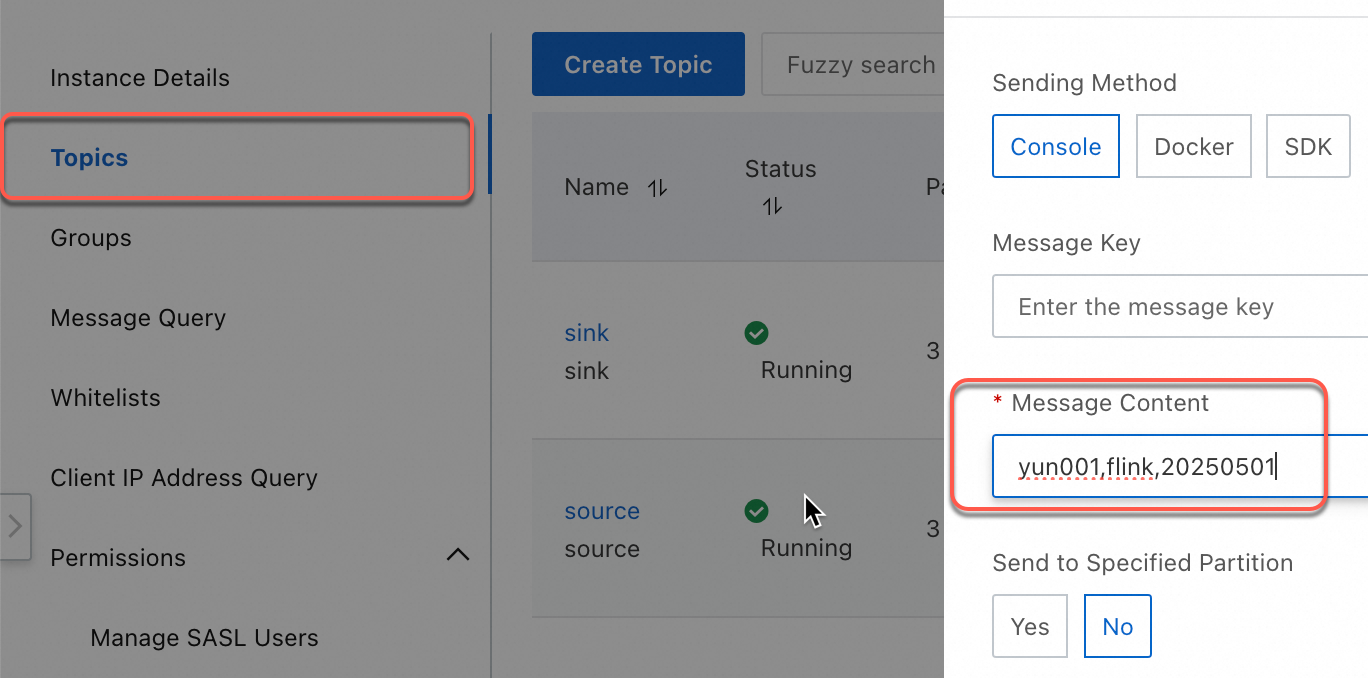
-
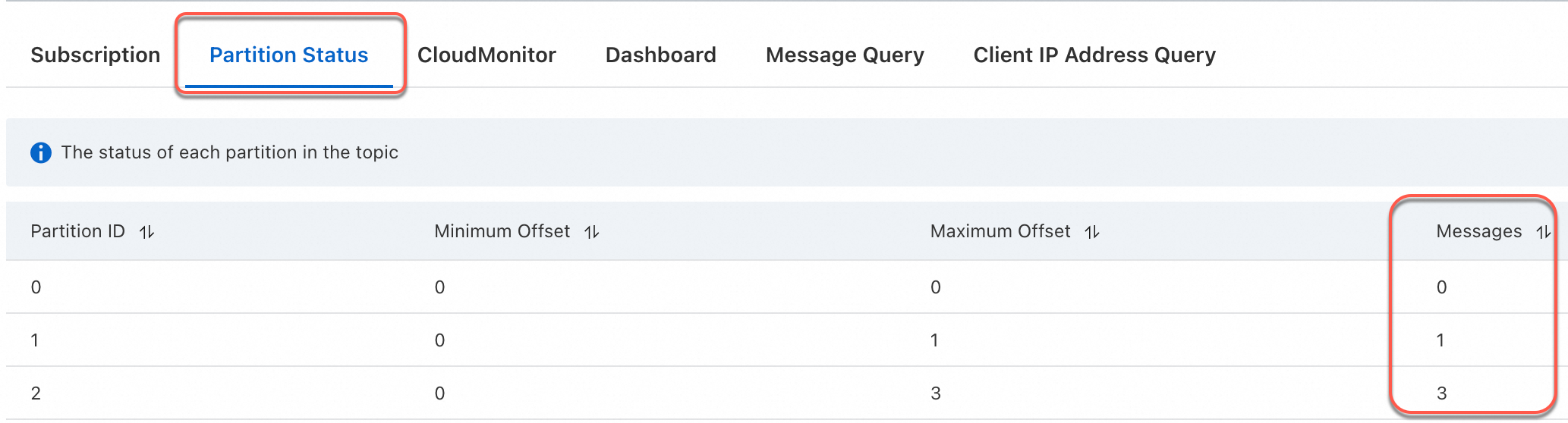
Verify that the messages appear in the downstream topic. Records sharing the same last two digits of the date field should land in the same partition.
Use a custom Kafka partitioner in a JAR job
Prerequisites
Before you begin, ensure that you have:
-
An ApsaraMQ for Kafka instance with source and sink topics configured
-
Maven installed for building the JAR
Step 1: Write a custom partitioner
KafkaPartitionerDataStream.java
Use setPartitioner in the KafkaRecordSerializationSchema builder to inject your partitioning logic:
KafkaRecordSerializationSchema.builder()
    .setTopic("sink")
    .setPartitioner(new KafkaSinkPartitioner())   // Custom partitioner
    .setKafkaValueSerializer(StringSerializer.class)
    .build()
The following is a complete example. The custom partitioner extracts the last two digits of the date field from each CSV record and routes records with the same date suffix to the same partition.
package com.aliyun;
import org.apache.flink.api.common.eventtime.WatermarkStrategy;
import org.apache.flink.connector.kafka.sink.KafkaRecordSerializationSchema;
import org.apache.flink.connector.kafka.sink.KafkaSink;
import org.apache.flink.connector.kafka.source.KafkaSource;
import org.apache.flink.connector.kafka.source.enumerator.initializer.OffsetsInitializer;
import org.apache.flink.connector.kafka.source.reader.deserializer.KafkaRecordDeserializationSchema;
import org.apache.flink.kafka.shaded.org.apache.kafka.common.serialization.StringDeserializer;
import org.apache.flink.kafka.shaded.org.apache.kafka.common.serialization.StringSerializer;
import org.apache.flink.streaming.api.datastream.DataStreamSource;
import org.apache.flink.streaming.api.environment.StreamExecutionEnvironment;
import org.apache.flink.streaming.connectors.kafka.partitioner.FlinkKafkaPartitioner;

public class KafkaPartitionerDataStream {
    public static void main(String[] args) throws Exception {
        StreamExecutionEnvironment env = StreamExecutionEnvironment.getExecutionEnvironment();
        // Build a Kafka source.
        KafkaSource<String> kafkaSource = KafkaSource.<String>builder()
                .setBootstrapServers("<BootstrapServers>")
                .setTopics("source")
                .setGroupId("test-group")
                .setStartingOffsets(OffsetsInitializer.earliest())
                .setDeserializer(KafkaRecordDeserializationSchema.valueOnly(StringDeserializer.class))
                .build();
        // Use a watermark strategy that generates no watermarks.
        DataStreamSource<String> source = env.fromSource(kafkaSource, WatermarkStrategy.noWatermarks(), "Kafka Source");
        // Build a Kafka sink.
        KafkaSink<String> sink = KafkaSink.<String>builder()
                .setBootstrapServers("<BootstrapServers>")
                .setRecordSerializer(
                        KafkaRecordSerializationSchema.builder()
                                .setTopic("sink")
                                .setPartitioner(new KafkaSinkPartitioner())       // Custom partitioner.
                                .setKafkaValueSerializer(StringSerializer.class)
                                .build())
                .build();
        source.sinkTo(sink).name("Kafka Sink");
        env.execute();
    }

    static class KafkaSinkPartitioner extends FlinkKafkaPartitioner<String> {
        // Data with identical last two digits in their date fields is routed to the same partition.
        @Override
        public int partition(String record, byte[] key, byte[] value, String topic, int[] partitionSize) {
            String[] s = record.split(",");
            int date = Integer.parseInt(s[2].substring(s[2].length() - 2));
            return date % 3;
        }
    }
}
pom.xml
Other released versions of the Kafka connector are available in the Maven Central Repository.
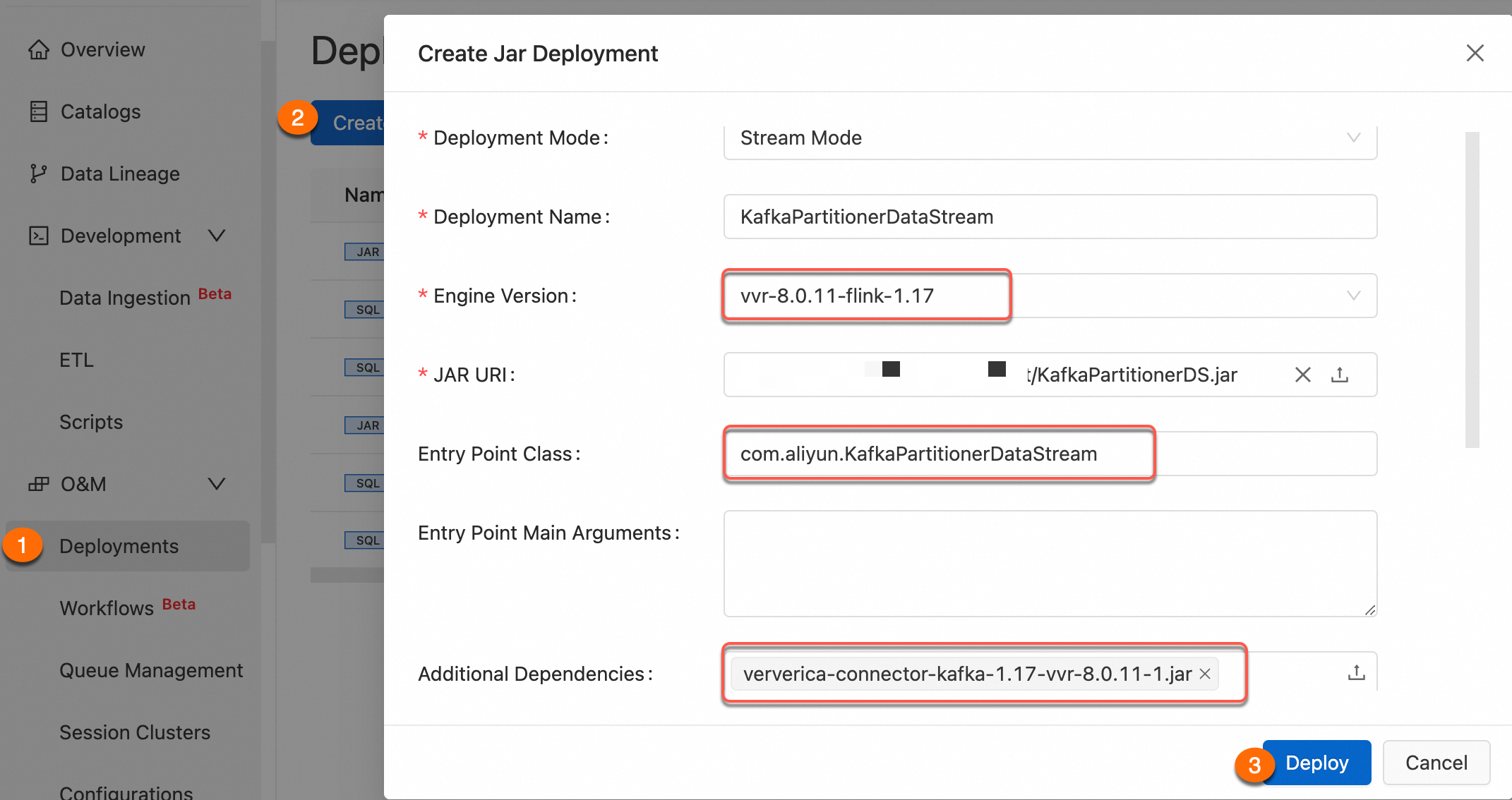
Set the Kafka connector dependency scope to provided in pom.xml and add its JAR as an additional job dependency. This improves version management and reduces upload size. For details, see the "Use connector dependencies" section of Develop a JAR draft.
<project xmlns="http://maven.apache.org/POM/4.0.0" xmlns:xsi="http://www.w3.org/2001/XMLSchema-instance"
         xsi:schemaLocation="http://maven.apache.org/POM/4.0.0 http://maven.apache.org/maven-v4_0_0.xsd">
    <modelVersion>4.0.0</modelVersion>
    <groupId>com.aliyun</groupId>
    <artifactId>KafkaPartitionerDataStream</artifactId>
    <version>1.0-SNAPSHOT</version>

    <dependencies>
        <!-- VVR Kafka connector (provided by the runtime) -->
        <dependency>
            <groupId>com.alibaba.ververica</groupId>
            <artifactId>ververica-connector-kafka</artifactId>
            <version>1.17-vvr-8.0.11-1</version>
            <scope>provided</scope>
        </dependency>

        <dependency>
            <groupId>org.apache.flink</groupId>
            <artifactId>flink-table-runtime</artifactId>
            <version>1.17.2</version>
            <scope>provided</scope>
        </dependency>
    </dependencies>

    <build>
        <finalName>KafkaPartitionerDS</finalName>
        <plugins>
            <!-- Java compiler -->
            <plugin>
                <groupId>org.apache.maven.plugins</groupId>
                <artifactId>maven-compiler-plugin</artifactId>
                <version>3.13.0</version>
                <configuration>
                    <source>1.8</source>
                    <target>1.8</target>
                </configuration>
            </plugin>
            <!-- Use maven-shade-plugin to create a fat JAR that contains all necessary dependencies. -->
            <plugin>
                <groupId>org.apache.maven.plugins</groupId>
                <artifactId>maven-shade-plugin</artifactId>
                <version>3.5.3</version>
                <executions>
                    <execution>
                        <phase>package</phase>
                        <goals>
                            <goal>shade</goal>
                        </goals>
                        <configuration>
                            <filters>
                                <filter>
                                    <artifact>*:*</artifact>
                                    <excludes>
                                        <exclude>META-INF/*.SF</exclude>
                                        <exclude>META-INF/*.DSA</exclude>
                                        <exclude>META-INF/*.RSA</exclude>
                                    </excludes>
                                </filter>
                            </filters>
                            <transformers>
                                <transformer implementation="org.apache.maven.plugins.shade.resource.ManifestResourceTransformer">
                                    <mainClass>com.aliyun.KafkaPartitionerDataStream</mainClass>
                                </transformer>
                            </transformers>
                        </configuration>
                    </execution>
                </executions>
            </plugin>
        </plugins>
    </build>
</project>
Step 2: Upload your custom partitioner JAR
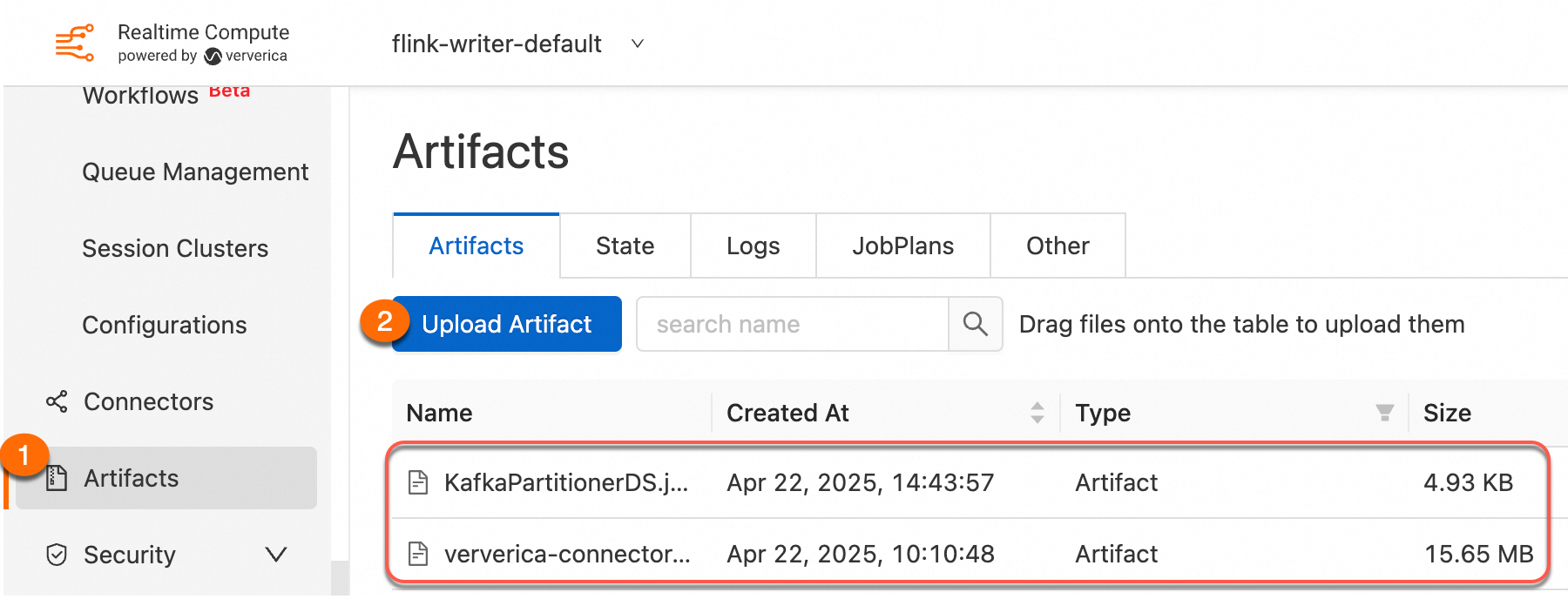
Package the project as a JAR and upload it using Artifacts.
Step 3: Create a JAR deployment
For details, see Create a JAR deployment.
Step 4: Verify
The following steps use ApsaraMQ for Kafka to send test messages and confirm partition routing.
-
Log on to the ApsaraMQ for Apache Kafka console.
-
In the Resource Distribution section of the Overview page, select the region where your instance resides.
-
On the Instances page, click the name of your instance.
-
On the Topics page, select a topic and click Send Message in the upper right corner. Send the following four messages:
yun001,flink,20250501 yun002,flink,20250505 yun003,flink,20250505 yun004,flink,20250505 -
Verify that the messages appear in the downstream topic. Records sharing the same last two digits of the date field should land in the same partition.