Faiss-Server is a service based on the open-source Faiss library. It provides vector similarity search using the gRPC protocol.
Supported vector file formats
- .fvecs (Fvecs format file)
- .svm (Libsvm format file) The Libsvm format is as follows:
21187279 1:0.2663046344870018 2:0.36652042181588923 3:1.0686633708024278 4:0.48038935355720136 5:0.25852895390543884 6:0.3548201486996048 7:0.5256999599627583 8:0.6950687558969181 9:0.678305894615746 10:0.22776047265501018
21264640 1:0.3939700179792862 2:0.2754414668803289 3:0.9439534329739017 4:0.40100161008614665 5:0.4995636031244379 6:0.013824724791385053 7:0.5587276328436032 8:0.5785080421720411 9:0.2784678162956546 10:0.5387681136371216
The general format is
tagid 1:xx 2:xx 3:xx. Here,tagidcan be any string and is often an item ID in recommendation scenarios. The number before each colon, such as1, is the dimension index, which usually starts from 1.xxis the value for that dimension. - .index (index file generated by Faiss)
Building an index from a large dataset can be slow. For better performance, build the Faiss index file offline from source data, such as a Libsvm file, and then load the generated .index file into Faiss-Server. This approach is much faster.
Load a local vector file
Sample file: article_word2vec.svm
docker run -it -p 9000:9000 -v /home/bruceding.jing:/index datascience-registry.cn-beijing.cr.aliyuncs.com/tools/faiss-server:1.0.0 --index_source=/index/article_word2vec.svm --index_params=FlatAfter running the command, the logs will show that the gRPC server started successfully and is listening on port 9000.
| Parameter | Description |
| -p | Maps a host port to a container port. This example uses port 9000, which is the default listening port for Faiss-Server. |
| /home/bruceding.jing | The host path to mount into the Docker container. Replace this with your actual path. |
| datascience-registry.cn-beijing.cr.aliyuncs.com/tools/faiss-server:1.0.0 | The Docker image address for Faiss-Server. |
| --index_source | The path to the vector file. |
| --index_params | Specifies the parameters for building the Faiss index. In this example, Flat is used, which creates an index for exhaustive search. Faiss-Server uses the |
Load a vector file from OSS
docker run -it -p 9000:9000 datascience-registry.cn-beijing.cr.aliyuncs.com/tools/faiss-server:1.0.0 --index_params=IVF256,Flat --search_params=nprobe=128 --accessid=xxx --accesskey=xxx --endpoint=oss-cn-beijing.aliyuncs.com --bucket_name=faiss-server --object_name=demo_data/article_word2vec.svm| Parameter | Description |
| --index_params | The value IVF256,Flat specifies a clustered index where data is partitioned into 256 lists. |
| --search_params | Searches the 128 clusters closest to the query vector. For more information about query parameters, see Index IO, cloning and hyper parameter tuning. |
| --bucket_name | The name of the OSS bucket. |
| --object_name | The path to the vector file object in OSS. |
| --endpoint | The OSS endpoint. This example uses a public endpoint. If you are running this in a VPC, use an internal endpoint to reduce data transfer costs and improve read speed. |
docker run datascience-registry.cn-beijing.cr.aliyuncs.com/tools/faiss-server:1.0.0 --helpVersion check with OSS
Faiss-Server is an online service. Building an index from a raw vector file can be time-consuming. To save time, you can pre-build an index file and load it directly into Faiss-Server.
In some scenarios, you may need to reload vector files periodically.
You can manage multiple versions of your vector data by using a version file to point to the currently loaded files. Faiss-Server asynchronously checks this version file for changes. If a change is detected, it automatically loads the latest index and idxmap files.
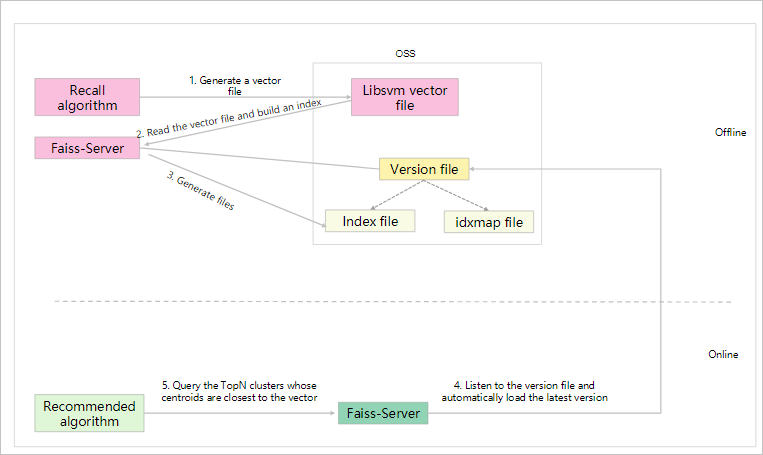
- 1. A vector retrieval algorithm generates vector files for items and stores them in OSS.
- 2 and 3. Faiss-Server reads the vector file from OSS to build an index. The version file contains the paths to the index and idxmap files:
- The index file is the generated Faiss index.
- The idxmap file maps each
tagidto its corresponding vector location in the index.
- 4. The online Faiss-Server continuously monitors the version file for updates.
This section describes how to build an index file offline.
- Build the index file.
This example builds an index. After the build is complete, the process exits. Because this operation does not start the gRPC service, the Docker
-pparameter is not required.docker run -it datascience-registry.cn-beijing.cr.aliyuncs.com/tools/faiss-server:1.0.0 --index_params=IVF256,Flat --search_params=nprobe=128 --accessid=xxx --accesskey=xxx --endpoint=oss-cn-beijing.aliyuncs.com --bucket_name=faiss-server --object_name=demo_data/article_word2vec.svm --version_name=demo_data/versions --action=build_indexThe following parameters are used in the example:--version_name: Specifies the path to the version file in OSS. If the file does not exist, it is created automatically.--action: For the build process, set this tobuild_index.
After the build is successful, the following three files are generated:20200501165638.idxmap,20200501165638.index, andversions. These files are stored in thedemo_data/directory under File Management.If your SVM vector file is stored locally, run the following command to build the index and upload the generated files to OSS.docker run -it -v /home/bruceding.jing:/index datascience-registry.cn-beijing.cr.aliyuncs.com/tools/faiss-server:1.0.0 --index_params=IVF256,Flat --search_params=nprobe=128 --accessid=xxx --accesskey=xxx --endpoint=oss-cn-beijing.aliyuncs.com --bucket_name=faiss-server --index_source=/index/article_word2vec.svm --version_name=demo_data/versions --action=build_indexNote The-vparameter mounts the local directory containing the SVM file into the Docker container. - Start Faiss-Server.
Open a new terminal and run the following command to start Faiss-Server.
docker run -it -p 9000:9000 datascience-registry.cn-beijing.cr.aliyuncs.com/tools/faiss-server:1.0.0 --index_params=IVF256,Flat --search_params=nprobe=128 --accessid=xxx --accesskey=xxx --endpoint=oss-cn-beijing.aliyuncs.com --bucket_name=faiss-server --version_name=demo_data/versions --check_version=trueThe following parameters are used in the example:- The
--index_paramsand--search_paramsparameters must match those used when building the index file. --version_name: Specifies the path to the version file in OSS. If the file does not exist, it is created automatically.--check_version=true: Enables the version check mechanism. When enabled, Faiss-Server automatically loads the new index when the version file is updated.
After the service starts, return to the first terminal and build the index again. After the build is complete, output similar to the following indicates that the new index was loaded successfully.2020-05-01 17:09:37,478 INFO src/faiss_index.cc:197 start to load 2020-05-01 17:09:37,567 INFO src/oss_util.cc:30 GetObjectToFile success62 2020-05-01 17:09:37,568 INFO src/faiss_index.cc:219 localPath=/tmp/20200501170924.index 2020-05-01 17:09:37,703 INFO src/oss_util.cc:30 GetObjectToFile success535963 2020-05-01 17:09:37,815 INFO src/oss_util.cc:30 GetObjectToFile success98159 2020-05-01 17:09:37,817 INFO src/faiss_index.cc:245 load index success - The
- Load an incremental file.
After loading a full index, Faiss-Server can also load incremental vector files in SVM format.
docker run -it -p 9000:9000 datascience-registry.cn-beijing.cr.aliyuncs.com/tools/faiss-server:1.0.0 --index_params=IVF256,Flat --search_params=nprobe=128 --accessid=xxx --accesskey=xxx --endpoint=oss-cn-beijing.aliyuncs.com --bucket_name=faiss-server --version_name=demo_data/versions --check_version=true --append_dir=demo_data/append--append_dir: Specifies the directory for incremental files in SVM format.When you add an incremental file to theappend_dirdirectory, you will see output similar to the following.2020-05-01 17:24:53,161 INFO src/oss_util.cc:30 GetObjectToFile success2428471 2020-05-01 17:24:53,357 INFO src/faiss_index.cc:383 append index, file:article_word2vec.svm, size=10907, idx size=10907
Test the vector service
After starting Faiss-Server, you can use the following tools to test the service.
Download tools and source code: faiss-client-go.tar.gz and faiss-client-java.tar.gz.
./faiss-client-go --host "11.158.**.**:9000" --vector "1:0.8254435895816826 2:0.3546776922906237 3:0.14982954432756015 4:0.4796270382425792 5:0.5478646494350313 6:0.3771617042371068 7:0.5107318036421319 8:0.7005006312566686 9:0.7030542773195687 10:0.692132791047145" --k 20| Parameter | Description |
| --host | The Faiss-Server address, including the IP address and port. |
| --vector | The query vector. Its format and dimensions must match the data in the SVM file. This example uses 10-dimensional data. |
| --k | Specifies the number of top N results to return. The default value is 10. In this example, the value is set to 20. |
tagid list
21292051 21292051 18621974 18621974 21134640 21134640 17331026 17331026 18163227 18163227 21391396 21391396 17376416 17376416 18587620 18587620 21181598 21181598 21658134 21658134
score list
0 0 0.016116945 0.016116945 0.016533913 0.016533913 0.021163488 0.021163488 0.027854014 0.027854014 0.029276766 0.029276766 0.03016185 0.03016185 0.037169978 0.037169978 0.039318927 0.039318927 0.042611975 0.042611975
faiss index list
3 10910 5213 16120 20962 10055 3378 14285 19244 8337 198 11105 6355 17262 9282 20189 3759 14666 20634 9727
[root@4f02da7c63d3 /work/faiss-client-go]tagid refers to the tag ID in the SVM file, which is typically an itemid.Deploy Faiss-Server on E-MapReduce
- Create an E-MapReduce (EMR) Data Science cluster. For more information, see Overview.
When you create the cluster, select Data Science for Cluster Type and EMR-3.31.0 for EMR Version. The Faiss (1.0.0) service is included by default.Note The datascience-registry.cn-beijing.cr.aliyuncs.com/tools/faiss-server:1.0.0 image is pre-packaged on E-MapReduce as faiss-server:1.0.0.
- Create a Shell job to load the vector file and start the gRPC service.
sudo docker run -d --restart unless-stopped -p 9001:9000 faiss-server:1.0.0 --index_params=IVF256,Flat --search_params=nprobe=128 --accessid=xxxx --accesskey=xxx --endpoint=oss-cn-huhehaote-internal.aliyuncs.com --bucket_name=faiss-test --object_name=article_word2vec.svm