Alibaba Cloud Linux delivers kernel hotfixes as RPM packages, letting you patch security vulnerabilities and bugs without rebooting. This topic explains how to find applicable hotfixes, install them, remove a faulty one, and control whether hotfixes reload automatically on server restart.
How it works
Kernel Live Patching (KLP) applies hotfix modules directly to the running kernel using the kpatch utility. Two types of hotfixes are available:
CVE hotfixes (prefixed
HOTFIX-SA-): address Common Vulnerabilities and Exposures (CVE) security issuesBugfix hotfixes (prefixed
HOTFIX-BA-): address non-security bugs; no CVE ID is associated
Each hotfix targets a specific kernel minor version (for example, 5.al8 for Alibaba Cloud Linux 3, al7 for Alibaba Cloud Linux 2). A hotfix applies only when its minor version matches your running kernel.
Find and download a kernel hotfix
Hotfixes are available through two sources: the CVE announcement platform or a YUM repository.
From the CVE announcement platform
The CVE announcement platform lists every released hotfix with its details and download link.
Open the security advisories page for your distribution:
Alibaba Cloud Linux 2.1903: https://mirrors.aliyun.com/alinux/cve/alinux2.xml
Alibaba Cloud Linux 3: https://mirrors.aliyun.com/alinux/3/cve/alinux3.xml
Click Advisory ID to sort the list. Advisories with IDs starting with
HOTFIXare kernel hotfixes.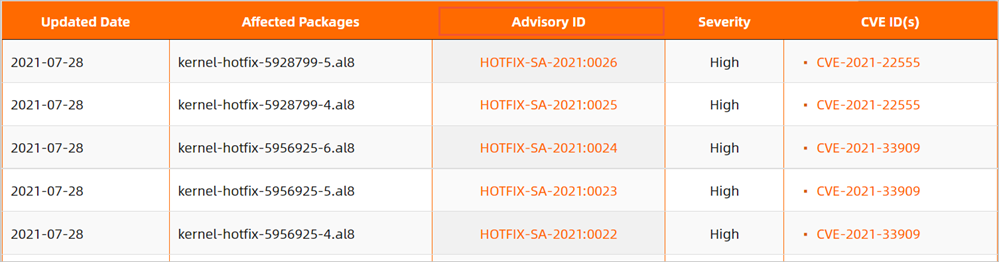
Each advisory contains the following columns:
Column Description Affected packages The hotfix package name, prefixed by kernel-hotfix-and suffixed by the OS minor version number. Use this to confirm whether the hotfix applies to your system.Advisory ID The release identifier. Click it to view hotfix details and download the RPM package. CVE ID(s) The CVE identifier being fixed. Empty for Bugfix hotfixes. Click the Advisory ID to open the hotfix details page.

The page shows the RPM package name in this format:
kernel-hotfix-{hotfix_id}-{minor_version}-{hotfix_version}-{timestamp}.{major_version}.{architecture}.rpmFor example,
kernel-hotfix-5928799-5.al8.x86_64 1.0-20210720165816.al8breaks down as:Field Value Meaning Hotfix ID 5928799Unique identifier for this hotfix Minor version 5.al8Applies to Alibaba Cloud Linux 3 kernels with minor version 5.al8Hotfix version 1.0Version of the RPM package Timestamp 20210720165816Created at 16:58:16 on July 20, 2021 Major version al8Alibaba Cloud Linux 3 (all AL3 systems use al8; AL2 systems useal7)Architecture x86_64System architecture The timestamp field may show an invalid value for some earlier hotfix versions.
From a YUM repository
Run sudo yum list | grep "kernel-hotfix" to see all available hotfixes. This is covered in the installation steps below.
Install a kernel hotfix
Prerequisites
Before you begin, ensure that you have:
SSH access to the Alibaba Cloud Linux ECS instance. For connection methods, see Connection methods.
sudoprivileges on the instance
Procedure
Install the kpatch utility:
sudo yum -y install kpatchCheck your running kernel version:
sudo uname -rExample output:
5.10.23-5.al8.x86_64The minor version number is the segment after the first hyphen —
5.al8in this example. Only hotfixes that match this value apply to your system.List available hotfixes for your kernel:
sudo yum list | grep "kernel-hotfix" | grep "<Minor version number of the operating system>"For example, if your minor version number is
5.al8, run:sudo yum list | grep "kernel-hotfix" | grep "5.al8"Example output:
kernel-hotfix-5928799-5.al8.x86_64    1.0-20210720165816.al8    alinux3-plus
kernel-hotfix-5956925-5.al8.x86_64    1.0-20210726171200.al8    alinux3-plus
Install the hotfix. Replace
<package-name>with the full package name from the previous step:sudo yum -y install <package-name>For example:
sudo yum -y install kernel-hotfix-5928799-5.al8.x86_64Do not append
.rpmto the package name when installing via yum.
Verify the installation
Run the following command to confirm the hotfix is loaded and active:
sudo kpatch listExpected output:
Loaded patch modules:
kpatch_5928799 [enabled]

Installed patch modules:
kpatch_5928799 (5.10.23-5.al8.x86_64)
[enabled] under Loaded patch modules confirms the hotfix is applied to the running kernel.
Remove a kernel hotfix
Remove a specific hotfix when it causes issues or does not take effect as expected.
Prerequisites
Before you begin, ensure that you have:
sudoprivileges on the instance
Procedure
List installed hotfixes:
sudo yum list installed | grep kernel-hotfixExample output:
kernel-hotfix-5928799-5.al8.x86_64 1.0-20210720165816.al8 @alinux3-plusRemove the faulty hotfix. Replace
<package-name>with the package name from the previous step:sudo yum -y remove <package-name>For example:
sudo yum -y remove kernel-hotfix-5928799-5.al8.x86_64
Verify the removal
Confirm the hotfix has been removed:
sudo kpatch listExpected output:
Loaded patch modules:

Installed patch modules:
Both sections are empty, indicating the hotfix is no longer installed or in effect.
Disable the kpatch service
Disabling the kpatch service prevents all installed kernel hotfix modules from loading automatically on the next reboot. The hotfix packages remain on disk; this only controls whether they are applied at startup.
If your hotfix is installed and in effect, but you do not want the operating system to load all the kernel modules of your hotfixes when you restart your server, you can perform the following steps to disable the kpatch service.
Prerequisites
Before you begin, ensure that you have:
sudoprivileges on the instance
Procedure
Confirm the kpatch service is currently enabled:
sudo systemctl is-enabled kpatch.serviceThe output
enabledconfirms the service is active.Disable the kpatch service:
sudo systemctl disable kpatch.serviceExpected output:
Removed symlink /etc/systemd/system/multi-user.target.wants/kpatch.service.
Verify the service is disabled
sudo systemctl status kpatch.serviceThe output confirms the service is disabled when you see disabled in the Loaded: line:
kpatch.service - "Apply kpatch kernel patches"
   Loaded: loaded (/usr/lib/systemd/system/kpatch.service; disabled; vendor preset: disabled)
To re-enable the kpatch service and restore automatic hotfix loading on restart, run sudo systemctl enable kpatch.service.