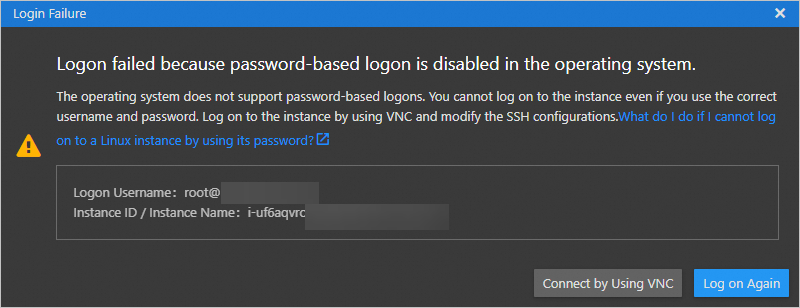
This topic describes the cause of and solution to the following issue: The Logon failed because password-based logon is disabled in the operating system error message appears when you connect to a Linux Elastic Compute Service (ECS) instance by using Workbench.
Problem description
When you connect to a Linux ECS instance by using a password on Workbench, the following error message appears: Logon failed because password-based logon is disabled in the operating system.
Cause and solution
The preceding issue may occur due to the following reasons:
No logon password was configured when the ECS instance was created. In this case, you can configure a logon password for the instance. For more information, see Reset the logon password of an instance.
The account that you use has overdue payments. If you connect to the instance by using its public IP address, the connection fails due to overdue payments in your account. In this case, you can use the private IP address of the instance to connect to it or complete the overdue payments and then connect to the instance.
An SSH key pair is bound to the ECS instance. If an SSH key pair is bound to the instance, password-based authentication is automatically disabled for the instance. To enable password-based authentication for the instance, you can reset its logon password or modify the SSH configuration file. For more information, see Reset the logon password of an instance or the Modify the SSH configuration file section of this topic.
Modify the SSH configuration file
Connect to the ECS instance by using Virtual Network Computing (VNC) and modify the SSH configuration file.
Check whether the
PasswordAuthenticationvalue in the/etc/ssh/sshd_configSSH configuration file isyes.sudo cat /etc/ssh/sshd_configIf the
PasswordAuthenticationvalue isno, which indicates that password-based authentication is disabled, change the value toyes.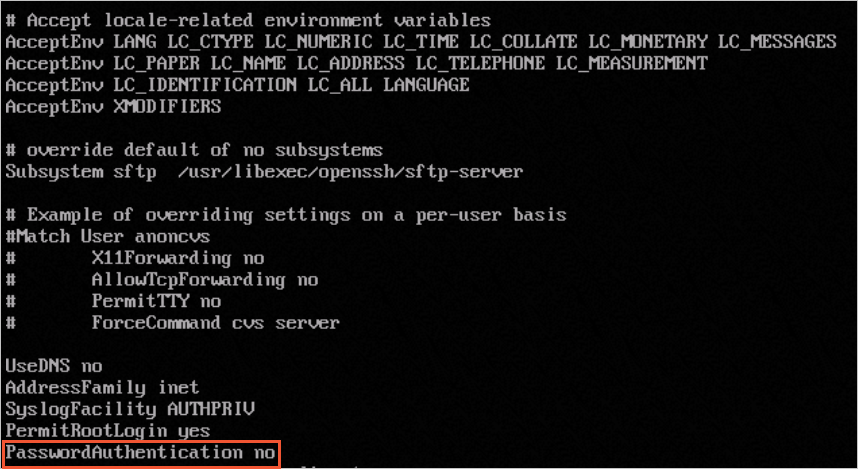
Open the SSH configuration file.
sudo vim /etc/ssh/sshd_configPress the
ikey to enter Insert mode, and change thePasswordAuthenticationvalue from no to yes.Press the
Esckey, enter:wq, and then press theEnterkey to save the change.
Restart the sshd service for the change to take effect.
sudo systemctl restart sshd.serviceConnect to the Linux ECS instance by using a password. If you can connect to the instance, the issue is resolved.
For more information, see Use Workbench to connect to a Linux instance over SSH.