Disclaimer: This article may contain information about third-party products. Such information is for reference only. Alibaba Cloud does not make any guarantee, express or implied, with respect to the performance and reliability of third-party products, as well as potential impacts of operations on the products.
Introduction
This article describes how to expand the FreeBSD system disk.
Background
Alibaba Cloud reminds you that:
- Before you perform operations that may cause risks, such as modifying instance configurations or data, we recommend that you check the disaster recovery and fault tolerance capabilities of the instances to ensure data security.
- You can modify the configurations and data of instances including but not limited to Elastic Compute Service (ECS) and Relational Database Service (RDS) instances. Before the modification, we recommend that you create snapshots or enable RDS log backup.
- If you have authorized or submitted sensitive information such as the logon account and password in the Alibaba Cloud Management Console, we recommend that you modify such information in a timely manner.
For more information about the system disk name and size, see the demo environment.
- Log on to the system, and run the following command to view the disk space. You can see that the disk size is 50 GB, but the remaining disk space is only 512B.
gpart show
The following command output is returned.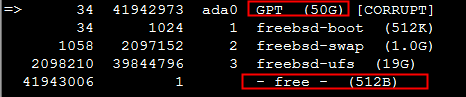
- Run the following command to restore the disk space from its idle status. Then, run the
gpartshowcommand to view the idle disk space:gpart recover ada0
The following command output is returned.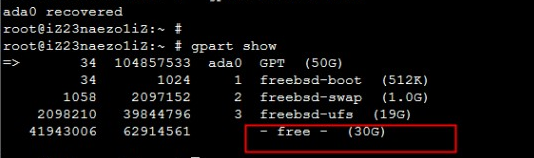
- Run the following command to adjust the disk size:
Note: the Swap partition occupies a portion of the disk.
gpart resize -i 3 -a 4k -s 48G ada0
The following command output is returned.
- Run the following command to resize the file system. If you agree to resize the file system from 19 GB to 48 GB, you are prompted to enter Yes.
growfs /dev/ada0p3
The following command output is returned.
- Run the following command to confirm the successful scale-out:
df -h
Application scope
- Elastic Compute Service