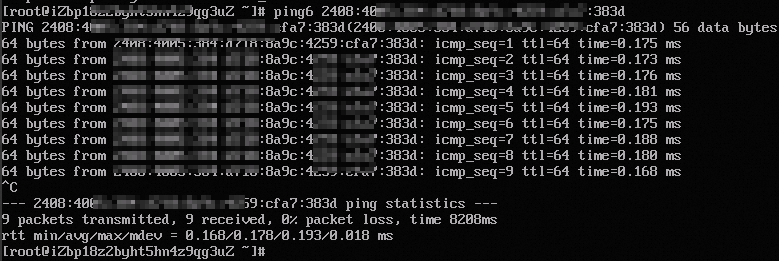
Diagnose and fix IPv6 ping failures caused by misconfigured addresses, security group rules, or missing IPv6 Internet bandwidth.
Symptoms
After you enable an IPv6 address for an ECS instance, the ping -6 command cannot reach the instance IPv6 address.
Causes
Possible causes:
-
The IPv6 address is misconfigured.
-
The security group is misconfigured.
-
IPv6 Internet bandwidth is not enabled, so the instance cannot communicate over IPv6.
Step 1: Check the IPv6 configuration
-
Connect to the Linux instance with a VNC connection. See Connect to a Linux instance using a VNC connection.
-
View and record the MAC address of the instance:
curl http://100.100.100.200/latest/meta-data/mac && echo -
Retrieve the instance metadata, including the IPv6 address, IPv6 gateway, and IPv6 CIDR block:
NoteReplace `[$MAC_ID]` with the MAC address obtained in the previous step.
curl http://100.100.100.200/latest/meta-data/network/interfaces/macs/[$MAC_ID]/ipv6s && echo \n && curl http://100.100.100.200/latest/meta-data/network/interfaces/macs/[$MAC_ID]/ipv6-gateway && echo \n && curl http://100.100.100.200/latest/meta-data/network/interfaces/macs/[$MAC_ID]/vswitch-ipv6-cidr-block && echo \nThe command returns a similar output:

-
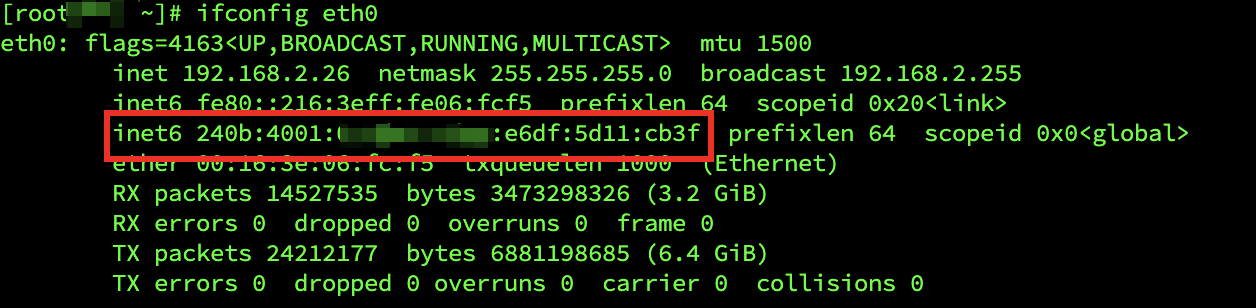
Check whether the IPv6 address of the instance matches the metadata:
NoteThis example uses the eth0 NIC. Replace it with your actual NIC name.
ifconfig eth0If the addresses are consistent, the configuration is correct. If not, reconfigure the IPv6 address. See Configure an IPv6 address.
-
Check whether the IPv6 gateway of the instance matches the metadata:
route -6 -ne | grep ::/0If the gateways are consistent, the configuration is correct. If not, reconfigure the IPv6 address. See Configure an IPv6 address.

-
Check whether the IPv6 CIDR block of the instance matches the metadata:
route -6 -ne | grep eth0If the CIDR blocks are consistent, the configuration is correct. If not, reconfigure the IPv6 address. See Configure an IPv6 address.

Step 2: Check the security group configuration
Go to ECS Console - Security Group.
In the upper-left corner of the page, select a region and resource group.

-
Find the target security group and click Actions in the Operation column.
-
On the security group details page, go to the Rules section and select Inbound or Outbound.
To use the ping command, add a rule that sets Protocol to All ICMPv6 and Source to the target IPv6 address segment, for example,
2001:db8:1234:1a00::***. If this rule is missing, see Add a security group rule.
Step 3: Check IPv6 Internet bandwidth
By default, an IPv6 address supports only private network communication. To access the Internet over IPv6, enable IPv6 Internet bandwidth. See Enable IPv6 Internet bandwidth.
Also check whether Egress-only rules are configured for the IPv6 gateway. To allow inbound traffic from the Internet to the instance IPv6 address, delete these rules.

Step 4: Verify IPv6 connectivity
Ensure both the server and the client support and have configured IPv6.
ping -6 aliyun.comThe following output indicates normal connectivity: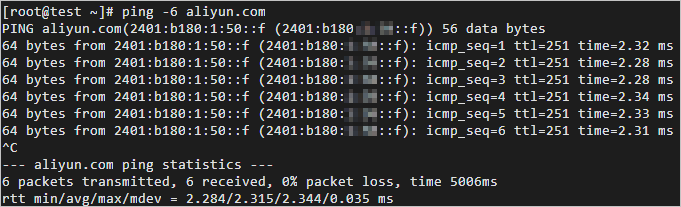
In this example, aliyun.com supports IPv6. After your ECS instance is configured, you can access aliyun.com over IPv6.
Ensure both the server and the client support and have configured IPv6. In this example, both ECS01 and ECS02 must have IPv6 configured.
On ECS01, run ping6 <Private IPv6 address of ECS02> to ping the IPv6 address of ECS02.
If reply packets are received, private IPv6 communication from ECS01 to ECS02 is normal.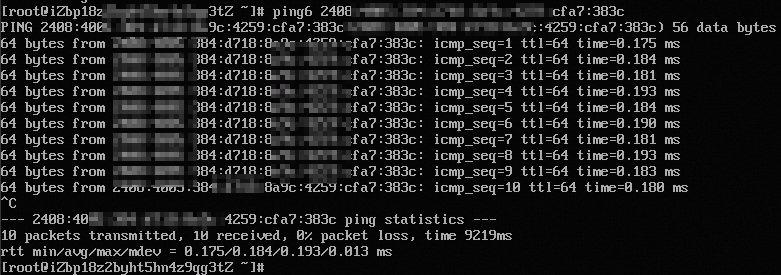
Similarly, run ping6 on ECS02 to ping the IPv6 address of ECS01.
If reply packets are received, private IPv6 communication from ECS02 to ECS01 is normal.