This document describes the causes of and solution to the "error: Unable to load host key: /etc/ssh/ssh_host_rsa_key" error when you connect to a Linux instance over SSH.
Symptoms
You cannot connect to a Linux instance using SSH. After you log in to the instance using Virtual Network Computing (VNC) and run thecat /var/log/secure orcat /var/log/messages command to check the logs, you see an error message similar to the following.
error: @@@@@@@@@@@@@@@@@@@@@@@@@@@@@@@@@@@@@@@@@@@@@@@@@@@@@@@@@@@
error: @ WARNING: UNPROTECTED PRIVATE KEY FILE! @
error: @@@@@@@@@@@@@@@@@@@@@@@@@@@@@@@@@@@@@@@@@@@@@@@@@@@@@@@@@@@
error: Permissions 0777 for '/etc/ssh/ssh_host_rsa_key' are too open.
error: It is required that your private key files are NOT accessible by others.
error: This private key will be ignored.
error: Unable to load host key "/etc/ssh/ssh_host_rsa_key": bad permissions
 error: Unable to load host key: /etc/ssh/ssh_host_rsa_key
error: Unable to load host key "/etc/ssh/ssh_host_rsa_key": invalid format
error: Unable to load host key "/etc/ssh/ssh_host_rsa_key": invalid format
error: Unable to load host key: /etc/ssh/ssh_host_rsa_key
error: Unable to load host key "/etc/ssh/ssh_host_ecdsa_key": invalid format
error: Unable to load host key "/etc/ssh/ssh_host_ecdsa_key": invalid format
error: Unable to load host key: /etc/ssh/ssh_host_ecdsa_keyCauses
This issue occurs if the sshd daemon cannot load the SSH host key because the key files on the instance are invalid. Common causes include:
The permissions for the SSH host key files are incorrect.
For example, the default permission for a private key file is
600. If you set a more permissive value, such as777, other users can read or modify the file. The SSH service considers this a security risk and ignores the key, which causes the connection to fail.The SSH host key files are corrupted, deleted, or tampered with.
Solution
To resolve this issue, regenerate the SSH host key files.
Connect to the Linux instance by using VNC.
For more information, see Connection methods overview.
Regenerate the host key files.
sudo rm -f /etc/ssh/ssh_host_*
sudo /usr/bin/ssh-keygen -A
sudo chmod 600 /etc/ssh/ssh_host_*
sudo chmod 644 /etc/ssh/*.pub
Run the following command to verify that the key files were generated.
ls -l /etc/ssh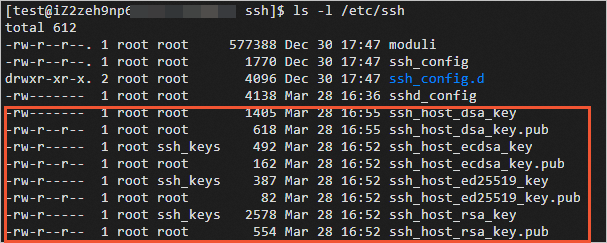
Restart the SSH service.
sudo systemctl restart sshd.service
Next steps
After regenerating the host key, you may encounter the following error when connecting to the instance over SSH. This error occurs because your local machine has cached the old host key fingerprint. To resolve this issue, see What do I do if the "Host key verification failed" error is returned when I use SSH to connect to a Linux instance?.
@@@@@@@@@@@@@@@@@@@@@@@@@@@@@@@@@@@@@@@@@@@@@@@@@@@@@@@@@@@
@ WARNING: REMOTE HOST IDENTIFICATION HAS CHANGED! @
@@@@@@@@@@@@@@@@@@@@@@@@@@@@@@@@@@@@@@@@@@@@@@@@@@@@@@@@@@@
IT IS POSSIBLE THAT SOMEONE IS DOING SOMETHING NASTY!
Someone could be eavesdropping on you right now (man-in-the-middle attack)!
It is also possible that the RSA host key has just been changed.
The fingerprint for the RSA key sent by the remote host is
ae:6e:68:4c:97:a6:91:81:11:38:8d:64:ff:92:13:50.
Please contact your system administrator.
Add correct host key in /root/.ssh/known_hosts to get rid of this message.
Offending key in /root/.ssh/known_hosts:70
RSA host key for x.x.x.x has changed and you have requested strict checking.
Host key verification failed.