Resolve image-related issues during ECS instance creation, such as version selection, OS compatibility, and Marketplace image security.
FAQ about Windows images
How do Windows versions differ in terms of memory limits?
Memory limits vary by Windows version. Select an instance type compatible with your Windows version's memory limits.
Why am I unable to select a Windows operating system when I create ECS instances of specific instance types?
A Windows instance requires at least 1 GiB of memory. For instances with less than 1 GiB, such as 0.5 GiB, only Linux images or Windows Server Version 2004 images are available.
NoteWindows Server 2012 with 1 GiB of memory may be unstable due to high memory usage. Use Windows Server 2012 or later for instances with more than 2 GiB of memory. For 1 GiB instances, use Windows Server 2008 or Windows Server Version 2004.
What type of container runtime do Windows Server with Container images contain?
Due to a change in Microsoft's container runtime support policy, Alibaba Cloud ECS Windows Server with Container images since early 2024 no longer include MCR. They use the open-source containerd runtime instead. To use MCR, purchase and install Mirantis Container Runtime.
Since March 1, 2024, Windows Server with Container images include the following container components:
The Windows Server container feature component (Hyper-V isolation not supported).
The containerd runtime library, version 1.7.13.
nerdctl.exe, a container management CLI, version 1.7.13.
nat.exe, a Windows container network CNI plug-in, version 1.0.0. See windows-container-networking.
Why does a Windows system fail to write data when user data is executed?
Problem
The system fails to write data to
C:\Users\Administrator\Desktop\userData_test.txtduring user data execution, reporting that the path cannot be found.Cause
In Windows,
C:\Usersand its subdirectories are accessible only after logon. User data runs during system initialization before logon, so writes toC:\Usersfail.Solution
Change the write path to a different directory. Example:
[bat] echo "userData" > C:\userData_test.txtWhat are the limitations of the Windows Server 2025 image?
vCPUs: 1 to 640
Memory: 2 GiB to 48 TiB
ECS instance types
The following ECS instance types do not support this image due to compatibility issues:
6th-generation AMD instance types (general-purpose instance family g6a, compute-optimized instance family c6a, and memory-optimized instance family r6a)
FAQ about Red Hat images
Which instance families are supported by Red Hat images?
How do I obtain technical support if issues occur when I use Red Hat Enterprise Linux operating systems?
You can submit a ticket to Alibaba Cloud directly instead of submitting through the Red Hat system. Unresolved issues are escalated to Red Hat.
Which official Red Hat subscriptions are included in RHEL images provided by Alibaba Cloud?
Alibaba Cloud Red Hat images include RHEL product subscriptions with the following repository sources:
RHEL 7
Red Hat Enterprise Linux 7 Server - Extras from RHUI (RPMs)
Red Hat Enterprise Linux 7 Server - Optional from RHUI (RPMs)
Red Hat Enterprise Linux 7 Server from RHUI (RPMs)
RHEL 8 and RHEL 9
BaseOS
AppStream
The latest RHEL 8 and RHEL 9 images also include CodeReady Linux Builder and Supplementary repositories by default. Contact Alibaba Cloud Support to enable them.
See RHEL 8 Package Manifest and RHEL 9 Package Manifest for repository sources and package lists.
Alibaba Cloud Red Hat images include only RHEL product packages. To install other products, such as Red Hat Satellite or Red Hat Ceph Storage, purchase separate Red Hat subscriptions and register your hosts.
Why does the Red Hat operating system purchased on Alibaba Cloud show as unsubscribed (Unknown)?
This is expected. Alibaba Cloud provides Red Hat updates through its own update source rather than a direct Red Hat account. Running subscription-manager shows an unsubscribed state:
+-------------------------------------------+
 System Status Details
+-------------------------------------------+
Overall Status: Unknown

System Purpose Status: Unknown
FAQ about SUSE images
What service support is available for SUSE operating systems?
SLES operating systems on Alibaba Cloud are regularly synchronized with SUSE update sources. For instances created from SLES public images, OS support is included in the Enterprise Support plan. If you have this plan, submit a ticket for support.
FAQ about custom images
How do I resolve the issue where the system disk fails to be automatically expanded for an instance created from a custom image?
A system disk may fail to expand automatically if cloud-init is not installed, fails to run, or the file system is unsupported. To expand it manually, see Disk expansion guide.
Why must I comment out mount entries when I create a custom image or an ECS instance?
When you create an ECS instance from a custom image, a disk may fail to attach for the following reasons:
The instance was created without a data disk.
The data disk is new and has not been partitioned or formatted.
The disk mount entries in the /etc/fstab file of the custom image are not commented out.
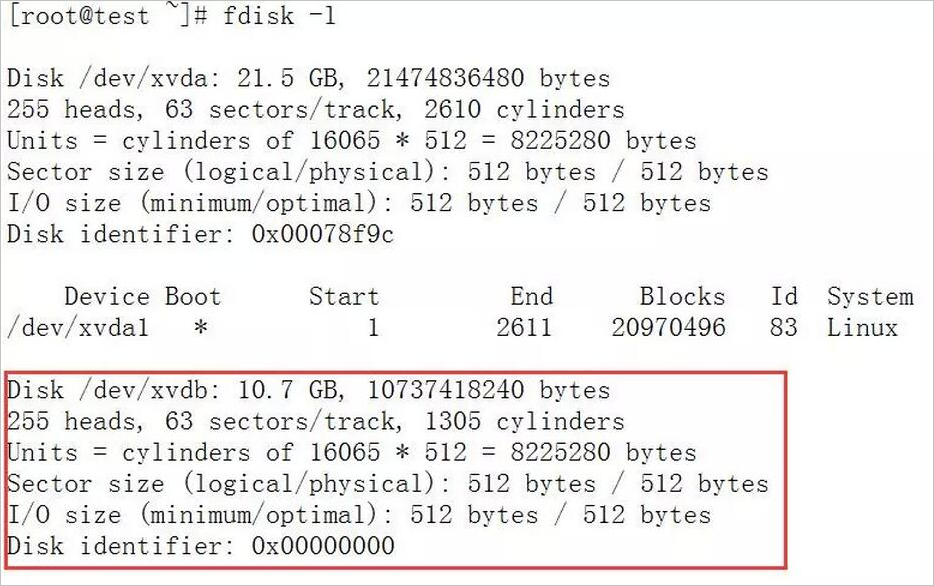
The following example shows a scenario where a data disk fails to attach: the disk is not partitioned, and the mount entries in /etc/fstab are not commented out.
The data disk is not partitioned:
The mount entries in /etc/fstab are not commented out:
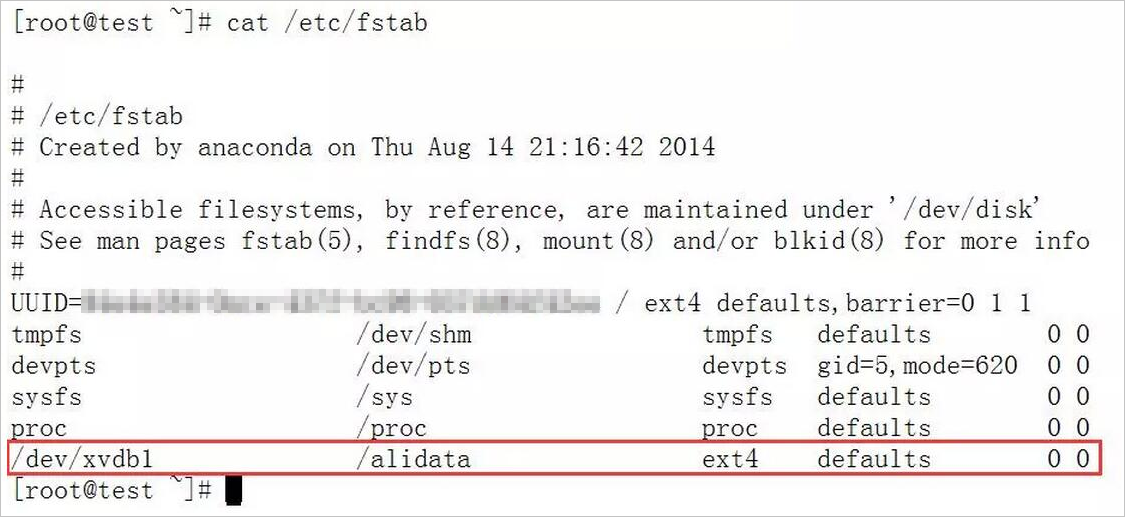
The instance attempts to attach the disk per /etc/fstab, but fails because the disk is not partitioned:

Commenting out mount entries is unnecessary if the data disk was created from a snapshot of a partitioned and formatted disk.
If the issue persists, submit a ticket for support.
What do I do if I cannot use specific custom images to create I/O optimized instances?
Some custom images do not support I/O optimized instances. Submit a ticket and specify the image name to request support.
FAQ about Alibaba Cloud Marketplace images
What are the features of Alibaba Cloud Marketplace images?
Alibaba Cloud Marketplace offers clean OS images and images with pre-installed environments, such as .NET, PHP, JAVA, and LAMP runtimes, control panels, and website building systems. These images let you quickly deploy environments or applications without manual setup.
The Marketplace offers more than 2,000 images from Alibaba Cloud and third-party providers, supporting runtime environments such as .NET, PHP, Java, LAMP, and Docker, as well as website building, application development, and visual management.
How do I purchase Alibaba Cloud Marketplace images?
An image must be purchased with an ECS instance and shares its lifecycle. You can purchase Alibaba Cloud Marketplace images in two ways:
Search for an image in Alibaba Cloud Marketplace and click Buy Now on the product page. You are redirected to the ECS custom purchase page.
On the ECS custom purchase page, select **Alibaba Cloud Marketplace** and search for an image by keyword.
How am I charged for Alibaba Cloud Marketplace images?
An image must be purchased with an ECS instance and shares the same lifecycle and billing method as the instance.
ECS instances support the subscription and pay-as-you-go billing methods. The billing method you select for the ECS instance also applies to the image.
The subscription and pay-as-you-go prices for Alibaba Cloud Marketplace images are set by the image providers. Some images are priced at 0 USD, while others are not priced at 0 USD. The price shown on the buy page at the time of purchase is final.
How am I billed for a custom image that is created based on an Alibaba Cloud Marketplace image?
If you create a custom image from an instance that uses an Alibaba Cloud Marketplace image, the custom image's base image is the original Marketplace image.
When you use this type of custom image to create an ECS instance, the image fee is the same as the fee for the original Alibaba Cloud Marketplace image.
If you share the custom image with other accounts or copy it to other regions, the price is also inherited from the original Alibaba Cloud Marketplace image.
Are Alibaba Cloud Marketplace images secure?
Alibaba Cloud Marketplace images are published by Alibaba Cloud and third-party providers with extensive system maintenance experience. All images are built from official Alibaba Cloud operating systems with Security Center pre-installed and have passed strict security audits.
What do I do if an issue occurs when I install or use an Alibaba Cloud Marketplace image?
View the service information on the image product page and contact the provider directly via Wangwang, phone, or email.
How do I use an API to determine whether an image is an Alibaba Cloud Marketplace image or a custom or shared image that is created based on an Alibaba Cloud Marketplace image?
Call DescribeImages. If
ProductCodeis not empty, the image is an Alibaba Cloud Marketplace image or derived from one.For example, if
ProductCodeisabcd000111, visit http://market.aliyun.com/products/5774****/abcd000111.html for details.
How do I use an API to create an ECS instance from an Alibaba Cloud Marketplace image?
Find the desired image in Alibaba Cloud Marketplace. The product page lists image IDs for each region. Use the image ID as an input parameter when calling RunInstances to create an instance.
Can I request a refund for an Alibaba Cloud Marketplace image? How is the refund calculated?
Whether a refund is available for an Alibaba Cloud Marketplace image depends on the policy stated on the image's product page. If a refund is available, the image provider will issue a refund based on your actual usage.
Does billing continue for an Alibaba Cloud Marketplace image that is used by a pay-as-you-go instance after the instance is stopped in economical mode?
Yes. Paid Alibaba Cloud Marketplace images do not support economical mode.
Can I request refunds for Red Hat or SUSE images?
No, you cannot. By default, refunds are not supported for ECS instances that use Red Hat or SUSE images, as indicated on their product pages in Alibaba Cloud Marketplace. If you need a refund, you can submit a ticket to request one for the ECS instance. However, the fees for the Red Hat or SUSE image are not refundable. After the ECS instance is refunded, the corresponding image cannot be used for other ECS instances.
Am I billed or refunded the image price difference when I upgrade or downgrade the configurations of an instance that uses a Red Hat or SUSE image?
Yes. For commercial Red Hat or SUSE images, the image price varies based on the number of vCPUs. When you upgrade or downgrade the ECS instance, you are billed or refunded the price difference if the image price changes. For the refund policy on ECS instance downgrades, see Unsubscription rules for the international site.
FAQ about compatibility between instances and operating systems
Compatibility between AMD-based instance types and operating systems
Compatibility between Intel-based instance types and operating systems
Compatibility of FreeBSD operating systems
Other questions
Which operating systems support visualization (graphical desktops)?
Linux: Linux systems use a command-line interface by default. Install a graphical user interface if needed.
Windows: All Windows operating systems support a graphical desktop except Windows Server Version 2004 and Windows Server 2022 Datacenter (both without graphical desktop). See Overview of public images.
How do I configure and use a private Docker image registry?
Docker image management relies on registries. Docker provides the open-source docker-registry project for building private registries.
To start a docker-registry with OSS support, install docker-registry from GitHub and run pip install docker-registry-driver-alioss to install the OSS driver.
Run the Docker registry.
docker run -e OSS_BUCKET=-e STORAGE_PATH=/docker/ -e OSS_KEY=-e OSS_SECRET=-p 5000:5000 -d chrisjin/registry:ali_ossConfigure config.yml.
 storage: alioss
 storage_path: _env:STORAGE_PATH:/devregistry/
 oss_bucket: _env:OSS_BUCKET[:default_value]
 oss_accessid: _env:OSS_KEY
 oss_accesskey: _env:OSS_SECRET
Start the Docker registry.
DOCKER_REGISTRY_CONFIG=[your_config_path] gunicorn -k gevent -b 0.0.0.0:5000 -w 1 docker_registry.wi:application
If the issue persists, submit a ticket for support.