This topic describes how to use the JindoFS software development kit (SDK) for password-free access to an E-MapReduce (EMR) JindoFS file system from outside an EMR cluster.
Prerequisites
This procedure is for an environment that uses an Elastic Compute Service (ECS) instance, Hadoop, and the Java SDK outside an EMR cluster.
Background
Before using the JindoFS SDK, remove Jindo-related packages from your environment, such as jboot.jar and smartdata-aliyun-jfs-*.jar. To use Spark, also delete the packages in the /opt/apps/spark-current/jars/ directory.
Step 1: Create an instance RAM role
Log on to the RAM console.
In the navigation pane on the left, choose .
Click Create Role. For Principal Type, select Cloud Service. Then, select the specific Alibaba Cloud service and click OK.
Step 2: Grant permissions to the RAM role
Log on to the RAM console.
(Optional) If you do not want to use system permissions, you can create a custom policy. For more information, see the "Create a custom policy" section in Resource Access Management.
In the navigation pane on the left, choose .
Click the name of the role that you created.
Click Precise Permission.
Set Permission Type to System Policy or Custom Policy.
Select a policy based on your requirements, such as AliyunOSSReadOnlyAccess.
Enter the policy name.
Click OK.
Step 3: Grant the RAM role to an ECS instance
Log on to the ECS console.
In the navigation pane on the left, choose .
In the top navigation bar, select a region.
Find the target ECS instance. In the Actions column, choose
 > Instance Settings > Attach/Detach RAM Role.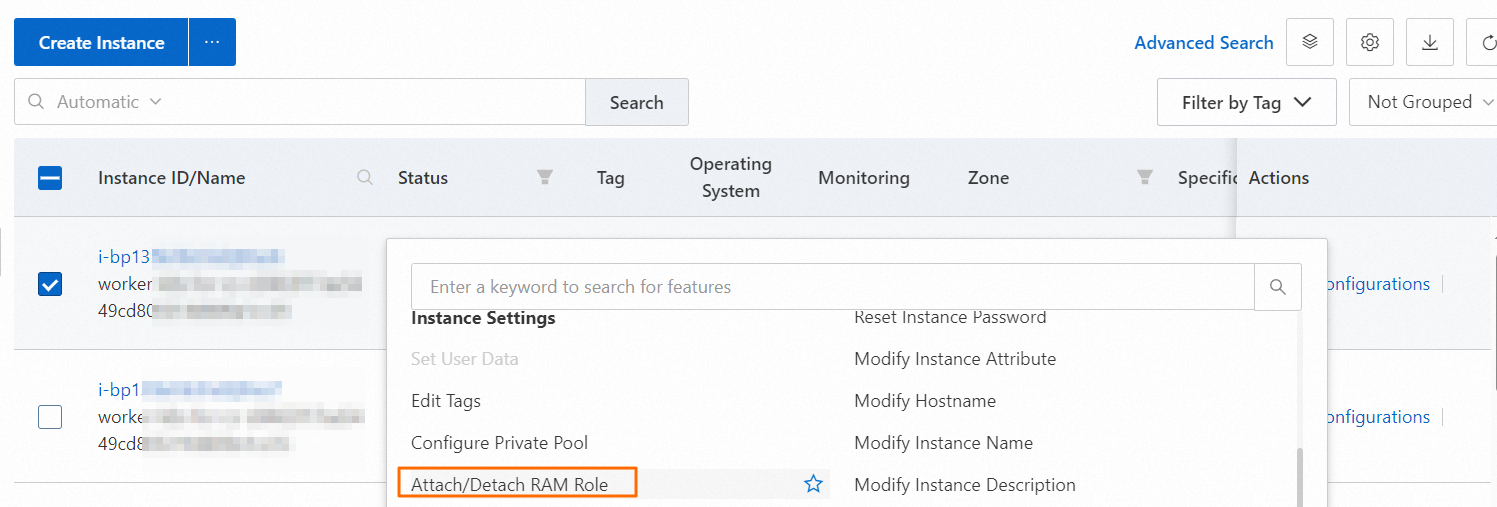
In the dialog box that appears, select the instance RAM role that you created and click Confirm.
Step 4: Set environment variables on the ECS instance
Run the following command on the ECS instance to set the environment variable.
export CLASSPATH=/xx/xx/jindofs-2.5.0-sdk.jarAlternatively, run the following command.
HADOOP_CLASSPATH=$HADOOP_CLASSPATH:/xx/xx/jindofs-2.5.0-sdk.jarStep 5: Test the password-free access method
Access OSS using a shell.
hdfs dfs -ls/-mkdir/-put/....... oss://<ossPath>Access OSS using Hadoop FileSystem.
The JindoFS SDK supports access to OSS using Hadoop FileSystem. The following code provides an example.
import org.apache.hadoop.conf.Configuration;
import org.apache.hadoop.fs.FileSystem;
import org.apache.hadoop.fs.LocatedFileStatus;
import org.apache.hadoop.fs.Path;
import org.apache.hadoop.fs.RemoteIterator;

import java.net.URI;

public class test {
    public static void main(String[] args) throws Exception {
        FileSystem fs = FileSystem.get(new URI("ossPath"), new Configuration());
        RemoteIterator<LocatedFileStatus> iterator = fs.listFiles(new Path("ossPath"), false);
        while (iterator.hasNext()){
            LocatedFileStatus fileStatus = iterator.next();
            Path fullPath = fileStatus.getPath();
            System.out.println(fullPath);
        }
    }
}