ALB Ingress extends a native Kubernetes Ingress with custom forwarding rules, allowing you to specify conditions such as the request header, query string, request method, cookie, and source IP, and to define custom forwarding actions such as a fixed response, redirection, or traffic mirroring. Some of these custom forwarding rules can be configured in the console.
How it works
ALB custom forwarding rules consist of forwarding conditions and forwarding actions that provide fine-grained traffic control for both requests and responses:
Forwarding condition: Configured using the
alb.ingress.kubernetes.io/conditions.<service_name>annotation. This condition is associated with a backend Service by name and applies to all paths in the Ingress that route to that Service. Only traffic that meets the condition triggers the corresponding action. The condition can match traffic in both the request and response directions.Forwarding action: Configured using the
alb.ingress.kubernetes.io/actions.<service_name>annotation. It defines the specific behavior of an ALB instance when handling a request or response, such as forwarding traffic or issuing a redirect.Rule direction: Use the
alb.ingress.kubernetes.io/rule-direction.<service_name>annotation to specify whether a custom forwarding rule applies to the request or response direction:Request direction: A client request is forwarded through the ALB Ingress to a backend Service.
Response direction: A backend Service response is forwarded through the ALB Ingress back to the client.
When a forwarding condition and a forwarding action are configured for the same direction, the action is triggered only for traffic that meets the forwarding condition.
Because thealb.ingress.kubernetes.io/rule-direction.<service_name> annotation applies to all configurations within the current Ingress resource, configure forwarding rules for the request and response directions in separate Ingress resources. For a configuration example, see Scenario 7: Modify response headers based on ResponseHeader.
Prerequisites
Install the component
Install the ALB Ingress Controller, or ensure that the installed version is v2.5.0 or later.
Create a sample Service
Copy the following example to a file named echoserver.yaml and run kubectl apply -f echoserver.yaml to create a sample Deployment and Service. This example uses an echoserver image that echoes received requests. You can use this setup to verify your ALB custom forwarding rules.
The sample images used in this topic are public images. Your cluster or nodes must have public network access to pull them:
Enable Internet access for an existing ACK cluster (recommended): Create a public NAT gateway for the virtual private cloud (VPC) hosting the cluster. All cluster resources will gain public access.
Assign static public IP addresses to nodes: Nodes with public IPs can pull public images, but every node running workloads must be assigned a public IP.
apiVersion: apps/v1
kind: Deployment
metadata:
  name: echoserver
  labels:
    app: echoserver
spec:
  replicas: 2
  selector:
    matchLabels:
      app: echoserver
  template:
    metadata:
      labels:
        app: echoserver
    spec:
      containers:
      - name: echoserver
        image: openkruise-registry.cn-shanghai.cr.aliyuncs.com/openkruise/demo:1.10.2
        imagePullPolicy: IfNotPresent
        ports:
        - containerPort: 8080
---
apiVersion: v1
kind: Service
metadata:
  name: echoserver
  labels:
    app: echoserver
spec:
  type: ClusterIP
  ports:
  - port: 80
    targetPort: 8080
    protocol: TCP
    name: http
  selector:
    app: echoserver
Configure forwarding conditions
After you create an Ingress and set path-based forwarding conditions in the ACK console, ACK automatically adds two forwarding rules with the path /created-by-<ALB-ID> to the Ingress to meet format requirements.
Scenario 1: Forward by source IP and request header
You can specify a maximum of five source IPs for a single custom forwarding rule.
In the following example, the ALB forwards a request to the backend service only if the request's source IP, request header, and path match the specified conditions.
Create sourceip-header.yaml and copy the following example into it, then run kubectl apply -f sourceip-header.yaml to create the Ingress.
Client IP: Matches
192.168.0.0/16or10.0.0.0/8.The request header contains
headername:headervalue1orheadername:headervalue2.Path: Use
/echo.
apiVersion: networking.k8s.io/v1
kind: Ingress
metadata:
  annotations:
    alb.ingress.kubernetes.io/conditions.echoserver: | # The name echoserver must match the name of the backend Service configured in spec.rules.
     [{
       "type": "Header",
       "headerConfig": {
         "key": "headername",
         "values": [
           "headervalue1",
           "headervalue2"
         ]
       }
     },
     {
      "type": "SourceIp",
      "sourceIpConfig": {
        "values": [
          "192.168.0.0/16",
          "10.0.0.0/8"
         ]
       }
     }]
  name: sourceip-header-ingress
spec:
  ingressClassName: alb
  rules:
  - http:
      paths:
      - path: /echo
        pathType: ImplementationSpecific
        backend:
          service:
            name: echoserver
            port:
              number: 80
Verify the results
Run the following command to send a request that includes a custom header. Replace ALB_ENDPOINT with your ALB instance endpoint.
Make sure that the client IP address is in the SourceIp list.curl -H "headername:headervalue1" -s ALB_ENDPOINT/echo | grep -A 16 "Request Information" Expected output:
Request Information:
	client_address=::ffff:10.0.2.93
	method=GET
	real path=/echo # The path that matches the forwarding condition.
	query=
	request_version=1.1
	request_scheme=http
	request_uri=http://alb-jyoefh22rkje******.******-**.alb.aliyuncsslbintl.com:8080/echo

Request Headers:
	accept=*/*
	headername=headervalue1 # The request header that matches the forwarding condition.
	host=alb-jyoefh22rkje******.******-**.alb.aliyuncsslbintl.com
	remoteip=140.205.***.***
	user-agent=curl/8.4.0
	x-forwarded-for=140.205.***.*** # The source IP that matches the forwarding condition.
Scenario 2: Forward by domain, method, and cookie
In the following example, the ALB forwards a request to the backend service only if the request's domain name, request method, cookie, and path match the specified conditions.
Copy the following example to host-method.yaml, and run kubectl apply -f host-method.yaml to create an Ingress.
Domain name: Set to
demo.alb.ingress.topinspec.rules.Request method:
PUTorHEAD.Cookie: Contains
cookiekey1=cookievalue1.Path: Use
/echo.
Domain name forwarding conditions support matching for wildcard domain names (such as *.com).apiVersion: networking.k8s.io/v1
kind: Ingress
metadata:
annotations:
alb.ingress.kubernetes.io/conditions.echoserver: | # The name echoserver must match the name of the backend Service configured in spec.rules.
[{
"type": "Cookie",
"cookieConfig": {
"values": [
{
"key":"cookiekey1",
"value":"cookievalue1"
}
]
}
},
{
"type": "Method",
"methodConfig": {
"values": [
"PUT",
"HEAD"
]
}
}]
name: host-method-ingress
spec:
ingressClassName: alb
rules:
- host: demo.alb.ingress.top
http:
paths:
- path: /echo
pathType: ImplementationSpecific
backend:
service:
name: echoserver
port:
number: 80Verify the results
Run the following command to send a request with a specific domain name, method, and cookie. Replace ALB_ENDPOINT with your ALB instance endpoint.
curl -H "Host:demo.alb.ingress.top" -X PUT -b "cookiekey1=cookievalue1" -s ALB_ENDPOINT/echo | grep -A 16 "Request Information"Expected output:
Request Information:
	client_address=::ffff:10.0.3.249
	method=PUT # The request method that matches the forwarding condition.
	real path=/echo # The path that matches the forwarding condition.
	query=
	request_version=1.1
	request_scheme=http
	request_uri=http://demo.alb.ingress.top:8080/echo

Request Headers:
	accept=*/*
	cookie=cookiekey1=cookievalue1 # The cookie that matches the forwarding condition.
	host=demo.alb.ingress.top # The domain name that matches the forwarding condition.
	remoteip=140.205.***.***
	user-agent=curl/8.4.0
	x-forwarded-for=140.205.***.***
Scenario 3: Forward by query string and headers
In the following example, the ALB forwards a request to the backend service only if the request's query string, request headers, and path match the specified conditions.
Copy the following example to a querystring.yaml file, and run kubectl apply -f querystring.yaml to create an Ingress.
Query string: Use
querystringkey1=querystringvalue2.Request header: Contains
headerkey1:headervalue1orheaderkey1:headervalue2, andheaderkey2:headervalue3orheaderkey2:headervalue4.Path: Use
/echo.
apiVersion: networking.k8s.io/v1
kind: Ingress
metadata:
  annotations:
    alb.ingress.kubernetes.io/conditions.echoserver: | # The name echoserver must match the name of the backend Service configured in spec.rules.
    [{
      "type": "QueryString",
      "queryStringConfig": {
        "values": [
          {
            "key":"querystringkey1",
            "value":"querystringvalue2"
          }
        ]
      }
    },
    {
      "type": "Header",
      "headerConfig": {
        "key":"headerkey1",
        "values": [
          "headervalue1",
          "headervalue2"
        ]
      }
    },
    {
      "type": "Header",
      "headerConfig": {
        "key":"headerkey2",
        "values": [
          "headervalue3",
          "headervalue4"
        ]
      }
    }]
  name: querystring-ingress
spec:
  ingressClassName: alb
  rules:
  - http:
      paths:
      - path: /echo
        pathType: ImplementationSpecific
        backend:
          service:
            name: echoserver
            port:
              number: 80
Verify the results
Run the following command to send a request that includes a specific query string and custom request headers. Replace ALB_ENDPOINT with your ALB instance endpoint.
curl -H "headerkey1:headervalue1" -H "headerkey2:headervalue4" -s "ALB_ENDPOINT/echo?querystringkey1=querystringvalue2" | grep -A 16 "Request Information"Expected output:
Request Information:
	client_address=::ffff:10.0.3.249
	method=GET
	real path=/echo?querystringkey1=querystringvalue2 # The path that matches the forwarding condition.
	query=querystringkey1=querystringvalue2 # The query string that matches the forwarding condition.
	request_version=1.1
	request_scheme=http
	request_uri=http://alb-jyoefh22rkje******.******-**.alb.aliyuncsslbintl.com/echo?querystringkey1=querystringvalue2

Request Headers:
	accept=*/*
	headerkey1=headervalue1 # The request header that matches the forwarding condition.
	headerkey2=headervalue4 # The request header that matches the forwarding condition.
	host=alb-jyoefh22rkje******.******-**.alb.aliyuncsslbintl.com
	remoteip=140.205.***.***
	user-agent=curl/8.4.0
	x-forwarded-for=140.205.***.***
Forwarding conditions
For information about the logic that applies when multiple forwarding conditions are used together, see Can multiple forwarding conditions of the same type take effect at the same time?
Condition | Description |
Domain name | Matches the request's domain name. The ALB forwards only requests with a matching domain name to the backend service. Forwarding conditions support matching wildcard domain names (for example,
Important This is equivalent to the |
Path | Matches the request's path. The ALB forwards only requests with a matching path to the backend service.
Important This has the same effect as the |
Header | Matches the request header. The ALB forwards only requests that contain a specific header to the backend service.
For a use case and an example, see Scenario 1: Forward by source IP and request header. |
Query string | Matches the query string. The ALB forwards only requests that contain a specific query string to the backend service.
For a use case and an example, see Scenario 3: Forward by query string and headers. |
Request method | Matches the request method. The ALB forwards only requests that use a specific method to the backend service.
For a use case and an example, see Scenario 2: Forward by domain, method, and cookie. |
Cookie | Matches the cookie and forwards a request to the backend Service only if it contains the correct cookie.
For use cases and examples, see Scenario 2: Forwarding based on domain name, request method, and cookie. |
Source IP | Matches the source IP of a request. Only requests from client source IPs that are in the list are forwarded to the backend Service.
For usage scenarios and examples, see Scenario 1: Forwarding based on SourceIp and request headers. Important The number of SourceIps in a single forwarding condition is limited to 5. |
Response header | Matches the response header and performs the forwarding action only on responses that contain the specified header. This setting must be used in conjunction with the
For scenarios and examples, see Scenario 7: Modify response headers based on ResponseHeader. |
Response status code | Matches the response status code. The service can be accessed only if the correct status code is returned. Note that this must be used in conjunction with the response direction forwarding action and the response direction forwarding rule annotation
For a use case and an example, see Scenario 8: Modify response headers based on the response status code. |
Configure forwarding actions
Scenario 1: Return a fixed response
Console
-
Log on to the ACK console. In the left navigation pane, click Clusters.
-
On the Clusters page, click the name of your cluster. In the left navigation pane, click .
On the Ingresses page, click Create Ingress and use the following parameters.
Parameter
Value
Gateway Type
ALB Ingress
Name
fixed-ingress
IngressClass
alb
Rules
Delete the default Mappings.
Custom Forwarding Rules
Enable Custom Forwarding Rules.
Add Condition: Select Path and enter /echo.
Action: Select Return Fixed Response.
Response Status Code: 503
Response Content Type (Optional): text/plain
Response Content (Optional): 503 error text
Keep the default values for other parameters.
When you are finished, click OK.
kubectl
The Ingress in the example below returns an HTTP 503 status code and 503 error text when it receives a request.
Create fixed-response.yaml by copying the following example, and run kubectl apply -f fixed-response.yaml to create an Ingress.
apiVersion: networking.k8s.io/v1
kind: Ingress
metadata:
  namespace: default
  name: fixed-ingress
  annotations:
    alb.ingress.kubernetes.io/actions.echoserver: | # The name echoserver must match the name of the backend Service that is configured in spec.rules.
      [{
          "type": "FixedResponse",
          "FixedResponseConfig": {
              "contentType": "text/plain",
              "httpCode": "503",
              "content": "503 error text"
          }
      }]
spec:
  ingressClassName: alb
  rules:
  - http:
      paths:
      - path: /echo
        pathType: Prefix
        backend:
          service:
            name: echoserver
            port:
              name: use-annotation # The name of the service port must be set to use-annotation.
Verify the results
Replace ALB_ENDPOINT with the endpoint of your ALB instance and run the following command:
curl -si ALB_ENDPOINT/echo | grep "HTTP/" Expected output:
HTTP/1.1 503 Service UnavailableScenario 2: Redirect requests to an HTTPS port
Redirection
The following Ingress example uses an HTTP 301 status code to redirect requests to port 443 of a new domain name.
If the redirected domain name resolves to the ALB instance endpoint, you can use this method to redirect traffic from the HTTP port of the ALB Ingress to the HTTPS port.
Create a redirect.yaml file, copy the following example into it, and run kubectl apply -f redirect.yaml to create an Ingress.
apiVersion: networking.k8s.io/v1
kind: Ingress
metadata:
  namespace: default
  name: redirect-ingress
  annotations:
    alb.ingress.kubernetes.io/actions.echoserver: | # The name echoserver must match the name of the backend Service that is configured in spec.rules.
      [{
          "type": "Redirect",
          "RedirectConfig": {
              "host": "www.alibabacloud.com",
              "path": "/en",
              "port": "443",
              "protocol": "https",
              "query": "_p_lc=1",
              "httpCode": "301"
          }
      }]
spec:
  ingressClassName: alb
  rules:
  - http:
      paths:
      - path: /echo
        pathType: Prefix
        backend:
          service:
            name: echoserver
            port:
              name: use-annotation # The name of the service port must be set to use-annotation.
Verify the results
Replace ALB_ENDPOINT with the endpoint of your ALB instance and run the following command:
curl -LIs ALB_ENDPOINT/echo | grep "HTTP"The expected output indicates that the request is redirected to the new domain name.
HTTP/1.1 301 Moved Permanently
Via: HTTP/1.1 SLB.208
HTTP/2 200
Redirection for multiple services
The following Ingress example redirects traffic for multiple Services.
Create a Service named echoserver2. For more information, see Create a sample Service.
Create a file named multi-redirect.yaml and copy the following example into it. Run
kubectl apply -f multi-redirect.yamlto create an Ingress.
apiVersion: networking.k8s.io/v1
kind: Ingress
metadata:
  namespace: default
  name: multi-redirect-ingress
  annotations:
    alb.ingress.kubernetes.io/actions.echoserver: | # The name echoserver must match the name of the backend Service that is configured in spec.rules.
      [{
          "type": "Redirect",
          "RedirectConfig": {
              "host": "www.alibabacloud.com",
              "path": "/en",
              "port": "443",
              "protocol": "https",
              "query": "_p_lc=1",
              "httpCode": "301"
          }
      }]
    alb.ingress.kubernetes.io/actions.echoserver2: | # The name echoserver2 must match the name of the backend Service that is configured in spec.rules.
      [{
          "type": "Redirect",
          "RedirectConfig": {
              "host": "www.alibabacloud.com",
              "path": "/en",
              "port": "443",
              "protocol": "https",
              "query": "_p_lc=1",
              "httpCode": "301"
          }
      }]
spec:
  ingressClassName: alb
  rules:
  - http:
      paths:
      - path: /echo
        pathType: Prefix
        backend:
          service:
            name: echoserver
            port:
              name: use-annotation # The name of the service port must be set to use-annotation.
      - path: /echo2
        pathType: Prefix
        backend:
          service:
            name: echoserver2
            port:
              name: use-annotation # The name of the service port must be set to use-annotation.
Verify the results
Replace ALB_ENDPOINT with the endpoint of your ALB instance and run the following command:
curl -LIs ALB_ENDPOINT/echo | grep "HTTP" ;
curl -LIs ALB_ENDPOINT/echo2 | grep "HTTP"
The expected output indicates that requests to both Services are redirected to the new domain name.
HTTP/1.1 301 Moved Permanently
Via: HTTP/1.1 SLB.208
HTTP/2 200
HTTP/1.1 301 Moved Permanently
Via: HTTP/1.1 SLB.208
HTTP/2 200
Scenario 3: Insert a custom request header
The Ingress in the example below inserts source:alibaba into the request header when a request is received.
Create a file named insert-header.yaml with the following example content, and run kubectl apply -f insert-header.yaml to create an Ingress.
apiVersion: networking.k8s.io/v1
kind: Ingress
metadata:
  namespace: default
  name: insert-header-ingress
  annotations:
    alb.ingress.kubernetes.io/actions.echoserver: | # The name echoserver must match the name of the backend Service that is configured in spec.rules.
      [{
          "type": "InsertHeader",
          "InsertHeaderConfig": {
              "key": "source",
              "value": "alibaba",
              "valueType": "UserDefined"
          }
      }]
spec:
  ingressClassName: alb
  rules:
  - http:
      paths:
      - path: /echo
        pathType: Prefix
        backend:
          service:
            name: echoserver
            port:
              number: 80
Verify the results
Replace ALB_ENDPOINT with the endpoint of your ALB instance and run the following command:
curl -s ALB_ENDPOINT/echo | grep -A 6 "Request Headers"Expected output:
Request Headers:
	accept=*/*
	host=alb-jyoefh22rkjeerxmcg.us-west-1.alb.aliyuncsslbintl.com
	remoteip=140.205.***.***
	source=alibaba # Custom request header
	user-agent=curl/8.4.0
	x-forwarded-for=140.205.***.***
Scenario 4: Mirror traffic to a server group
Traffic mirroring allows an ALB Ingress to copy incoming requests and send them to another server group.
Log on to the Application Load Balancer (ALB) console. In the navigation pane on the left, choose . On the Server Group page, obtain the ID of the server group.
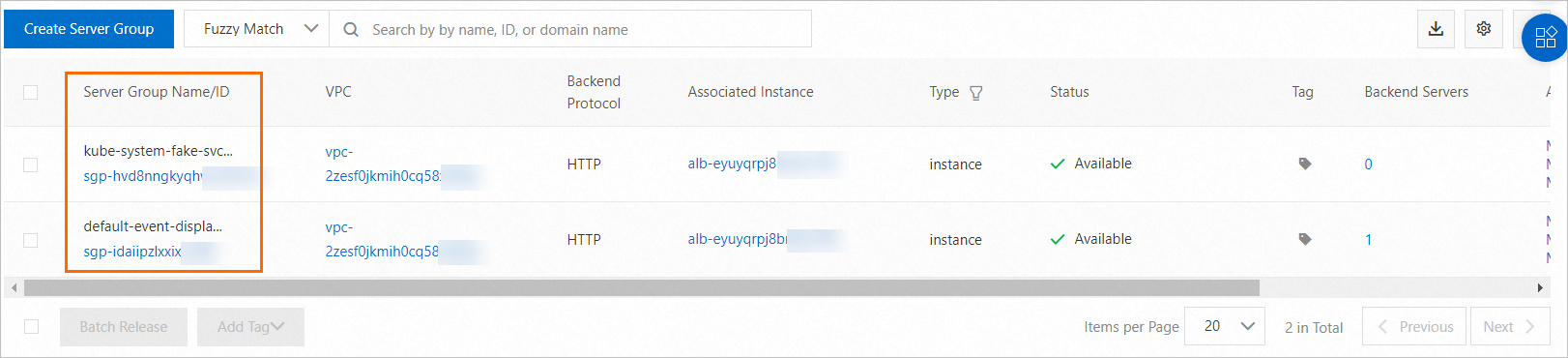
Create a
traffic-mirror.yamlfile with the following example, and run thekubectl apply -f traffic-mirror.yamlcommand to create an Ingress.The following Ingress example mirrors incoming requests to the server group
sgp-2auud2fxj1r46*****.apiVersion: networking.k8s.io/v1 kind: Ingress metadata: name: traffic-mirror-ingress annotations: alb.ingress.kubernetes.io/actions.echoserver: | # The name echoserver must match the name of the backend Service that is configured in spec.rules. [{ "type": "TrafficMirror", "TrafficMirrorConfig": { "TargetType" : "ForwardGroupMirror", "MirrorGroupConfig": { "ServerGroupTuples" : [{ "ServerGroupID": "sgp-2auud2fxj1r46*****" }] } } }] spec: ingressClassName: alb rules: - host: demo.domain.ingress.top http: paths: - path: /echo pathType: Prefix backend: service: name: echoserver port: number: 80
Scenario 5: Forward to multiple backend services
When an ALB Ingress receives a request, it forwards the request to multiple backend Services based on custom weights.
Create a Service named echoserver2. For more information, see Create a sample Service.
Create an Ingress resource.
Console
-
Log on to the ACK console. In the left navigation pane, click Clusters.
-
On the Clusters page, click the name of your cluster. In the left navigation pane, click .
On the Ingresses page, click Create Ingress and use the following parameters.
Parameter
Value
Gateway Type
ALB Ingress
Name
forward-ingress
IngressClass
alb
Rules
Delete the default Mappings.
Custom forwarding rule
Enable Custom Forwarding Rules.
Add Condition:
Domain Name: demo.alb.ingress.top
Path: /echo
Action: Select Forward To.
Service: echoserver
Port: 80
Service: echoserver2
Port: 80
Keep the default values for other parameters.
When you are finished, click OK.
kubectl
Create a
forward.yamlfile with the following example, and runkubectl apply -f forward.yamlto create an Ingress.The following Ingress example forwards incoming requests to the
echoserverandechoserver2Services at a weight ratio of 80:20.apiVersion: networking.k8s.io/v1 kind: Ingress metadata: name: forward-ingress annotations: alb.ingress.kubernetes.io/actions.echoserver: | # The name echoserver must match the name of the backend Service that is configured in spec.rules. [{ "type": "ForwardGroup", "ForwardConfig": { "ServerGroups" : [{ "ServiceName": "echoserver", "Weight": 80, "ServicePort": 80 }, { "ServiceName": "echoserver2", "Weight": 20, "ServicePort": 80 }] } }] spec: ingressClassName: alb rules: - host: demo.alb.ingress.top http: paths: - path: /echo pathType: Prefix backend: service: name: echoserver port: name: use-annotation # This must be set to use-annotation.-
Scenario 6: Rewrite request configurations
ALB Ingress lets you use custom forwarding rules to modify the domain name, path, and query parameters of a request. Unlike the rewrite-target annotation, this allows you to modify the domain name. This feature is useful for URL simplification, client-transparent rewrites, and hiding backend implementation details.
Copy the following example to a file named rewrite.yaml and run the kubectl apply -f rewrite.yaml command to create an Ingress.
In the example below, the client's URLhttps://example.com/api/echois rewritten tohttps://example.org/echo.
apiVersion: networking.k8s.io/v1
kind: Ingress
metadata:
  namespace: default
  name: rewrite-ingress
  annotations:
    alb.ingress.kubernetes.io/actions.echoserver: | # The name echoserver must match the name of the backend Service that is configured in spec.rules.
       [{
           "type": "Rewrite",
           "RewriteConfig": {
               "host": "example.org",
               "path": "/echo",
               "query": "${query}"
           }
       }]
spec:
  ingressClassName: alb
  rules:
  - host: example.com
    http:
      paths:
      - path: /api/echo
        pathType: ImplementationSpecific
        backend:
          service:
            name: echoserver
            port:
              number: 80
Verify the results
Replace ALB_ENDPOINT with the endpoint of your ALB instance and run the following command:
curl -H "Host:example.com" -s "ALB_ENDPOINT/api/echo?querystring=request" | grep -A 7 "Request Information"Expected output:
Request Information:
	client_address=::ffff:10.0.2.93
	method=GET
	real path=/echo?querystring=request
	query=querystring=request
	request_version=1.1
	request_scheme=http
	request_uri=http://example.org:8080/echo?querystring=request # The domain name and path are rewritten.
Scenario 7: Modify response headers based on ResponseHeader
The Ingress in the following example modifies the response header. When the response header contains Content-Type: text/plain, the Ingress inserts source: alibaba into the response header.
Create a file named response-header.yaml with the example below, and run kubectl apply -f response-header.yaml to create an Ingress.
When you create a forwarding rule for the response direction, you need to set the annotation
alb.ingress.kubernetes.io/rule-direction.<service-name>to Response. The default value for this annotation is Request.A forwarding rule for the response direction alone cannot handle request forwarding. The following example also configures a separate Ingress for the request direction.
apiVersion: networking.k8s.io/v1
kind: Ingress
metadata:
  name: response-header-ingress
  annotations:
    alb.ingress.kubernetes.io/rule-direction.echoserver: Response # For response-direction rules, this must be set to Response.
    alb.ingress.kubernetes.io/conditions.echoserver: | # Used with a forwarding condition for the response direction. A custom response header is inserted only for responses that meet the forwarding condition.
     [{
         "type": "ResponseHeader",
         "responseHeaderConfig": {
            "key": "Content-Type",
            "values": [
               "text/plain"
            ]
         }
     }]
    alb.ingress.kubernetes.io/actions.echoserver: | # Inserts a custom response header.
     [{
         "type": "InsertHeader",
         "InsertHeaderConfig": {
             "key": "source",
             "value": "alibaba",
             "valueType": "UserDefined"
         }
     }]
spec:
  ingressClassName: alb
  rules:
  - http:
      paths:
      - path: /echo
        pathType: ImplementationSpecific
        backend:
          service:
            name: echoserver
            port:
              name: use-annotation # This must be set to use-annotation.

---
# Ingress for the request direction
apiVersion: networking.k8s.io/v1
kind: Ingress
metadata:
  name: request-ingress
spec:
  ingressClassName: alb
  rules:
  - http:
      paths:
      - path: /echo
        pathType: ImplementationSpecific
        backend:
          service:
            name: echoserver
            port:
              number: 80
Verify the results
Replace ALB_ENDPOINT with the endpoint of your ALB instance and run the following command:
curl -sI ALB_ENDPOINT/echo | grep "source"Expected output:
source: alibabaScenario 8: Modify response headers by status code
The Ingress in the example below modifies the response header by removing Content-Type from the response header when the response status code is 200 or 300.
Create a response-code.yaml file, copy the following example into it, and run kubectl apply -f response-code.yaml to create an Ingress.
When you create a forwarding rule for the response direction, you need to set the annotation
alb.ingress.kubernetes.io/rule-direction.<service-name>to Response (this annotation is set to Request by default).A forwarding rule for the response direction alone cannot handle request forwarding. The following example also configures a separate Ingress for the request direction.
apiVersion: networking.k8s.io/v1
kind: Ingress
metadata:
  annotations:
    alb.ingress.kubernetes.io/rule-direction.echoserver: Response # For response-direction rules, this must be set to Response.
    alb.ingress.kubernetes.io/conditions.echoserver: | # Used with a forwarding condition for the response direction. The response header is removed only for responses that meet the forwarding condition.
     [{
       "type": "ResponseStatusCode",
       "responseStatusCodeConfig": {
         "values": [
             "200",
             "300"
         ]
       }
     }]
    alb.ingress.kubernetes.io/actions.echoserver: | # Removes a response header.
     [{
         "type": "RemoveHeader",
         "RemoveHeaderConfig": {
             "key": "Content-Type"
         }
     }]
  name: response-code-ingress
spec:
  ingressClassName: alb
  rules:
  - http:
      paths:
      - path: /echo
        pathType: ImplementationSpecific
        backend:
          service:
            name: echoserver
            port:
              name: use-annotation # This must be set to use-annotation.

---
# Ingress for the request direction
apiVersion: networking.k8s.io/v1
kind: Ingress
metadata:
  name: request-ingress
spec:
  ingressClassName: alb
  rules:
  - http:
      paths:
      - path: /echo
        pathType: ImplementationSpecific
        backend:
          service:
            name: echoserver
            port:
              number: 80
Verify the results
Replace ALB_ENDPOINT with the endpoint of your ALB instance and run the following command:
curl -sI ALB_ENDPOINT/echoExpected output:
HTTP/1.1 200 OK
Date: Thu, 29 Jan 2026 09:46:20 GMT
Connection: keep-alive
Vary: Accept-Encoding
# The Content-Type: text/plain header is removed.
Forwarding action reference
Request direction
Forwarding action | Description |
Fixed response | Returns a response with fixed content to the client.
Important
For a use case, see Scenario 1: Return a fixed response. |
Redirection | Redirects clients to another URL by using an HTTP 3xx status code.
Important
For a use case, see Scenario 2: Redirect requests to an HTTPS port. |
Traffic mirroring | Mirrors requests to a server group by specifying the server group ID.
Important
For a use case, see Scenario 4: Mirror traffic to a server group. |
Forward to multiple backend server groups | You can add multiple server groups to an ALB backend and set their weights to control the traffic distribution ratio. You can add a server group by specifying its
Important
For a use case, see Scenario 5: Forward to multiple backend services. |
Rewrite | This action rewrites the domain name, path, and query string of an incoming request before forwarding it to the backend Service.
Important
For a use case, see Scenario 6: Rewrite request configurations. |
Insert request header | Inserts a header into the request. If a header with the same name already exists, its value is overwritten.
For a use case, see Scenario 3: Insert a custom request header. |
Remove request header | Removes a request header.
|
QPS throttling | Configures an overall request rate limit and a per-client source IP request rate limit.
Important
|
Response direction
Forwarding action | Description |
Insert response header | Inserts a header into the response. If a header with the same name already exists, its value is overwritten.
For use cases of modifying response headers in the response direction, see Scenario 7: Modify response headers based on ResponseHeader and Scenario 8: Modify response headers by status code. |
Remove response header | Removes a response header.
|
Quota and limits
A forwarding rule for a service can have up to 10 forwarding conditions, including the domain name and Path specified in
spec.rules.A forwarding rule supports one terminal forwarding action—such as a redirect, a fixed response, or forwarding to multiple server groups—which can be combined with a rate limiting action.
When configuring redirection, fixed response, or forwarding to multiple server groups,
backend.service.port.namemust be set touse-annotation.
FAQ
How same-type forwarding conditions work
Different routing rule blocks use a logical AND, while values within the same routing rule block use a logical OR. For example:
Two different Header rule blocks use a logical AND. The request is forwarded only if the request header matches both
headervalue1andheadervalue2.alb.ingress.kubernetes.io/conditions.service-name: | [{ "type": "Header", "headerConfig": { "key": "headername", "values": [ "headervalue1" ] } }, { "type": "Header", "headerConfig": { "key": "headername", "values": [ "headervalue2" ] } }]Values within the same Header rule block use a logical OR. The request header only needs to match either
headervalue1orheadervalue2.alb.ingress.kubernetes.io/conditions.service-name: | [{ "type": "Header", "headerConfig": { "key": "headername", "values": [ "headervalue1", "headervalue2" ] } }]
Why the error The param of Rules.1.RuleConditions.2.HostConfig.Values.2 is duplicated?
If you configure a Host condition in the forwarding conditions and also specify the same domain name in the host field of spec.rules, the Ingress configuration will fail. Please configure the domain name in only one of these locations.