Delta Lake is a data lake solution from Databricks that manages the entire data lifecycle — from ingestion, organization, and management to querying and egress. Combined with third-party upstream and downstream tools, Delta Lake helps you build a fast, easy-to-use, and secure data lake.
Background information
A typical data lake solution stores various types of data on a big data storage engine such as Alibaba Cloud Object Storage Service (OSS) or an on-premises Hadoop Distributed File System (HDFS), and connects to an analytics engine such as Spark or Presto to parse the data. However, this approach has the following problems:
-
Failed imports produce dirty data that is difficult to clean up, and failed jobs are difficult to recover.
-
No extract, transform, and load (ETL) process is available, which leads to inadequate data quality supervision.
-
No transaction support to isolate read and write operations, which prevents streaming and batch read/write operations from running independently.
The Delta Lake solution works as follows:
-
It adds a data management layer on top of the big data storage layer, similar to metadata management in a database. The metadata is stored alongside the data and is visible to users, as shown in Data warehouse and data lake.
-
Delta Lake introduces atomicity, consistency, isolation, and durability (ACID) based on metadata management, which resolves issues with dirty data from failed imports and the lack of read/write isolation during data ingestion.
-
Metadata stores source table columns, and Delta Lake validates data during import to ensure data quality.
-
Transaction support allows batch and streaming read/write operations to run in isolation.
ACID is an acronym for the four key properties that ensure reliable database transactions: atomicity, consistency, isolation, and durability.
Figure 1. Data warehouse and data lake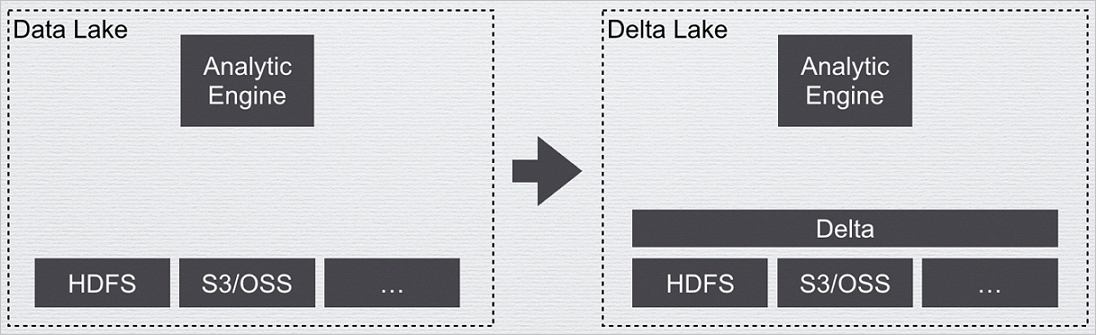
The following table compares Data Warehouse, Data Lake, and Delta Lake.
|
Comparison criteria |
Data Warehouse |
Data Lake |
Delta Lake |
|
Architecture |
Coupled or decoupled compute and storage |
Decoupled compute and storage |
Decoupled compute and storage |
|
Storage management |
Strict, proprietary |
Native format |
Common format, lightweight |
|
Scenarios |
Reporting, analytics |
Reporting, analytics, data science |
Reporting, analytics, data science |
|
Flexibility |
Low |
High |
High |
|
Data quality and reliability |
Very high |
Low |
High |
|
Transactional |
Supported |
Not supported |
Support |
|
Performance |
High |
Low |
High |
|
Extensibility |
Depends on the implementation |
High |
High |
|
Users |
Administrators |
Administrators, data scientists |
Administrators, data scientists |
|
Cost |
High |
Low |
Low |
Scenarios
Delta Lake is suitable for cloud-based data lake management and supports the following scenarios:
-
Real-time query: Data flows from upstream sources into Delta Lake in real time and is immediately available for querying. For example, in a Change Data Capture (CDC) scenario, you can use Spark Streaming to consume binlogs in real time. The Delta Lake merge feature updates upstream data into the data lake, and you can then query it with Hive, Spark, or Presto. Because ACID is supported, data ingestion and queries are isolated, which prevents dirty reads.
-
Delete or update for General Data Protection Regulation (GDPR): Typical data lake solutions do not support deletion or updates. To modify data in these solutions, you must clear the raw data and rewrite it to storage. Delta Lake supports direct data deletion and updates.
-
Real-time data synchronization with CDC: You can use the Delta Lake merge feature to run a streaming job that merges upstream data into the data lake in real time.
-
Data quality control: You can use Delta Lake schema validation to filter out abnormal data during import or process it further.
-
Schema evolution: Data schemas are not fixed. Delta Lake allows you to modify the data schema through an API.
-
Real-time machine learning: In machine learning scenarios, much of the effort goes to data processing — cleaning, transformation, and feature extraction — which typically requires handling historical and real-time data separately. Delta Lake simplifies this by unifying the entire data processing pipeline into a single reliable real-time stream. Operations such as data cleaning, transformation, and feature engineering become stream actions, eliminating the need to process historical and real-time data separately.
Comparison with open source Delta Lake
EMR Delta Lake extends open source Delta Lake with additional support for SQL, Optimize, and more. The following table compares the features of EMR Delta Lake and open source Delta Lake (version 0.6.1).
|
Feature |
EMR Delta |
Open source Delta |
|
SQL |
|
|
|
API |
|
|
|
Hive connector |
Support |
Support |
|
Presto connector |
Support |
Support |
|
Parquet |
Supported |
Supported |
|
ORC |
Not supported |
Not supported |
|
Text format |
Not supported |
Not supported |
|
Data Skipping |
Support |
Not supported |
|
ZOrder |
Supported |
Not supported |
|
Native DeltaLog |
Support |
Not supported |