Partitioning organizes table data into separate storage directories based on the values in one or more partition key columns. Each distinct value in a partition key column becomes its own partition. When you define multiple partition key columns, MaxCompute creates multi-level partitions — a structure similar to nested directories.
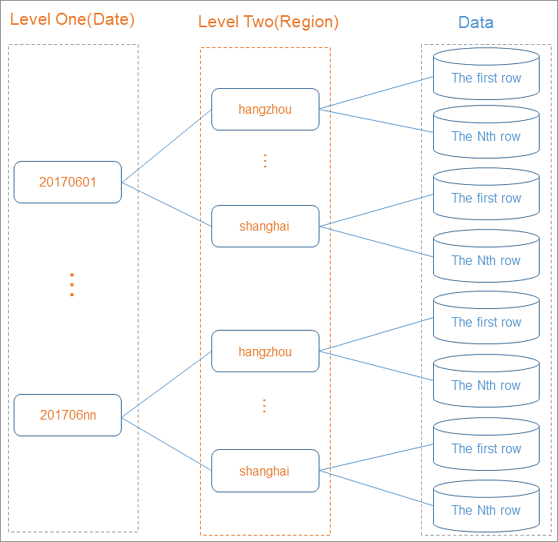
How partitioning works
When you run a query, MaxCompute evaluates the WHERE clause to identify relevant partitions and skips the rest — a process called partition pruning. MaxCompute scans only the partitions specified in the WHERE clause instead of the entire table.
Partition pruning provides the following benefits:
Faster queries — scanning a subset of data reduces query execution time
Lower compute costs — less data scanned means fewer resources consumed
Simpler data management — partitions simplify data management and support independent data operations
Flexible data access — target specific time ranges, regions, or other dimensions directly in the
WHEREclause
For a full overview of partitioned tables, see Overview of partitioned tables.
Partition operations
On an existing partitioned table, you can add partitions and modify partition values. For details, see Partition and column operations.
Certain SQL operations on partitions, such as inserting data into dynamic partitions, can be less efficient and may result in higher costs. For details on dynamic partition behavior, see Insert or overwrite data into dynamic partitions (DYNAMIC PARTITION).
Partitioned tables
A partitioned table physically organizes data into separate storage locations based on the values in one or more designated columns. MaxCompute uses different syntax for partitioned and non-partitioned tables — the commands for creating, modifying, and inserting data differ between the two table types.
For guides on working with partitioned tables:
For syntax details on table commands: