DDL operations that rebuild B-tree indexes — such as adding a primary key, adding a secondary index, or running OPTIMIZE TABLE — generate large volumes of redo logs. On the primary node, writing these redo logs is a bottleneck that slows DDL execution. On read-only nodes, parsing and applying the same redo logs can cause severe replication lag and, under concurrent DDL workloads, make the read-only node unavailable.
DDL physical replication optimization addresses both problems by optimizing the redo log write path on the primary node and the redo log apply path on read-only nodes. With this feature enabled, the time to add a primary key on the primary node drops to approximately 20.6% of the baseline, and replication latency on read-only nodes drops to approximately 0.4% of the baseline.
Prerequisites
Before you begin, ensure that the cluster meets one of the following version requirements. To check the current version, see Engine versions.
PolarDB for MySQL 8.0.1 with revision version 8.0.1.1.10 or later
PolarDB for MySQL 5.7 with revision version 5.7.1.0.10 or later
How it works
PolarDB separates compute from storage. The primary node and read-only nodes share the same underlying data, and physical replication keeps them consistent by propagating redo logs rather than binary logs. It also reduces the I/O overheads caused by fsync operations on binary logs.
InnoDB stores data in B-tree indexes. DDL operations that create or rebuild these indexes — adding a primary key, creating a secondary index, or running OPTIMIZE TABLE — generate a large number of redo logs. Without optimization:
Writing redo logs becomes a bottleneck on the primary node's DDL execution path.
Read-only nodes must parse and apply all of those redo logs before they can serve consistent reads, causing replication lag that can cascade into node unavailability under concurrent DDL workloads.
DDL physical replication optimization removes these bottlenecks by making redo log writes on the primary node more efficient and reducing the work read-only nodes must do to apply DDL-generated redo logs.
Limitations
Supported DDL operations: creating primary keys and secondary indexes only. Full-text indexes and spatial indexes are not supported.
Metadata-only DDL operations such as
RENAME TABLEdo not require this feature because they consume minimal resources and are fast by default.Not supported on PolarDB for MySQL 8.0.2 or 5.6.
Enable DDL physical replication optimization
Set the following parameter at the global level to enable the feature.
| Parameter | Level | Default value | Description |
|---|---|---|---|
innodb_bulk_load_page_grained_redo_enable | Global | OFF | Controls DDL physical replication optimization. Set to ON to enable. |
Performance results
The following tests were run on a PolarDB for MySQL 8.0 cluster with one primary node and one read-only node (16 CPU cores, 128 GB memory, 50 TB storage).
Test setup
Schema:
CREATE TABLE t0(a INT PRIMARY KEY, b INT) ENGINE=InnoDB;Data: Tables with 1 million, 10 million, 100 million, and 1 billion rows, populated with random values:
DELIMITER //
CREATE PROCEDURE populate_t0()
BEGIN
     DECLARE i int DEFAULT 1;
     WHILE (i <= $table_size) DO
             INSERT INTO t0 VALUES (i, 1000000 * RAND());
             SET i = i + 1;
     END WHILE;
END //
DELIMITER ;
CALL populate_t0();Replace$table_sizewith the number of rows to insert, for example1000000.
DDL operations tested:
ADD PRIMARY KEYADD INDEX(secondary index)OPTIMIZE TABLE
Test 1: DDL execution time on the primary node
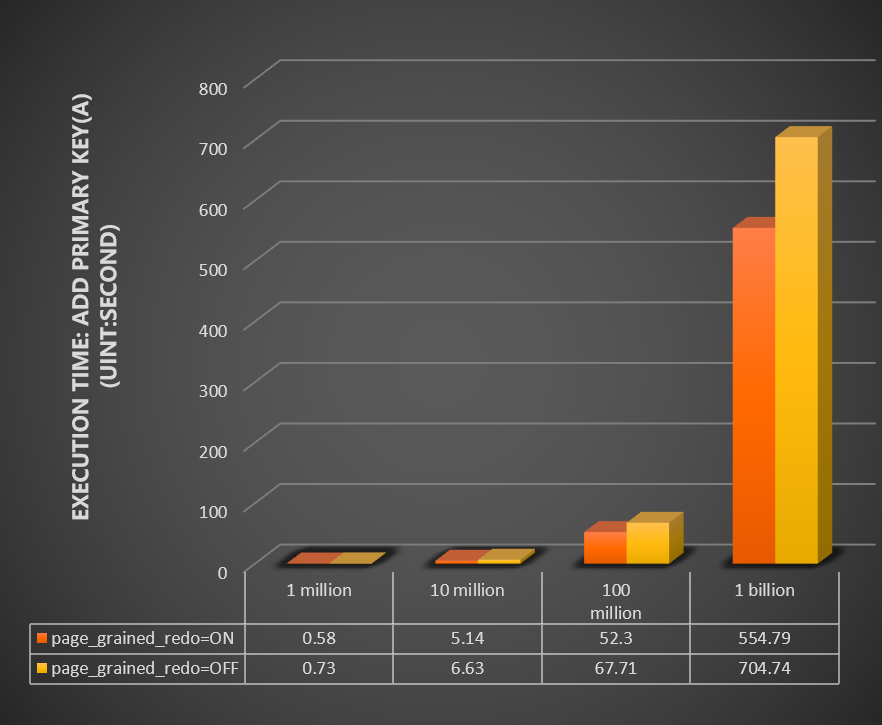
Compare the time (in seconds) for ADD PRIMARY KEY and OPTIMIZE TABLE across table sizes, with innodb_bulk_load_page_grained_redo_enable set to ON versus OFF.
Add primary key:
Optimize table:
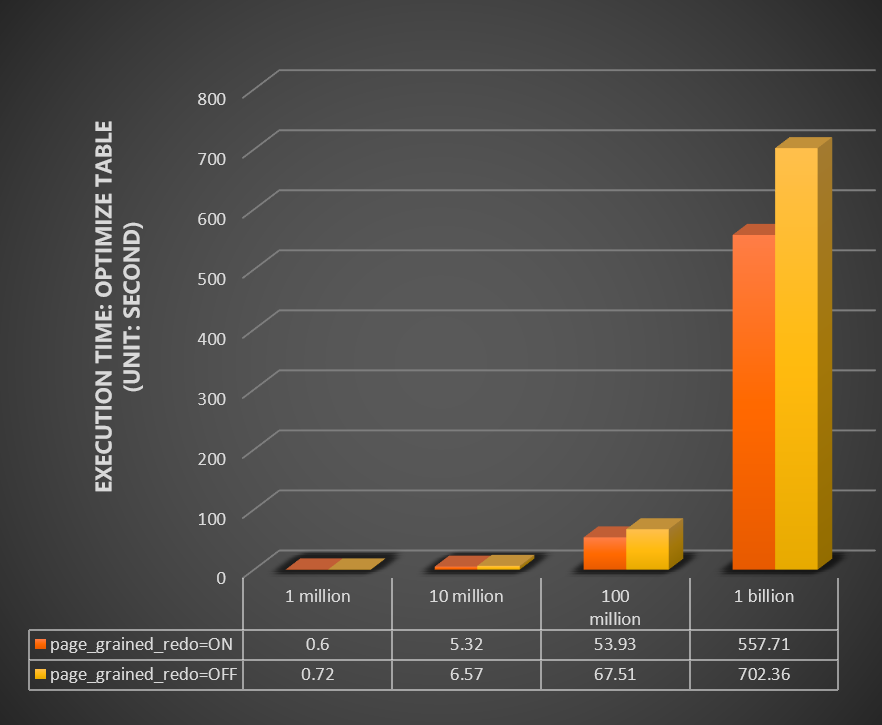
Test 2: Combined with parallel DDL
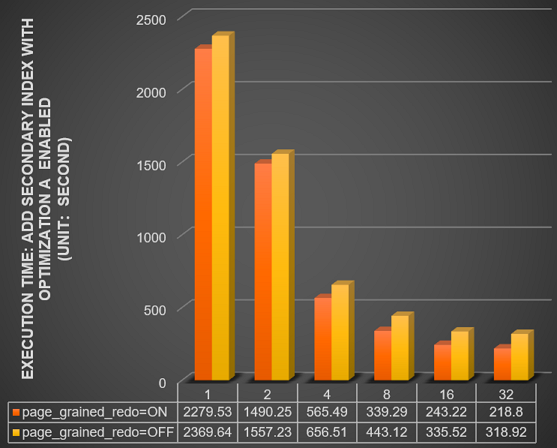
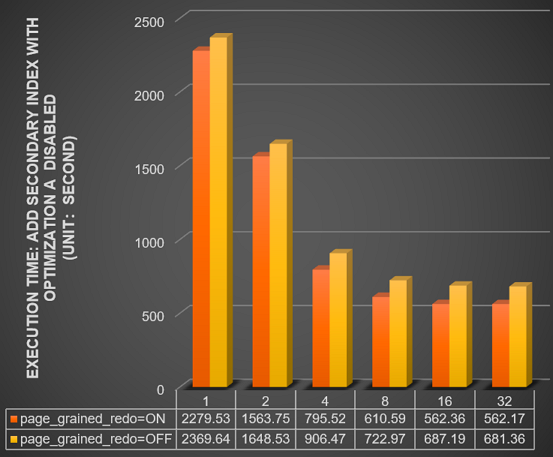
Compare the time (in seconds) for ADD INDEX on a 1 billion row table across different thread counts (innodb_polar_parallel_ddl_threads set to 1, 2, 4, 8, 16, and 32), with innodb_bulk_load_page_grained_redo_enable set to ON versus OFF.
With parallel DDL enabled (innodb_polar_use_sample_sort and innodb_polar_use_parallel_bulk_load both enabled):
With parallel DDL disabled (innodb_polar_use_sample_sort and innodb_polar_use_parallel_bulk_load both disabled):
For more information about parallel DDL parameters, see Parallel DDL.
Test 3: Read-only node stability under concurrent DDL
Test the read-only node's status, CPU usage, memory usage, IOPS, and replication latency when the primary node runs 1, 2, 4, 6, and 8 concurrent DDL operations on a 1 billion row table.
Feature enabled (`innodb_bulk_load_page_grained_redo_enable = ON`):
| Number of concurrent DDL operations | 1 | 2 | 4 | 6 | 8 |
|---|---|---|---|---|---|
| Status of the read-only node | Normal | Normal | Normal | Normal | Normal |
| Peak CPU usage (%) | 1.86 | 1.71 | 1.76 | 2.25 | 2.36 |
| Peak memory usage (%) | 10.37 | 10.80 | 10.88 | 11 | 11.1 |
| Read IOPS (reads per second) | 10965 | 10762 | 10305 | 10611 | 10751 |
| Peak replication latency (s) | 0 | 0.73 | 0.87 | 0.93 | 0.03 |
Feature disabled (`innodb_bulk_load_page_grained_redo_enable = OFF`):
For 4 concurrent DDL operations, the data shown is from before the read-only node became unavailable. A hyphen (-) indicates the DDL operations failed at that concurrency level and no result was returned.
| Number of concurrent DDL operations | 1 | 2 | 4 | 6 | 8 |
|---|---|---|---|---|---|
| Status of the read-only node | Normal | Normal | Unavailable | Unavailable | Unavailable |
| Peak CPU usage (%) | 4.2 | 9.5 | 10.3 | - | - |
| Peak memory usage (%) | 22.15 | 23.55 | 68.61 | - | - |
| Read IOPS (reads per second) | 9243 | 7578 | 7669 | - | - |
| Peak replication latency (s) | 0.8 | 14.67 | 211 | - | - |
With the feature disabled, the read-only node becomes unavailable at 4 or more concurrent DDL operations and replication latency spikes to 211 seconds under 4 concurrent operations. With the feature enabled, the node stays healthy across all tested concurrency levels with replication latency under 1 second.
Contact us
If you have any questions about DDL operations, please contact technical support.
What's next
Parallel DDL — Use parallel threads to further reduce DDL execution time on the primary node.
Engine versions — Check your cluster's current revision version.