Overview
This issue may be caused by one of the following causes:
The domain name is newly registered
A newly registered domain name is not synchronized with the Domain Name System (DNS) server where the domain name is to be resolved in real time. You can log on to Alibaba Cloud DNS console to check whether the DNS server is desired. If the DNS server is not wanted, you can manually modify the IP address of the DNS server for the domain name. By default, a maximum of 48 hours is required for the changes of DNS servers to takes effect.
The domain name has expired
The domain name has expired, and the Domain Name System (DNS) records of the domain name are disabled. As a result, the website to which the domain name points cannot be accessed.
Solution: Check the expiration date of the domain name in the Alibaba Cloud WHOIS. Renew your domain name that has expired. For more information, see Renew domain names. After successful renewal, the resolution of your domain name will be resumed within 24 to 48 hours.
The subdomain is hosted by a third-party DNS service provider
If your subdomain is hosted by other DNS service providers, the DNS settings for the primary domain name will not take effect for this subdomain. For example, you configure the DNS settings for your primary domain example.com in the Alibaba Cloud DNS console, and the subdomain www.example.com is managed by another Alibaba Cloud account or another DNS service provider. In this case, any changes that you made in the DNS settings of primary domain example.com for DNS records of the subdomain www.example.com will not take effect.
Solution: Reset the DNS record in the account or service provider where the subdomain www.example.com is hosted and retest.
The DNS record was modified
If the DNS record has been modified, the updates take effect after the DNS resolution result cached on the corresponding local DNS server expires. The time when the updates take effect depends on the time to live (TTL) period of the DNS resolution result cached on local DNS servers. For more information, see FAQ about the time when DNS settings take effect.
The DNS server for a domain name was modified
Generally, after you change DNS servers for a domain name, it takes 48 hours for the updated settings to take effect on global DNS nodes. Before the settings take effect, make sure that the resolution data is consistent between the DNS server provided by Alibaba Cloud DNS and the DNS server provided by a third-party service. Otherwise, domain name resolution may not take effect. For frequently asked questions (FAQ) about changing DNS servers for a domain name, see FAQ about changing DNS servers for a domain name.
The DNS server is not assigned by Alibaba Cloud DNS
Check whether the DNS server is assigned by Alibaba Cloud DNS. For more information about the current DNS server, you can access Alibaba Cloud WHOIS for query. If the result shows that the current DNS server is not one of the following server, the DNS resolution service that you use is not provided by Alibaba Cloud DNS. We recommend that you contact your DNS service provider for confirmation.
Server assigned by Alibaba Cloud DNS | Edition |
vip(1-8).alidns.com | Paid |
ns(1-32).hichina.com, ns(1-8).alidns.com | Free |
Solution: Set the DNS server to the server name assigned by Alibaba Cloud DNS. For more information, see How to modify the DNS server for an Alibaba Cloud domain name.
If the WHOIS Information page shows that the current DNS server of the domain name is the original DNS server after you modify the server name, please wait for a few minutes. This because the registration information of a domain name is cached on the WHOIS platform and not updated in real time. You can click Get the latest information on the WHOIS Information page to query the result.
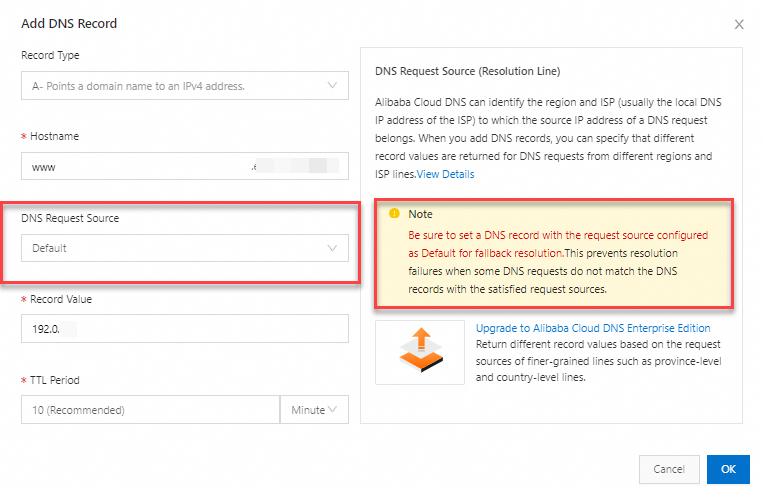
No default DNS line is specified for the domain name
If no DNS records with the request source configured as Default for fallback resolution, DNS resolution may fail when DNS requests from some regions and ISP lines do not match the DNS records.
Solution: Set a DNS record with the request source configured as "Default" for the domain name and restart DNS resolution after the TTL (Time to Live) for cached entries expires.