FAQ
Differences between 301 and 302 redirects
301 redirect: A 301 redirect indicates a permanent move.
302 redirect: A 302 redirect indicates a temporary move.
Similarity: Both 301 and 302 status codes indicate a redirection. When a browser receives a 301 or 302 status code from the server, it is redirected to a new URL. This new URL is retrieved from the Location header in the response. The user sees the address they entered, Address A, instantly change to Address B.
Difference: A 301 redirect means the resource at the old address, Address A, is permanently removed and is no longer accessible. When a search engine crawls the new content, it also replaces the old URL with the new one. A 302 redirect means the resource at the old address, Address A, still exists and is accessible. The redirection from Address A to Address B is temporary. A search engine will crawl the new content but keep the old URL.
The resolution result from a dig command is inconsistent with the console settings after you add a URL forwarding record
When you add a URL forwarding record, Alibaba Cloud DNS automatically adds an A record for you. This A record points to the URL forwarding server address provided by Alibaba Cloud DNS. Therefore, it is normal if you set the record value to a URL in the console but a `dig` command returns an A record with an IP address of 203.107.XX.XX.
An HTTP ERROR 502 message appears when you access a domain name after adding a URL forwarding record
If a message indicates that an ICP filing is missing when you add the URL forwarding record, check whether both the source and destination domain names have completed their ICP filings. If not, you must complete the ICP filing process.
If a 502 error occurs after you add a URL forwarding record, the ICP filing may have expired.
Why does an "Abnormal ICP filing" error appear when I add a URL forwarding record?
When you add a URL forwarding record, the source domain name is resolved to an Alibaba Cloud forwarding server, which then forwards the request. Alibaba Cloud URL forwarding servers are deployed in the Chinese mainland. Therefore, the source domain name must have a valid ICP filing. The ICP filing does not need to be completed with Alibaba Cloud.
Adding a Implicit URL Forwarding forwarding record results in a blank page when you access the domain name
A browser, such as Chrome, may show an error message. This error occurs because the `X-Frame-Options` header is set on the destination site, which prevents the site from being nested in a frame. To fix this issue, contact your website technician to remove the `X-Frame-Options` configuration from the destination site.
Adding anImplicit URL Forwarding forwarding record displays the target address in the address bar
Check the JavaScript (JS) code on the destination URL page. If you find the code highlighted in the following figure, remove that section of the JS code.

After you add a URL forwarding record, the page redirects to an incorrect address when refreshed.
This issue usually occurs if the destination page contains JS code that triggers a redirection. Contact your website technician to investigate.
A dig test does not return the corresponding A record and value after a URL forwarding record is added in Alibaba Cloud DNS
If a `dig` command for the source domain name does not return an IP address related to 203.107.XX.XX, submit a ticket to Alibaba Cloud DNS. Our technical support staff will handle the issue for you.
An ERR_EMPTY_RESPONSE error appears when you open the page after adding a URL forwarding record
This error usually occurs during a Challenge Collapsar (CC) attack. The Queries Per Second (QPS) for the domain name is too high. As a result, the URL forwarding server stops the forwarding service for that domain name. We recommend that you use another method to implement the forwarding service.
A "connection refused" message appears when you open the page after adding a URL forwarding record
Symptom: No information about the block is displayed in the console.
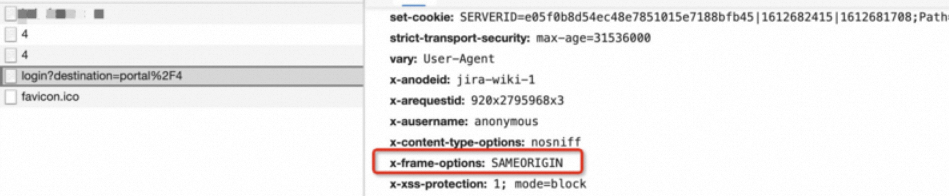
Cause: The issue is caused by the same-origin policy. Check the header of the last 200 OK response in the network path. It may contain a same-origin restriction.
Solution: This issue is usually caused by the security policy settings of your website. Check your configuration or use only Explicit URL Forwarding forwarding.
How many URL forwarding records can I configure?
Different Alibaba Cloud DNS editions support different numbers of URL forwarding records. The limits are as follows:
Free Edition: 2
Personal Edition: 5
Enterprise Ultimate Edition: 10
For more information about the differences between editions, see the URL forwarding (single domain name) section in Version comparison.
Does URL forwarding support HTTPS configuration?
The source domain name for URL forwarding supports HTTP but not HTTPS. The destination address supports both HTTP and HTTPS. To redirect HTTPS requests, you must install an SSL Certificate on an intermediate server, or the server must support automatic issuance of universal certificates. URL forwarding does not support this because of certificate management and security considerations. If you want to forward HTTPS requests, you must configure an HTTPS redirect on your origin server. The following is an example configuration for Nginx:
server {
  listen 443 ssl;
  server_name yourdomain.com;
  ssl_certificate     /path/to/cert.pem;
  ssl_certificate_key /path/to/cert.key;
  return 301 https://targetsite.com$request_uri;
}
Does URL forwarding support redirection with path parameters?
Explicit URL Forwarding/Implicit URL Forwarding forwarding does not support configuration with path parameters.