Purchase a Public Zone instance to provide a highly available, high-performance, and secure public authoritative DNS service for your business domain names.
Why choose a paid edition
Alibaba Cloud offers both free and paid public authoritative DNS services. The Free Edition is suitable only for testing and development because it does not meet the requirements of production environments for availability, security, and fine-grained management. We recommend that you upgrade to a paid edition for production environments. You can access paid editions by purchasing a Public Zone instance. The key advantages of paid editions include the following:
|
Feature |
Free Edition |
Paid Edition |
Paid Edition advantage |
|
SLA guarantee |
None |
100% monthly availability |
Guarantees 100% monthly availability for critical business domains and prevents service interruption caused by single points of failure. |
|
Line parsing |
Basic |
Intelligent resolution |
Optimizes global user access speed using intelligent resolution lines and supports massive DNS records with higher API call frequency. |
|
Security protection |
None |
Optional Anti-DDoS |
Defends against high-volume DNS DDoS attacks to ensure stable domain name resolution. |
|
Technical support |
None |
Expert support |
Access advanced O&M features such as resolution logs and health checks, plus expert technical support. |
For more information about the differences between the editions, see Edition comparison.
Purchase guide
Purchase entry points
Method 1: Go to the purchase page for Public Zone: Authoritative hosted domain (subscription).
Method 2:
-
Go to Alibaba Cloud DNS – Instance plans and click the Public Zone tab.
-
Click Buy Now.
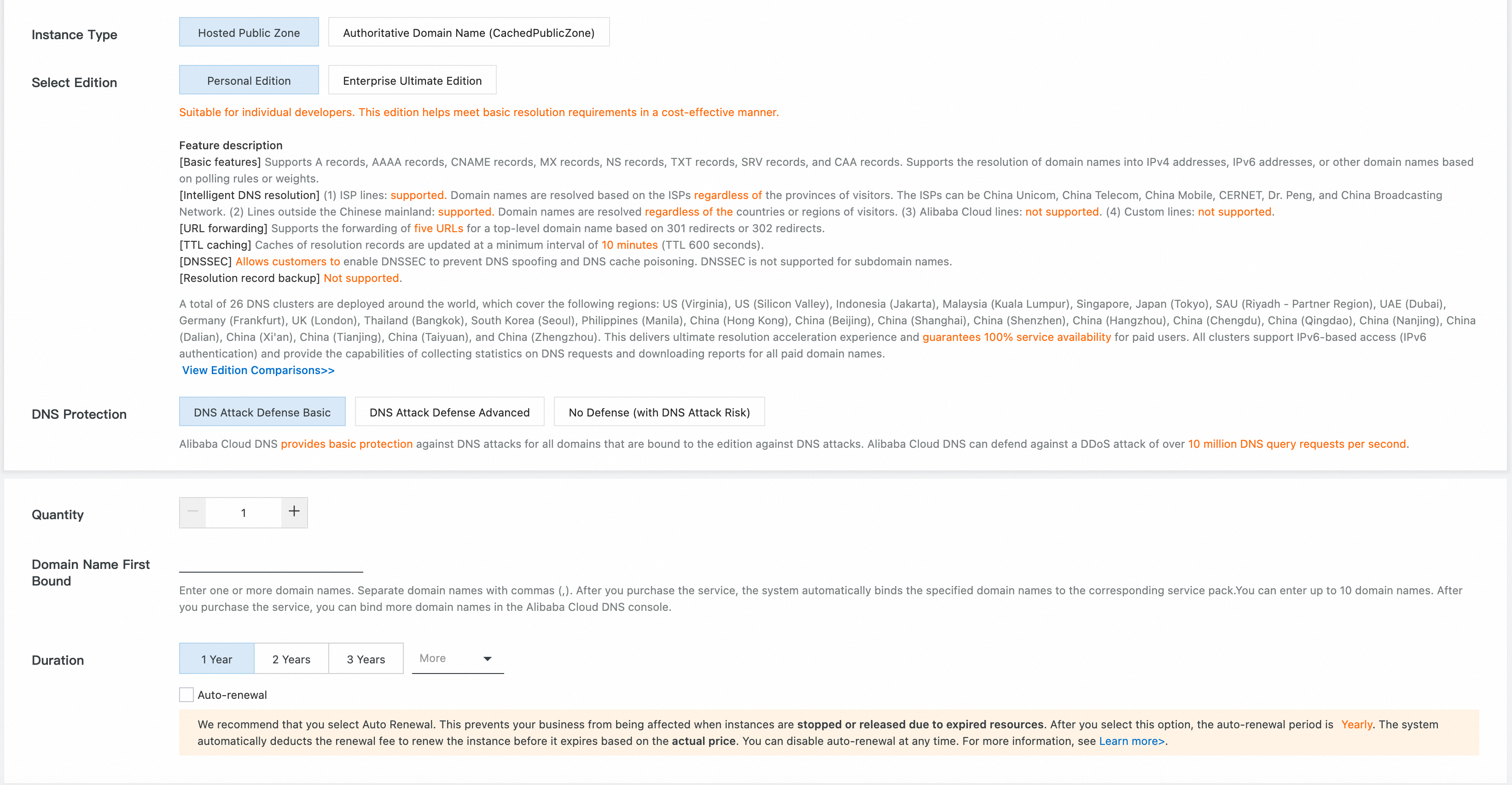
Form field descriptions
|
Field |
Required |
Description |
|
Instance type |
Yes |
Authoritative hosted domain: Provides stable, high-quality public authoritative DNS for a specified number of domain names. Keep the default setting. |
|
Version Selection |
Yes |
Personal Edition: Designed for individual developers with basic DNS needs at a competitive price. Enterprise Ultimate Edition: Built for enterprises across industries, offering fine-grained O&M capabilities and expert consulting. Premium Edition: Tailored for enterprises across industries with no limits on key metrics, plus fine-grained O&M and expert consulting. For more details on edition differences, see Edition comparison. |
|
DNS security |
Yes |
Personal Edition: Optional DNS security defense Enterprise Ultimate Edition: Required DNS security defense Premium Edition: Includes full DNS defense by default |
|
Number of domains |
Yes |
The number of domains the instance can bind. Default is 1. Maximum is 100,000. |
|
Binding a domain name for the first time |
No |
Enter domain names separated by commas. After purchase, the system automatically binds these domains to your plan. You can enter up to 10 domains here. To bind more, go to the console after purchase and use batch binding. |
|
Subscription duration |
Yes |
Choose from 1 month, 3 months, 6 months, 1 year, 2 years, or 3 years. |
|
Auto-renewal on expiration |
No |
We recommend selecting Auto-renewal on expiration to avoid service disruption or resource release due to expiration. If enabled, the Unified Auto Renewal Cycle is annual, and your account will be charged at the real-time price before expiration. You can cancel auto-renewal anytime. |
Pricing details
Plan 1: Personal Edition + DNS Security (Optional)
DNS Security is optional for the Personal Edition. The billing formula is: Total fee = (Unit price of Personal Edition + Unit price of DNS Security) × Number of domain names
Billable item | Price | Description |
| 7 USD/domain name/year | Personal Edition: 7 USD/domain name/year Basic Security: 86 USD/domain name/year Advanced Security: 429 USD/domain name/year Note For purchase and use by individual developers only Enterprise users cannot purchase new Personal Edition instances. Existing Personal Edition instances can still be used and renewed. |
| 93 USD/domain name/year | |
| 436 USD/domain name/year |
Plan 2: Ultimate Edition + DNS Security (Required)
DNS Security is required for the Ultimate Edition. The billing formula is: Total fee = (Unit price of Ultimate Edition + Unit price of DNS Security) × Number of domain names
Billable item | Price | Description |
| 167 USD/domain name/year | Ultimate Edition: 81 USD/domain name/year Basic Security: 86 USD/domain name/year Advanced Security: 429 USD/domain name/year |
| 510 USD/domain name/year |
Plan 3: Premium Edition
The Premium Edition includes Advanced DNS Security by default. The billing formula is: Total fee = Unit price of Premium Edition × Number of domain names
Billable item | Price |
| 4,287 USD/domain name/year |
Post-purchase configuration
1. Add your domain to Public Zone
For domains registered with Alibaba Cloud: Make sure that the domain status is Normal, the domain is not locked or expired, and the domain is not bound to another instance.
For domains registered elsewhere:
-
If the domain has no existing DNS records, you can add the domain to Public Zone. For more information, see Domain management.
-
If the domain has existing DNS records, you must migrate all records to Alibaba Cloud Public Zone. For more information, see How to smoothly migrate domain name resolution to Alibaba Cloud DNS.
2. Bind domains to your instance
-
Find the target instance and click Bind Zone in the Actions column.

-
On the Bind domain page, in the Basic information section, click Bind Zone and enter the domain names that you want to bind. If your instance supports multiple domains, you can enter more than one domain name.
3. Switch your domain’s DNS server addresses and verify
-
Go to Alibaba Cloud DNS – Public authoritative DNS, find the DNS Server IP Address for the target domain, and copy the addresses that are assigned by the system. After you bind the domain, the addresses are typically in the format of
vip(1-8).alidns.com.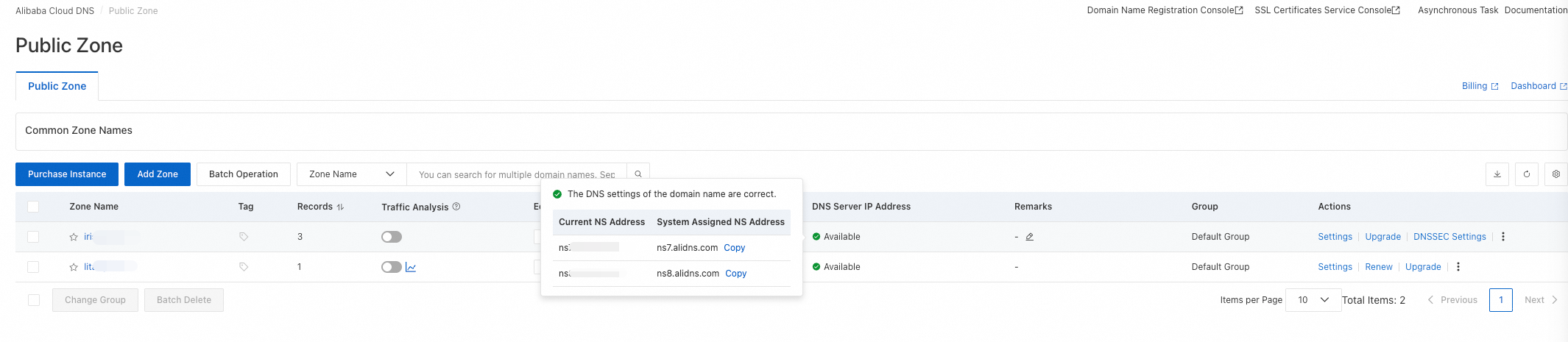
-
Go to the console of your domain registrar to update the DNS server addresses. If your domain is registered with Alibaba Cloud, perform the following steps:
Go to the Domain Names console. In the domain name list, find the target domain name and click Manage in the Actions column.

In the left menu bar, click Modify DNS, and then click the Modify DNS Server button.

Enter the DNS server addresses assigned by Alibaba Cloud DNS, such as
vip1.alidns.comandvip2.alidns.com. Then, submit your changes.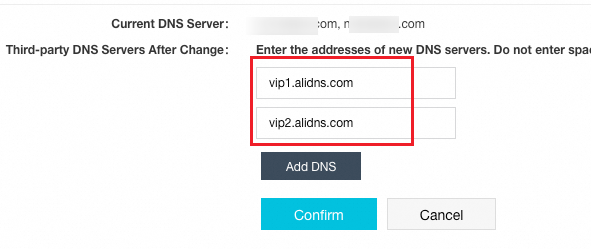
For more information about how to update DNS server addresses with other registrars, see Modify your domain’s DNS servers.
Verify that the resolution is activated
After you change the DNS server addresses for your root domain, it typically takes a few minutes to 48 hours for the changes to propagate. The propagation time depends on the time-to-live (TTL) settings of the top-level domain (TLD). Wait for the configuration to take effect. You can use one of the following methods to verify the result:
-
Go to Alibaba Cloud DNS – Public authoritative DNS and check whether the status of the DNS Server IP Address for the target domain is Available.
-
You can also run a command to verify the resolution.
# Check if NS records are active
dig yourdomain NS
# Check if resolution works correctly
dig @vip1.alidns.com yourdomain A
Instance management and upgrades
-
If an instance expires, service degradation or resolution failure may occur. We recommend that you configure auto-renewal for the instance in advance. For more information, see Instance expiration and renewal.
-
Only partial refunds are supported for instances. For more information, see Refund an instance.
-
For more information about how to unbind a domain, switch instance bindings, or upgrade or downgrade an instance, see Upgrade, unbind, rebind, or downgrade an instance.
FAQ
Q: Is monthly billing supported? A: Yes, it is. On the purchase page, you can click More durations to select a shorter billing cycle. The minimum billing cycle is one month.
Q: What if I purchase a plan for more domains than I need? A: You cannot reduce the number of domains in your plan after purchase. We recommend that you purchase a plan based on your actual needs.
Q: What do I do if the domain binding fails? A: The following list describes common causes and their solutions:
-
The domain is already bound to another instance: Unbind the domain from the other instance and then bind it to the desired instance.
-
The domain name is in an invalid format: Check whether the domain name contains special characters.
-
You do not have the required permissions: Verify the permissions of your account.
Q: How long does it take for the new DNS server settings to take effect? A: After you change the DNS server addresses for a root domain, it typically takes a few minutes to 48 hours for the changes to take effect. The actual time required depends on the TTL settings of the TLD.
For more information, see Instance-related FAQ.