If you encounter inaccurate intelligent DNS resolution for domain names hosted by Alibaba Cloud DNS servers, you can use the following methods to troubleshoot the issues.
The solutions described in this topic apply to domain names resolved using Alibaba Cloud DNS. If your domain names are hosted by Domain Name System (DNS) servers of other vendors, contact those vendors for specific solutions.
1. View the egress IP addresses of the local DNS server
Intelligent DNS resolution of Alibaba Cloud DNS is implemented based on the egress IP addresses of the local DNS servers used by clients instead of the IP addresses of these clients. The clients include mobile phones, personal computers (PCs), and Internet of Things (IoT) devices. You can obtain the egress IP addresses of the local DNS server used by a client using one of the following methods:
Contact the administrator of the network in which the client is located.
Run the
dig +short TXT whoami.ds.akahelp.netcommand in a Linux operating system or thenslookup -q=txt whoami.ds.akahelp.netcommand in a Windows operating system several times.
After you run the command in the Linux operating system, you may obtain the following parameters:
$ dig +short TXT whoami.ds.akahelp.net ok at 11:20:47#Run the command in the Linux operating system.
"ns" "123.126.xx.xx" #ns indicates the egress IP address of the DNS server used by the local machine, which may be an IPv4 address or an IPv6 address.
"ecs" "120.52.xx.xx/32/24" #ecs (EDNS-client-subnet) indicates the client subnet in the DNS request.
"ip" "123.126.xx.xx" #ip indicates the representative client IP address selected by the authoritative name server from the ecs. The local DNS server does not carry the real IP address of the client to protect user privacy.
Execution result of the command in the Windows operating system
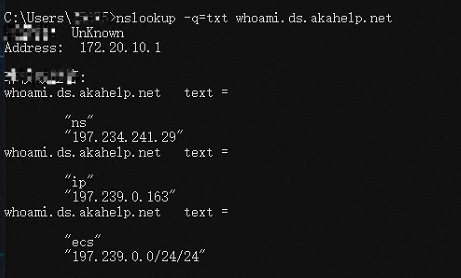
Execution result of the command in the Linux operating system

After obtaining the egress IP addresses of the local DNS server, run the dig domain name @vip4.alidns.com +subnet=egress IP address of the local DNS server command to check whether the domain name is resolved as expected.
Replace vip4.alidns.com with the actual name of your DNS server. For more information, see View DNS server status and handle exceptions.
2. Check whether the DNS record that contains a custom line takes effect
If you want to use a custom line, you must specify a CIDR block as the DNS request source. Enter the egress CIDR block of the local DNS servers used by clients instead of the CIDR block of the clients. Otherwise, the DNS resolution line cannot be matched and only the DNS records that contain the default line are returned.
A local DNS server often uses more than one egress IP addresses. To make intelligent DNS resolution more accurate, contact the administrator of the network in which the client is located to obtain the egress IP addresses of the local DNS server.
If the local DNS server only has a few egress IP addresses, run the dig +short TXT whoami.ds.akahelp.net command in the Linux operating system or the nslookup -q=txt whoami.ds.akahelp.net command in the Windows operating system several times to obtain the egress IP addresses of the local DNS server.
Custom lines do not support IPv6 addresses. If the egress IP addresses of local DNS servers are IPv6 addresses, the custom line will not be matched and only the DNS records that contain the default line are returned.
3. Check whether a CNAME record that contains the default line is cached
Scenario
A canonical name (CNAME) record that contains the default line is added.
A, AAAA, text (TXT), and mail exchanger (MX) records that contain non-default lines are added.
Cause analysis
When a DNS request for a DNS record that contains a non-default line is initiated:
If the DNS record is an A record and an AAAA record that contains the non-default line is added but no A record is added, no DNS record is returned. This does not cause inaccurate intelligent DNS resolution.
If the DNS record is an AAAA record and an A record that contains the non-default line is added but no AAAA record is added, no DNS record is returned. This does not cause inaccurate intelligent DNS resolution.
If the DNS record is an A record and no A or AAAA record that contains the non-default line is added, but only TXT or MX records are added, the CNAME record that contains the default line is returned and cached in the local DNS server. This causes inaccurate intelligent DNS resolution.
If the DNS record is an AAAA record and no A or AAAA record that contains the non-default line is added, but only TXT or MX records are added, the CNAME record that contains the default line is returned and cached in the local DNS server. This causes inaccurate intelligent DNS resolution.
If the DNS record is an MX or TXT record and no corresponding record type that contains the non-default line is added, the CNAME record that contains the default line is returned and cached in the local DNS server. The CNAME record has the highest priority. During the time-to-live (TTL) period of the cached CNAME record, even if a DNS request for an A or AAAA record that contains the non-default line is initiated, the request will hit the cached record and return the CNAME record that contains the default line. This causes inaccurate intelligent DNS resolution.
Solution
After you add an A record and an AAAA record that contain non-default lines for a domain name, add a CNAME record for the domain name. Take the domain name dns-example.top as an example. First, map test.dns-example.top to IPv4 and IPv6 addresses using A and AAAA records, then map the business domain name under the China Mobile line to test.dns-example.top using a CNAME record.
test.dns-example.topis used for reference only. When you configure a CNAME record, select another second-level domain name that has no DNS records as needed.You must add a CNAME record after an AAAA record and an A record are added. Otherwise, the DNS resolution may be interrupted.
Before the DNS settings are modified:
Host record | Record type | Request source | Record value |
@ | AAAA | China Mobile | ff03:0:0:0:0:0:0:c1 |
@ | A | China Mobile | 223.5.*.* |
@ | CNAME | Default | www.aliyun.com |
After the DNS settings are modified:
Host record | Record type | Request source | Record value |
@ | AAAA | China Mobile | ff03:0:0:0:0:0:0:c1 |
@ | A | China Mobile | 223.5.*.* |
@ | CNAME | China Mobile | test.dns-example.top |
@ | CNAME | Default | www.aliyun.com |
The CNAME record that contains the default line has the same priority as the CNAME record that contains a non-default line. If you initiate a DNS request for an MX record or a TXT record that contains a non-default line and no corresponding MX record or TXT record is added, no DNS record is returned. In this case, cache pollution issues do not occur.