HTTPDNS provides DNS resolution over TLS-encrypted TCP connections, as specified in RFC 7858.
Obtaining DoT/DoH endpoints
Obtaining user_id
Access the service.
On the Integration Configuration tab, select Method 3: DoT/DoH Integration.
Currently, DoT/DoH supports two integration methods: short address integration and custom encrypted address integration.
ImportantFor enhanced security, we recommend you Enable Encrypted Address method.
Click Add Encrypted Address, enter the custom part in the dialog box to obtain the custom integration address.

Finally, turn on the enable status switch for the encrypted address.
WarningIf you decide to abandon the DoH method for accessing public DNS, you can set the enable status to off.
Please exercise caution when using the service suspension function. After suspension, you will be downgraded to a free user, which means billing stops, console report display and other feature operations are discontinued. Your public DNS service will no longer have SLA guarantees and will be subject to rate limiting and resolution rejection.
The service can be restarted after suspension. After restart, the service will restore its original configuration and billing will resume.
Configure DoT
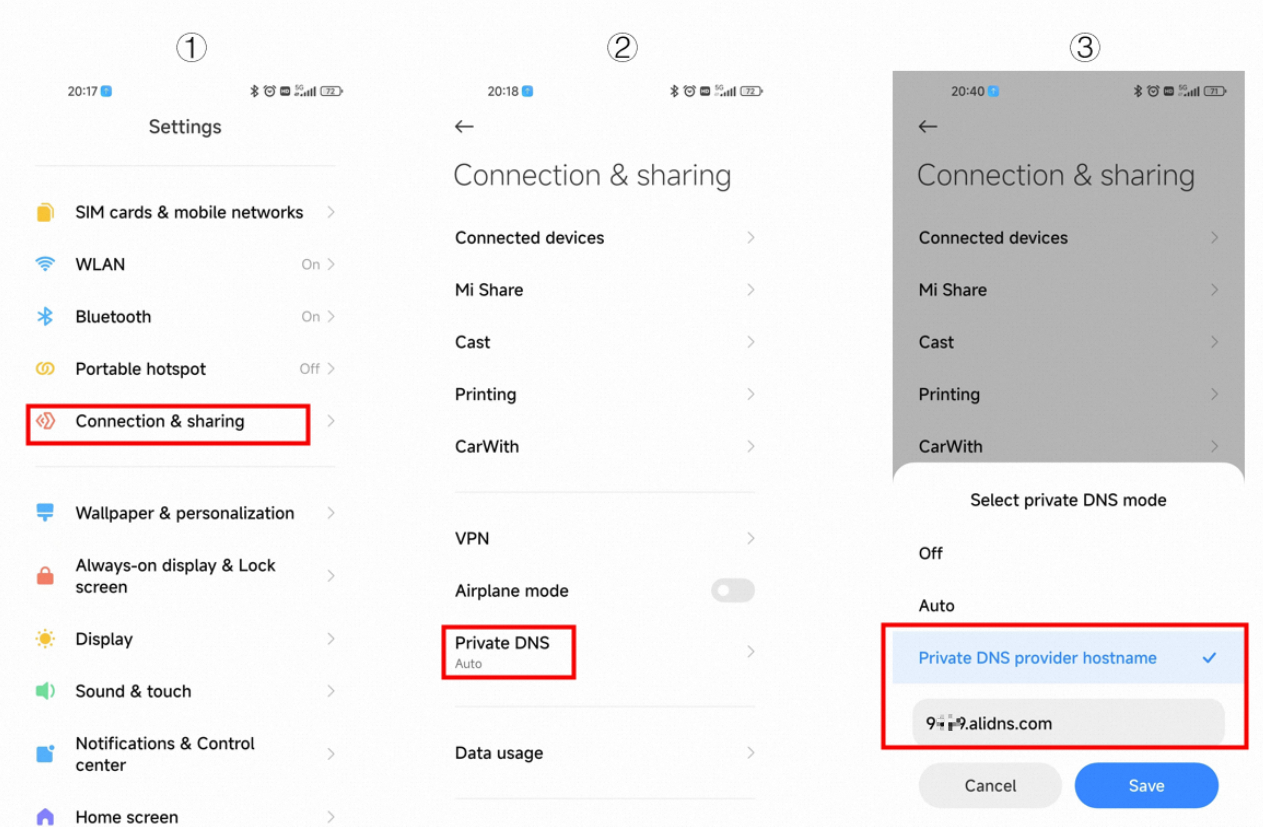
Android phone users can use the DNS DoT secure transmission service by configuring the domain name and address of Public DNS in their phone settings. The following example uses MIUI 14:
Go to the Settings page, click Connection & sharing.
Click Private DNS.
Select Private DNS provider hostname and enter the Public DNS server name.