Is DNS resolution affected if a paid instance of Alibaba Cloud DNS expires?
After a paid instance of Alibaba Cloud Domain Name System (DNS) expires, the DNS records of the instance are retained for seven days. If you renew the instance within seven days after it expires, DNS resolution is not affected. If you do not renew the instance within seven days after it expires, the instance is released. After the instance is released, you must follow the following instructions to prevent DNS resolution exceptions:
If your domain name is registered with Alibaba Cloud, the instance is automatically downgraded to the free edition of Alibaba Cloud DNS and the DNS records that are supported only by the paid editions of Alibaba Cloud DNS are disabled. If the update prohibition lock has been enabled for your domain name or the network times out, the instance fails to be downgraded and the DNS service becomes abnormal. To prevent this issue, you must change the DNS server names to those assigned for the free edition of Alibaba Cloud DNS in the domain name console. You can obtain the DNS server names assigned for the free edition from the Alibaba Cloud DNS console. You can access the WHOIS page to check the state of your domain name. If the update prohibition lock has been enabled for your domain name, Domain Status is clientUpdateProhibited on the query result page.
If your domain name is registered with a third-party DNS service provider, you must change the DNS server names of your domain name to those assigned for the free edition of Alibaba Cloud DNS to prevent DNS resolution from being affected.
Is DNS resolution affected if the domain name to which an Alibaba Cloud DNS instance is bound expires?
If the domain name to which an Alibaba Cloud DNS instance is bound expires, DNS resolution becomes unavailable. After you renew the expired domain name, DNS resolution is resumed within 24 to 48 hours in most cases.
What does DNS protection mean in the paid editions of Alibaba Cloud DNS?
DNS protection means that Alibaba Cloud DNS provides protection against DNS attacks, mainly DNS query flood attacks, for all the domains that are bound to the paid instances of Alibaba Cloud DNS. In a DNS query flood, an attacker floods the DNS server of a domain with a large number of DNS queries. This instantly brings a large query load to the DNS server. If the number of DNS queries reaches a certain limit per second, the DNS resolution on the DNS server times out and the DNS server even crashes. As a result, the user client cannot obtain the IP address of the attacked domain, and the corresponding website is inaccessible.
Does the free edition of Alibaba Cloud DNS support DNS protection?
No, the free edition of Alibaba Cloud DNS does not support DNS protection.
What are the scope and capability of DNS protection?
Alibaba Cloud DNS provides two levels of DNS protection: DNS Attack Defense Basic and DNS Attack Defense Advanced. DNS Attack Defense Basic can defend against an attack of over 10 million DNS queries per second. DNS Attack Defense Advanced can defend against an attack of over 100 million DNS queries per second.
Is DNS protection available within the validity period for a paid instance of Alibaba Cloud DNS?
Yes, Alibaba Cloud DNS protects your domain name against all distributed denial of service (DDoS) attacks that occur during the validity period for the paid instance of Alibaba Cloud DNS that is bound to your domain name.
Can DNS protection be used to defend against DDoS attacks?
Yes, DNS protection can be used to defend against DDoS attacks, and you do not need to pay for the protection within the validity period of your paid instance.
What should I do if the number of DNS queries in an attack exceeds the upper limit supported by DNS Attack Defense Advanced?
If you encounter such an attack, submit a ticket to contact us.
Why am I asked to change DNS server names after I upgrade a paid instance of Alibaba Cloud DNS?
The DNS server names assigned to an instance of Personal Edition are different from those assigned to an instance of Enterprise Standard Edition or Enterprise Ultimate Edition. Your business will not be affected if you do not change your DNS server names. However, to keep DNS records consistent, we recommend that you change your DNS server names to those assigned by Alibaba Cloud DNS as prompted.
Where can I view DNS protection data if I have purchased DNS protection?
You can view DNS protection data in the Alibaba Cloud DNS console. For more information, see DNS protection.
Is DNS resolution affected if I upgrade a free instance of Alibaba Cloud DNS to a paid instance of Alibaba Cloud DNS?
Changing the DNS server names assigned for the free edition to those assigned for a paid edition has no impact on DNS resolution because this is a process of smooth upgrade.
Is DNS resolution affected if I change the DNS server names of a paid instance that I have purchased?
Whether the change of DNS server names affects DNS resolution depends on your domain name registrar. For more information, see the following table.
Domain name registrar | Change mode | Impact |
Third-party DNS service provider | Change the DNS server names assigned for the free edition of Alibaba Cloud DNS to those assigned for a paid edition of Alibaba Cloud DNS. | The change has no impact on DNS resolution. |
Third-party DNS service provider | Change the DNS server names assigned for a third-party DNS service provider to those assigned for a paid edition of Alibaba Cloud DNS. | Smooth migration can be implemented without interrupting your business. For more information, see Smooth domain name imgration to Alibaba Cloud DNS. |
Alibaba Cloud | Change the DNS server names assigned for a third-party DNS service provider to those assigned for a paid edition of Alibaba Cloud DNS. | Smooth migration can be implemented without interrupting your business. For more information, see Smooth domain name imgration to Alibaba Cloud DNS. |
Alibaba Cloud | Change the DNS server names assigned for the free edition of Alibaba Cloud DNS to those assigned for a paid edition of Alibaba Cloud DNS. | The change has no impact on DNS resolution. |
If my paid instance of Alibaba Cloud DNS is about to expire but I do not want to renew it, can I downgrade the instance to the free edition of Alibaba Cloud DNS?
Yes, you can downgrade your instance from the paid edition of Alibaba Cloud DNS to the free edition of Alibaba Cloud DNS.
If your domain name is registered with Alibaba Cloud, log on to the Alibaba Cloud DNS console. On the Authoritative DNS Resolution page, click the Editions tab and click Bind Domain Name in the Actions column of your domain name. In the Bind Domain Name section on the page that appears, click Unbind Domain Name in the Actions column. After the domain name is unbound from the instance, Alibaba Cloud DNS automatically downgrades your DNS servers to the free edition of Alibaba Cloud DNS. If the update prohibition lock is enabled for your domain name, Alibaba Cloud DNS cannot perform the automatic downgrade. If this issue occurs, you must disable the update prohibition lock, obtain the DNS server names assigned for the free edition from the Alibaba Cloud DNS console, and then change the DNS server names in the domain name console.
If your domain name is registered with a third-party DNS service provider, log on to the Alibaba Cloud DNS console. On the Authoritative DNS Resolution page, click the Editions tab and click Bind Domain Name in the Actions column of your domain name. In the Bind Domain Name section on the page that appears, click Unbind Domain Name in the Actions column. After you unbind the domain name, obtain the DNS server names assigned for the free edition from the Alibaba Cloud DNS console, and then change the DNS server names in the domain name console.
Why does my paid instance of Alibaba Cloud DNS fail to be bound to domain names?
The general cause is that the number of domain names that you want to bind to your paid instance exceeds the upper limit supported by the edition of Alibaba Cloud DNS. You can log on to the Alibaba Cloud DNS console. On the Authoritative DNS Resolution page, click the Editions tab and click Bind Domain Name in the Actions column of your domain name. In the Basic Information section of the page that appears, you can view the value of Maximum Bound Domain Names. If you want to bind more domain names, click Upgrade on the Editions tab and increase the value of Quantity on the page that appears.
When I attempt to bind my paid instance of Alibaba Cloud DNS to a domain name, why am I prompted that the domain name does not exist?
The general cause is that the domain name that you want to bind is the temporary domain name of a virtual host. Temporary domain names are used for website debugging and cannot be resolved for users. You must bind a domain name that you have registered to your instance.
Will DNS resolution be affected after a paid instance of Alibaba Cloud DNS expires?
If your paid instance of Alibaba Cloud DNS expires and you do not renew it within seven days, its DNS records are deleted after seven days. DNS resolution becomes unavailable if you do not change the DNS server names for the paid instance after the paid instance expires. To continue using a paid instance of Alibaba Cloud DNS, click here to buy one and bind it to a domain name.
When I attempt to change DNS server names, why am I asked to try again later because an operation is in progress?
The general cause is that Alibaba Cloud DNS is automatically changing the DNS server names assigned for the free edition to those assigned for a paid edition. We recommend that you wait 5 minutes and log on to the Alibaba Cloud DNS console to check the status of the DNS servers.
How do I query which edition of Alibaba Cloud DNS is used for my domain names?
You can perform the following steps to query which edition of Alibaba Cloud DNS is used for your domain names:
Log on to the Alibaba Cloud DNS console.
On the Authoritative Domain Names tab of the Authoritative DNS Resolution page, view all your domain names and the corresponding editions of Alibaba Cloud DNS. On the Editions tab of the Authoritative DNS Resolution page, view the information about the paid instances of Alibaba Cloud DNS.
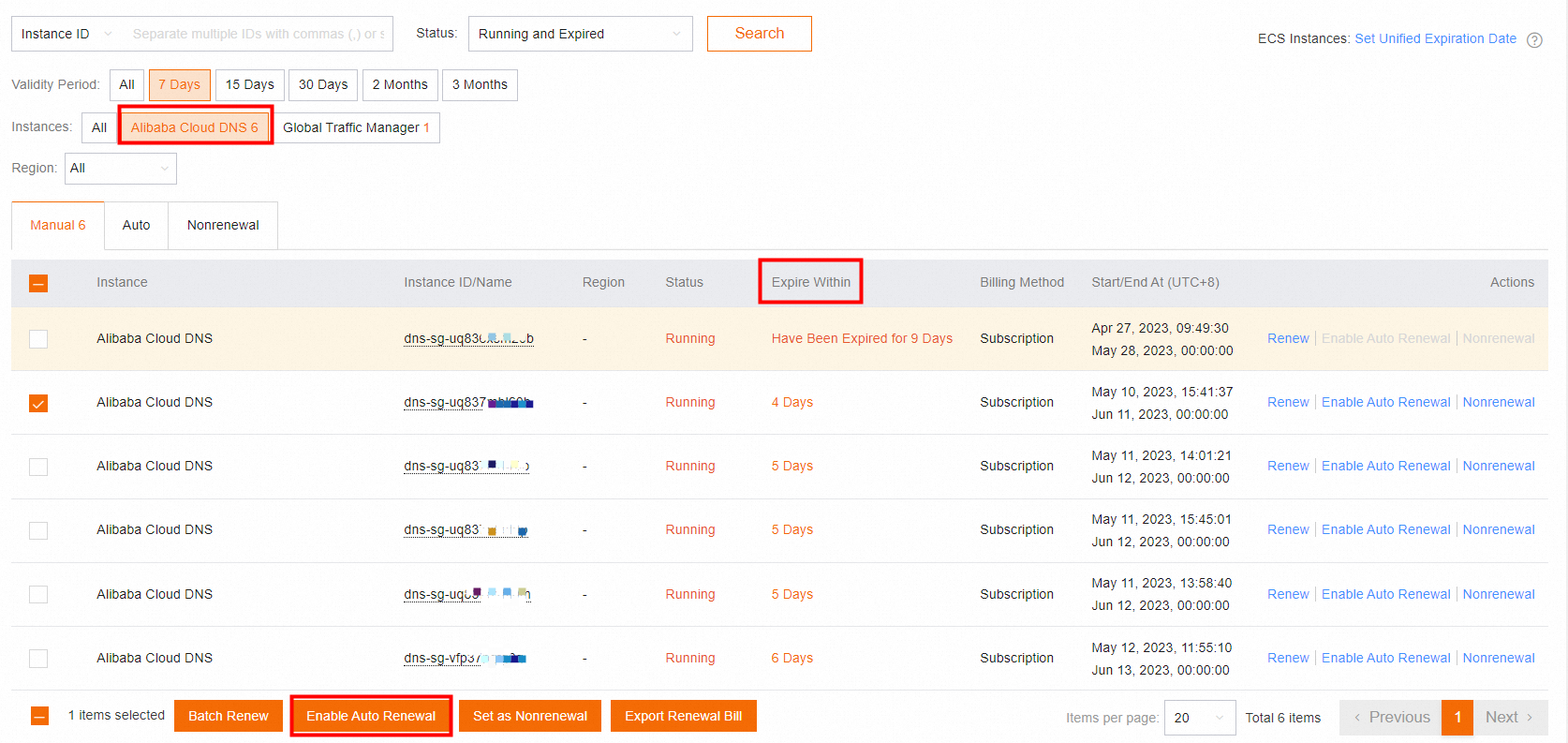
How do I enable auto-renewal for my paid instances of Alibaba Cloud DNS?
You can perform the following steps to enable auto-renewal for your paid instances of Alibaba Cloud DNS:
Log on to the Alibaba Cloud DNS console.
On the Authoritative Domain Names tab of the Authoritative DNS Resolution, click Configure Auto-renewal.
On the renewal page, select Alibaba Cloud DNS for Instances. On the Manual tab, select the instances for which you want to enable auto-renewal and click Enable Auto Renewal. You can view the fee deduction time for auto-renewal based on the value of Expire Within shown in the following figure.