Storage Overview displays data as of the previous day (T-1). It provides key information about your storage and metadata, including storage trends, storage class distribution, table format distribution, and file size distribution. This information helps you quickly assess your current storage usage, identify potential issues, and optimize your resources.
Prerequisites
-
Object Storage Service (OSS) is activated.
-
You have configured location hosting in Data Lake Formation (DLF).
Enable storage overview
-
Log on to the Data Lake Formation console.
-
In the left-side navigation pane, choose , and then click Enable Now to activate the feature.
-
When you enable Storage Overview, Storage Overview writes statistical information to the corresponding OSS buckets. This action incurs minor storage costs.
-
Data is not available on the first day of activation. Statistics are generated and available the next day.
Features
Metadata analysis
Total resources
-
Total storage and monthly/daily changes: The total storage of all tables managed in metadata. This includes only storage in OSS and excludes Hadoop Distributed File System (HDFS) storage.
-
Total number of tables and monthly/daily changes: The total count of all tables managed in metadata.
-
Total number of databases and monthly/daily changes: The total count of all databases managed in metadata.
-
API monthly/daily access volume: The number of API calls for the current calendar month.
Trend changes
Displays trend charts for storage volume, table count, database count, and API calls. You can select a specific time range to analyze.

Table and database storage ranking
Ranks tables and databases by their OSS storage consumption. Use this information to identify and optimize the largest storage consumers based on your business needs.
The Table storage ranking panel on the left displays the rank, table name, and table storage size. The Database storage ranking panel on the right displays the rank, database name, and database storage size. Click a table name or database name to view its details.
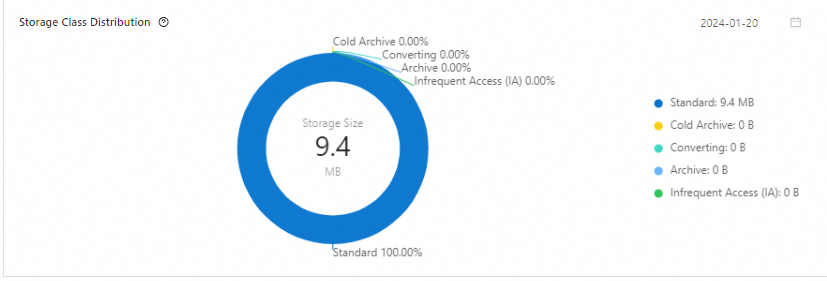
Storage class distribution
Shows how your data is distributed across different OSS storage classes, which include Standard, Infrequent Access (IA), Archive, and Cold Archive. Use this information to choose the right storage class for your data and optimize costs.
Storage format distribution
View the distribution of storage formats for the analyzed tables.

File size distribution and small file ranking
Analyzes file size distribution and ranks tables by their small file count. You can use this ranking to identify and optimize tables that contain a large number of small files to improve query performance.

Location analysis
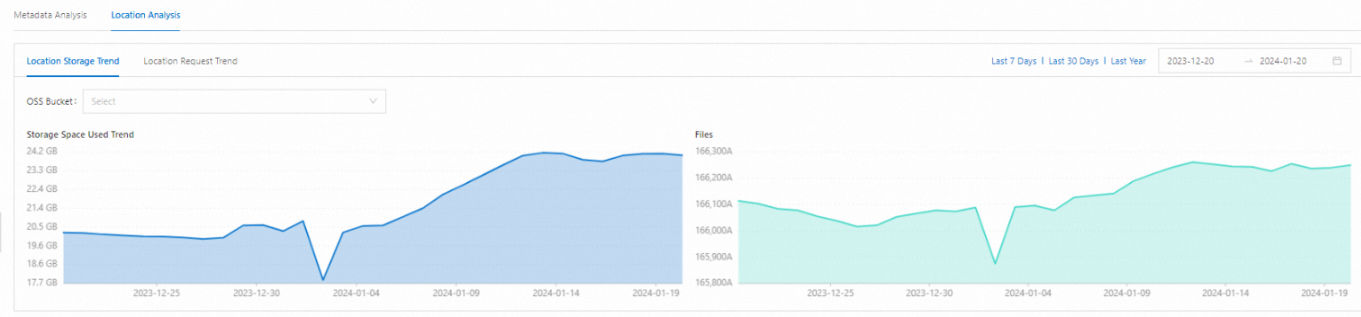
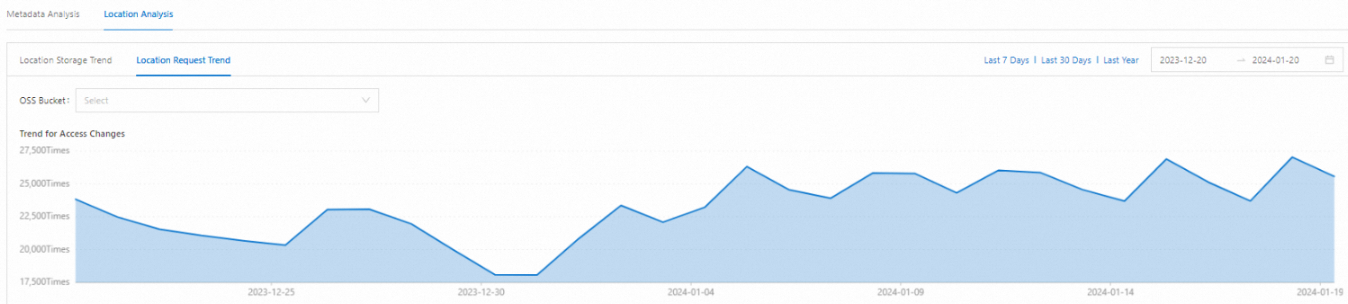
Provides trend analysis for storage and requests, along with storage rankings for your locations. You can filter the results by OSS bucket and time range.
Location storage trends
Location request trends
Location storage ranking
The Location storage ranking table includes four columns: Rank, OSS bucket, Storage size, and Total file count. It lists each bucket's storage usage and file count in descending order by storage size.