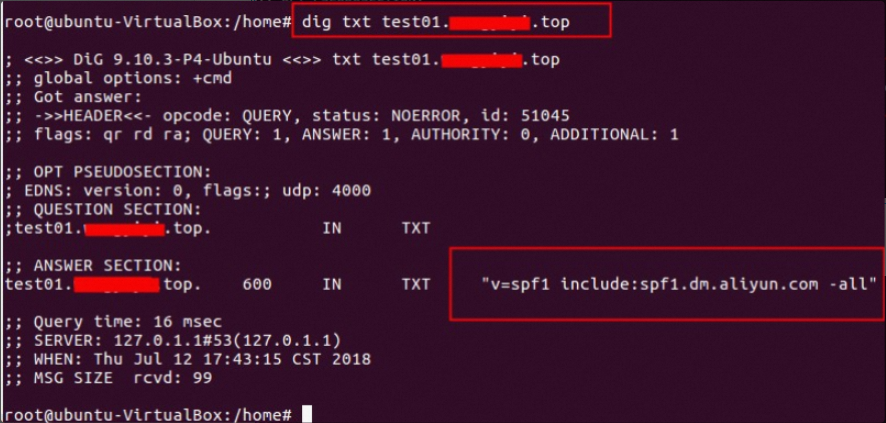
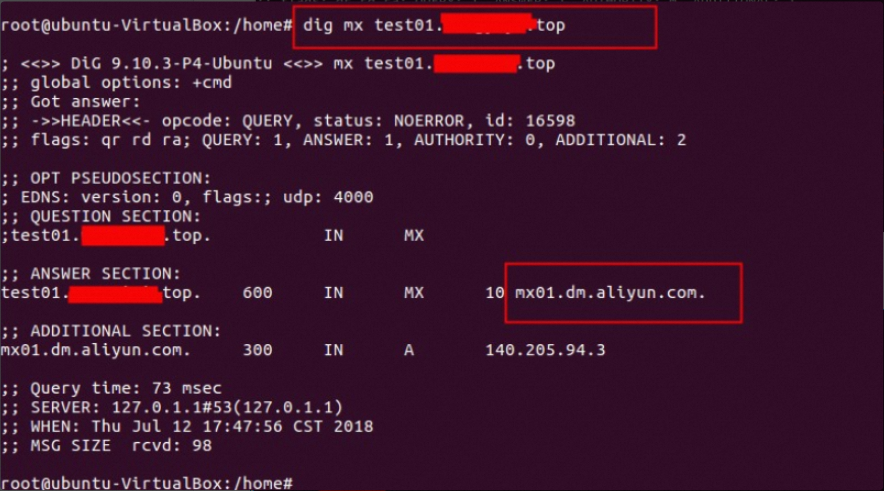
This article shows you how to verify that the DNS settings for your sender domain are correctly configured. It covers verification methods for SPF, DKIM, DMARC, and MX records using the Alibaba Cloud DNS Check Tool, the Windows nslookup command, and the Linux dig command. The examples use sub.example.com as the sender domain and example.com as the primary domain name.
Example: sub.example.com in China (Hangzhou)
The domain sub.example.com is a subdomain of the primary domain name example.com.
Before verifying, you must configure the DNS records at your domain name service provider. Find the required record values on the Direct Mail > Sender Domains > Configure page in the Alibaba Cloud console. After the records are configured, use one of the following methods to verify that they have taken effect.
When you run the queries, replace the example domain name with your own.
Using the Alibaba Cloud DNS Check Tool
1. SPF (sender policy framework)
Purpose: Prevents sender spoofing by declaring a list of server IP addresses that are authorized to send email for your domain name.
Domain to query:
sub.example.comRecord type: TXT
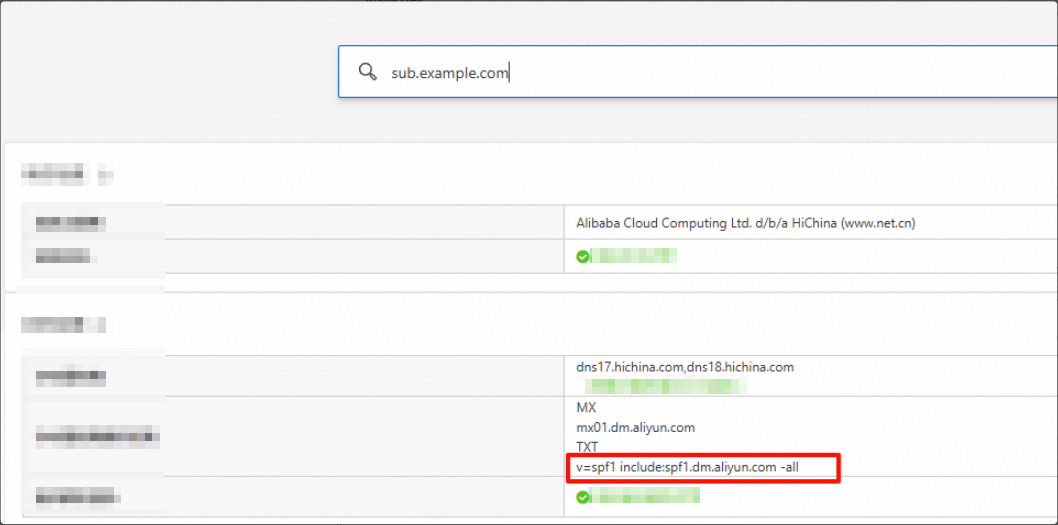
A domain can have only one SPF record. If you have multiple outgoing IP addresses, merge them into a single record.
Record value syntax examples:
Two domains: v=spf1 include:spf.qiye.aliyun.com include:spf1.dm.aliyun.com -all
Domain + IP address: v=spf1 include:spf.qiye.aliyun.com ip4:x.x.x.x -all
Domain + IP address range (use with caution): v=spf1 include:spf.qiye.aliyun.com ip4:x.x.x.x/24 -all
Use ip4 instead of ipv4.
Do not use a domain for DirectMail if it is already used for an enterprise email service—this causes conflicts that disrupt your email flow. Use a subdomain for email delivery instead.
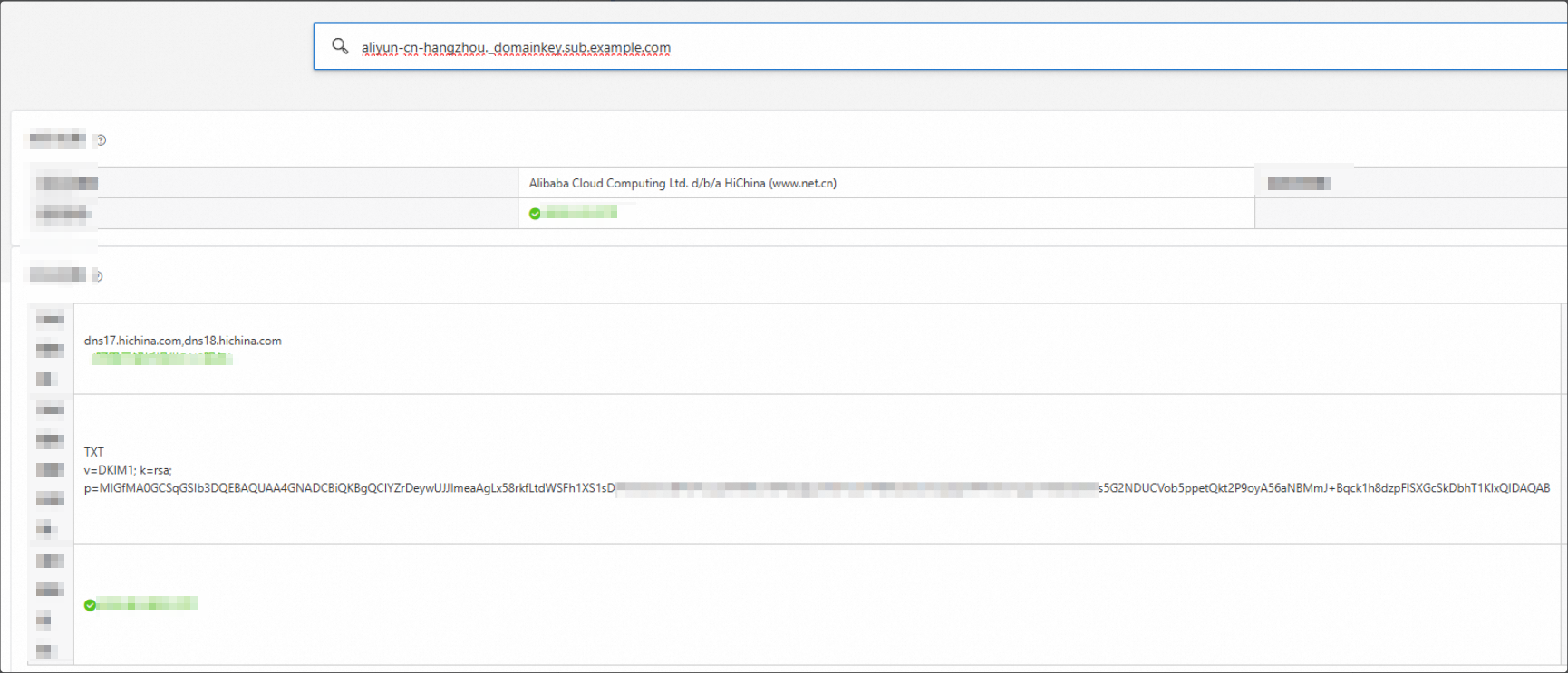
2. DKIM (DomainKeys identified mail)
Purpose: Verifies the integrity of an email by using a digital signature, which prevents the email from being tampered with during transit.
Domain to query:
aliyun-cn-hangzhou._domainkey.sub.example.com. The format is: host record + sender domain.Record type: TXT
The selector part varies depending on the region that you select in the console: aliyun-cn-hangzhou.
Legacy DKIM records do not include a 1024 or 2048 identifier in the host record.
Legacy:
China (Hangzhou): aliyun-cn-hangzhou._domainkey.sub.example.com
Singapore: aliyun-ap-southeast-1._domainkey.sub.example.com
US (Virginia): aliyun-us-east-1._domainkey.sub.example.com
Germany (Frankfurt): aliyun-eu-central-1._domainkey.sub.example.com
1024-bit:
China (Hangzhou): aliyun-cn-hangzhou-1024._domainkey.sub.example.com
Singapore: aliyun-ap-southeast-1-1024._domainkey.sub.example.com
US (Virginia): aliyun-us-east-1-1024._domainkey.sub.example.com
Germany (Frankfurt): aliyun-eu-central-1-1024._domainkey.sub.example.com
2048-bit:
China (Hangzhou): aliyun-cn-hangzhou-2048._domainkey.sub.example.com
Singapore: aliyun-ap-southeast-1-2048._domainkey.sub.example.com
US (Virginia): aliyun-us-east-1-2048._domainkey.sub.example.com
Germany (Frankfurt): aliyun-eu-central-1-2048._domainkey.sub.example.com
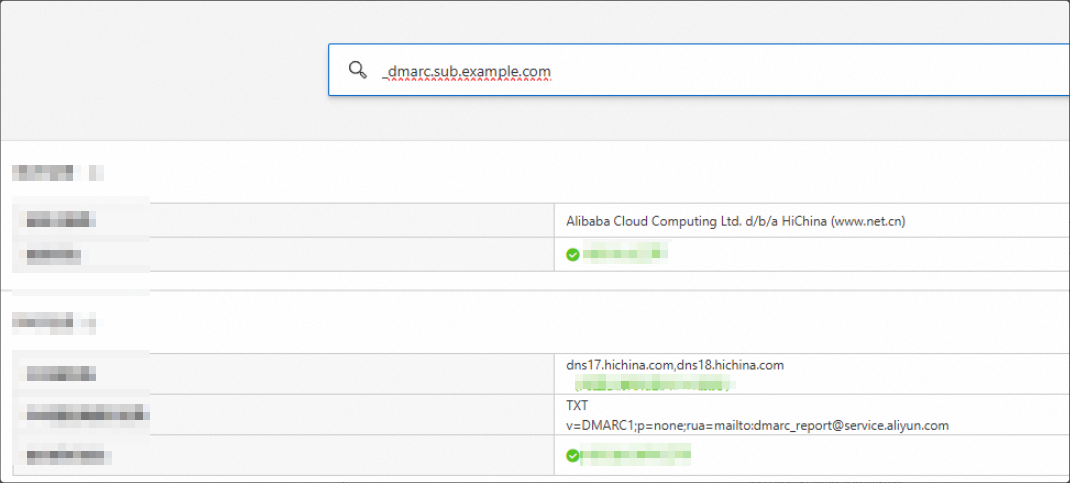
3. DMARC (domain-based message authentication, reporting, and conformance)
Purpose: Specifies how to handle emails that fail SPF or DKIM checks and enables you to receive reports on email activity.
Query the
TXTrecord for the domain name_dmarc.sub.example.com.Record type: TXT
4. MX (mail exchange) record
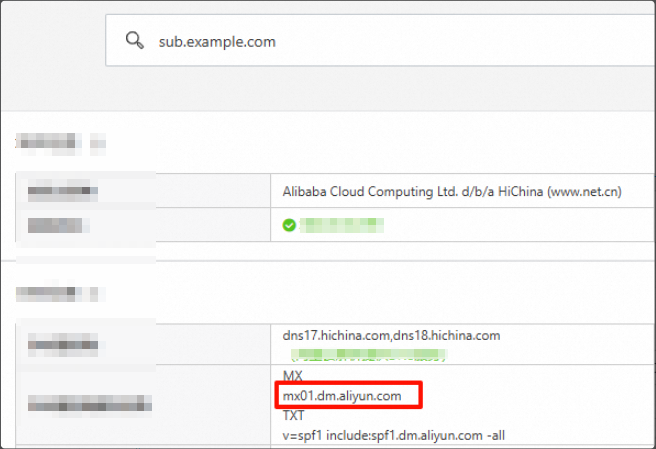
Purpose: Specifies the mail server that is responsible for accepting email messages on behalf of a domain name.
Domain to query:
sub.example.comRecord type: MX
Using command-line tools
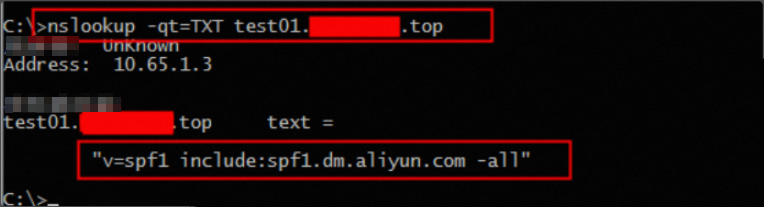
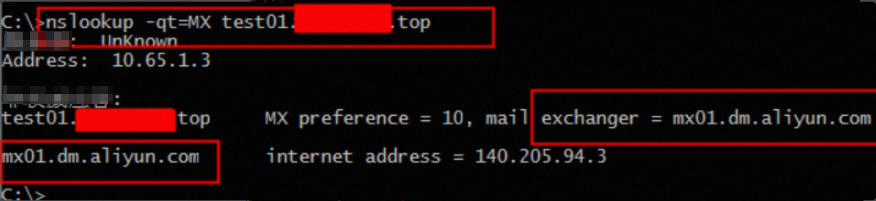
Using the nslookup command in Windows
SPF/DMARC/MX:
nslookup -type=TXT sub.example.com        # SPF
nslookup -type=TXT _dmarc.sub.example.com # DMARC
nslookup -type=MX sub.example.com         # MX
DKIM example:
# Run the command that corresponds to your region.

# Legacy:
China (Hangzhou): nslookup -type=TXT aliyun-cn-hangzhou._domainkey.sub.example.com
Singapore: nslookup -type=TXT aliyun-ap-southeast-1._domainkey.sub.example.com
US (Virginia):
nslookup -type=TXT aliyun-us-east-1._domainkey.sub.example.com
Germany (Frankfurt): nslookup -type=TXT aliyun-eu-central-1._domainkey.sub.example.com

# 1024-bit:
China (Hangzhou): nslookup -type=TXT aliyun-cn-hangzhou-1024._domainkey.sub.example.com
Singapore: nslookup -type=TXT aliyun-ap-southeast-1-1024._domainkey.sub.example.com
US (Virginia): nslookup -type=TXT aliyun-us-east-1-1024._domainkey.sub.example.com
Germany (Frankfurt): nslookup -type=TXT aliyun-eu-central-1-1024._domainkey.sub.example.com

# 2048-bit:
China (Hangzhou): nslookup -type=TXT aliyun-cn-hangzhou-2048._domainkey.sub.example.com
Singapore: nslookup -type=TXT aliyun-ap-southeast-1-2048._domainkey.sub.example.com
US (Virginia): nslookup -type=TXT aliyun-us-east-1-2048._domainkey.sub.example.com
Germany (Frankfurt): nslookup -type=TXT aliyun-eu-central-1-2048._domainkey.sub.example.com
Using the dig command in Linux
SPF/DMARC/MX:
dig TXT sub.example.com           # SPF
dig TXT _dmarc.sub.example.com    # DMARC
dig MX sub.example.com            # MX
DKIM example:
# Run the command that corresponds to your region.

# Legacy:
China (Hangzhou): dig TXT aliyun-cn-hangzhou._domainkey.sub.example.com
Singapore: dig TXT aliyun-ap-southeast-1._domainkey.sub.example.com
US (Virginia):
dig TXT aliyun-us-east-1._domainkey.sub.example.com
Germany (Frankfurt): dig TXT aliyun-eu-central-1._domainkey.sub.example.com

# 1024-bit:
China (Hangzhou): dig TXT aliyun-cn-hangzhou-1024._domainkey.sub.example.com
Singapore: dig TXT aliyun-ap-southeast-1-1024._domainkey.sub.example.com
US (Virginia): dig TXT aliyun-us-east-1-1024._domainkey.sub.example.com
Germany (Frankfurt): dig TXT aliyun-eu-central-1-1024._domainkey.sub.example.com

# 2048-bit:
China (Hangzhou): dig TXT aliyun-cn-hangzhou-2048._domainkey.sub.example.com
Singapore: dig TXT aliyun-ap-southeast-1-2048._domainkey.sub.example.com
US (Virginia): dig TXT aliyun-us-east-1-2048._domainkey.sub.example.com
Germany (Frankfurt): dig TXT aliyun-eu-central-1-2048._domainkey.sub.example.com