Set up DMARC records to prevent domain spoofing and receive reports on unauthorized use of your domain.
What is DMARC
DMARC (Domain-based Message Authentication, Reporting & Conformance) lets you prevent domain spoofing and receive reports when others attempt to forge your domain.
When a recipient's MTA supports DMARC, it verifies emails sent from your domain. If verification fails, a report is sent to the address specified in the DMARC record.
DMARC record parameters
TXT="v=DMARC1;p=quarantine;pct=0;ri=3600;rua=mailto:abc@example.net;ruf=mailto:abc@example.net"-
P: Policy action for emails that fail DMARC verification. Values: none, quarantine, reject.
-
p=none: Deliver all emails, even if they fail DMARC verification.
-
p=quarantine: Quarantine emails that fail DMARC verification. Use the pct parameter (default: 100) to set the percentage of failing emails to quarantine.
-
p=reject: Reject all emails that fail DMARC verification.
-
-
rua: Email address that receives aggregate DMARC reports.
-
ruf: Email address that receives forensic (failure) reports.
-
SP: Subdomain policy. Works like P but applies to subdomains. If set on the parent domain, subdomains inherit this policy.
-
ri: Interval in seconds between aggregate reports. Optional; default: 86400 (24 hours).
-
ADKIM: DKIM alignment mode. r (default): relaxed, allows subdomains. s: strict, requires exact domain match.
-
ASF: SPF alignment mode. r (default): relaxed, allows subdomains. s: strict, requires exact domain match.
-
v: Version. Required. Must be "DMARC1" and appear as the first tag.
-
fo: Failure reporting options. Optional; default: 0. Colon-separated list. Ignored if ruf is not set. Pair with p=none for observation testing; setting fo=1 with p=reject may prevent rejection.
Set up a DMARC record
1. Verify that you have configured one of the following: the SPF record "v=spf1 include:spf1.dm.aliyun.com -all", or DKIM using the value provided in the console.
2. Add the following DMARC record:
|
Mail server |
DNS record type |
Record value |
|
_dmarc |
TXT |
v=DMARC1; p=quarantine; rua=mailto:dmarc_report@example.net |
Notice
-
"dmarc_report@example.net" is where Direct Mail collects DMARC reports by default. To view a specific report, replace it with a working email address from the same organization (a subdomain address is also accepted).
-
If your domain is not registered with Alibaba Cloud, contact your domain registrar for DNS configuration instructions.
Example: Alibaba Cloud DNS
The following steps use Alibaba Cloud DNS.
1. Log on to the Alibaba Cloud DNS console. Select your domain and click Resolution Settings. 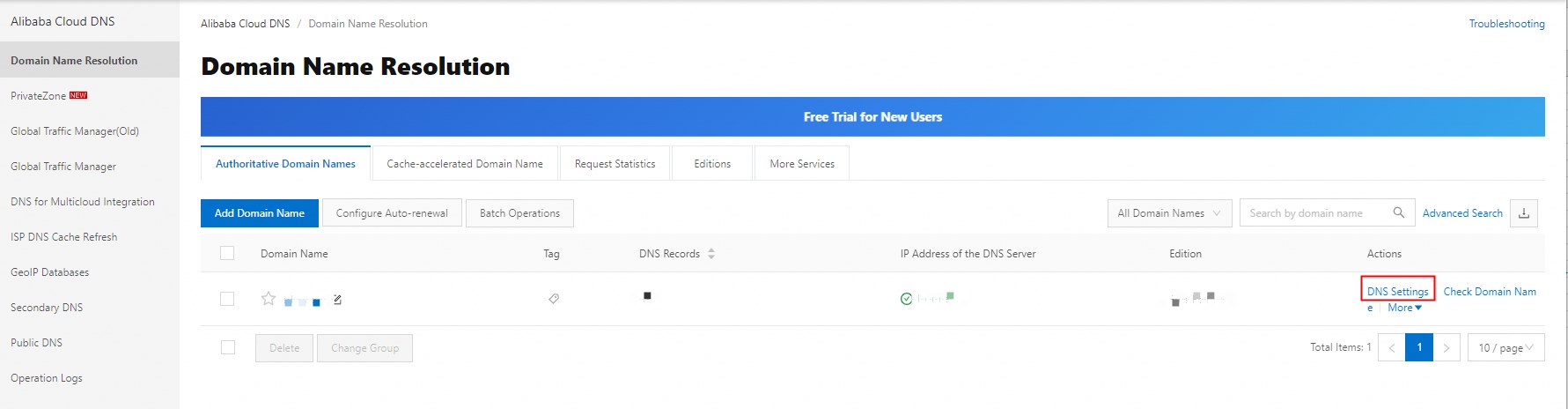
2. Click "Add Record", enter the following values, and click "Confirm".
Example:
Record type: TXT
Host: @
The following figure shows an example DMARC record: 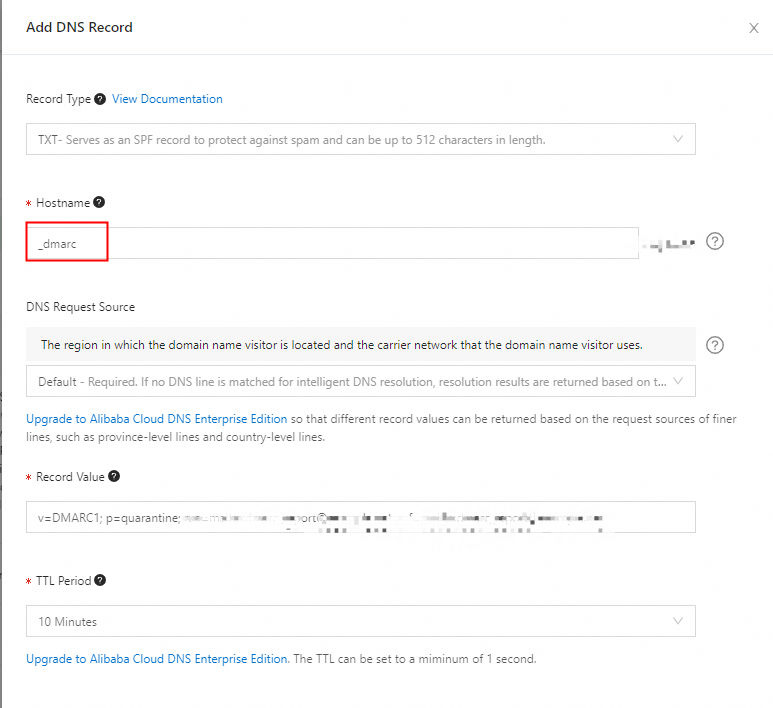
Query DMARC records
Use the dig or nslookup command to query DMARC records:
Linux: dig _dmarc.yourdomain.com txt
Windows: nslookup -qt=TXT _dmarc.yourdomain.com