Automatic failover reduces manual intervention when a physical failure occurs on a Dedicated Host. When enabled, the system automatically migrates all Elastic Compute Service (ECS) instances from the failed Dedicated Host to another Dedicated Host, helping minimize downtime and business disruption. This topic describes how to enable or disable automatic failover for a Dedicated Host.
By default, Failover upon Host Failure is selected when you create a Dedicated Host. Unless you manually deselected this option, you do not need to enable it again.
What happens during automatic failover
When a Dedicated Host fails and automatic failover is enabled, all ECS instances on the host are migrated to another Dedicated Host. After the migration:
The host ID and instance metadata remain unchanged. This includes the instance ID, private IP address, and public IP address of each ECS instance.
The machine ID of the Dedicated Host is changed.
Limits
ECS instances on local SSD type i2 Dedicated Hosts do not support self-service migration or automatic failover. If a Dedicated Host with local SSDs fails, you can submit a ticket to request a migration. However, data on the local SSDs will be lost after the migration.
If automatic failover is disabled and your Dedicated Host fails, submit a ticket to apply for a new Dedicated Host.
Procedure
-
Log on to the ECS console.
-
In the left-side navigation pane, choose Instances & Images >
 > Dedicated Hosts.
 -
In the top navigation bar, select the region and resource group of the resource that you want to manage.

-
Find the Dedicated Host that you want to manage. In the Host ID/Name column, move the pointer over the name or ID of the Dedicated Host, and then click
 next to the name.
 -
In the Modify DDH Information dialog box, click
 to turn on or turn off Auto Failover.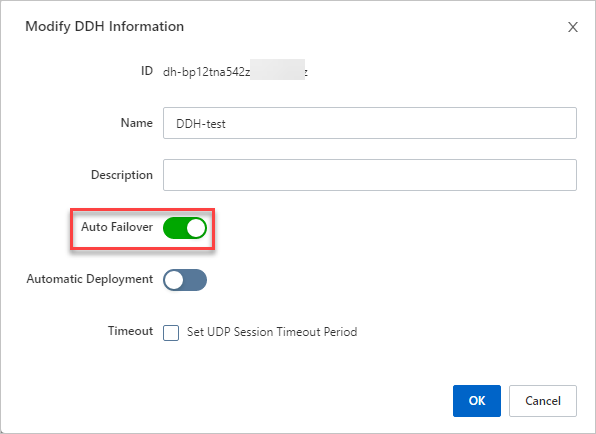
-
Click OK.
Verify the result
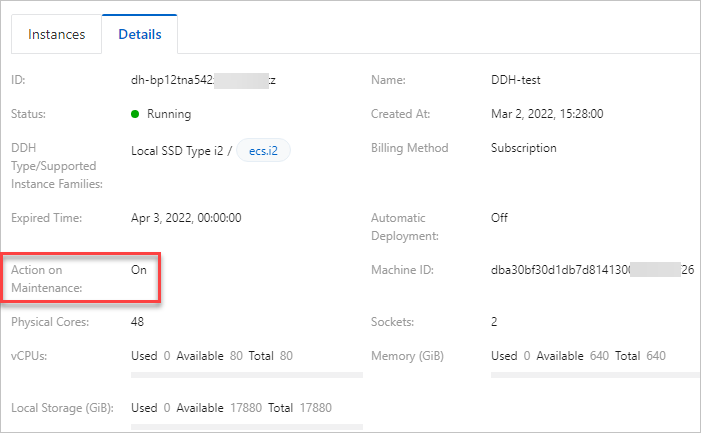
On the Host tab, find the Dedicated Host and click Details in the Actions column.
On the Host Details tab, verify that the Failover parameter is set as expected.
Related information
If a Dedicated Host has triggered an alert, we recommend that you call the RedeployDedicatedHost API operation to migrate it.