You can configure custom cache keys by creating rules that generate cache keys based on different parts of an HTTP request, such as the URI, request parameters, HTTP request headers, or custom variables. This feature converts requests for the same file into a single cache key, which prevents the same request from being cached as different files. As a result, this improves the cache hit rate, reduces origin fetches, and decreases response times and bandwidth consumption.
Use cases
The custom cache key feature modifies only the cache identifier of a request and does not change the origin fetch URL. The content of the origin fetch request remains the same as the client request.
A cache key is a unique identifier for a file cached on a DCDN point of presence. By default, the cache key is the client’s request URL, including query parameters.
Use case 1
Clients send requests with complex query parameters. Even when multiple requests access the same file, different parameter values cause DCDN points of presence to treat them as requests for different files. Consequently, DCDN caches multiple copies and increases the number of origin fetches.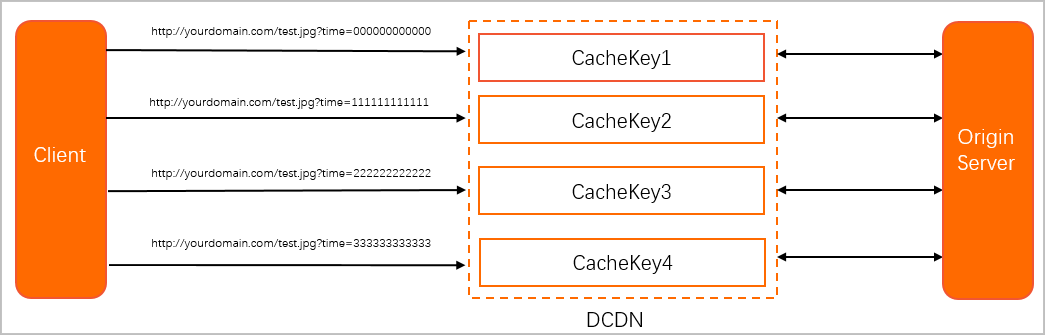
Use custom cache key rules to unify cache keys for similar requests. This reduces origin fetches.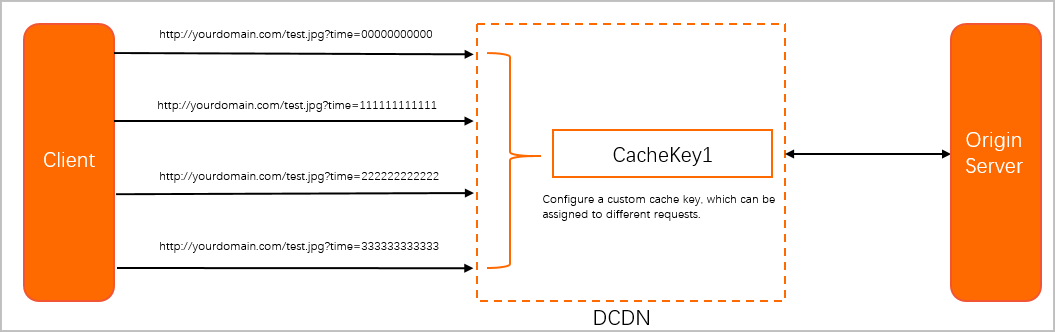
Use case 2
Clients send identical URLs. DCDN treats these as requests for the same file. However, HTTP headers include a client field that distinguishes client systems. You want DCDN to treat these requests as distinct files.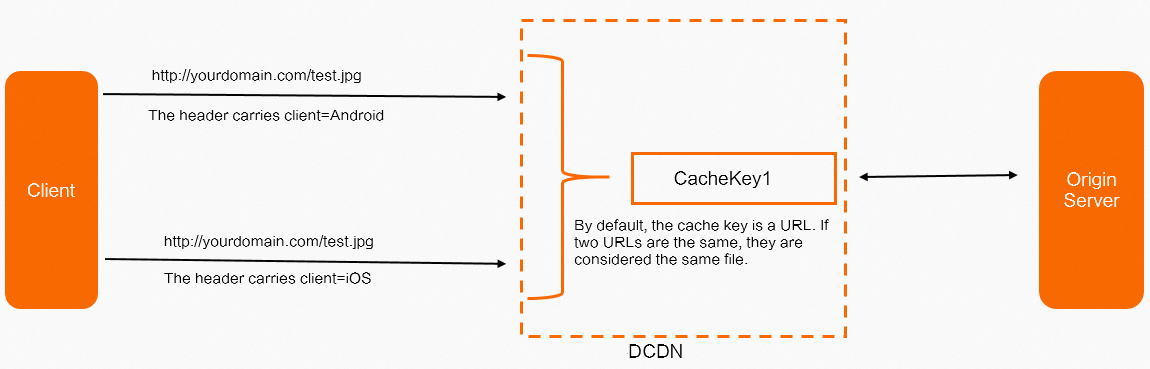
Add the value of the client header to the cache key. DCDN then treats the two requests as having different cache keys.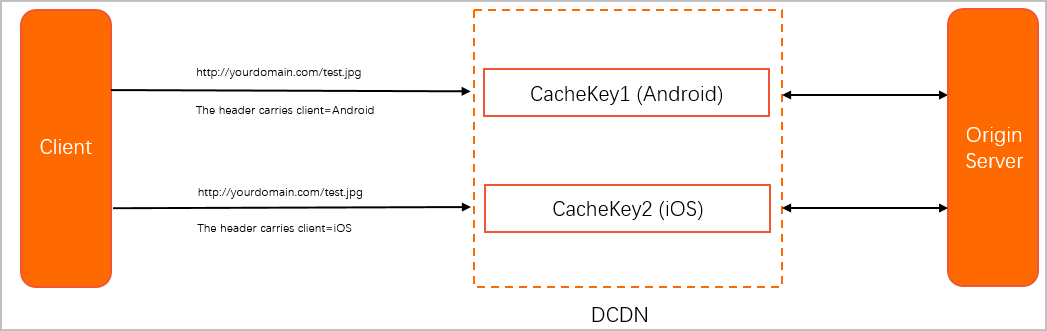
Procedure
-
Log on to the DCDN console.
-
In the left-side navigation pane, click Domain Names.
On the Domain Names page, find the domain name that you want to manage and click Configure.
-
In the left-side navigation tree of the domain name, click Caching.
On the Custom Cache Key tab, configure the custom cache key.
NoteYou can modify the URI, query parameters, and HTTP headers. You can also define custom variables to extract fields from requests. The final cache key combines four parts: URI, parameter operations, HTTP headers, and custom variables.

Parameter Type
Operation Description
Rule Condition
Rule conditions identify various parameters in a user request to determine whether a configuration applies to the request.
Do not use: Do not use rule conditions.
To add or edit rule conditions, manage them in the Rules Engine.
URIs
If the client’s request URI matches the configured Source URI, DCDN replaces the origin URI with the configured Final URI to generate the cache key.
You can configure multiple URI replacement rules. DCDN applies them in order, from top to bottom. When it matches an Source URI, DCDN uses the corresponding Final URI and stops checking further rules.
Source URI: A URI that starts with a forward slash (/). It must not include the
http://prefix or domain name. Supports PCRE regular expressions.Final URI: URI that starts with a forward slash (/) and does not include the http:// prefix or domain name.
Parameter Actions
These operations apply to query parameters in the client’s original request URL. You can Add, Delete, Modify, or Reserve parameters. The result of these operations appends to the cache key. You can configure multiple operations. DCDN applies them in order, from top to bottom.
Add: Add a new query parameter to the cache key. For example, if the original URL is
http://image.example.com/cat.jpgand you addtype=jpg, the cache key becomeshttp://image.example.com/cat.jpg?type=jpg.Delete: Remove a specified query parameter from the original URL when generating the cache key. For example, if the original URL is
http://image.example.com/cat.jpg?type=jpgand you delete thetypeparameter, the cache key becomeshttp://image.example.com/cat.jpg.Modify: Modify the specified parameter in the original request URL when generating the cache key. For example, if the original URL is
http://image.example.com/cat.jpg?type=jpgand you modify the parameter totype=png, the cache key is.Reserve: Keep only specified query parameters from the original URL when generating the cache key. For example, if the original URL is
http://image.example.com/cat.jpg?type=jpg&path=imageand you keep only thetypeparameter, the cache key becomeshttp://image.example.com/cat.jpg?type=jpg.
HTTP Headers
Append the value of a specified HTTP header from the client’s original request to the cache key. You can specify multiple HTTP header names, separated by spaces. DCDN appends their values to the cache key in order.
For example, if the original URL is
http://image.example.com/cat.jpgand the client sends an HTTP headerpath:image, and you setpathin the HTTP Headers configuration, the cache key becomeshttp://image.example.com/cat.jpgimage.Custom Variables
Use a regular expression to match values from request parameters, HTTP headers, cookies, or URIs in the client’s original request. If the regular expression matches, append the matched value to the cache key. For details, see Configuration examples.
Click OK to complete the configuration.
Configuration examples
URIs
Requests for http://aliyundoc.com/a/b/image.jpg and http://aliyundoc.com/a/b/c/image.jpg refer to the same file. The cache key is http://aliyundoc.com/c/image.jpg.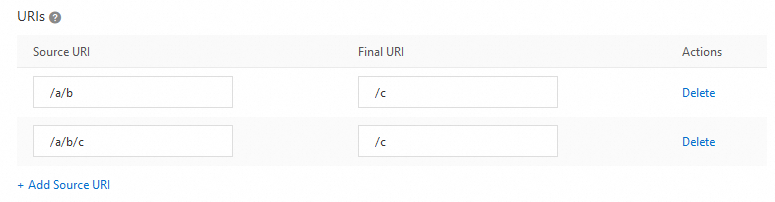
Parameter Actions
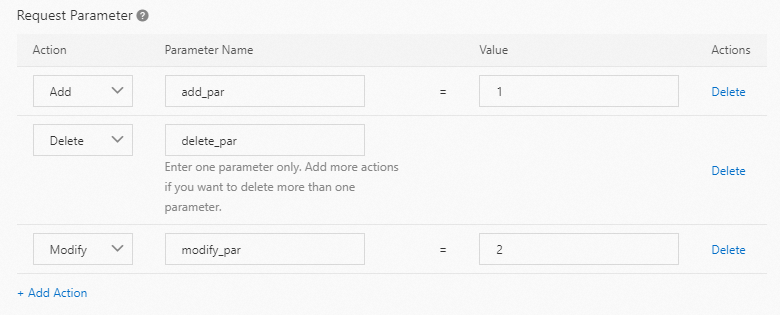
The client’s request http://aliyundoc.com/a/b/image.jpg?delete_par=1&modify_par=1 adds add_par=1, deletes delete_par, and modifies modify_par to 2. The final cache key is http://aliyundoc.com/a/b/image.jpg?modify_par=2&add_par=1.
In parameter operations, if you apply multiple operations to the same variable, they take effect in this order: add > delete > keep > modify.
HTTP Headers
The values of the User-Agent and Accept-Language HTTP headers from a client request are appended to the cache key. For example, if a request for http://aliyundoc.com/a/b/image.jpg contains the headers User-Agent=Mozilla/5.0 (Linux; X11) and Accept-Language=en, the cache key for the request is http://aliyundoc.com/a/b/image.jpgMozilla/5.0(Linux;X11)en.
Custom Variables
Example 1
The variable name is language. Its source is the Request Header. The source field name is Accept-Language. The matching pattern is ([%w]+),([%w]+). The variable expression is $1aa.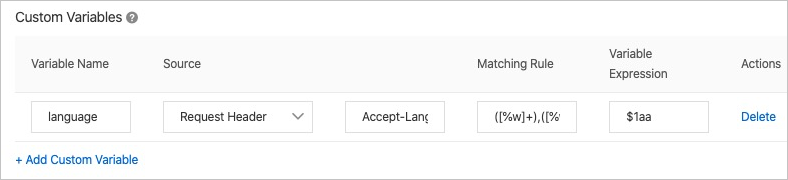
For the client request http://aliyundoc.com/a/b/image.jpg with the HTTP header Accept-Language=en,ch , the pattern matches en and assigns it to $1. The variable expression appends aa, resulting in the variable value enaa. This variable, aliased as language, is then appended to the URL to form the final cache key: http://aliyundoc.com/a/b/image.jpgenaa.
In a variable expression, $n refers to the content matched by the nth pair of parentheses in the matching rule. For example, in Example 1, Accept-Language=en,ch, the matching rule is ([%w]+),([%w]+). Therefore, $1=en and $2=ch.
Example 2
The variable name is expired. The source is Request Cookie. The source field name is a. The matching rule is [%w]+:(.*). The variable expression is $1.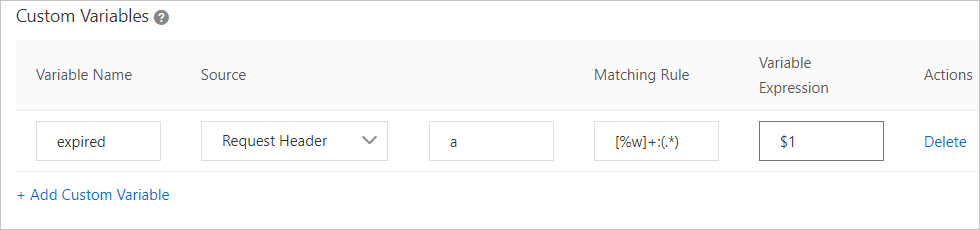
For the client request http://aliyundoc.com/a/b/image.jpg with the cookie Cookie a=expired_time:12635187, the pattern matches 12635187 and assigns it to $1. This variable, aliased as expired, is then appended to the URL to form the final cache key: http://aliyundoc.com/a/b/image.jpg12635187.
Example 3
Configure both URI rules and custom variables.
URI:
Match all URIs that follow the pattern
/abc/.*/abcand replace them with/abc.
Custom variable:
The variable name is
testname. Its source is thePath. The matching pattern is/abc/xyz/(.*). The variable expression is$1.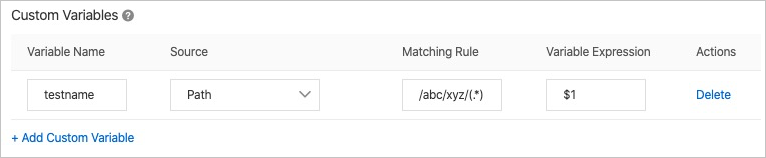
For the client request URL
http://aliyundoc.com/abc/xyz/abc/image.jpg, the URI rule modifies the cache key tohttp://aliyundoc.com/abc/image.jpg. The custom variable rule then matches/abc/xyz/(.*). In this case,$1equalsabc. DCDN appends this to the modified cache key to form the final cache key:http://aliyundoc.com/abc/image.jpgabc. This combination of rules supports more complex caching logic.If no custom variable matches, DCDN does not append the variable expression
$1to the cache key.