This guide shows you how to use the DataWorks OpenAPI (2024-05-18) to programmatically query the data lineage of data tables and columns. We provide API call examples and SDK code for automated, large-scale lineage analysis.
Key concepts
Imagine reviewing a business report that shows a significant increase in quarterly sales. As a data analyst or manager, you might ask:
-
How is this "sales" metric calculated?
-
What is the source of its raw business data? Does it come from an order table or a payment transaction table?
-
What processing steps did the data go through, from its raw state to the final report, such as cleaning, transformation, and aggregation?
-
If the data for this metric is incorrect, which downstream reports or applications will be affected?
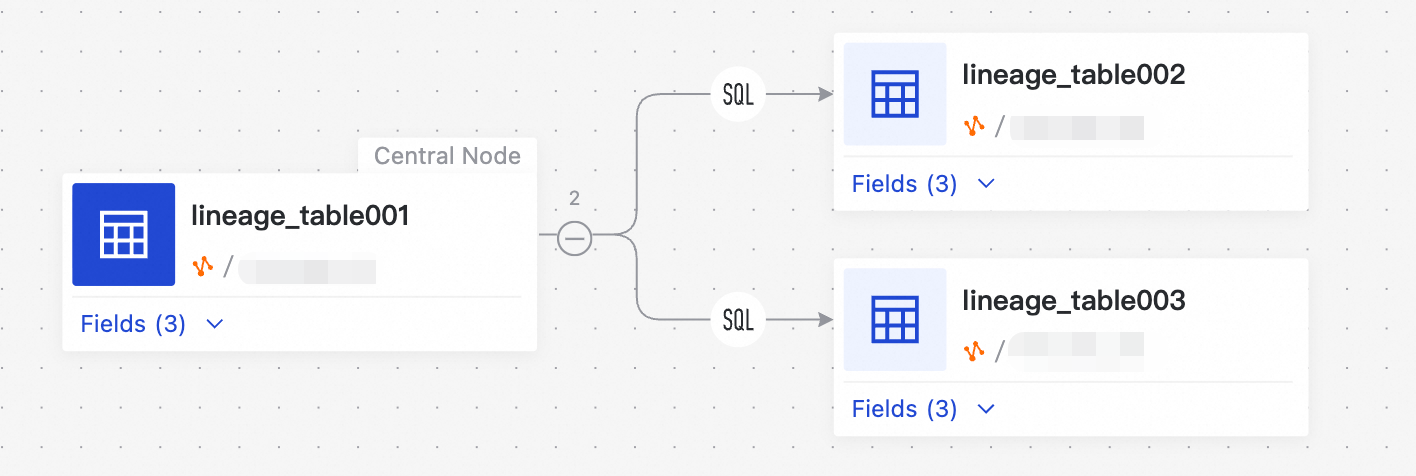
Clear data lineage provides the following core benefits:
-
Data tracing and troubleshooting
When you find a data anomaly or error, you can follow the data lineage upstream to quickly locate the calculation logic or source data that caused the problem. This significantly reduces troubleshooting time. -
Impact analysis
When you need to change a data table structure, column, or calculation logic, you can analyze the downstream lineage to accurately assess which data and business reports will be affected. This helps avoid unforeseen consequences of a change. -
Data governance and trust
Clear data lineage is the foundation for data asset management, data standard implementation, and data quality monitoring. It makes the data lifecycle transparent, increasing stakeholder trust in the data. -
Cost optimization and asset inventory
By analyzing data lineage, you can identify data tables or compute tasks that have no downstream consumers. This allows you to optimize data warehouse costs and retire obsolete assets.
In DataWorks, the system automatically parses and records the data lineage generated by various compute tasks, such as MaxCompute SQL and EMR Spark tasks. With the DataWorks OpenAPI, you can programmatically access this lineage information to integrate lineage analysis capabilities into your own data management platform or automated O&M workflows.
Prerequisites: Get entity ID
To query data lineage, you first need the unique identifier for your target data table or column. This identifier, called an entity ID, is a required parameter for metadata and lineage-related API calls.
You can obtain an entity ID in one of the following two ways:
1. Get entity ID from the console
For a small number of known tables or columns, the fastest method is to manually copy the ID from the console.
Get table entity ID
-
In the DataWorks console, go to the Data Map module.
-
Search for and navigate to the details page of the target table.
-
In the Table Basic Information panel on the left, find the Entity ID and copy it.
The entity ID is in the format
maxcompute-table:::<project_name>::<table_name>.
Get column entity ID
-
On the details page of the target table, switch to the Lineage tab and select Column Lineage.
-
In the column lineage graph, click the column node you want to inspect.
-
A details panel appears on the right. Find the Entity ID in the panel and copy it.
The entity ID is in the format
maxcompute-column:::<project_name>::<table_name>::<column_name>.
2. Get entity IDs in bulk by using the API
When you need to obtain entity IDs in bulk, manual operations become tedious. In this case, use the OpenAPI for batch queries:
-
Get table IDs in bulk: Call the
ListTablesAPI. For more information, see ListTables. -
Get column IDs in bulk: Call the
ListColumnsAPI. For more information, see ListColumns.
Query lineage by using the ListLineages API
After you obtain the entity ID, you can use the ListLineages API to query the upstream and downstream lineage of the entity.
1. Key parameters
The following table describes the key request parameters of the ListLineages API. You can debug the API online in the OpenAPI portal.
|
Parameter |
Type |
Description |
|
|
String |
Used to query downstream lineage. Pass in the source (upstream) entity ID, and the API returns all downstream lineage of the entity. |
|
|
String |
Used to query upstream lineage. Pass in the destination (downstream) entity ID, and the API returns all upstream lineage of the entity. |
|
|
String |
Used together with |
|
|
String |
Used together with |
|
|
Boolean |
Specifies whether to include detailed lineage relationship information in the response. We recommend that you set this parameter to |
-
If you specify both
SrcEntityIdandDstEntityId, the API returns the lineage relationship between the specified upstream and downstream entities. -
If
SrcEntityIdandDstEntityIdare the same ID, the API returns the self-referencing lineage relationship of that entity.
2. Examples
Assume that you have a MaxCompute table with an entity ID of maxcompute-table:::test_project::test_table.
Example 1: Query downstream lineage of the table
To query all downstream tables of this table, specify it as the source:
-
SrcEntityId:maxcompute-table:::test_project::test_table -
NeedAttachRelationship:true
To find only downstream tables whose names contain "report", add the DstEntityName parameter:
-
DstEntityName:report
Example 2: Query upstream lineage of the table
To query which tables or tasks produce this table, specify it as the destination:
-
DstEntityId:maxcompute-table:::test_project::test_table -
NeedAttachRelationship:true
Similarly, you can use the SrcEntityName parameter to filter upstream sources.
3. Understand the API response
After a successful call to the ListLineages API, you receive a list of lineage relationships. Each relationship contains the source entity, destination entity, and their association details.
Sample response for a single lineage relationship (JSON):
{
  "SrcEntity": {
    "Id": "maxcompute-table:::test_project::table_from",
    "Name": "table_from",
    "Attributes": {
      "rawEntityId": "maxcompute-table:::test_project::table_from"
    }
  },
  "DstEntity": {
    "Id": "maxcompute-table:::test_project::table_to",
    "Name": "table_to",
    "Attributes": {
      "project": "test_project",
      "region": "cn-shanghai",
      "table": "table_to"
    }
  },
  "Relationships": [
    {
      "Id": "123456789:maxcompute-table.test_project.table_from:maxcompute-table.test_project.table_to:maxcompute.SQL.76543xxx",
      "CreateTime": 1761089163548,
      "Task": {
        "Id": "76543xxx",
        "Type": "dataworks-sql",
        "Attributes": {
          "engine": "maxcompute",
          "channel": "1st",
          "taskInstanceId": "12345xxx",
          "projectId": "123456",
          "taskId": "76543xxx"
        }
      }
    }
  ]
}
How to interpret the response:
-
SrcEntityandDstEntity: Represent the upstream and downstream entities of the lineage, respectively. You can use theirIdto call the GetTable or GetColumn API to obtain more detailed metadata. -
Relationships: Describes howSrcEntityandDstEntityare associated.-
Task: Describes the task that generated this lineage relationship. If the task is a DataWorks scheduled task,Task.AttributescontainstaskIdandtaskInstanceId. You can use these IDs to call the GetTask API to obtain the detailed task definition and running status.
-
Java SDK walkthrough
The following example uses the Java SDK to demonstrate how to implement a complete lineage query workflow in code.
1. Prepare the environment
-
JDK version: Make sure that JDK 8 or later is installed.
-
Maven dependency: Add the following dependency to the
pom.xmlfile of your project. Replace${latest.version}with the latest SDK version
<dependency>
    <groupId>com.aliyun</groupId>
    <artifactId>dataworks_public20240518</artifactId>
    <version>${latest.version}</version>
</dependency>
2. Complete code example
The following code demonstrates how to initialize the client, query upstream and downstream lineage of a specified table, and print key information.
import java.util.List;
import java.util.Map;
import com.aliyun.dataworks_public20240518.Client;
import com.aliyun.dataworks_public20240518.models.GetTableRequest;
import com.aliyun.dataworks_public20240518.models.GetTableResponse;
import com.aliyun.dataworks_public20240518.models.LineageEntity;
import com.aliyun.dataworks_public20240518.models.LineageRelationship;
import com.aliyun.dataworks_public20240518.models.LineageTask;
import com.aliyun.dataworks_public20240518.models.ListLineagesRequest;
import com.aliyun.dataworks_public20240518.models.ListLineagesResponse;
import com.aliyun.dataworks_public20240518.models.ListLineagesResponseBody.ListLineagesResponseBodyPagingInfo;
import com.aliyun.dataworks_public20240518.models.ListLineagesResponseBody.ListLineagesResponseBodyPagingInfoLineages;
import com.aliyun.dataworks_public20240518.models.Table;
import com.aliyun.tea.TeaException;
public class LineageQuerySample {
  /**
     * <b>description</b> :
     * <p>Initialize the client with credentials.</p>
     *
     * @return Client
     * @throws Exception
     */
  public static com.aliyun.dataworks_public20240518.Client createClient() throws Exception {
    com.aliyun.teaopenapi.models.Config config = new com.aliyun.teaopenapi.models.Config()
      // Your AccessKey ID
      .setAccessKeyId(System.getenv("ALIBABA_CLOUD_ACCESS_KEY_ID"))
      // Your AccessKey Secret
      .setAccessKeySecret(System.getenv("ALIBABA_CLOUD_ACCESS_KEY_SECRET"));
    // For the endpoint, see https://api.aliyun.com/product/dataworks-public
    config.endpoint = "dataworks.cn-hangzhou.aliyuncs.com";
    return new com.aliyun.dataworks_public20240518.Client(config);
  }
  public static void main(String[] args_) throws Exception {
    Client client = LineageQuerySample.createClient();
    // The entity ID of the table to query. Replace this with the entity ID of the MaxCompute table you want to query.
    String tableId = "maxcompute-table:::test_project::test_table";
    try {
      // 1. Query upstream lineage
      ListLineagesRequest listLineagesRequest = new ListLineagesRequest()
        .setDstEntityId(tableId)
        .setNeedAttachRelationship(true)
        .setPageNumber(1)
        // The default number of records per page is 10. The maximum is 100.
        .setPageSize(10);
      // Filter upstream tables by keyword matching on table name
      listLineagesRequest.setSrcEntityName("demo");
      ListLineagesResponse listLineagesResponse = client.listLineages(listLineagesRequest);
      String requestId = listLineagesResponse.getBody().getRequestId();
      System.out.println("\nQuery upstream lineage");
      // Print the request ID for troubleshooting
      System.out.println(requestId);
      ListLineagesResponseBodyPagingInfo pagingInfo = listLineagesResponse.getBody().getPagingInfo();
      if (pagingInfo.getTotalCount() > 0 && pagingInfo.getLineages() != null) {
        for (ListLineagesResponseBodyPagingInfoLineages lineage : pagingInfo.getLineages()) {
          // Get a single lineage record and query the corresponding upstream table
          LineageEntity srcEntity = lineage.getSrcEntity();
          System.out.println("============================================");
          System.out.println("ID: " + srcEntity.getId());
          System.out.println("Name: " + srcEntity.getName());
          // Get upstream table information
          Table table = getTable(client, srcEntity.getId());
          if (table != null) {
            System.out.println("Comment: " + table.getComment());
            System.out.println("Create Time: " + table.getCreateTime());
            System.out.println("Modify Time: " + table.getModifyTime());
          }
        }
      }
            // 2. Query downstream lineage
            listLineagesRequest = new ListLineagesRequest()
                    .setSrcEntityId(tableId)
                    .setNeedAttachRelationship(true)
                    .setPageNumber(1)
                    // The default number of records per page is 10. The maximum is 100.
                    .setPageSize(10);
            listLineagesResponse = client.listLineages(listLineagesRequest);
            requestId = listLineagesResponse.getBody().getRequestId();
            System.out.println("\nQuery downstream lineage");
            // Print the request ID for troubleshooting
            System.out.println(requestId);
            pagingInfo = listLineagesResponse.getBody().getPagingInfo();
            if (pagingInfo.getTotalCount() > 0 && pagingInfo.getLineages() != null) {
                for (ListLineagesResponseBodyPagingInfoLineages lineage : pagingInfo.getLineages()) {
                    // Get a single lineage record and query the corresponding downstream table
                    LineageEntity dstEntity = lineage.getDstEntity();
                    System.out.println("============================================");
                    System.out.println("ID: " + dstEntity.getId());
                    System.out.println("Name: " + dstEntity.getName());
                    // Get downstream table information
                    Table table = getTable(client, dstEntity.getId());
                    if (table != null) {
                        System.out.println("Comment: " + table.getComment());
                        System.out.println("Create Time: " + table.getCreateTime());
                        System.out.println("Modify Time: " + table.getModifyTime());
                    }
                    // Parse lineage relationships
                    List<LineageRelationship> relationships = lineage.getRelationships();
                    if (relationships != null) {
                        for (LineageRelationship relationship : relationships) {
                            System.out.println("\n\tRelationshipId: " + relationship.getId());
                            System.out.println("\tRelationshipCreateTime: " + relationship.getCreateTime());
                            // Parse task details
                            LineageTask task = relationship.getTask();
                            Map<String, String> attributes = task.getAttributes();
                            // For DataWorks scheduled tasks, you can get the task ID and task instance ID from attributes
                            if (attributes != null && attributes.containsKey("taskId") && attributes.containsKey("taskInstanceId")) {
                                System.out.println("\tTaskId: " + attributes.get("taskId"));
                                System.out.println("\tTaskInstanceId: " + attributes.get("taskInstanceId"));
                            }
                        }
                    }
                }
            }
        } catch (TeaException error) {
            // This is for demonstration only. Handle exceptions with care and do not ignore them in production.
            // Error message
            System.out.println(error.getMessage());
            // Diagnostic URL
            System.out.println(error.getData().get("Recommend"));
            com.aliyun.teautil.Common.assertAsString(error.message);
        } catch (Exception _error) {
            TeaException error = new TeaException(_error.getMessage(), _error);
            // This is for demonstration only. Handle exceptions with care and do not ignore them in production.
            // Error message
            System.out.println(error.getMessage());
            // Diagnostic URL
            System.out.println(error.getData().get("Recommend"));
            com.aliyun.teautil.Common.assertAsString(error.message);
        }
    }
    public static Table getTable(Client client, String tableId) {
        // Query table information by ID
        GetTableRequest getTableRequest = new GetTableRequest()
                .setId(tableId)
                .setIncludeBusinessMetadata(true);
        try {
            GetTableResponse getTableResponse = client.getTable(getTableRequest);
            return getTableResponse.getBody().getTable();
        } catch (Exception e) {
            System.out.println(e.getMessage());
        }
        return null;
    }
}
Python SDK walkthrough
The following example uses the Python SDK to demonstrate how to implement a complete lineage query workflow in code.
1. Prepare the environment
-
Python version: Make sure that Python 3.6 or later is installed.
-
Install the SDK: Install the DataWorks Python SDK by using pip. Replace
${latest.version}with the latest SDK version
pip install alibabacloud_dataworks_public20240518==${latest.version}2. Complete code example
The following code demonstrates how to initialize the client, query upstream and downstream lineage of a specified table, and print key information.
# -*- coding: utf-8 -*-
import os
import sys
from alibabacloud_dataworks_public20240518.client import Client as dataworks_public20240518Client
from alibabacloud_tea_openapi import models as open_api_models
from alibabacloud_dataworks_public20240518 import models as dataworks_public_20240518_models
from alibabacloud_tea_util import models as util_models
from alibabacloud_tea_util.client import Client as UtilClient


class LineageQuerySample:

    @staticmethod
    def create_client():
        """Initialize the client with AccessKey credentials."""
        config = open_api_models.Config(
            # Your AccessKey ID
            access_key_id=os.environ.get('ALIBABA_CLOUD_ACCESS_KEY_ID'),
            # Your AccessKey Secret
            access_key_secret=os.environ.get('ALIBABA_CLOUD_ACCESS_KEY_SECRET')
        )
        # For the endpoint, see https://api.aliyun.com/product/dataworks-public
        config.endpoint = 'dataworks.cn-hangzhou.aliyuncs.com'
        return dataworks_public20240518Client(config)

    @staticmethod
    def get_table(client, table_id):
        """Get table information by entity ID."""
        get_table_request = dataworks_public_20240518_models.GetTableRequest(
            id=table_id,
            include_business_metadata=True
        )
        try:
            response = client.get_table(get_table_request)
            return response.body.table
        except Exception as e:
            print(e)
            return None

    @staticmethod
    def main():
        client = LineageQuerySample.create_client()
        # The entity ID of the table to query. Replace this with the entity ID of the MaxCompute table you want to query.
        table_id = 'maxcompute-table:::test_project::test_table'
        runtime = util_models.RuntimeOptions()

        try:
            # 1. Query upstream lineage
            upstream_request = dataworks_public_20240518_models.ListLineagesRequest(
                dst_entity_id=table_id,
                need_attach_relationship=True,
                page_number=1,
                # The default number of records per page is 10. The maximum is 100.
                page_size=10,
                # Filter upstream tables by keyword matching on table name
                src_entity_name='demo'
            )
            upstream_response = client.list_lineages_with_options(upstream_request, runtime)
            print('\nQuery upstream lineage')
            print(upstream_response.body.request_id)
            paging_info = upstream_response.body.paging_info
            if paging_info.total_count > 0 and paging_info.lineages:
                for lineage in paging_info.lineages:
                    src_entity = lineage.src_entity
                    print('============================================')
                    print(f'ID: {src_entity.id}')
                    print(f'Name: {src_entity.name}')
                    table = LineageQuerySample.get_table(client, src_entity.id)
                    if table:
                        print(f'Comment: {table.comment}')
                        print(f'Create Time: {table.create_time}')
                        print(f'Modify Time: {table.modify_time}')

            # 2. Query downstream lineage
            downstream_request = dataworks_public_20240518_models.ListLineagesRequest(
                src_entity_id=table_id,
                need_attach_relationship=True,
                page_number=1,
                page_size=10
            )
            downstream_response = client.list_lineages_with_options(downstream_request, runtime)
            print('\nQuery downstream lineage')
            print(downstream_response.body.request_id)
            paging_info = downstream_response.body.paging_info
            if paging_info.total_count > 0 and paging_info.lineages:
                for lineage in paging_info.lineages:
                    dst_entity = lineage.dst_entity
                    print('============================================')
                    print(f'ID: {dst_entity.id}')
                    print(f'Name: {dst_entity.name}')
                    table = LineageQuerySample.get_table(client, dst_entity.id)
                    if table:
                        print(f'Comment: {table.comment}')
                        print(f'Create Time: {table.create_time}')
                        print(f'Modify Time: {table.modify_time}')
                    # Parse lineage relationships
                    if lineage.relationships:
                        for relationship in lineage.relationships:
                            print(f'\n\tRelationshipId: {relationship.id}')
                            print(f'\tRelationshipCreateTime: {relationship.create_time}')
                            task = relationship.task
                            attributes = task.attributes
                            if attributes and 'taskId' in attributes and 'taskInstanceId' in attributes:
                                print(f'\tTaskId: {attributes["taskId"]}')
                                print(f'\tTaskInstanceId: {attributes["taskInstanceId"]}')

        except Exception as error:
            # This is for demonstration only. Handle exceptions with care and do not ignore them in production.
            print(error)
            UtilClient.assert_as_string(str(error))


if __name__ == '__main__':
    LineageQuerySample.main()