The OpenEvent module sends DataWorks event messages to a shared Message Queue for Apache Kafka topic. You can subscribe to the topic to receive the messages. Before you can use the features of the OpenEvent module, you must enable event message subscription and configure related parameters in the DataWorks console. This topic describes how to enable event message subscription and configure a shared Message Queue for Apache Kafka topic.
Background information
DataWorks publishes change event messages to a shared Message Queue for Apache Kafka topic. Consumers subscribe to the topic to receive the messages. For more information about the logic of message subscription, see Overview.
Limits
- You can complete the configuration only by using your Alibaba Cloud account or as a RAM user to which the AliyunDataWorksFullAccess policy is attached.
- New users cannot use a shared Message Queue for Apache Kafka topic to receive event messages any longer.
- After you enable event message subscription, DataWorks provides a shared Message Queue for Apache Kafka topic and a consumer group that have been configured. You can also create up to five consumer groups. Note For more information about topics, consumer groups, and users, see Terms.
Step 1: Enable event message subscription
- Log on to the DataWorks console.In the left-side navigation pane, click Open Platform.
- Click the OpenEvent tab.
- Turn on Enable Message Subscription. Note After you enable event message subscription, DataWorks pushes messages of the specified event types to the provided topic. If you turn off Enable Message Subscription, DataWorks stops pushing messages to the topic.

Step 2: Configure the shared Message Queue for Apache Kafka topic
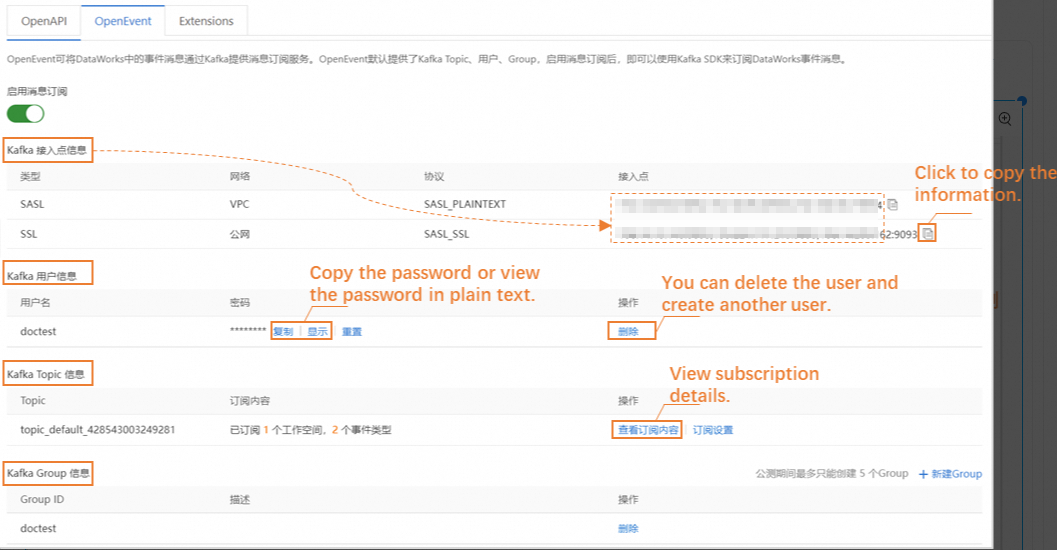
After you enable event message subscription, DataWorks creates a Kafka user, a shared Message Queue for Apache Kafka topic, and a consumer group for you. You need to only specify the workspaces and event types to which the topic applies. To configure the topic, perform the following steps:
- In the Kafka Topic Information section, click Configure Subscription in the Actions column.
- In the dialog box that appears, select the workspaces and event types based on your business requirements.
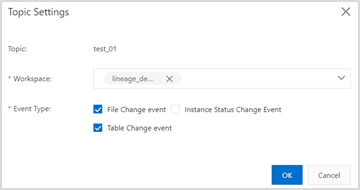 DataWorks allows you to subscribe to the following types of events: file change events, instance status change events, and table change events. For more information about supported event types, see Supported event types.
View the Kafka configurations
What to do next
After you enable event message subscription and configure the topic, you can obtain the Kafka configurations and develop a consumer program by using Message Queue for Apache Kafka SDK. This way, you can consume the messages published by DataWorks. For more information about how to create a consumer program, see Develop a client based on Message Queue for Apache Kafka SDK.