For real-time data synchronization from a single MySQL table, you must configure network and whitelist settings for the data source before you run a data synchronization node. This topic describes how to prepare the network environment and account permissions for data synchronization.
Prerequisites
- Data sources: A source MySQL database and a destination data source have been provisioned. The destination data source can be MaxCompute, Hologres, Elasticsearch, DataHub, or Kafka.
- An exclusive resource group for Data Integration is required. You can purchase and configure one as needed. For more information, see Resource planning and configuration.
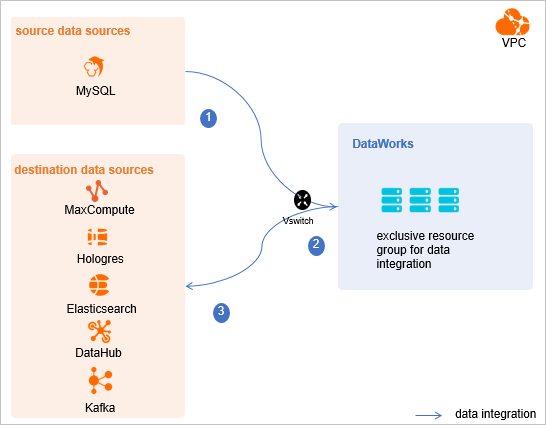
- Evaluate and plan the network environment: Before you perform data integration, you must establish network connectivity between your data sources and the exclusive resource group for Data Integration. This topic guides you through configuring specific access settings, such as VSwitches and whitelists.
- If the data source and the exclusive resource group for Data Integration are in the same region and the same virtual private cloud (VPC), they are connected by default.
- If the data source and the exclusive resource group for Data Integration are in different network environments, you must connect them by using a VPN gateway or other methods.
Background information
- For example, if you use the same VPC environment, you must add the CIDR block of the VPC where the exclusive resource group for Data Integration resides to a whitelist. This ensures that the resource group can access the data source.
-
You must create a dedicated account to access the data source. This account is used to perform data extraction and write operations during integration.
-
If the source data source is MySQL, you must enable the binary log. The binary log records all changes to database table structures (such as from CREATE and ALTER operations) and data modifications (such as from INSERT, UPDATE, and DELETE operations). The binary log allows you to view the database change history, perform incremental backups and recovery, and set up replication for a primary-secondary database.
The binary log has the following formats:- Statement: Statement-based replication. The binary log records each SQL statement that modifies data.
- Row: Row-based replication. The binary log does not store the SQL statement context but records only the modified rows.
- Mixed: Mixed-mode replication. This mode is a combination of the Statement and Row formats. In most cases, statements are logged by using the Statement format. If an operation cannot be replicated by using the Statement format, the Row format is used. MySQL automatically determines which format to use for each SQL statement.
Limits
- Real-time synchronization of MySQL data in DataWorks is based on real-time subscription to MySQL. This feature supports only MySQL
5.xor8.xdata sources hosted on ApsaraDB RDS for MySQL. Do not configure a PolarDB-X instance as a MySQL data source. To synchronize data from a PolarDB-X instance, see Configure a PolarDB-X data source to configure it directly as a PolarDB-X data source. - XA ROLLBACK is not supported. For transaction data that is in the XA PREPARE state, real-time synchronization writes the data to the destination. If an XA ROLLBACK is executed, the rollback operation is not synchronized. To resolve XA ROLLBACK scenarios, you must manually remove the affected table from the real-time synchronization node, re-add it, and then perform a new full data initialization and incremental data synchronization.
- To use a MySQL data source from a different Alibaba Cloud account, you must run the data synchronization node in an exclusive resource group for Data Integration. The shared resource group for Data Integration cannot access data in this data source.
Procedure
- Configure a whitelist.
Add the CIDR block of the VPC for the exclusive resource group for Data Integration to your MySQL database whitelist.
- View and record the network information of the exclusive resource group.
- Log on to the DataWorks console.
- In the left-side navigation pane, click Resource Groups.
- On the Exclusive Resource Group tab, click View Information for the target data integration resource group.
- Copy the EIP and Network segment to your database whitelist.
- On the Exclusive Resource Group tab, click Network Settings for the target data integration resource group.
- On the VPC Binding tab, view the vSwitch CIDR Block and add it to the database whitelist.
- Add the recorded elastic IP address (EIP) and CIDR block of the exclusive resource group for Data Integration to the whitelist of your MySQL cluster.
- View and record the network information of the exclusive resource group.
- Create an account and grant permissions.
Create a database logon account for data synchronization. This account must have the
SELECT, REPLICATION SLAVE, REPLICATION CLIENTpermissions.- Create an account.
For more information, see Create an account for ApsaraDB RDS for MySQL.
- Grant permissions.
You can run the following command to grant the required permissions to the account. Alternatively, you can grant the
SUPERpermission to the account. When you run the command, replace'sync_account'with the account that you created.
The-- Create a synchronization account and set a password to allow login from any host. The percentage sign (%) specifies any host. CREATE USER 'sync_account'@'%' IDENTIFIED BY 'password'; -- Grant the SELECT, REPLICATION SLAVE, and REPLICATION CLIENT permissions to the synchronization account. GRANT SELECT, REPLICATION SLAVE, REPLICATION CLIENT ON *.* TO 'sync_account'@'%';*.*syntax grants the account these permissions on all tables in all databases. You can also grant permissions on specific tables in a specific database. For example, to grant permissions on the user table in the test database, run the following statement:GRANT SELECT, REPLICATION CLIENT ON test.user TO 'sync_account'@'%';.Note TheREPLICATION SLAVEpermission is a global permission and cannot be granted on a specific table in a specific database.
- Create an account.
- Enable the MySQL binary log.
Check whether the binary log is enabled and query its format:
- Run the following command to check whether the binary log is enabled.
show variables like "log_bin";If the command returns ON, the binary log is enabled.
- If you use a secondary database to synchronize data, run the following command to check whether its binary log is enabled.
show variables like "log_slave_updates";If the command returns ON, the binary log is enabled for the secondary database.
Run the following command to check the binary log format.show variables like "binlog_format";The value returned indicates the format:- If ROW is returned, the binary log format is ROW.
- If STATEMENT is returned, the binary log format is STATEMENT.
- If MIXED is returned, the binary log format is MIXED.
- Run the following command to check whether the binary log is enabled.
Next steps
After you complete the configuration, network connectivity is established between the source and destination data sources and the resource group, with no access restrictions. You can then add the source and destination data sources to the list of data sources in DataWorks, which simplifies their association when you create a data synchronization node. For more information about how to add a data source, see Add data sources.