After a deployment package from a source environment is imported into a target environment, the data objects it contains are displayed on the deployment package overview page based on the import rules. You can manage or publish these objects from the overview page as needed.
Prerequisites
A deployment package file from the source environment has been imported into the target environment. For more information, see Import a deployment package.
Notes
To ensure data security in the production environment and prevent data failures caused by incorrect object dependencies, the system enters a maintenance state during object publishing. This prevents issues that can be caused by concurrent operations. After the publishing is complete, a system administrator or super administrator must manually stop the maintenance state. Other users can use the system normally only after the maintenance state is stopped.
If an object in the deployment package has the same version as the corresponding object in the current environment, it does not need to be published. However, this object is still counted in the total number of objects on the overview page.
Dataphin V3.11 supports exporting historical objects created before Dataphin V3.9 and publishing them to other tenants.
Permissions
Only users with the cross-tenant publishing user role can access and manage objects that are waiting to be published.
Access the deployment package overview
Log on to Dataphin with a cross-tenant publishing user account.
On the Dataphin homepage, from the top menu bar, select Management Center > Cross-tenant Publish.
In the navigation pane on the left, choose Migration > Import Deployment Package.
In the Actions column of the target deployment package, click the
 publish icon.
Deployment package overview
The deployment package overview page shows a comparison between the imported package and the current environment. It also shows the number of changed objects and statistics about their publishing status: To be published, Publishing, Succeeded, Failed, or Succeeded with risks. On this page, you can publish and manage objects of various types and statuses. The objects are grouped by functional module: Global, Data Architecture, Development, Tag Architecture, Tag, Data Standard, Data Quality, and Data Security.
The deployment package overview page shows only the objects that need to be published. Objects in the package that have the same version as their counterparts in the current environment are ignored.
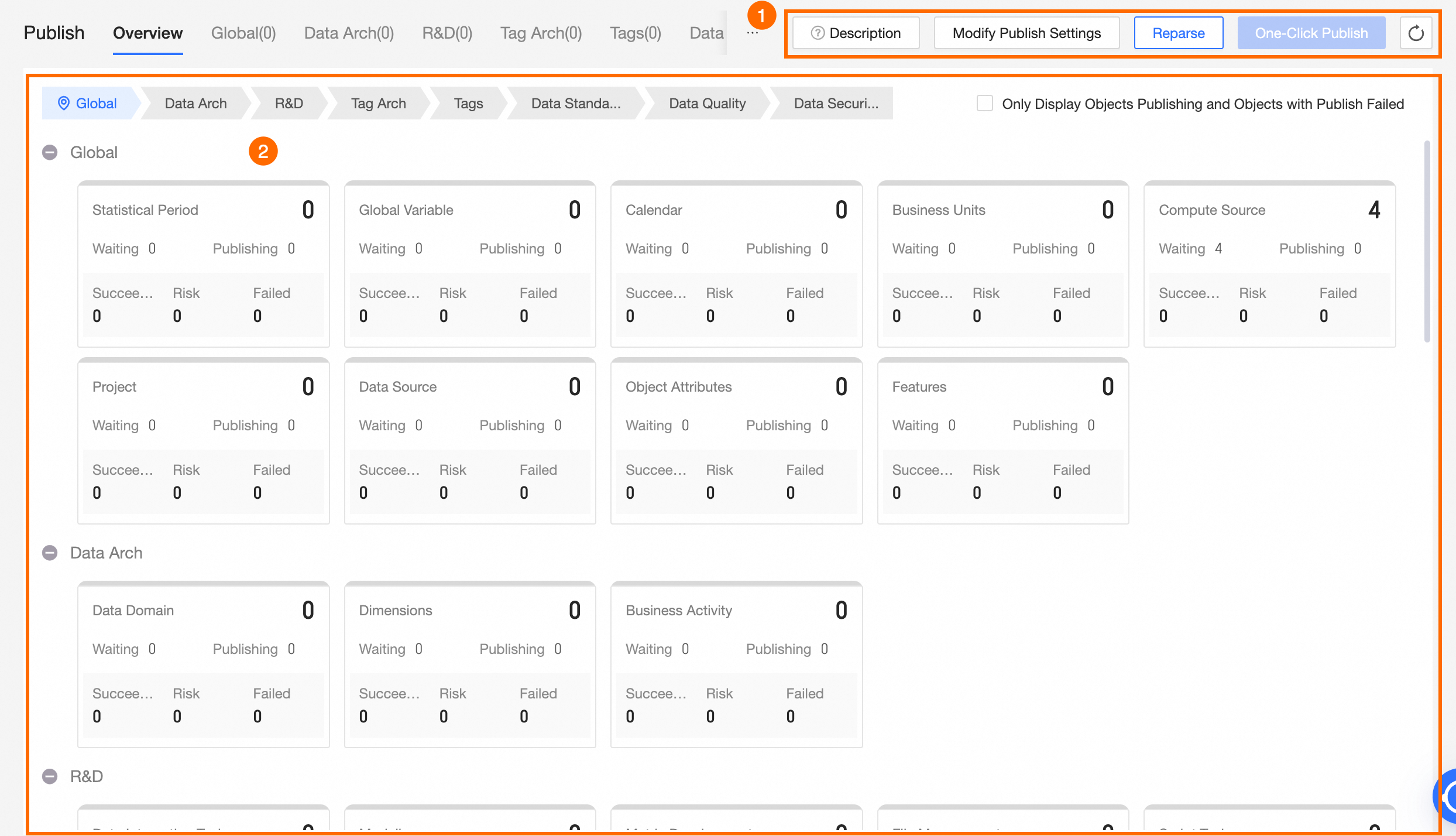
Area | Description |
① Operations area | Supports the following operations: Modify Publish Settings, Reparse, One-click Publish, and Refresh.
|
② Publish Object List | The system divides objects into functional modules and displays a card for each module. The cards show the status and object information for the corresponding module.
|
 : The module is waiting to be published.
 : The module contains objects that failed to publish.
 : The module is being published.
 : All objects in the module were published successfully.
 icon on its card to view the details.
Change types
When you import a deployment package file, the system automatically identifies and marks the change type for each object based on the following rules. The change types are Add, Update, and Delete.
Add: If an object in the imported package does not exist in the target environment, its change type is Add. When you publish this type of object, it will be added to the target environment.
Update: If an object in the imported package already exists in the target environment but has a different version, its change type is Update. When you publish this type of object, it will overwrite the corresponding object in the target environment.
Delete: If the imported package does not contain an object that exists in the target environment, its change type is Delete. When you publish this type of object, the corresponding object will be deleted from the target environment.
Permissions for publishing objects
After you import a deployment package file, the cross-tenant publishing user must also have the required publish permissions for the corresponding object types to publish the objects to a production or development environment. The required permissions are described below:
Object to publish | Subtype | Permissions required |
Global |
| Requires a cross-tenant publishing user with the super administrator or system administrator role. |
Data block | Requires a cross-tenant publishing user with the super administrator or system administrator role, or a data block architect for the corresponding block. | |
Compute engine | Requires a cross-tenant publishing user who also has one of the following roles or permissions: super administrator, system administrator, data block architect for the block that is bound to the compute engine, or compute engine owner. | |
Project | Requires a cross-tenant publishing user who also has one of the following roles or permissions: super administrator, system administrator, data block architect for the block that is bound to the compute engine, or project owner. | |
Data source | Requires a cross-tenant publishing user with the data source administrator or data source owner role. | |
Data architecture |
| Requires a cross-tenant publishing user with the super administrator or system administrator role, or a data block architect for the corresponding block. |
Development object |
| Requires a cross-tenant publishing user with super administrator permissions. Alternatively, the user must be a cross-tenant publishing user and a member of the project that contains the object, and have submit permissions for Dev or Basic projects or publish permissions for Prod projects. |
|
| Requires a cross-tenant publishing user with the super administrator or system administrator role. |
Data standard |
| Requires a cross-tenant publishing user with the super administrator or system administrator role. |
Data quality |
| Requires a cross-tenant publishing user with the super administrator or system administrator role. |
Data security |
| Requires a cross-tenant publishing user with the super administrator or system administrator role. |
Recommended publishing order
Publish objects in the following order, which is based on their dependencies.
Global (Compute engine -> Data source -> Statistic period -> Global variable -> Public calendar -> Object property -> Python third-party package -> Data block -> Project -> Identification feature)
Data architecture (Subject area -> Business activity -> Business object)
Data security (Key -> Data categorization -> Data classification -> Identification feature)
Data standard (Lookup table folder -> Lookup table -> Root -> Data standard set folder -> Data standard set -> Public standard property -> Standard template)
Data quality (Rule template)
Standard (Data standard -> Mapping rule)
Development (Offline physical table -> Node)
Tag architecture (Tag entity -> Tag entity ID)
Tag (Workbench object)
Data quality (Quality rule)
Data standard (Mapping relationship)
Data security (Identification result)