This topic describes how to build a fully automated GitOps delivery pipeline for applications on Container Service for Kubernetes (ACK) using Git, appcenter, and Container Registry.
Background
You can use any third-party Continuous Integration (CI) system to run the following CI process:
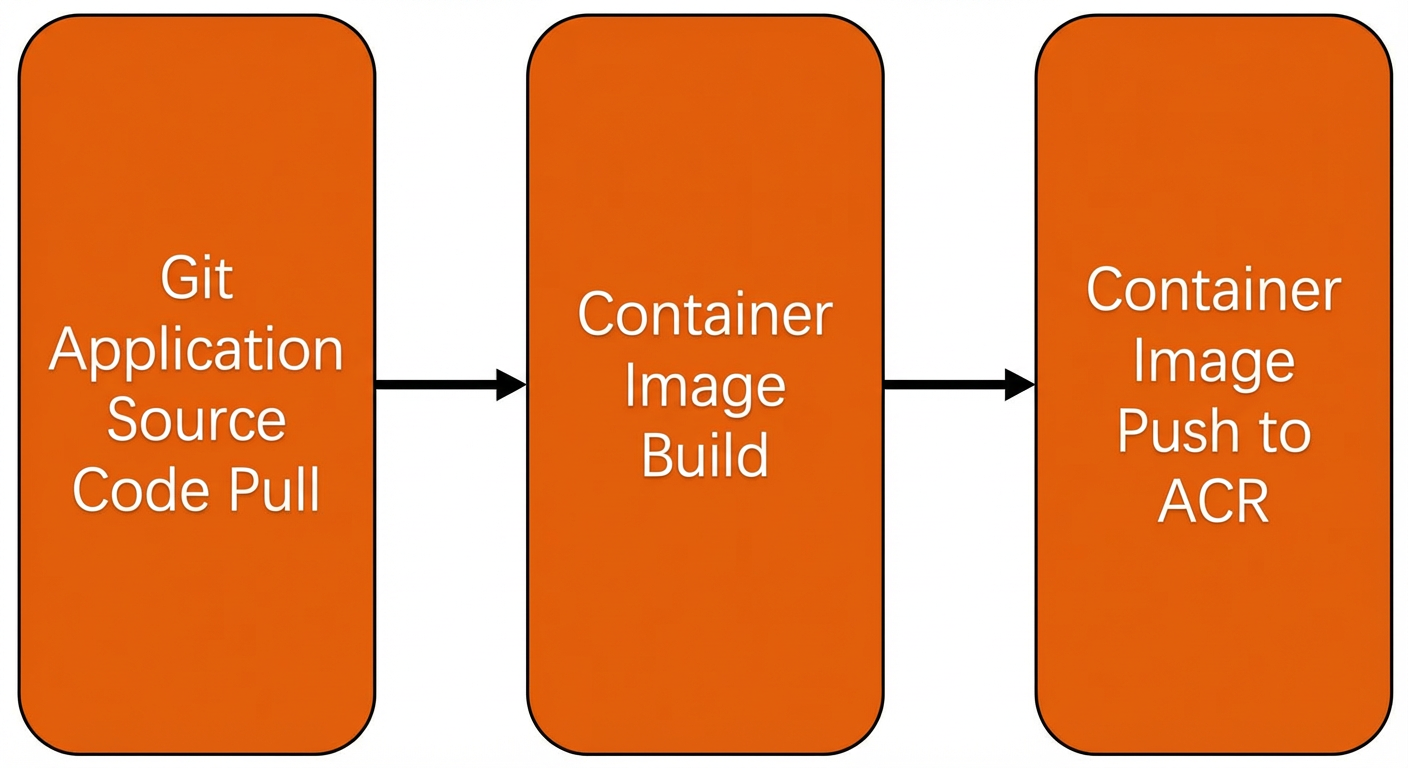
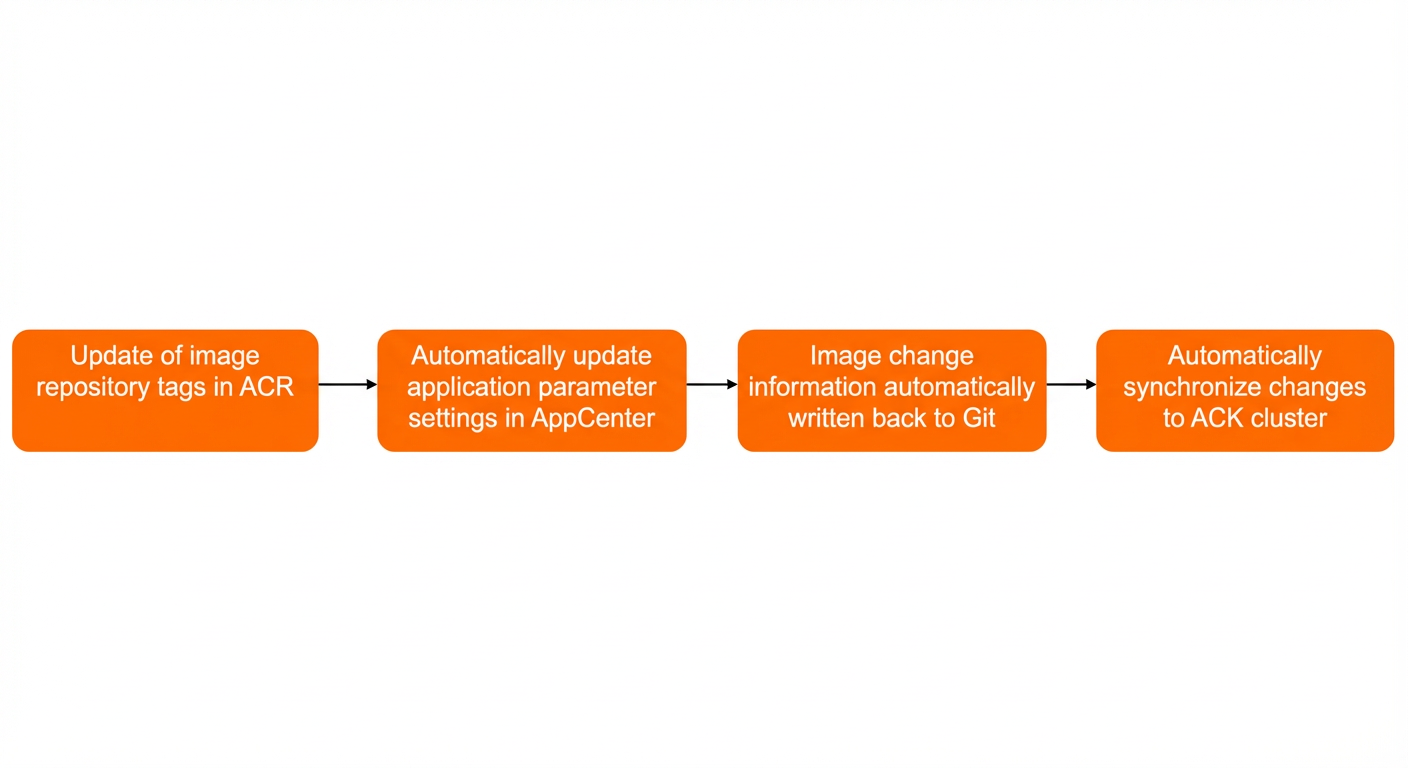
When the CI process successfully pushes an Application's container image to a Container Registry image repository, this automatically triggers the Continuous Delivery (CD) process to update the container image. This topic demonstrates how appcenter automatically monitors a Container Registry image repository for changes. If a container image tag that matches the filter criteria is updated, the following process is triggered:
Limitations
-
This feature works only with Applications created using appcenter 2.2.5.1 or later.
-
This feature applies only to Application manifests that are managed in a Git system and rendered using Kustomize or Helm.
-
This feature applies only to Applications that have the synchronization policy set to
auto-sync. -
You must store the private image pull credentials in the same cluster where the appcenter system is deployed. Cross-cluster reading of private image pull credentials is not supported.
Before you begin
The GitHub repository for the sample Application used in this topic is available at appcenter-guestbook.
Log on to GitHub, fork the repository to your account, and modify the image address in the values.yaml file of the sample Application as described in Configure container image updates. This change ensures the Application can automatically update its container image and correctly write the changes back to the GitHub application repository.
-
The directory structure of the guestbook Application manifest is as follows:
├── helm │ ├── Chart.yaml │ ├── templates │ │ ├── frontend-deployment.yaml │ │ ├── frontend-service.yaml │ │ ├── ingress.yaml │ │ ├── redis-master-deployment.yaml │ │ ├── redis-master-service.yaml │ │ ├── redis-slave-deployment.yaml │ │ └── redis-slave-service.yaml │ ├── values-idc.yaml │ └── values.yaml └── README.md -
In the guestbook Application, the frequently updated image is the guestbook image in the
frontend deployment. The relevant parameters in the values.yaml file are as follows:frontend: replicaCount: 3 image: repository: registry.cn-hongkong.aliyuncs.com/haoshuwei24/guestbook tag: "v1"
Configure container image updates
-
Annotation format
You can add an annotation to an Application in appcenter to enable automatic updates for one or more container images. The format is as follows:
argocd-image-updater.argoproj.io/image-list: <image_spec_list><image_spec_list>can be a single container image or a list of container images separated by commas (,). The format for each container image description is as follows:[<alias_name>=]<image_path>[:<version_constraint>] -
Image tag filter conditions
Using the
registry.cn-hongkong.aliyuncs.com/haoshuwei24/guestbookimage as an example, you can set filter conditions to control the update scope when new tags for the guestbook image are pushed to the Container Registry repository.-
Allow any image tag to trigger an Application update:
argocd-image-updater.argoproj.io/image-list: registry.cn-hongkong.aliyuncs.com/haoshuwei24/guestbook -
Filter allowed tags using a regular expression:
argocd-image-updater.argoproj.io/<image_name>.allow-tags: <match_func>NoteThe format of
<match_func>isregexp:<expression>, where<expression>is a standard regular expression.For example, to allow only tags from
v1tov9to trigger Application updates, use the following annotation:argocd-image-updater.argoproj.io/<image_name>.allow-tags: regexp:^v[1-9]
-
-
Specify an alias for a container image
You can set an alias for a container image for use in other configurations. The alias must be an alphabetic string and can be used only in the
image-listannotation, as shown below:argocd-image-updater.argoproj.io/image-list: guestbook=registry.cn-hongkong.aliyuncs.com/haoshuwei24/guestbookNoteguestbookis the alias for the container imageregistry.cn-hongkong.aliyuncs.com/haoshuwei24/guestbook. -
Configure a container image update policy
Several update policies are available for container images. The default update policy is
semver.Update policy
Description
semverSorts tags by semantic version and updates to the latest tag.
latestSorts tags by creation time and updates to the most recent tag.
nameSorts tags alphabetically and updates to the latest tag.
digestUpdates to the latest pushed version of a mutable tag.
The annotation format is as follows:
argocd-image-updater.argoproj.io/<image_name>.update-strategy: <strategy>To set the update policy for
guestbook=registry.cn-hongkong.aliyuncs.com/haoshuwei24/guestbooktolatest, use the following annotation:argocd-image-updater.argoproj.io/guestbook.update-strategy: latest -
Parameter settings for different Application types
-
Parameters for Helm-based Applications: An Application can reference multiple container images. For example, the
guestbooksample Application includesfrontend.image.repository,frontend.image.tag,redis.master.image.repository, andredis.master.image.tag. The annotation format is as follows:annotations: argocd-image-updater.argoproj.io/image-list: guestbook=registry.cn-hongkong.aliyuncs.com/haoshuwei24/guestbook,redis-master=registry.cn-hongkong.aliyuncs.com/haoshuwei24/redis argocd-image-updater.argoproj.io/guestbook.helm.image-name: frontend.image.repository argocd-image-updater.argoproj.io/guestbook.helm.image-tag: frontend.image.tag argocd-image-updater.argoproj.io/redis-master.helm.image-name: redis.master.image.repository argocd-image-updater.argoproj.io/redis-master.helm.image-tag: redis.master.image.tag -
Parameters for Kustomize-based Applications: To enable automatic container image updates for Kustomize-based Applications, you must first define an alias for the image you want to update (which can include a tag), and then specify the original image address (without the tag). The annotation format is as follows:
annotations: argocd-image-updater.argoproj.io/image-list: <image_alias>=<image_name>:<image_tag> argocd-image-updater.argoproj.io/<image_alias>.kustomize.image-name: <original_image_name>The following is a sample annotation:
annotations: argocd-image-updater.argoproj.io/image-list: guestbook=registry.cn-hongkong.aliyuncs.com/haoshuwei24/guestbook argocd-image-updater.argoproj.io/guestbook.kustomize.image-name: registry.cn-hongkong.aliyuncs.com/haoshuwei24/guestbook
-
Step 1: Configure credentials
Configure the following credentials to allow appcenter to automatically monitor for changes in the Container Registry image repository and update the Application.
Configure Container Registry credentials
The Container Registry access credentials that appcenter uses to periodically check image repositories are configured in a ConfigMap named argocd-image-updater-config in the appcenter namespace.
-
Run the following command to query the default configuration file of the
argocd-image-updater-configConfigMap.kubectl -n appcenter get cm argocd-image-updater-config -oyamlExpected output:
apiVersion: v1 data: registries.conf: | registries: - name: AlibabaCloud Container Registry api_url: https://registry.cn-hongkong.aliyuncs.com prefix: registry.cn-hongkong.aliyuncs.com credentials: secret:appcenter/acr#acr kind: ConfigMap metadata: name: argocd-image-updater-config namespace: appcenterParameter
Description
nameThe name of the container image repository configuration.
api_urlThe API address of the container image repository. This address is automatically generated based on the current region when appcenter is installed.
prefixThe query prefix for the container image repository. This prefix is automatically generated based on the current region when appcenter is installed.
credentialsThe access credentials for the container image repository, in the format
secret:<secret_namespace>/<secret_name>#<your_key>. -
Run the following command to configure a Secret resource named
acrin the appcenter namespace.This Secret is used by appcenter to access the Container Registry repository in the
cn-hongkongregion (China (Hong Kong)).kubectl -n appcenter apply -f - <<EOF apiVersion: v1 kind: Secret metadata: name: acr type: Opaque stringData: acr: <your_username>:<your_password> # Replace <your_username>:<your_password> with your container image repository access credentials. EOF
(Optional) Configure Git credentials for write-back
If you provided a username and password when you created the Application, appcenter can already write changes back to the Git repository, and you can skip this step. Otherwise, you can configure Git credentials for writing back container image changes in one of the following two ways:
-
Method 1: When you create an Application in appcenter and configure Git access, Git credentials are created. To use these stored credentials, add the following annotation:
apiVersion: argoproj.io/v1alpha1 kind: Application metadata: annotations: argocd-image-updater.argoproj.io/write-back-method: git -
Method 2: Store the Git credentials in a Secret, as shown in the following example:
apiVersion: argoproj.io/v1alpha1 kind: Application metadata: annotations: argocd-image-updater.argoproj.io/write-back-method: git:secret:appcenter/git-credsHere,
git:secret:appcenter/git-credsrefers to a Secret resource namedgit-credsin the appcenter namespace. To create this Secret, run the following command:kubectl -n appcenter create secret generic git-creds \ --from-literal=username=<your_username> \ --from-literal=password=<your_password>
Step 2: Deploy an application from Git
-
Create the guestbook Application using appcenter.
-
Run the following command to view the guestbook Application.
kubectl -n appcenter get application guestbook -oyamlExpected output:
apiVersion: argoproj.io/v1alpha1 kind: Application metadata: name: guestbook namespace: appcenter spec: destination: namespace: guestbook server: https://192.168.0.32:6443 project: default source: helm: valueFiles: - values.yaml path: helm repoURL: https://github.com/AliyunContainerService/appcenter-guestbook.git targetRevision: main -
Set the synchronization policy for the guestbook Application to
auto-sync.-
Create a file named syncPolicy.patch with the following content.
cat <<EOF > syncPolicy.patch spec: syncPolicy: automated: {} EOF -
Run the following command to update the guestbook Application in the appcenter namespace.
kubectl -n appcenter patch Application guestbook --type=merge -p "$(cat syncPolicy.patch)"
-
-
Configure automatic container image updates for the guestbook Application.
-
Create a file named imageUpdate.patch with the following content.
cat <<EOF > imageUpdate.patch metadata: annotations: argocd-image-updater.argoproj.io/image-list: guestbook=registry.cn-hongkong.aliyuncs.com/haoshuwei24/guestbook argocd-image-updater.argoproj.io/guestbook.helm.image-name: frontend.image.repository argocd-image-updater.argoproj.io/guestbook.helm.image-tag: frontend.image.tag EOF -
Run the following command to update the guestbook Application in the appcenter namespace.
kubectl -n appcenter patch Application guestbook --type=merge -p "$(cat imageUpdate.patch)"-
You can use an annotation in the following format to describe one or more container images:
argocd-image-updater.argoproj.io/image-list: <image_spec_list>Here,
<image_spec_list>is a single container image or a comma-separated list of container images, expressed as:[<alias_name>=]<image_path>[:<version_constraint>] -
You can use an annotation in the following format to specify how a Helm-based Application updates the
image-nameandimage-tagparameters:argocd-image-updater.argoproj.io/<alias_name>.helm.image-name: <helm_values_parameter> argocd-image-updater.argoproj.io/<alias_name>.helm.image-tag: <helm_values_parameter>In the values.yaml file of the guestbook sample Application, the container image parameters for the frontend component are as follows:
frontend: replicaCount: 3 image: repository: registry.cn-hongkong.aliyuncs.com/haoshuwei24/guestbook tag: "v1"The corresponding annotation is as follows:
argocd-image-updater.argoproj.io/guestbook.helm.image-name: frontend.image.repository
argocd-image-updater.argoproj.io/guestbook.helm.image-tag: frontend.image.tag
-
-
-
Configure Git write-back for the guestbook Application after an automatic container image update.
-
Create a file named gitWriteback.patch with the following content.
cat <<EOF > gitWriteback.patch metadata: annotations: argocd-image-updater.argoproj.io/write-back-method: git EOF -
Run the following command to update the guestbook Application in the appcenter namespace.
kubectl -n appcenter patch Application guestbook --type=merge -p "$(cat gitWriteback.patch)"
-
Step 3: Test the image update
-
Run the following commands to push a new version of the guestbook image.
docker tag registry.cn-hongkong.aliyuncs.com/haoshuwei24/guestbook:v1 registry.cn-hongkong.aliyuncs.com/haoshuwei24/guestbook:v4 docker push registry.cn-hongkong.aliyuncs.com/haoshuwei24/guestbook:v4 -
Run the following command to view the logs of the argocd-image-updater component in the appcenter namespace.
kubectl -n appcenter logs -f argocd-image-updater-<xxx>Expected output:
time="2022-03-28T07:28:27Z" level=info msg="Successfully updated image 'registry.cn-hongkong.aliyuncs.com/haoshuwei24/guestbook:v1' to 'registry.cn-hongkong.aliyuncs.com/haoshuwei24/guestbook:v4', but pending spec update (dry run=false)" alias=guestbook application=guestbook image_name=haoshuwei24/guestbook image_tag=v1 registry=registry.cn-hongkong.aliyuncs.com time="2022-03-28T07:28:27Z" level=info msg="Committing 1 parameter update(s) for application guestbook" application=guestbook -
On GitHub, check whether the .argocd-source-guestbook.yaml file is automatically generated in the guestbook Application repository.
The content of the automatically generated .argocd-source-guestbook.yaml file is as follows. ArgoCD Image Updater has automatically updated the image tag to
v4.helm: parameters: - name: frontend.image.repository value: registry.cn-hongkong.aliyuncs.com/haoshuwei24/guestbook forcestring: true - name: frontend.image.tag value: v4 forcestring: true -
Run the following command to check whether the guestbook Application has been automatically updated to the latest container image.
kubectl -n guestbook get deploy frontend -ojsonpath="{.spec.template.spec.containers[0].image}"Expected output:
registry.cn-hongkong.aliyuncs.com/haoshuwei24/guestbook:v4