ack-kubernetes-webhook-injector keeps cloud service whitelists in sync with your pod lifecycle. When a pod starts, the component automatically adds the pod's IP address to the specified whitelist. When the pod is deleted, the IP address is removed. This gives you fine-grained, automatic access control without manual updates.
Supported services
| Service | Annotation (instance ID) | Annotation (whitelist name) |
|---|---|---|
| ApsaraDB RDS | ack.aliyun.com/rds_id | ack.aliyun.com/white_list_name |
| ApsaraDB for Redis | ack.aliyun.com/redis_id | ack.aliyun.com/white_list_name |
| Server Load Balancer (SLB) access control list (ACL) | ack.aliyun.com/access_control_policy_id | _(not applicable)_ |
Limits and considerations
The component requires the Terway network plug-in.
The component only supports ACK managed clusters.
The AccessKey pair used during installation must have permissions to manage the target cloud services (ApsaraDB RDS, ApsaraDB for Redis, or SLB).
Not all Alibaba Cloud services provide internal endpoints in every region. Check endpoint availability on OpenAPI Explorer before switching to internal endpoint access.
For ApsaraDB RDS and ApsaraDB for Redis, add annotations to
spec.template.metadata.annotations(the pod template), not tometadata.annotations(the Deployment).
Prerequisites
Before you begin, ensure that you have:
An ACK managed cluster. See Create an ACK managed cluster
The Terway network plug-in configured for the cluster. See Use the Terway plug-in
An AccessKey pair with permissions to manage the target cloud services (ApsaraDB RDS, ApsaraDB for Redis, or SLB). See Obtain an AccessKey pair
Install ack-kubernetes-webhook-injector
Log on to the ACK console. In the left-side navigation pane, choose Marketplace > Marketplace.
Find and click ack-kubernetes-webhook-injector. In the upper-right corner of the page, click Deploy.
In the panel that appears, select a cluster and namespace, enter a release name, and click Next.
On the Parameters wizard page, select a chart version. In the
openapisection, setakto your AccessKey ID andskto your AccessKey Secret, then click OK.
Add pod IP addresses to a whitelist
After installation, annotate the pod template in your Deployment to specify the target service instance and whitelist. The component reads these annotations and handles all whitelist updates automatically.
Add pod IP addresses to an ApsaraDB RDS whitelist
Create a Deployment with the RDS annotations. Replace
<rm-wz9nanjcud75b****>with your RDS instance ID and<rds_group>with the name of the whitelist group. Add the annotations tospec.template.metadata.annotations(the pod template), not tometadata.annotations(the Deployment).apiVersion: apps/v1 kind: Deployment metadata: labels: app: inject-test name: inject-test spec: replicas: 1 selector: matchLabels: app: inject-test template: metadata: annotations: ack.aliyun.com/rds_id: <rm-wz9nanjcud75b****> ack.aliyun.com/white_list_name: <rds_group> labels: app: inject-test spec: containers: - command: - sleep - "3600" image: alpine:latest name: inject-testAfter the pod starts, get the pod's IP address:
kubectl --kubeconfig .kube/config_sts_test -n inject-test get pod -o wideExpected output:
NAME                           READY   STATUS    RESTARTS   AGE   IP            NODE
inject-test-68cc8f9bbf-gj86n   1/1     Running   0          22s   172.25.0.28   cn-hangzhou.xxx
Log on to the ApsaraDB RDS console and check the whitelist of the RDS instance. The pod's IP address (for example,
172.25.0.28) should appear in the specified whitelist group. For more information, see Configure an enhanced IP address whitelist.To verify that the IP address is removed when the pod is deleted, scale the Deployment to 0 replicas and check the RDS whitelist again. The pod's IP address is no longer listed in the whitelist.
Add pod IP addresses to an ApsaraDB for Redis whitelist
Add the following annotations to spec.template.metadata.annotations in your Deployment. Replace <redis-instance-id> with your Redis instance ID and <redis_group> with the whitelist group name.
annotations:
  ack.aliyun.com/redis_id: <redis-instance-id>
  ack.aliyun.com/white_list_name: <redis_group>
Add pod IP addresses to an SLB ACL
Add the following annotation to spec.template.metadata.annotations in your Deployment. Replace <acl-id> with the ID of your SLB access control policy.
annotations:
  ack.aliyun.com/access_control_policy_id: <acl-id>
Use an internal endpoint
By default, ack-kubernetes-webhook-injector calls the public endpoint of each Alibaba Cloud service. If your cluster has public access disabled, configure the component to use internal endpoints instead.
Not all Alibaba Cloud services provide internal endpoints in every region. Check endpoint availability on OpenAPI Explorer before proceeding.
Log on to the ACK console. In the left-side navigation pane, click Clusters.
On the Clusters page, click the name of your cluster. In the left-side pane, choose Workloads > Deployments.
In the top navigation bar, select kube-system from the Namespace drop-down list. Find the kubernetes-webhook-injector Deployment, and in the Actions column, choose More > View in YAML.

Under
spec.template.spec.containers.command, add- '--intranet-access', then click Update.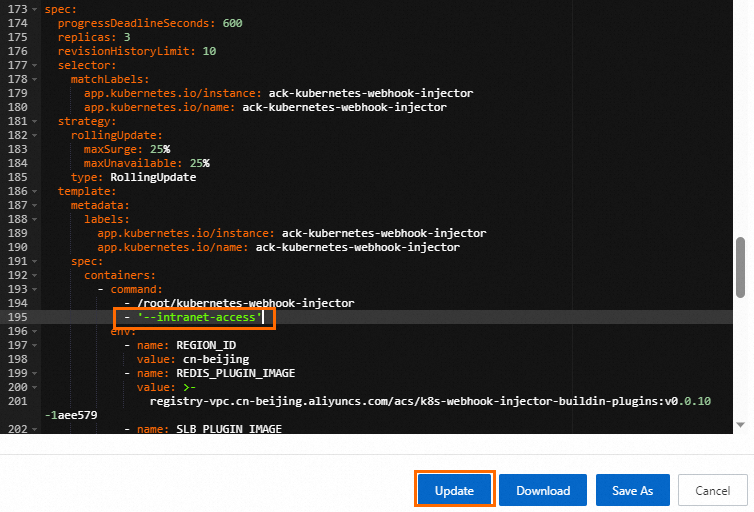
Uninstall ack-kubernetes-webhook-injector
Uninstall the component using the Helm release management feature in ACK. See Manage releases by using Helm.
After uninstalling the release, delete the related configurations:
kubectl -n kube-system delete secret kubernetes-webhook-injector-certs
kubectl delete mutatingwebhookconfigurations.admissionregistration.k8s.io kubernetes-webhook-injector