A node pool scale-out can fail for reasons such as insufficient instance inventory or an unsupported ECS instance type in the specified zone. Elastic strength helps you evaluate the availability of your node pool configuration and the health of your instance supply. It also provides configuration recommendations. ACK displays node pools that have poor elastic strength.
Concepts
Not all resource pools are always available. The scale-out process can be affected by inventory levels or resource constraints. For example, the c6e instance family supports enterprise SSDs but not standard SSDs. These factors can reduce the number of available resource pools below the theoretical maximum.
The following figure shows a node pool configured with two zones, two instance types, and a specific disk type. Although multiple resource pools exist in theory, only one is actually available. This is due to factors such as inventory, instance deployment status, and disk resource constraints.

View the elastic strength of a node pool
Log on to the Container Service Management Console . In the navigation pane on the left, click Clusters.
On the Clusters page, click the name of your cluster. In the navigation pane on the left, click .
-
On the Node Pools page, check the Status column to identify node pools with poor elastic strength. A poor rating indicates an inventory health score of 0 or less.
Click the Scalability Level: Weak button to view detailed information. The following figure shows the details.
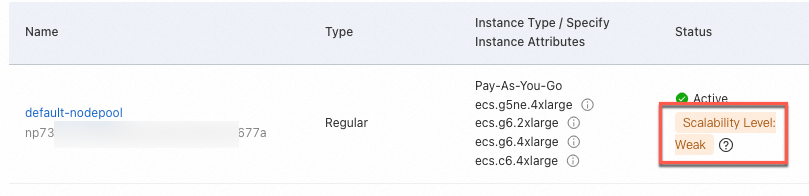
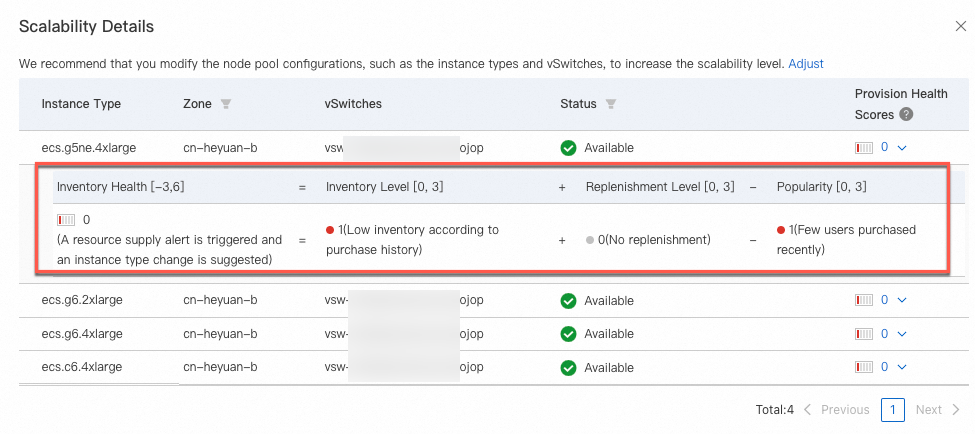
Poor elastic strength and recommended solutions
To adjust the node pool configuration, see Create and manage a node pool. To improve high availability, select multiple vSwitches in different zones and configure multiple instance types that have sufficient inventory.
In the Scalability Details dialog box, view the assessment results in the Status column.
|
Type |
Result |
Recommended solution |
|
Resource constraint check |
Image and instance type mismatch |
Adjust the instance types in the node pool. |
|
System disk and instance type mismatch |
Adjust the instance types or system disk type in the node pool. |
|
|
Data disk and instance type mismatch |
Adjust the instance types or data disk type in the node pool. |
|
|
Instance type does not support IPv6 |
Adjust the instance types in the node pool. |
|
|
vSwitch does not exist |
Adjust the vSwitches in the node pool. |
|
|
Instance inventory check |
Instance type not deployed |
Adjust the instance types in the node pool. |
|
Instance type is out of stock |
Adjust the instance types in the node pool. |
References
For more information about node configuration recommendations, see ECS instance type configuration recommendations.