Cloud Backup's tiered backup feature helps you balance data security with storage costs. It lets you create a flexible retention schedule by setting longer retention periods for specific backups, such as the first backup of each week, month, or year. This approach keeps recent backups readily available while retaining older backups less frequently for long-term compliance. This topic covers how tiered backups work, how to configure them, and provides practical examples.
Overview of tiered backup policies
A tiered backup policy creates frequent backups for recent data and infrequent backups for older data. This policy ensures data security, optimizes storage efficiency, and reduces long-term backup costs.
Recent backups (high frequency): Recent backups are created more frequently, such as hourly, daily, or weekly. This ensures that you can quickly recover to the most recent state if data loss or corruption occurs. Recent backups are usually stored in the Standard storage layer for fast access, which allows for rapid business recovery.
Long-term backups (low frequency): As data ages, the need to access it decreases. Older backups are created less frequently, such as monthly, quarterly, or even yearly. These backups can be moved to the lower-cost Archive Storage layer. This method meets compliance requirements and reduces storage costs.
The advantages of this policy include the following:
Cost-effectiveness: Storage costs decrease over time. You do not need to keep all historical data in high-cost, fast-access storage.
Recovery efficiency: Recent backup data can be recovered quickly. This ensures business continuity and data timeliness.
Data retention: This policy meets regulatory and business requirements for the long-term retention of historical data. It also supports auditing and compliance checks.
Resource optimization: This policy optimizes storage resource usage by moving infrequently accessed data to a less expensive storage layer.
Implement a tiered retention mechanism by setting special retention periods in a backup policy.
Traditionally, to retain a specific backup version for a long time, you had to extend the general retention period of the backup policy. This approach extended the retention for all backups, which resulted in wasted storage resources. Special retention periods offer more flexible lifecycle management for backups. They extend the retention period only for backups at key points in time. This ensures that important data is available for the long term without unnecessary storage overhead.
Special retention period mechanism
In addition to the general retention period in a backup policy, set an extra retention period, known as a special retention period, for the first backup of each week, month, and year. This mechanism allows for precise control over data retention policies across different timeframes and meets the varied compliance and disaster recovery needs of an enterprise.
The following three types of special retention periods are supported:
Weekly special retention period
The first backup created by a policy between 00:00 on Sunday and 00:00 on the following Sunday is selected as a weekly special backup. A weekly special retention period is set for this backup.
Monthly special retention period
The first backup created by a policy between 00:00 on the first day of a month and 00:00 on the first day of the next month is selected as a monthly special backup. A monthly special retention period is set for this backup.
Special annual retention period
The first backup created by a policy between 00:00 on January 1 of a year and 00:00 on January 1 of the following year is designated as a yearly special backup. A yearly special retention period is set for this backup.
You can set weekly, monthly, and yearly special retention periods in the same backup policy. If multiple rules apply to the same backup, the longest retention period takes effect. Backups with special retention periods are marked in the console for easy identification and management.
Set special retention periods
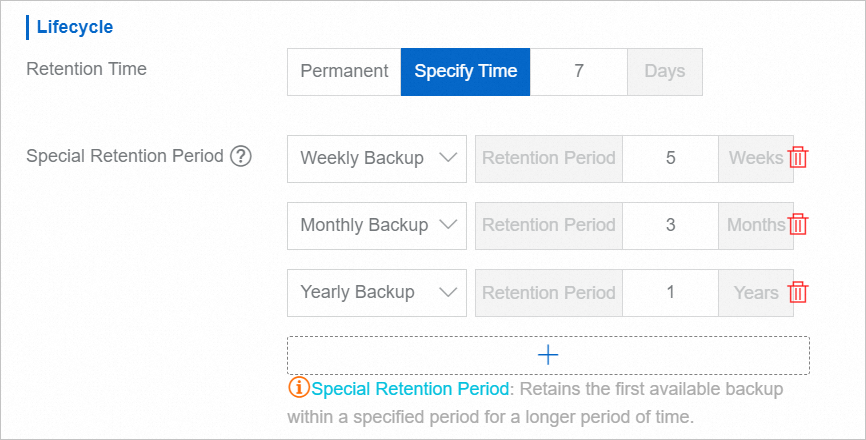
When you configure the backup lifecycle for a new or existing backup policy, set the Special Retention Period. For example, retain general backups for 7 days, weekly special backups for 5 weeks, monthly special backups for 3 months, and yearly special backups for 1 year. For more information, see Policy Center.
After the special retention period configuration takes effect, view backups with a special retention tag in the backup history. The following figure shows a backup with a yearly special retention tag.

Special retention period configuration examples
The following examples explain how special retention periods work and how conflicts are handled.
Example 1: Create special retention periods
A backup policy is set to run daily at 01:00. The retention period is 7 days for general backups, 5 weeks for Weekly Backup, 3 months for Monthly Backup, and 2 years for Yearly Backup.
The retention status for backups from January 1 to January 10 is as follows:
Yearly special retention: The backup created on January 1 is retained for 2 years. The yearly special retention period takes effect.
Monthly special retention: The backup created on January 2 is retained for 3 months.
On January 1, the monthly special retention period conflicts with the yearly special retention period. The monthly retention is postponed and takes effect on January 2.
Weekly special retention: The backups created on Monday, January 3, and Sunday, January 9, are retained for 5 weeks.
On Sunday, January 2, the weekly special retention period conflicts with the monthly special retention period. The weekly retention is postponed and takes effect on January 3.
General retention: The other backups created from January 1 to January 10 are retained for 7 days.
Example 2: Modify special retention periods
Based on the configuration in Example 1, at 00:00 on January 11, change the retention period for Monthly Backup to 6 months and for Yearly Backup to 3 years.
The retention status for backups from January 11 to January 20 is as follows:
Yearly special retention: The backup created on January 11 is retained for 3 years.
The yearly special retention period was modified at 00:00 on January 11, so the new rule takes effect at 00:00 on January 11.
Monthly special retention: The backup created on January 12 is retained for 6 months.
The monthly special retention period was modified at 00:00 on January 11, so the new rule takes effect at 00:00 on January 11. On January 11, the monthly retention conflicts with the yearly retention. Therefore, the monthly retention is postponed and takes effect on January 12.
Weekly special retention: The backup created on Sunday, January 16, is retained for 5 weeks. The weekly special retention period takes effect.
General retention: The other backups created from January 11 to January 20 are retained for 7 days.
Example 3: Delete special backups
Based on the configuration in Example 2, at 00:00 on January 21, the special backups from January 1, January 2, January 11, and January 12 are manually deleted.
The retention status for backups from January 21 to January 31 is as follows:
Yearly special retention: The backup created on January 21 is retained for 3 years.
The yearly special backup from January 11 was deleted. Because no yearly special backup exists between 00:00 on January 11 and 01:00 on January 21, the yearly special retention period takes effect for the backup created on January 21.
Monthly special retention: The backup created on January 22 is retained for 6 months.
The monthly special backup from January 12 was deleted. On January 21, the monthly retention conflicts with the yearly retention. Because no monthly special backup exists between 00:00 on January 11 and 01:00 on January 22, the monthly special retention period takes effect for the backup created on January 22.
Weekly special retention: The backups created on Sunday, January 23, and Sunday, January 30, are retained for 5 weeks. The weekly special retention period takes effect.
General retention: The other backups created from January 21 to January 31 are retained for 7 days.
As of 00:00 on February 1, the following backups are still retained:
Yearly special backup (retained for 3 years): January 21.
Monthly special backup (retained for 6 months): January 22.
Weekly special backups (retained for 5 weeks): January 3, January 9, January 16, January 23, and January 30.
General backups (retained for 7 days): January 25, January 26, January 27, January 28, January 29, and January 31.