Problem description
The origin server of an Alibaba Cloud CDN-accelerated domain name is an NGINX server, and the Gzip compression feature is enabled. When a client requests a resource from the origin server, the Gzip compression feature takes effect. However, when a client request is redirected from a point of presence (POP) to the origin server, the Gzip compression feature does not take effect. The following section describes the details:
If Gzip compression and decompression work as expected, the NGINX server returns the compressed content to reduce traffic overhead and accelerate response. However, after you use Alibaba Cloud CDN, requests are redirected from POPs to the origin server and clients receive the uncompressed content. In this case, the Gzip compression feature on the origin server does not take effect. The following section provides more details:
If Alibaba Cloud CDN is not used and request headers contain the
Accept-Encoding: gzip, deflateheader, the corresponding response header isContent-Encoding: gzip. In this case, the content is compressed.If Alibaba Cloud CDN is used and request headers contain the
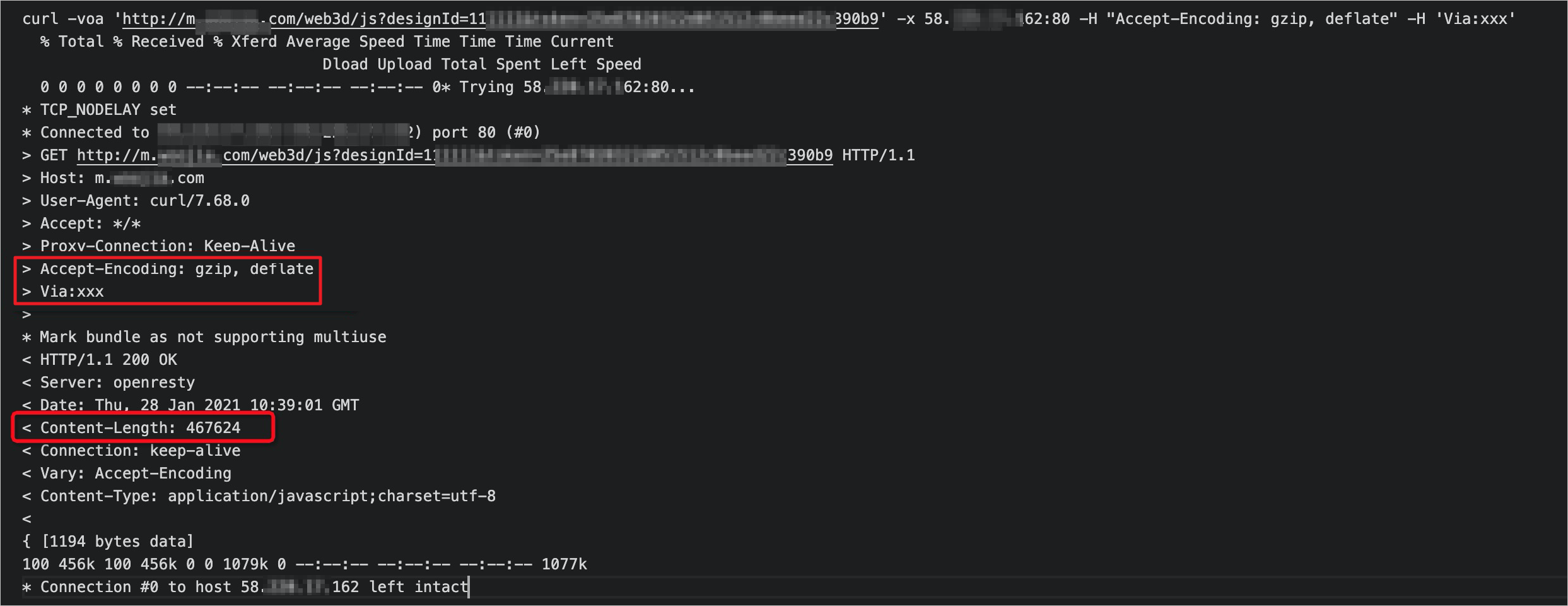
Accept-Encoding: gzip, deflateheader, the corresponding response header isContent-Length, and theContent-Encoding: gzipheader is not returned.
Cause
The Gzip-related configuration on the NGINX origin server is invalid, and the Gzip compression feature is not enabled for requests that are redirected to the origin server . The following section provides more details:
If a request is redirected from a POP to the origin server, the Via header is added to the request to specify that the request is from a proxy. In this example, Alibaba Cloud CDN is the proxy. However, the ngx_http_gzip_module module of NGINX contains a gzip_proxied configuration item, which controls whether to enable Gzip compression for proxied requests. One of the prerequisites for the configuration item to take effect is that request headers contain the Via header. Therefore, the gzip_proxied configuration item determines whether to enable Gzip compression for origin requests.
Solution
If you encounter the same issue that is described in Problem description, perform the following steps to update the configuration file of NGINX. If you cannot identify the issue, see References.
Locate the Gzip-related blocks in the configuration files of NGINX. Gzip can be configured in the http, server, and location blocks, which correspond to different configuration files. In this example, Gzip is configured in the http block of the
nginx.conffile.Check whether the
gzip_proxiedconfiguration item exists. If it exists, modify the configuration item based on the following configuration. If it does not exist, add the following configuration. For more information about thegzip_proxiedconfiguration item, see NGINX documentation.NoteIf the
gzip_proxiedconfiguration item does not exist, the value of the following configuration isoffby default.gzip_proxied anyNoteanyindicates that Gzip compression is enabled for all proxied requests.After you save the preceding configuration, run the following commands in sequence to confirm the configurations of NGINX and reload configuration files of NGINX.
nginx -t
nginx -s reload
Enable Alibaba Cloud CDN. After the requests are redirected to the NGINX origin server, check whether the response contains the
Content-Encoding: gzipheader. If so, the content is compressed.
References
You can perform the following steps to check whether you encounter the same issue that is described in the Issue section:
Open a command-line interface (CLI) that supports the
curlcommand.Run the following curl command to access the origin server with the
Accept-Encoding: gzip, deflateheader included.curl -voa 'http://[$Domain]/[$Resource]' -x [$Original_Server_IP]:80 -H 'Accept-Encoding: gzip, deflate'Note[$Domain]: your domain name.
[$Resource]: the URL of a requested resource, such as an image or an API operation.
[$Original_Server_IP]: the public IP address of the NGINX origin server.
The system returns a response similar to the following content. Check whether the
Content-Encoding: gzipheader is returned.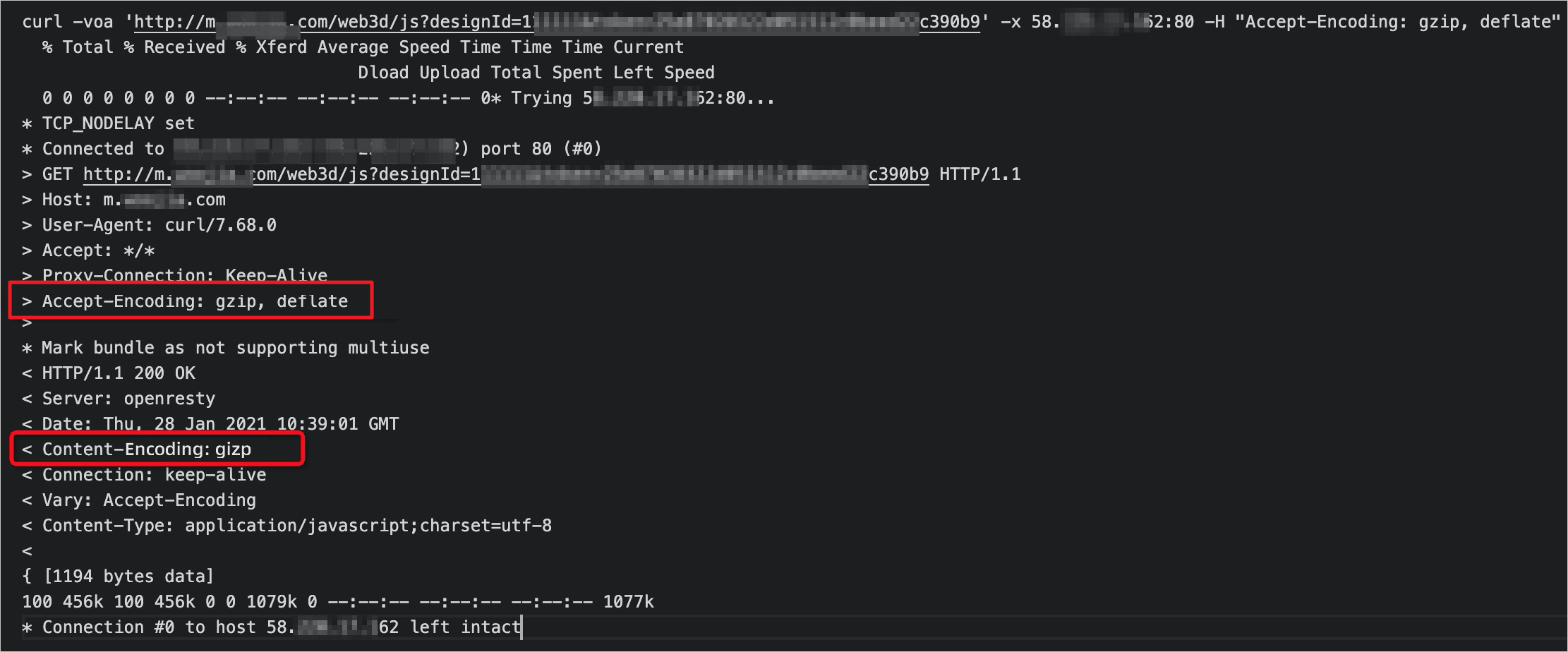
Refer to the following command and add a
Viaheader based on the command in Step 2 to simulate a request from a proxy.curl -voa 'http://[$Domain]/[$Resource]' -x [$Original_Server_IP]:80 -H 'Accept-Encoding: gzip, deflate' -H 'Via:xxx'NoteYou can use any value for the
Viaheader, which does not affect the test result. In this example,xxxis used.The system returns a response similar to the following content. Check whether the
Content-Lengthheader is returned instead of theContent-Encoding: gzipheader.