Backup and Disaster Recovery Center (BDRC) provides a data protection scoring dashboard for your Alibaba Cloud storage resources, helping you assess their data security status. This topic explains the scoring principles and the scoring information displayed in the BDRC console.
Star ratings for data protection scoring
|
Score range |
Star rating |
Message |
|
95 to 100 |
★★★★★ |
Congratulations. Your data protection status is good. |
|
80 to 94 |
★★★★☆ |
Your data protection status needs to be improved. We recommend that you optimize data protection based on your business requirements. |
|
70 to 79 |
★★★☆☆ |
Your data protection score is low. We recommend that you optimize data protection at the earliest opportunity. |
|
61 to 69 |
★★☆☆☆ |
Your data protection score is low. We recommend that you configure a data protection solution at the earliest opportunity. |
|
60 |
★☆☆☆☆ |
Your data protection score is low. We recommend that you configure a data protection solution at the earliest opportunity. |
Scoring criteria
We recommend that you follow the 3-2-1 backup rule for a complete backup solution:
-
3: At least three files are stored, including one raw data and two backup files.
-
2: The two backups are stored on two media.
-
1: At least one backup is stored in a geographically separate region.
Traditional backup software and cloud-native backup services on the public cloud use cost-effective, highly reliable Object Storage Service (OSS) to store backup data. Therefore, "2" can also mean using two backup methods or solutions on the public cloud. Even if both use OSS as the storage medium, backup data remains isolated because each solution uses a separate control link and different OSS buckets.

BDRC combines data backup solutions at the SaaS and IaaS storage layers and assigns star ratings based on the 3-2-1 standard. The full score is 100. For more information about data backup solutions, see Data protection solutions of Alibaba Cloud.
|
Data protection solution |
Message |
Star rating |
Score range |
|
Two backup solutions. At least one solution is configured with cross-region replication. |
Congratulations. Your data protection status is good. |
★★★★★ |
95 to 100 |
|
A backup solution with cross-region replication configured. |
Your data protection status needs to be improved. We recommend that you optimize data protection based on your business requirements. |
★★★★☆ |
80 to 94 |
|
A backup solution without cross-region replication configured. |
Your data protection score is low. We recommend that you optimize data protection at the earliest opportunity. |
★★★☆☆ |
70 to 79 |
|
OSS cross-region replication or not configured. |
Your data protection score is low. We recommend that you configure a data protection plan at the earliest opportunity. |
★★☆☆☆ |
61 to 69 |
|
Not configured. |
Your data protection score is low. We recommend that you configure a data protection plan at the earliest opportunity. |
★☆☆☆☆ |
60 |
-
OSS cross-region replication applies only to the current version and cannot replicate previous versions. Therefore, if you rely solely on OSS cross-region replication, your data protection still needs improvement.
-
Only cloud backup is available for Tablestore. If you configure a backup solution with cross-region replication enabled for Tablestore, you can achieve a five-star rating. This means you use cloud backup for Tablestore and replicate backup vaults across regions.
Check item scores
BDRC checks and scores the data protection status of your Alibaba Cloud storage resources, including Elastic Compute Service (ECS), OSS, File Storage NAS (NAS), and Tablestore.
|
Resource type |
Check item or data protection solution |
Deducted score (if not configured) |
Remarks |
|
ECS |
Disk snapshots |
15 |
If a disk is associated with an automatic snapshot policy or an ECS instance backup policy, no score is deducted. |
|
Cross-region snapshot replication |
5 |
||
|
Backup of ECS files and ECS-hosted self-managed databases |
15 |
If you back up an ECS file or an ECS-hosted self-managed database, no score is deducted. |
|
|
Cross-region replication of ECS file backup vaults |
5 |
||
|
OSS |
OSS versioning |
15 |
If OSS versioning is suspended, no score is deducted. |
|
OSS cross-region replication |
5 |
||
|
OSS backup |
15 |
If a backup plan is associated with an OSS bucket, no score is deducted. |
|
|
Cross-region replication of OSS backup vaults |
5 |
||
|
File Storage NAS |
NAS recycle bin |
10 |
|
|
NAS backup |
10 |
If a backup plan is associated with NAS, no score is deducted. |
|
|
Cross-region replication of NAS backup vaults |
20 |
||
|
Tablestore |
Tablestore backup |
15 |
If a backup plan is associated with a table in a Tablestore instance, no score is deducted. |
|
Cross-region replication of Tablestore backup vaults |
25 |
For check items that require a cloud backup solution, no score is deducted if a backup policy or plan is associated with resources in the following situations:
-
The backup policy or plan is suspended.
-
The backup policy or plan does not match any data. For example, the prefix in an OSS backup plan does not match any objects, or the file directory in a NAS backup plan does not match any files.
Resource scoring
If a resource type has multiple instances, the aggregated score is displayed in the Resource Risk section of the Overview page in the BDRC console. BDRC scores each instance based on the preceding criteria and then applies a weighted formula: (Average score + Lowest score) / 2. The lowest score is factored in twice to ensure that serious but infrequent risks are given adequate weight.
Example: Your account has eight ECS instances. One instance scores 60 and the remaining seven score 75. The calculation is as follows:
Average score: (60 + 7 × 75)/8 = 73.125. Lowest score: 60. Final score: (73.125 + 60)/2 = 66.56, which is displayed as " ".
".
Increase and update data protection scores
To increase your data protection scores, optimize data protection solutions based on the check item scores in the preceding table. For example, configure disk snapshots or cloud backup solutions for more resources.
BDRC refreshes data protection scores once daily to avoid frequent API calls. After you configure a new data protection solution, the score update is reflected within 24 hours. To manually refresh scores, click Check All Resource on the Overview page or Sync Resource on the Resource Center page.
Resource risk overview
Displays data protection scores for storage resources, including ECS, OSS, NAS, and Tablestore.
Each resource type is displayed on a card that shows its risk score (out of 100), the number of at-risk resources versus the total number of resources, and the count of unconfigured check items. The check items for ECS are disk snapshot, cross-region replication for disk snapshots, file/self-managed database backup, and cross-region replication for file backup vaults. The check items for OSS are OSS versioning, OSS cross-region replication, OSS backup, and cross-region replication for OSS backup vaults. The check items for NAS are NAS recycle bin, NAS backup, and cross-region replication for NAS backup vaults. The check items for Tablestore are Tablestore backup and cross-region replication for Tablestore backup vaults. Each card has a toggle switch in the upper-right corner to enable or disable risk monitoring for that resource type.
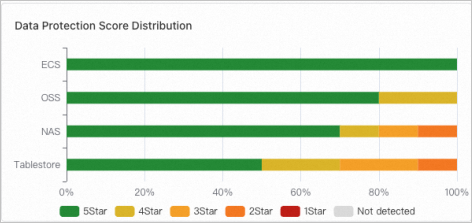
Data protection score distribution
Displays the distribution of data protection scores for each storage resource type within your account as a histogram.
Top 10 risky resources
Lists the top 10 resources with the lowest data protection scores.
Use the tabs at the top of the page to filter by resource type: All, ECS, OSS, NAS, and Tablestore. The list includes the Resource type, instance ID/name, Data protection score, and Actions columns. Click Details in the Actions column to view more information about a specific resource.
Data protection diagram
Visualizes the overall data protection status of each storage resource type within your account across regions.
The left side of the page displays the Data Protection Score (with resource protection status categorized by ECS, OSS, NAS, and Tablestore) and Data Protection Risk (with risk counts categorized by dimensions such as snapshots, backups, and cross-region replication). The main area uses red, yellow, and green blocks to visualize the protection status of each resource. Click a resource block to open a pop-up window with details, including its Data protection risk score and high availability status. You can click Remediate to resolve the identified risks.